

If you’re running a sales team, you already know the real struggle isn’t getting leads; it’s converting them to buyers.
Between incoming calls, WhatsApp enquiries, follow-ups, demo requests, callbacks, missed calls and endless spreadsheet updates, things slip through the cracks. A hot lead gets buried under a new one as someone forgets to follow up. Another representative repeats the exact details twice for the same customer and the process becomes irritating because the last representative didn’t update the sheet.
And before you know it, the deal you should’ve closed yesterday is gone today. None of this happens because your team is careless. It happens because manual tracking can’t keep up with the speed, volume and complexity of modern sales, whereas sales automation can.
A good CRM puts all your customer data in one place — calls, WhatsApp messages, emails, notes, updates, everything. It automatically creates a client profile the moment a lead is captured, so nothing gets lost across sheets or chats.
Follow-ups and pipeline stages are automated and every interaction stays organised in one system. Your team always knows who to call, when to follow up and what happened in the last conversation.
This blog will take you through the essentials:
Let’s begin with the basics and understand what a CRM actually does to keep your sales process organised and effective.

A sales CRM (customer relationship management) software is not just a database. CRM is the technology and strategy used in sales to keep track of all contacts with current and future customers. To help sales teams personalise interactions, increase productivity, and close more deals, a CRM system centralises customer data, monitors the sales pipeline, automates processes, and offers insights.
Instead of going through Spreadsheets or scrolling through old chats, your team gets one complete timeline for each customer, from first enquiry to final agreement. Calls, WhatsApp messages, meeting history and pipeline progress all stay in one organised view, making it easier for your representatives to know what happened and what needs to happen next.
The role of CRM tools has never been more important than it is in 2025. Sales in 2025 are fast, multi-channel and demanding. Customers expect quick replies, personalised conversations and professional communication. Businesses can no longer rely on memory or manual follow-ups.
Here’s what a CRM platform actually helps your team do every day:
A CRM keeps all your customer interactions in one place — calls, WhatsApp messages, notes and every follow-up. Nothing gets scattered across spreadsheets, chats or personal phones.
Your team always has the full context and can instantly see the last conversation, what was discussed and what needs to happen next.
Follow-ups are the heart of the sales process. Most deals are not closed on the first call, but after multiple touches — reminders, updates, clarifications and follow-up calls.
A CRM makes this process predictable by:
This ensures every lead stays warm and every representative stays consistent.
This helps you move deals faster, reduce bottlenecks and make accurate forecasts.
A good CRM lets you automate tasks like:
This saves hours of manual data entry and ensures your team never forgets a follow-up, misses a task or loses track of a lead.
Instead of juggling between apps, your team can handle all inside the CRM system. i.e.,
everything at one place, i.e., in the CRM system.
A good CRM provides built-in reports on how your team is performing, showing you the number of calls they made, the revenue generated and more. This makes team tracking easier for the managers, as they now have clear visibility into where their team stands and how far the target still needs to be achieved.
Also, once you know the number of deals in a month, how much revenue is currently active in your pipeline, you can start predicting what will actually close. This makes your forecasting realistic and easy.
When every sales representative follows one unified process, your sales cycle becomes far more predictable. Customers receive a consistent experience, managers can easily track progress and the entire team works in sync.
This results in reliable outcomes, stronger engagement, improved performance and a sales operation that can grow smoothly as your business expands.
Every CRM claims to “boost sales”, but the real impact comes from a few core features your team will use every single day. These are the features worth paying attention to
With a CRM, all your leads are captured automatically the moment they show interest — someone fills a form on your website, clicks on a Facebook/Google ad, calls your business number, messages your WhatsApp Cloud API or submits details through a marketplace like IndiaMART or Justdial, the CRM instantly pulls that information through APIs or webhooks.
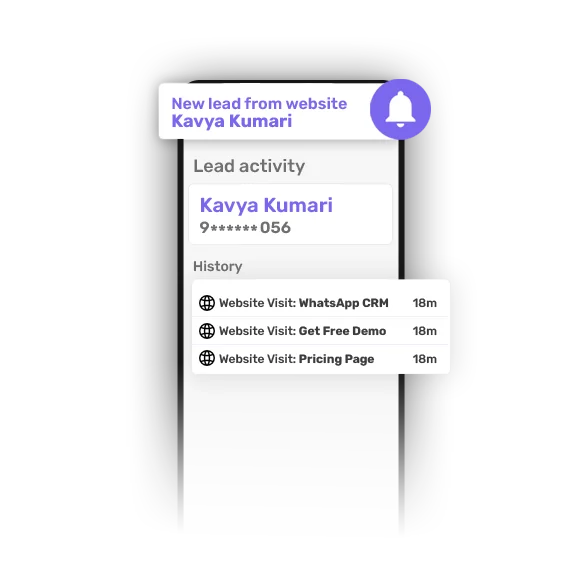
It saves time, avoids manual data entry and helps your team respond faster.
A CRM keeps every lead’s details organised in one place — phone numbers, emails, call logs, WhatsApp conversations, notes, tasks and past interactions. Your team doesn’t have to ask, “Who spoke to this lead last?” or search through sheets and chats. Anyone can open the profile and instantly see the full context, making follow-ups faster and more accurate.
A CRM makes your sales pipeline clear, visual and it becomes easy for anyone on the team to understand and navigate. Your sales representative always knows what to work on next, managers gain visibility into where deals are progressing and real-time updates enable the team to take timely actions to keep the pipeline healthy.
A CRM takes the pressure off your team by automating tasks that often slip through the cracks. It sends timely reminders, triggers WhatsApp messages, assigns leads to the right representative, creates tasks automatically and even notifies representatives when it’s time to call someone back.
A CRM gives you more than just numbers — it gives you clarity. With built-in sales analytics, you can see how your team is performing, how leads are progressing through the funnel, which sources convert best and where drop-offs occur.
These insights help you spot leaks early, understand customer behaviour and make decisions based on data instead of guesswork. In short, analytics turn your entire sales process into something you can measure, improve and scale.
A robust mobile app is essential for field sales teams handling visits, meetings and on-ground updates. A good CRM mobile app lets reps update leads, log calls, check tasks and access customer data instantly — no need to open a laptop or return to the office.
It works smoothly across devices and operating systems (iOS and Android), making it easy for your team to work from anywhere — whether they’re travelling, on-site with a client or following up between meetings. In short, your sales process stays active even when your team is remote.
Marketing automation enables your team to run targeted campaigns and nurture leads more efficiently, eliminating the need for manual tasks. You can set up automated sequences — such as WhatsApp messages, or reminders that reach the right lead at the right time based on their behaviour.
These features form the foundation of modern CRM solutions. Now, let’s take a look at the top CRM tools available for sales teams today.
Choosing the right CRM tool becomes much easier when you compare each platform using the same structure.
Below is a clear and balanced breakdown of 11 widely-used CRM tools for sales, including their overview, key features, pros, cons, pricing overview and ideal fit.
Each CRM solves a different set of needs, so use this section as a quick reference to match your team’s workflow, industry and customer interactions.
telecrm is not just another sales CRM — it’s a complete sales, marketing and customer support platform built specifically for Indian SMBs, fast-growing startups and high-volume calling teams. While most CRMs require multiple add-ons or third-party tools to manage calls, automated WhatsApp messages, telecrm brings everything into one simple and powerful system designed around how Indian teams actually work.
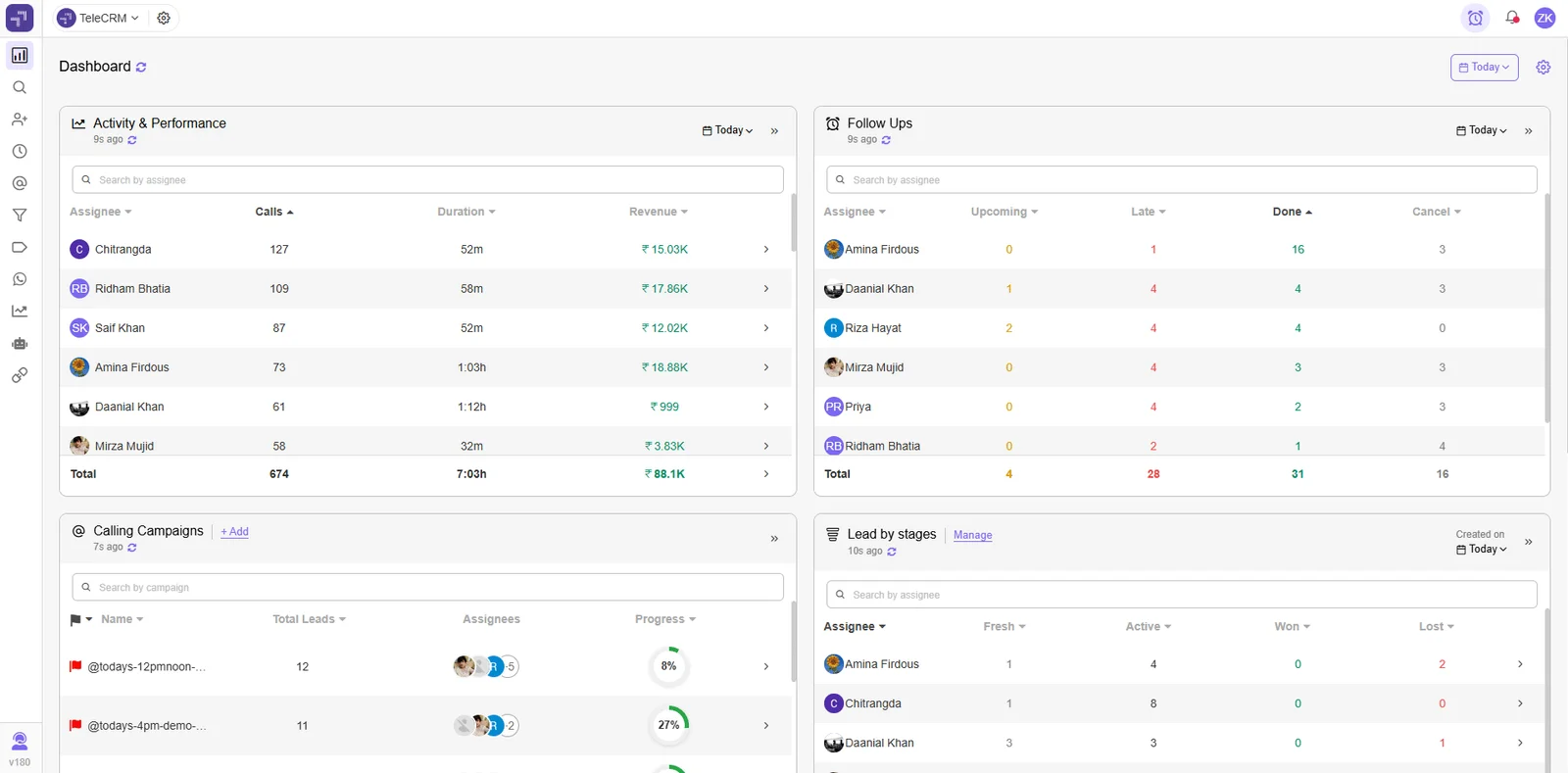
In short, telecrm is the most affordable solution built to help Indian businesses move faster, stay organised and convert more leads with fewer leaks in the sales funnel.
Affordable for Indian SMBs, with tiered plans based on sales team size.
Core CRM —
Core CRM + WhatsApp Chat Sync —
Zoho CRM is one of the most widely used customer relationship management software platforms globally, especially among small and mid-sized businesses. It provides a broad suite of CRM tools, ranging from lead management to workflow automation, email tracking, inventory management and analytics.
Zoho’s ecosystem (Zoho Books, Zoho Desk, Zoho Campaigns) makes it suitable for teams wanting an all-in-one business suite.
Affordable, with multiple tiers including a free plan for small teams.
Zoho CRM also offers the flexibility to pay monthly (though at higher per-user rates), and there are no long-term lock-ins.
HubSpot CRM is known for its user-friendly interface and strong marketing cloud capabilities. The free plan is one of the best in the market, making it popular among start-ups and small sales teams. HubSpot’s strength lies in content-focused businesses that rely heavily on inbound marketing.
Professional plans become costly for SMBs.
HubSpot offers a generous free plan.
Starter CRM Suite — ₹752/month (billed annually)
Professional CRM Suite — ₹69,697/month (billed annually)
They have packs for businesses and enterprises. For more information, please visit their website.
Salesforce is the world’s most powerful and customisable sales CRM. It is used by enterprises that need deep reporting, AI-powered insights, multi-department workflows and massive scalability. Salesforce is designed for companies with complex business processes and multi-country operations.
Pricing is significantly higher than Indian SMB-focused CRMs and may require additional onboarding or consulting costs depending on your setup.
Freshsales offers a balanced mix of sales CRM, telephony, email tracking and AI lead scoring. The interface is clean, and the product integrates well with Freshdesk and the larger Freshworks suite, making it easy for teams to manage both sales and support workflows without switching tools.
Offers free plan and affordable tiers for small teams.
Pipedrive is a visual, pipeline-driven CRM that emphasises simplicity. It is built for sales representatives who prefer quick deal updates and minimal data entry. Its clutter-free interface makes it easy for teams to stay focused on moving deals forward without overcomplicating their workflow.
No free plan. Affordable entry-level plans.
LeadSquared is a powerful CRM platform used widely in education, finance, healthcare and real estate. It is known for its strong automation and lead management capabilities. Its industry-specific workflows make it especially effective for teams that handle high lead volumes and structured sales processes.
Premium pricing designed for mid-market and enterprise teams. LeadSquared does not offer a free plan. Pricing varies based on features, add-ons and industry-specific requirements.

Vtiger is an all-in-one CRM with sales, marketing and service modules. It is popular among SMBs wanting an integrated CRM platform without high costs. Its unified setup helps smaller teams manage the entire customer lifecycle without juggling multiple tools.
Affordable pricing, suitable for small businesses.
Close CRM is built for inside sales teams that rely heavily on calls, emails and sequences. It includes built-in calling tools and email automation suitable for all sales teams. Its fast, communication-first design helps representatives move through high-volume outreach without slowing down.
Mid to high pricing, depending on calling features.

Monday CRM is a customisable work management system with CRM features. It is ideal for teams who want flexibility in building their own workflows, boards and automations. Its visual layout makes collaboration easier, especially for teams managing both projects and sales pipelines together.
Affordable entry plans. Paid automations may require upgrades.

Kylas CRM is a sales management software focused on Indian customers, offering a mix of pipeline management, automation and lead tracking. It is suitable for medium-sized teams wanting affordable and scalable CRM software. Its straightforward setup makes it easy for growing teams to adopt without needing heavy technical support.
Simple flat-pricing structure targeted at growing teams.
Kylas charges a flat monthly fee, not per user, which can make it cost-effective for teams of any size.
Choosing the right CRM becomes much easier when you can compare all options side by side. This table provides a quick overview of how each CRM performs across the features that matter the most.
CRM Name | Core Strength | Calling Support | WhatsApp Suppot | Automation on Capabilty | Pricing Range | Ideal For |
telecrm | Built for Indian calling + WhatsApp sales teams | Built in auto-dialer | Native WhatsApp cloud API | Strong, no code | Affordable | SMBs, telecalling, field sales, agencies |
Zoho CRM | Large app ecosystem | Via Integrations | Via Integrations | Mid to strong | Affordable to mid | SMEs needing modular tools |
HubSpot CRM | Inbound marketing+clean UI | Via Integrations | Via Integrations | Strong (paid plans) | Free to expensive | Marketing driven teams |
Salesforce Sales Cloud | Enterprise customisation + AI | Via Integrations | Via Integrations | Enterprise grade | High | Large Enterprises |
Freshsales | Balanced all-round CRM | Built-in calling | Via Integrations | Moderate | Affordable | SMB's with support + sales |
Pipedrive | Visual pipeline management | Via Integrations | Via Integrations | Basic to Moderate | Low to mid | Deal-focused small teams |
LeadSquared | Strong automation + industry workflows | Via integrations | Via integrations | Strong | High | Education, finance, healthcare |
Vtiger CRM | All-in-one sales + service | Via integrations | Via integrations | Moderate | Affordable | SMEs needing support + sales mix |
Close CRM | Inside sales + calling tools | Built-in calling | No native WhatsApp | Strong for calls | Mid to high | SaaS, global inside sales |
Monday Sales CRM | Flexible workflows + project mgmt | Via integrations | Via integrations | Moderate | Low to mid | Agencies, cross-functional teams |
Kylas CRM | Indian SMB-focused | Via integrations | Via integrations | Moderate | Mid | SMEs upgrading from sheets |
Choosing a CRM is less about picking the tool with the most features and more about finding what your sales team will actually use every single day. Every business has a different sales cycle, lead volume, communication style and team structure, so the “best CRM software” depends on what fits your workflow — not what looks fancy in a demo.
Here are the things you should look at before making a decision:
Choose a tool with simple navigation. A user-friendly interface also reduces training time and improves adoption across sales representatives and field teams.
Look for features like automated reminders, follow-up alerts and automated WhatsApp messages. These save hours every week and keep the entire sales cycle streamlined.
A robust mobile app helps representatives update leads, log calls, track visits and manage tasks without needing a laptop. It also ensures your sales pipeline stays updated in real time.
Avoid tools that look affordable but require multiple add-ons for basic features like automation, WhatsApp or integrations.
For SMBs, scalable and cost-effective plans matter more than unnecessary upgrades.
Your CRM should smoothly connect with the tools you already use — marketing platforms, lead sources, WhatsApp, Google Workspace and social media integrations.
Good integrations reduce duplicate work and allow customer data to flow automatically across your business processes.
Every industry works differently, and the way teams handle leads can vary a lot based on the nature of their work.
Real estate teams track site visits while closely evaluating tools like propstream pricing, education businesses follow up on enquiries, automobile dealers manage test drives and service companies handle repeat customers.
Choose a CRM platform that supports your specific customer interactions, sales pipeline and communication style.
Even the best CRM fails if your team doesn’t use it the right way. Look for a CRM with reliable onboarding, quick support and simple training resources. Good customer service teams make adoption easier and help you set up the right processes from day one.
At last, the right CRM software should make your team’s day-to-day work easier, not heavier. Pick the tool that fits your sales process, communication channels and business needs and you’ll see faster sales growth and fewer leaks in your pipeline.
Choosing a CRM isn’t just about picking a software — it’s about giving your sales team a system that actually supports the way they work. For that, you need a tool that fits your style of selling, not one that forces you to change how your team already operates.
And once you look at the options given above, you’ll notice that each CRM brings something useful to the table. Some are great for marketing, some are perfect for enterprises and some work best for simple deal tracking. The right choice depends entirely on your daily workflow, the number of leads you handle and the channels your team uses the most.
So take your time, test a few tools, add real leads and see which CRM your team is most comfortable using. If you want a CRM built for sales teams that rely on calls, WhatsApp, telecrm is the easiest tool to start with, as it is very easy to use as compared to other CRMs available in the market, and it keeps your entire sales process under one roof, without complicating how your team works.
So what are you waiting for? Book a demo with us or visit our homepage now!



© Copyright 2026 telecrm.in - All Rights Reserved • Privacy Policy • T&C



© Copyright 2025 Telecrm.in - All Rights Reserved • Privacy Policy • T&C