
Tired of your sales team spending too much time on routine tasks like sending follow-up emails or updating spreadsheets? You’re not alone. Many sales teams today lose valuable hours to repetitive tasks, which reduces the time they can spend talking to customers or closing deals. But there’s an easier way to handle these chores – using sales automation software.
Sales automation software handles repetitive sales tasks like lead assignment, follow-up reminders, call logging and WhatsApp messages. It frees reps to focus on calling and closing. For Indian SMBs that run on phone calls, WhatsApp and portal leads, it stops leads leaking when teams rely on Excel and memory.
This guide covers:
Sales automation software is a tool that helps sales teams save time by handling repetitive, everyday tasks. It’s sometimes also known as sales force automation software (SFA). It helps in taking care of routine jobs, such as assigning leads, sending follow-up messages and setting reminders. This means your team can focus more on actually talking to customers and closing deals, rather than getting stuck with paperwork or spreadsheets.
One of the best things about sales automation software is how smoothly it works with your CRM. For example, when you get a new lead, the software assigns it to a sales rep on automation, then sends them a notification and schedules any needed follow-ups. You no longer have to manually assign leads or risk forgetting important contacts because the software does it all for you.
Sales automation matters because missed follow-ups lose deals. When reps rely on memory, spreadsheets and scattered WhatsApp chats, leads go cold. Automation assigns leads, sets reminders and logs calls, so no enquiry is forgotten. Indian buyers expect quick replies, and the team that responds first usually wins the deal.
Let’s be honest — sales today moves fast. If your team is still wasting time setting reminders, sorting leads or updating sheets, they’re always going to be one step behind. Customers expect quick replies and personal attention. If you can’t give them that, someone else will.
You can’t afford to rely on memory or manual work. Forgetting a follow-up, missing a lead or sending a late reply can easily cost you a deal. That’s where sales automation helps. It does the small, repetitive stuff — like assigning leads or sending reminders — so your team doesn’t have to.
And the best part? Your salespeople finally get to focus on what they’re actually good at — talking to people and closing deals. When they’re not stuck with admin, they’ll sell more, feel less stressed and keep your customers happier. Simple as that.
In 2026, sales automation focuses on real conversations, not dashboards. The strongest tools centre on calls and WhatsApp, because that is where Indian deals move forward. Five trends now shape what buyers should look for.
Sales still start with a phone call — especially in markets like India. That’s why more automation tools now come with built-in dialers, auto call-logging and reminders. Your team doesn’t need to manually note down who they called, when they need to follow up or what was said. Everything gets tracked and organised without effort. This saves time and avoids missed follow-ups.
In India, WhatsApp isn’t just for chatting with friends — it’s become a core part of sales. Customers prefer it, and teams are using it for demos, document sharing and follow-ups. Good sales automation tools now offer full WhatsApp integration. You can set automatic welcome messages, follow-ups, even quick replies — all directly from your CRM. No juggling between tabs, no lost chats.
Field sales reps do not work at a desk. In 2026, mobile CRMs let reps check in from a location, assign leads, send WhatsApp messages and update follow-ups from a phone. This suits FMCG, real estate and insurance teams who sell on the move across Indian cities.
The gap between sales and marketing is getting smaller. Many tools now allow both teams to use the same system. A lead who clicks on a campaign email can be auto-assigned to a rep, who can follow up instantly — no delay, no confusion. This smooth handover helps you respond faster and close more deals.
In 2026, AI in sales tools is practical, not flashy. It flags which leads are worth chasing, suggests the best time to follow up and drafts message replies. It does not replace reps; it gives them sharper nudges so fewer leads slip.
Tool | Best For | Key Features | Starting Price (Billed annually) |
telecrm | Calling & WhatsApp-first sales teams | Autodialer, WhatsApp CRM, Lead capture, Task automation | ₹799 per user (annual) |
HubSpot | All-in-one CRM with strong email tools | Email tracking, Deal pipeline, AI insights | Free (Paid starts at $15) |
Zoho SalesIQ | Website chat & lead engagement | Live chat, Chatbots, Visitor tracking, CRM sync | ₹0 (Paid starts at ₹350) |
Pipedrive | Visual sales pipeline & task automation | Deal stages, Email templates, AI tips, Auto-assign | $12 per user (annual) |
Salesmate | Built-in calling, texting & sequences | Sales sequences, Calling, Smart campaigns | $23 per user (annual) |
Keap | Small businesses with sales + marketing | CRM, Follow-ups, Booking, Invoicing | $249 total (annual billing) |
Freshsales | Mid-size to enterprise sales teams | Lead scoring, Email & phone integration, AI insights | ₹749 per user (annual) |
Choosing the right sales automation software can be tricky, especially with so many options out there. To make it easier, we’ve handpicked seven top tools that can help you stay organised, close deals faster and run your sales process more smoothly.
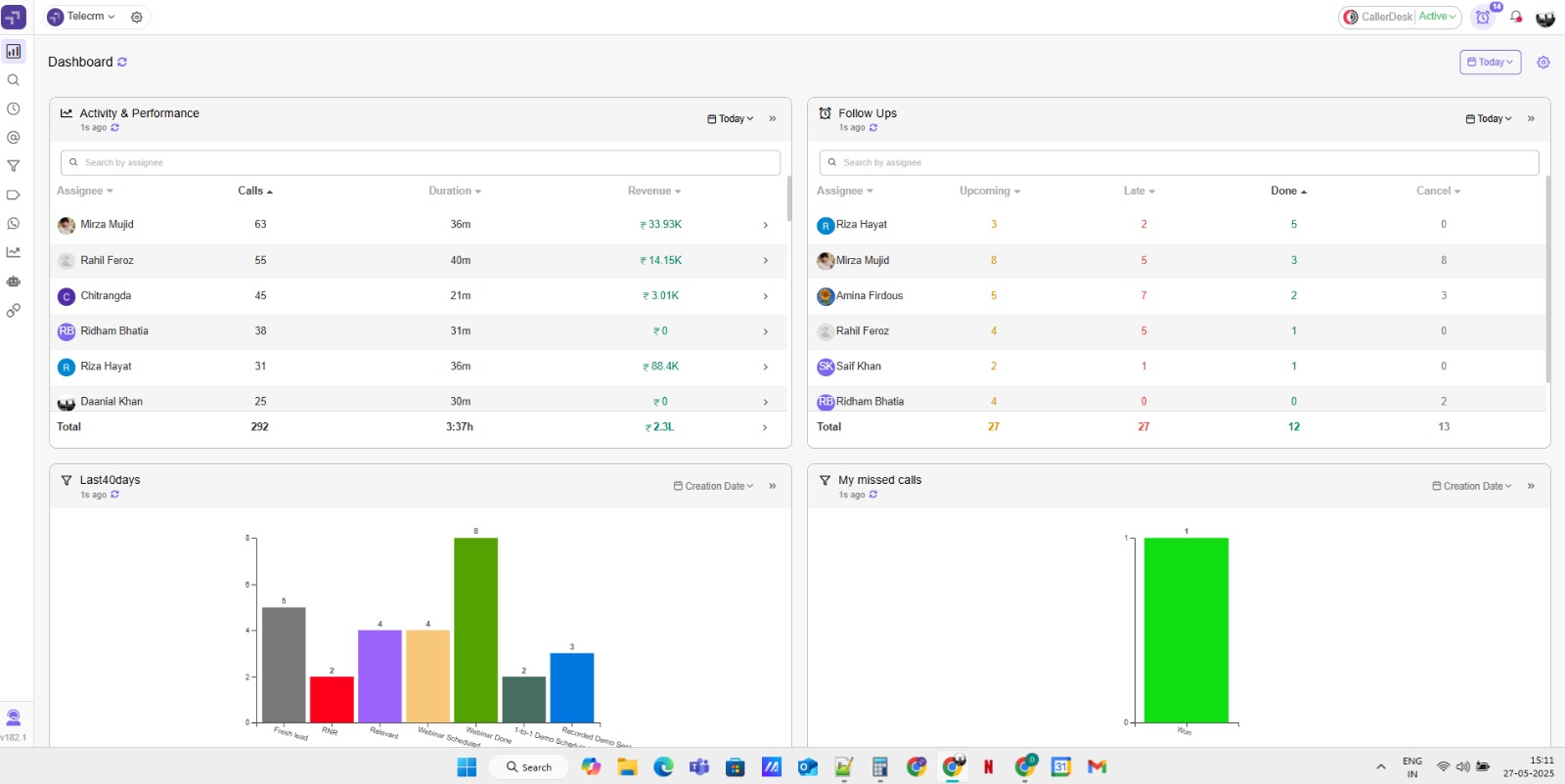
If your sales team relies heavily on calling and WhatsApp, telecrm is a complete sales management software solution. It’s not just a CRM (customer relationship management) — it’s a complete sales control centre designed for Indian teams that want speed, clarity and zero follow-up gaps. Whether you’re managing hundreds of leads, running WhatsApp campaigns or tracking call performance, telecrm handles it all in one place. No juggling between Excel, WhatsApp Web and missed call logs — everything is tracked, automated and updated in real-time.
With powerful features like an inbuilt autodialer, WhatsApp Cloud API integration and smart task automation, telecrm helps your team stay focused on selling — not admin work. Whether you’re a small team of 3 or scaling past 300, it’s built to keep your sales process sharp, clean and fully in your control.
Autodialer: telecrm’s Autodialer feature helps your team increase the call percentage, with end-to-end tracking and recording of calls.
WhatsApp CRM: Send personalised messages to your leads on one of the most popular channels in the country, set up a chatbot for resolving low-level queries and even send bulk messages with the official WhatsApp Cloud API.
Automated lead capture: Automatically capture leads from multiple sources like your website, Facebook, WhatsApp and any other source in real-time.
Task automation: Automate repetitive tasks such as sending welcome messages, assigning leads to callers, scheduling follow-ups and running drip marketing campaigns.
Set triggers and workflows: Easily automate tasks with customisable triggers and workflows, like enriching lead fields, transferring leads based on specific conditions or sending welcome WhatsApp messages when a new lead enters the system.
Comprehensive analytics: With our Leaderboard feature, track and measure key metrics concerning the leads generated, calls undertaken and sales made in a given period. Also, generate custom sales reports instantly using any metric.
Customisable CRM: Configure your CRM to fit your specific needs with custom sales pipelines, lead fields and team member roles (Root, Admin, Manager and Caller).
telecrm’s pricing structure is simple and straightforward to accommodate the needs of all businesses.
Quarterly plan: ₹1099 per user per month
Annual plan: ₹799 per user per month (Save upto 27%)
Add-ons: The Enterprise plan is available for larger teams (100+ licences) with customised pricing and additional features.
For further details, visit telecrm pricing.

HubSpot Sales Hub is a well-known pick for teams that want a clean, easy-to-use system with lots of tools under one roof. Whether you’re sending emails, setting up pipelines or tracking deals, it’s all there. Best part? You can start free and grow as your team gets more advanced.
Lead management and prospecting: Manage leads and sales activities in one workspace
Email templates and tracking: Use and customise templates and track email engagement
Sales automation: Automate personalised emails and follow-up tasks
Call tracking: Log and prioritise sales calls automatically
Deal management: Streamline the sales process with AI-powered tools
HubSpot Sales Hub provides a range of pricing plans to cater to different business needs and budgets:
Free plan: $0 per month, includes contact management, deal pipeline, quotes, live chat and meeting schedule
Starter plan: $15 per month per seat (billed annually), includes sales automation, goals, sales content analytics, payments and task queues
Professional plan: $90 per month per seat (billed annually), you get everything in Starter plus prospecting, sequences, forecasting, custom reporting and playbooks
Enterprise plan: $150 per month per seat, includes everything in Professional plus custom objects, predictive lead scoring, conversation intelligence and recurring revenue tracking
For further details, visit HubSpot Sales Hub pricing.

Zoho SalesIQ is great for businesses that focus on chatting with visitors in real time. It’s all about engaging people who land on your website and converting them into leads. With tools like live chat, visitor tracking and chatbot flows, it keeps your team in control of conversations from the first click.
Live chat and visitor tracking: Engage with website visitors in real time, monitor their behaviour and respond promptly
Automated lead routing: Automatically assign leads to the most suitable agents based on their activity and interests
Customisable chatbots: Use low-code bots to handle initial customer interactions, answer common questions and collect data
Real-time analytics: Gain insights into customer behaviour and engagement, helping refine marketing and sales strategies
CRM integration: Seamlessly sync data with Zoho CRM for comprehensive customer management and targeted outreach
Zoho SalesIQ offers user-based plans that scale with your team. All plans include a 15-day free trial with no credit card required:
Free plan: ₹0, includes 3 operator licenses, visitor insights for 10K visitors per month, 100 chat sessions per month and basic features like canned replies and file sharing
Basic plan: ₹350 per operator per month (billed annually), includes 1 operator license, visitor insights for 50K visitors per month, 1000 chat sessions per month, advanced visitor information and chat routing
Professional plan: ₹750 per operator per month (billed annually), includes 1 operator license, visitor insights for 100K visitors per month, unlimited chat sessions and real-time reporting
Enterprise plan: ₹1,200 per operator per month (billed annually), includes 1 operator license, visitor insights for 200K visitors per month, unlimited chat sessions, chat translation and advanced AI features
For more details, visit Zoho SalesIQ Pricing.

Pipedrive is a robust sales automation system designed to streamline your sales process and eliminate manual work. Everything revolves around moving deals forward, step by step. It’s especially useful if you want to set up follow-ups, automate small tasks and keep an eye on what’s next without the tool getting in your way.
AI-powered sales assistant: Offers personalised tips, notifications and progress updates to enhance sales performance
Automation: Automate tasks like follow-up emails, deal creation and ownership transfers to prevent lead leakage
Smart contact data: Instantly pull valuable information about contacts from various sources to better qualify leads
Auto lead assignment: Automatically distribute leads to the appropriate sales reps based on predefined criteria
Email templates: Utilise customisable email templates to maintain a personal touch while automating communication
Pipedrive offers several pricing plans to fit different business needs:
Essential plan: $12 per user per month (billed annually). Includes lead, calendar and pipeline management
Advanced plan: $24 per user per month (billed annually) along with all the Essential features plus full email sync, automation and meeting scheduling
Professional plan: $49 per user per month (billed annually) comprising all the Advanced features plus AI-powered tools, contract management and revenue forecasts
Power plan: $59 per user per month (billed annually) involving all the Professional features plus project management and increased control
Enterprise plan: $79 per user per month (billed annually) consisting of all the features in the Power plan plus enhanced security and unlimited customisation
For more details, visit Pipedrive Pricing.

Salesmate is a dynamic sales automation tool that helps streamline sales processes and enhance productivity. It enables sales teams to automate repetitive tasks, manage pipelines and close deals more efficiently. With a robust set of features catering to various aspects of the sales process, from lead generation to sales management, Salesmate’s integration capabilities and automation features make it an excellent choice for businesses looking to streamline operations and boost sales efficiency.
Automated workflows: Create custom workflow automation for tasks like email follow-ups, deal assignments and updates
Smart email campaigns: Personalise and automate email campaigns based on customer behaviour and engagement
Built-in calling & texting: Make calls and send texts directly from the CRM, with automatic logging and sales team tracking
Sales sequences: Set up multi-step sequences to nurture leads and automate follow-ups
Advanced analytics: Gain insights with detailed reports and performance analytics to optimise sales strategies
Basic plan: $23 per user per month (billed annually), including core sales automation features
Pro plan: $39 per user per month (billed annually), includes advanced automation and integrations
Business plan: $63 per user per month (billed annually), offers comprehensive sales and marketing automation software
Enterprise plan: Custom pricing, includes all features with additional customisation and support
For more details, visit Salesmate Pricing.

Keap is a comprehensive CRM and sales automation tool designed to help small businesses streamline operations and manage customer relationships better with automated follow-ups, appointment bookings and more. By combining CRM, sales automation and marketing tools, Keap offers an all-in-one solution for businesses. Its robust automation capabilities save time on repetitive tasks, allowing you to focus on more important aspects of your business.
Automated follow-ups: Automatically send personalised emails and texts to leads and customers
CRM: Manage your customer data, track interactions and organise tasks
Sales pipeline: Visualise and manage sales processes with customisable pipelines
Appointment scheduling: Simplify scheduling with integrated booking features
Payment processing: Automate invoicing and payment collection seamlessly
Ignite: $249 per month (billed annually) for 2 users and 1500 total contacts along with other features
Grow: $329 per month (billed annually), for 3 users and 2500 contacts
Max Classic Plan: $499 per month (billed annually) for 5 users and 5000 contacts
Note: These figures vary depending on the user licences you purchase. For more details, visit Keap Pricing.

Freshsales, part of the Freshworks software suite, is a powerful sales automation tool designed to help businesses manage their sales processes more effectively. It integrates CRM capabilities with advanced automation to streamline workflows and improve sales productivity. With AI-driven insights, customizable sales pipelines and integrated communication tools, Freshsales is ideal for businesses seeking a robust and scalable sales automation solution.
AI-powered insights: Utilise AI to gain valuable insights and improve decision-making
Lead scoring: Automatically score leads based on their engagement and behaviour
Sales sequences: Automate personalised email sequences and follow-up tasks
Pipeline management: Visualise and manage your sales pipeline with customisable stages
Built-in phone & email: Communicate directly within the CRM with automatic logging and tracking
Free plan: ₹0 per month, including basic CRM features for small teams
Growth plan: ₹749 per user per month (billed annually), including advanced CRM features and automation tools
Pro plan: ₹3239 per user per month (billed annually), everything from Growth, plus, Contact Scoring by Freedy AI, Custom Sales Activities and a lot more
Enterprise plan: ₹4899 per user per month (billed annually), you get everything in Pro, plus field-level permission, custom modules and a lot more
For more details, visit Freshsales Pricing.
Sales automation software suits any team that handles daily inbound leads and follows up by phone or WhatsApp. It matters most once more than two reps share leads and a manager needs visibility.
It fits real estate teams chasing portal leads, education counsellors following up on admission enquiries, insurance and loan agents managing renewals and FMCG field reps logging visits. It is less useful when one person handles every lead by hand and needs no reporting.
The main benefit of sales automation software is fewer lost deals. It automates the whole journey from first contact to close, so reps stop forgetting follow-ups and managers stop chasing updates. Five clear benefits stand out.
Here’s the scoop on the major perks of automating your sales processes.
Automating sales tasks isn’t just about saving time; it’s about saving your sanity. With sales automation software, those endless hours spent on data entry, lead tracking and managing follow-ups are not just reduced dramatically but are carried out with complete automation. This means your reps can focus more on engaging with customers and closing deals, rather than getting bogged down by paperwork and tedious sales management.
Humans make mistakes, but the sales automation platform makes far fewer. When you automate data entry and other repetitive tasks, you minimise the risk of human error. This leads to more accurate data and better reports. In short, it ensures your team is being productive and your sales operations are running smoothly.
Sales automation tools help you respond faster and more consistently to your customers. Whether it’s sending out a welcome email or following up after a service query, automation ensures that every customer feels heard and valued. This consistency in communication builds trust and loyalty, which are crucial for long-term business success.
As your business grows, so does the workload. The right sales automation software scales with your business, handling increased demands without proportionally increasing your manpower. This scalability means you can grow your operations without compromising on the quality of your customer interactions or the productivity of your team.
With sales automation, your team is always one step ahead. Automated workflows mean no more guessing about when to follow up or what to say. The system can prompt your team with action items and reminders, keeping everyone on track. This not only improves efficiency but also ensures that a potential sales opportunity never goes begging.
Implementing sales automation software can greatly enhance your sales processes, but to get the most out of it, you need to follow some best practices. Below are six best practices that will bode well for you when using your sales automation software:
Define clear goals: Before you start using sales automation, it’s essential to know what you want to achieve. Whether it’s increasing conversion rates, improving follow-up consistency or reducing manual data entry, having clear goals will help you set up your system more effectively and measure your success.
Train your team: No matter how effective the software you purchase is, it’s only as good as the people using it. Make sure your sales team is well-trained in handling the automation software. Provide them with tutorials, hands-on training sessions and regular updates to ensure they can leverage all the features to their fullest extent.
Integrate with existing systems: Your sales automation software should integrate smoothly with your existing CRM, email and other business tools for seamless operation. This helps maintain data consistency, avoid duplicate entries and guarantee that all your tools work together harmoniously.
Regularly review and update: Sales processes and market conditions change over time. Regularly review your automation workflows and update them as needed. This helps in keeping your automation strategies relevant and effective, ensuring you’re always operating at peak efficiency.
Focus on personalisation: Automation doesn’t mean losing the personal touch. Use the data and insights from your sales automation software to personalise your communications with prospects and customers. Tailored messages and targeted follow-ups will significantly improve your engagement and conversion rates.
Monitor performance and analytics: Consistently track the performance of your automated processes using the analytics features provided by your automation software. Monitoring key metrics such as response rates, conversion rates and sales cycle length can provide valuable insights into what’s working and what needs improvement.
Your sales team didn’t sign up for admin work. They’re here to close deals, build relationships and grow the business. But when they’re stuck juggling Excel sheets, forgotten follow-ups and scattered WhatsApp chats, that’s just not possible.
Sales automation is no longer optional. It is how Indian sales teams work in 2026. The right tool keeps reps focused, leads warm and the pipeline moving without overload.
And if you want one tool that does it all — calls, WhatsApp, lead tracking, reminders — telecrm is built for you. It’s designed for Indian sales teams who want to follow up fast, stay organised and never let a lead slip through the cracks.
Ready to see it in action?
Book your demo today and see how telecrm can change the way your team sells — forever.
Sales automation software runs repetitive sales tasks like lead assignment, follow-up reminders, call logging and WhatsApp messages. It lets reps spend more time talking to prospects and closing, and less time on data entry and admin.
A CRM stores lead data, contact history and pipeline stages. Sales automation adds the actions on top, such as auto-assigning leads, sending follow-ups and logging calls. Most modern tools, including telecrm, combine both.
telecrm starts at ₹799 per user per month on the annual plan and ₹1099 per user per month on the quarterly plan. Other tools vary widely, so check each vendor’s current pricing page before comparing.
Small Indian businesses usually need calling, WhatsApp follow-ups and automatic lead capture rather than heavy email tools. telecrm is built for this, while HubSpot and Zoho suit teams that rely more on email and website chat.
Yes. Tools with an inbuilt dialer and WhatsApp integration log calls and chats against the same lead. telecrm uses an autodialer and the official WhatsApp Cloud API, so call notes and WhatsApp follow-ups sit in one place.
Yes. A mobile-first tool lets field reps log visits, assign leads, send WhatsApp messages and update follow-ups from a phone. This suits FMCG, real estate and insurance teams who sell away from a desk.
It captures every lead automatically, assigns it to a rep instantly and sets a follow-up reminder. Nothing waits in an inbox or spreadsheet, so enquiries from IndiaMart, Meta Ads or website forms are not forgotten.
Not always. One person handling a few leads by hand may not need it. It becomes useful once two or more reps share leads, follow up by phone or WhatsApp and a manager needs visibility on who is doing what.



© Copyright 2026 telecrm.in (Flamon Cloudtech Pvt Ltd) - All Rights Reserved • Privacy Policy • T&C



© Copyright 2026 telecrm.in - All Rights Reserved • Privacy Policy • T&C