
B2B sales automation tools are software platforms that handle lead capture, follow-up scheduling, call logging, pipeline tracking and performance reporting automatically — so sales reps spend less time on admin and more time on selling.
For Indian B2B teams managing leads from Meta Ads, IndiaMart, WhatsApp and website forms, the right automation tool replaces spreadsheets, disconnected apps and missed follow-ups with one organised system.
This guide covers:
Sales automation tools are software platforms that handle repetitive sales tasks automatically — lead capture, follow-up reminders, call logging and pipeline updates — so sales reps focus on conversations and closing instead of admin.
B2B sales automation tools are CRM and outreach platforms built specifically for longer sales cycles — they manage multi-touchpoint follow-ups, multiple decision-makers, demo scheduling, pipeline tracking and manager reporting across calls, WhatsApp and email.
While sales automation tools can be used across industries, B2B sales automation tools are designed specifically for businesses that sell to other businesses.
That’s why B2B sales automation tools bring every sales activity into one central system.
They typically help you with:
By keeping your data organised and your process structured, these tools help you reduce missed opportunities, improve follow-ups and ultimately increase sales revenue.
The 31 tools below are listed with best-fit buyer profiles, key features, pros, cons and current pricing. Tools built specifically for Indian sales teams or with native INR pricing are indicated in their entries.
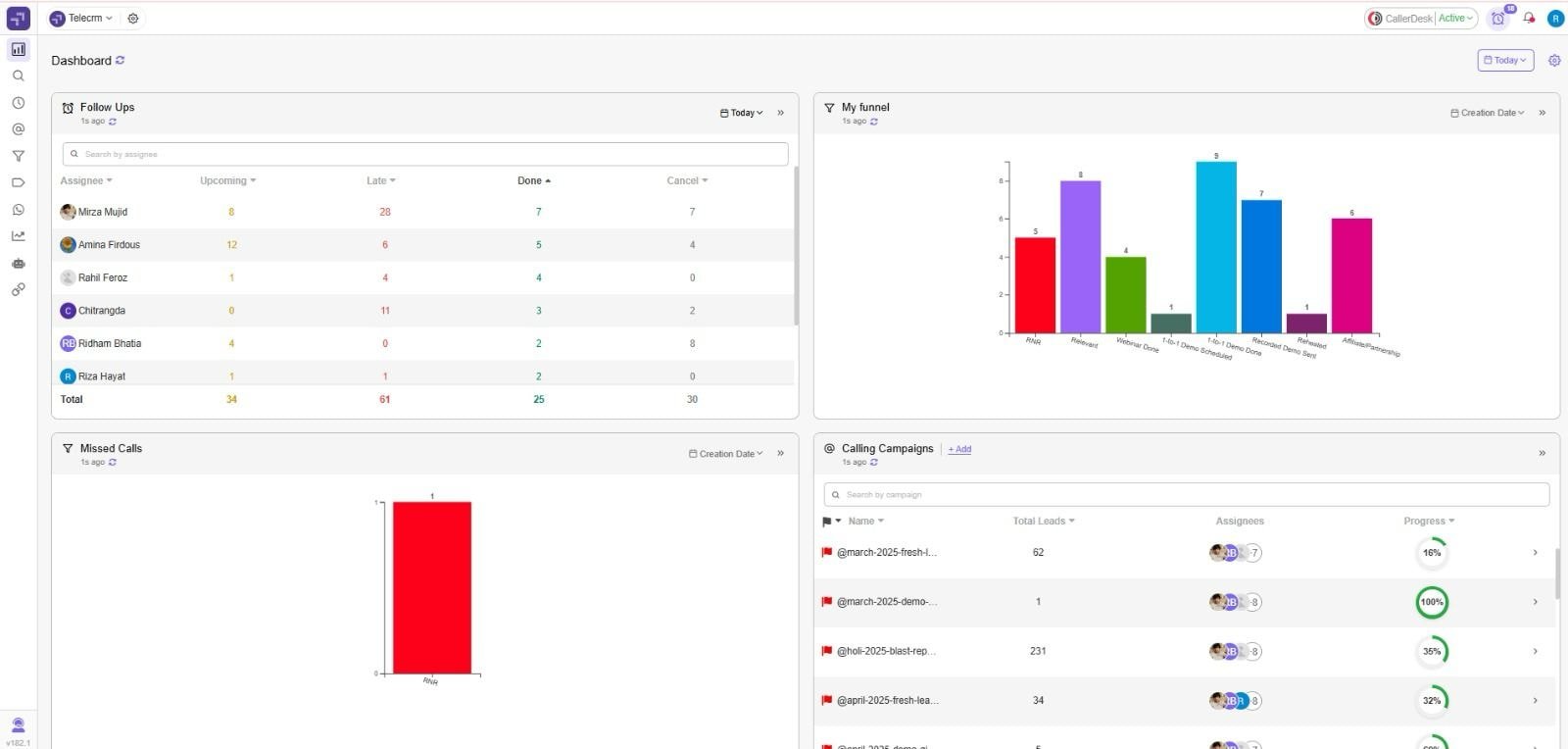
Indian SMBs and startups that rely heavily on outbound calls and WhatsApp conversations. telecrm is built specifically for the Indian sales ecosystem, offering affordability, unlimited leads and a focus on communication channels that local sales teams actually use.
Key features
Pros
Cons
Pricing: Starts at ₹799/user/mo(billed annually)
SMEs and enterprises that want an affordable yet powerful CRM with deep customisation and automation features. Zoho is flexible enough for different industries, from real estate to IT services.
Key features
Pros
Cons
Pricing: Starts at ₹800/user/month, with higher plans for AI and enterprise features.
Companies that want a user-friendly CRM that works best for inbound marketing-driven sales teams. HubSpot is ideal if your business already uses content, email and campaigns to generate leads.
Key features
Pros
Cons
Pricing: Free CRM plan available. Paid Sales Hub starts at ₹7497/seat/month.
Salesforce Sales Cloud is built for large enterprises with complex multi-team sales processes, advanced AI forecasting and the need for deep customisation across territories and product lines.
Key features
Pros
Cons
Pricing: Starts at $25/user/month; enterprise plans can exceed $150/user/month.
Startups and growing mid-sized businesses that want an affordable, intuitive CRM with AI assistance. Freshsales is particularly good for teams new to CRM adoption.
Key features
Pros
Cons
Pricing: Starts at ₹749/user/month; enterprise plan available at $69/user/month.
Pipedrive is for SMBs that want a simple, visual CRM to manage deals and pipelines without complexity. Perfect for teams needing quick setup and clarity on sales activities.
Key features
Pros
Cons
Pricing: Starts at $14/user/month.
Skylead is for B2B sales teams and agencies that need LinkedIn and email outreach, prospecting, and data enrichment in one sales automation tool.
Key features
Pros
Cons
Pricing: Starts at $100/seat/month. AI data enrichment costs $1 per 100 credits.
Apollo is for B2B companies focused on outbound prospecting and automated outreach at scale. Combines prospecting database + engagement tools in one platform.
Key features
Pros
Cons
Pricing: Free plan; paid starts at $39/user/month.
Outreach is for mid-sized and enterprise B2B teams running structured outbound campaigns. Known for advanced sales engagement automation and AI insights.
Key features
Pros
Cons
Pricing: Custom pricing, from around $100/user/month.
Sales teams and agencies that rely on cold outreach often need multiple tools to manage campaigns, inbox health, and prospect engagement. Salesforge is designed for teams running high-volume cold email campaigns that need inbox health management, multi-sender functionality and automated follow-up sequences in one platform.
Key features
Pros
Cons
Pricing: Flexible subscription plans available depending on campaign scale.
Salesloft is for outbound sales and SDR teams that need structured cadences and call intelligence. Great for sales coaching and performance tracking.
Key features
Pros
Cons
Pricing: Custom pricing, around $75–125/user/month.
Close CRM is for SMBs and startups with call-heavy sales teams. Ideal for SaaS, agencies and inside sales that need strong native telephony.
Key features
Pros
Cons
Pricing: Starts at $35/user/month.
Keap is for small businesses and solopreneurs who need a simple CRM with strong email automation and basic sales pipelines.
Key features
Pros
Cons
Pricing: Starts at $249/month for 1 user; extra users cost more.
Insightly is a versatile sales automation software that blends CRM software with project management, making it ideal for SMBs and mid-market teams.
It gives revenue teams full sales pipeline visibility through visual pipeline management, custom fields and automated workflows that cut down on repetitive tasks.
Key features
Pros
Cons
Pricing: Starts at $29/user/month.
Copper CRM is built specifically for Google Workspace users. It connects directly with Gmail, Google Calendar and Google Drive, letting sales teams manage contacts and pipelines without leaving their Google tools.
It helps sales professionals manage customer relationships, capture customer data and automate repetitive tasks through smart automated workflows.
Key features
Pros
Cons
Pricing: Starts at $29/user/month.
Nutshell is a user-friendly sales automation software built for SMBs that need a simple yet powerful CRM software with strong pipeline management and email automation.
It helps sales professionals manage customer relationships, capture and organise customer data and stay consistent with outreach through sequenced follow-ups and automated workflows.
Key features
Pros
Cons
Pricing: Starts at $13/user/month.
EngageBay is for startups and SMBs that want an affordable all-in-one CRM with marketing, sales and support automation in one platform.
Key features
Pros
Cons
Pricing: Free plan available; paid plans start at $12.74/user/month.
ActiveCampaign is an all-in-one sales automation software that combines CRM software, email marketing and customer experience automation for SMBs and enterprises. It helps revenue teams nurture leads across email, SMS and chat — with automated workflows that move contacts through the pipeline based on behaviour and engagement data.
With powerful lead scoring, multi-channel communication across email, SMS and chat, plus detailed engagement data and customer data tracking, ActiveCampaign enables sales professionals to execute account-based marketing strategies, boost marketing ROI and make informed, data-driven decisions.
Key features
Pros
Cons
Pricing: Starts at $15/user/month for CRM + automation.
Zendesk Sell is a modern sales automation software that helps sales professionals simplify the sales cycle, strengthen customer relationships and improve sales productivity. It provides intuitive pipeline management, automated lead distribution and real-time tracking of engagement data across multiple channels.
With built-in calling, email integration and analytics dashboards, Zendesk Sell enables revenue teams to automate repetitive tasks, capture valuable customer data and make faster, data-driven decisions to close more deals.
Key features
Pros
Cons
Pricing: Starts at $19/user/month.
LeadSquared is a sales automation CRM designed for fast-growing Indian SMBs and enterprises. It handles lead capture from 100+ sources, multi-channel follow-ups via calls, WhatsApp, email and SMS, and includes industry-specific workflows for education, healthcare and financial services. It offers powerful automated workflows, lead scoring and multi-channel communication across calls, WhatsApp, email and SMS to boost sales productivity.
With advanced pipeline management, campaign tracking and engagement data reporting, LeadSquared helps revenue teams manage customer data, increase marketing ROI and make smarter, data-driven decisions.
Key features
Pros
Cons
Pricing: Starts at ₹2,500/user/month.
Bitrix24 is an all-in-one sales automation software that combines CRM software, project management and team collaboration in a single platform. It helps revenue teams manage the entire sales cycle with visual pipeline management, automated workflows and integrated communication tools across multiple channels like calls, email and social media.
With built-in lead management, customer data tracking and analytics dashboards, Bitrix24 enables sales professionals to improve sales productivity, build stronger customer relationships and make informed, data-driven decisions.
Key features
Pros
Cons
Pricing: Free plan available. Paid plans from ₹1590/month (5 users).
Teams already using Monday.com for project management who want a customisable sales CRM with automation.
Key features
Pros
Cons
Pricing: Starts at $10/user/month.
Salesmate is a modern sales automation software built for growing SMBs and mid-sized teams that want to simplify their sales cycle while boosting sales productivity. It offers visual pipeline management, smart lead capture and automated workflows for follow-ups across calls, emails and multiple channels.
With built-in calling, texting and email sequencing, Salesmate helps sales professionals engage prospects effectively, strengthen customer relationships and give revenue teams complete visibility into deals and customer data for better forecasting and data-driven decisions.
Key features
Pros
Cons
Pricing: Starts at $23/user/month.
SugarCRM is a flexible sales automation software designed for SMBs and enterprises that need deep customisation and end-to-end sales pipeline management. It helps sales professionals build stronger customer relationships by capturing customer data, automating follow-ups and streamlining the buying process.
With powerful automated workflows, AI-driven forecasting and advanced analytics, SugarCRM enables revenue teams to make data-driven decisions, improve sales productivity and track the entire sales cycle across multiple channels.
Key features
Pros
Cons
Pricing: Starts at $82/user/month.
SharpSpring is a marketing and sales automation platform designed for agencies and SMBs that need lead scoring, email marketing, pipeline tracking and campaign management in one system — at a price point below HubSpot. It offers features like lead scoring, automated workflows, pipeline tracking and campaign management to improve customer relationships and boost sales productivity.
With tools for email marketing, dynamic landing pages and detailed engagement data reporting, SharpSpring helps revenue teams manage the entire sales cycle across multiple channels while driving better marketing ROI.
Key features
Pros
Cons
Pricing: Starts at $449/month (unlimited users, based on contacts).
Enterprises that need a no-code platform can go with Creatio to build highly customised CRM and automation workflows.
Key features
Pros
Cons
Pricing: Starts at $25/user/month.
Pipeline CRM is a simple yet powerful CRM software built for small businesses and agencies that want complete sales pipeline visibility without the clutter. It offers visual pipeline management software with drag-and-drop stages, workflow automation for sales tasks, email tracking and dashboards for reporting and accurate sales forecasts.
Easy to adopt and affordable, it helps sales teams stay on top of deals, improve follow ups and close more opportunities with confidence.
Key features
Pros
Cons
Pricing: Starts at $25/user/month.
Agile CRM is an affordable all-in-one platform combining sales pipeline management, marketing automation and service tools for SMBs. It provides workflow automation, built-in telephony, appointment scheduling and even helpdesk ticketing, making it a versatile choice for growing sales teams.
With its marketing campaigns, landing pages and pipeline visibility, Agile CRM helps businesses make data-driven decisions, forecast revenue and improve customer interactions — all at a budget-friendly price.
Key features
Pros
Cons
Pricing: Free plan available; paid plans start at $8.99/user/month.
Nutshell CRM is designed for SMBs that need a straightforward pipeline management software with built-in email automation to keep outreach consistent. Its customisable visual pipelines, automated sequences and sales process tracking give managers real-time insights into conversion rates and team performance.
With reporting dashboards and activity tracking, Nutshell CRM ensures reps stay focused on the right deals, enabling businesses to improve sales forecasting and close deals faster.
Key features
Pros
Cons
Pricing: Starts at $13/user/month.
Small businesses and startups that want a clean, straightforward CRM with strong contact management and email marketing. BigContacts is ideal when you need to organise leads/contacts, set follow-ups and send campaigns without the complexity of big, enterprise systems.
Key features
Pros
Cons
Pricing: Starts at $13/user/month.
Zoho Bigin is a lightweight CRM software focused on pipeline visibility for solopreneurs and small teams. It offers visual pipeline management, workflow automation, email tracking and a mobile app for sales reps on the go.
With simple dashboards and real-time updates, Zoho Bigin makes it easy to monitor pipeline stages, track conversion rates and maintain clean customer data. Affordable and beginner-friendly, it’s perfect for small businesses looking to improve sales pipeline management, forecasting and overall sales performance.
Key features
Pros
Cons
Pricing: Starts at ₹400/user/month.
The right B2B sales automation tool depends on team size, daily call volume, lead sources and whether the team communicates primarily via phone, WhatsApp or email. Indian SMB sales teams typically need lead assignment, call tracking, WhatsApp integration and a real-time manager dashboard above everything else.
Here are five things you should focus on before making a decision.
Start by understanding how your team handles leads, follow-ups and closures today. Choose a tool that supports your existing workflow instead of forcing major changes that slow adoption.
Look beyond basic features. The right tool should automate lead assignment, follow-ups, reminders, deal updates and reporting. The more work it handles automatically, the more time your team saves.
If your team mainly uses calls and WhatsApp, choose tools that support them natively. If email or outbound outreach is your focus, pick platforms built for that. The tool should match how your team actually sells.
Your managers should instantly know which deals are hot, which reps need support and where deals are getting stuck. If you still depend on Excel for daily reviews, the system is not doing enough.
A tool should be easy for your team to adopt and affordable as you grow. Check onboarding support, pricing limits, feature restrictions and upgrade costs before committing.
The right sales automation tool should simplify your work, improve follow-ups and help your team close more deals — without adding complexity or confusion.
Not every sales automation software or CRM will fit your business. The best B2B tools are the ones that actually remove repetitive tasks, improve follow-ups and give revenue teams complete visibility into the sales cycle. They should also make customer relationships stronger by helping you capture, manage and act on engagement data across multiple channels.
A B2B sales automation tool must include workflow automation, lead capture and assignment, multi-channel communication, AI-powered insights, pipeline management, analytics, integration capabilities and mobile access — the absence of any of these creates gaps in the sales workflow.
Here are the most important features to look for when building a sales automation strategy:
The core of automating sales processes is the ability to replace manual, administrative tasks with smart, automated workflows. Look for B2B sales automation software that can auto-assign leads, send reminders, update deal stages and trigger follow-ups without human effort.
Leads are the fuel of any buying process. The best tools capture customer data from multiple channels, website forms, WhatsApp, ads, phone calls and instantly distribute them to the right sales professionals. Smart lead distribution improves sales productivity by ensuring the right rep works the right deal.
Modern buyers expect engagement on their preferred platforms. Choose tools that integrate calling, WhatsApp, SMS and email in one place so your revenue teams don’t have to juggle internal processes across different apps. This helps track the customer journey and strengthens customer relationships.
Top sales automation software now includes AI for lead scoring, call summarisation and predictive analytics. AI in B2B sales automation helps reps prioritise hot leads, while managers can forecast revenue and measure marketing ROI more accurately.
A clear, visual pipeline is non-negotiable. The best tools give a stage-by-stage breakdown of the sales cycle, show which leads are stuck and help forecast revenue. With drag-and-drop automated workflows, reps can focus less on repetitive tasks and more on closing deals. For finance teams working alongside sales, accurate forecasting also depends on how revenue is recognised post-close — which is where revenue recognition software becomes critical.
Without data, there’s no improvement. Look for tools with dashboards that track calls, follow-ups, engagement data, conversion rates and marketing ROI. This empowers managers and sales professionals to measure sales productivity, identify bottlenecks and refine account-based marketing strategies.
No sales tool works in isolation. The best platforms integrate with your email, calendar, WhatsApp API, payment systems and marketing platforms to create connected internal processes and smoother buying processes.
For field sales professionals, mobile access is critical. Good tools should allow reps to update customer data, log visits and view pipelines directly from their phones, boosting sales productivity even outside the office.
For Indian SMB sales teams managing high call volumes and WhatsApp-based follow-ups, telecrm offers the most purpose-built feature set at an accessible price point. For teams needing broader marketing automation, Zoho CRM and HubSpot are the strongest mid-market options. Enterprise teams with complex multi-team workflows should evaluate Salesforce or Outreach.
The reality of B2B sales in 2026 is simple: if your team is still stuck in spreadsheets, manual entry and outdated internal processes, you’re losing deals every single day. The best way to fix this is by adopting the right sales automation software that handles administrative tasks, manages customer relationships and gives revenue teams visibility into the entire sales cycle.
From lightweight CRMs like Zoho Bigin and Pipedrive, to all-in-one platforms like telecrm, Zoho CRM and HubSpot, to enterprise giants like Salesforce or Outreach, every business can find a tool that aligns with their sales automation strategy.
If you’re serious about growth, investing in sales automation software is no longer optional; it’s essential. The sooner your team embraces automation, the sooner you’ll improve sales productivity, strengthen customer relationships and start closing more deals with confidence.
B2B sales automation is the use of software to handle repetitive tasks in business-to-business selling — lead capture, follow-up scheduling, call logging, pipeline updates and performance reporting — automatically. It frees sales reps to focus on conversations rather than admin, and gives managers real-time visibility into team performance.
For Indian sales teams using calls and WhatsApp as primary channels, telecrm is the most purpose-built option — with a built-in dialler, WhatsApp API, lead assignment and manager dashboard at an accessible price. Zoho CRM and LeadSquared are strong alternatives for teams needing more marketing automation or industry-specific workflows.
Look for: automatic lead capture from all your sources, built-in follow-up reminders by call or WhatsApp, call logging without manual input, a real-time manager dashboard and pricing that scales with team size. For Indian teams, native WhatsApp integration and INR pricing are additional priorities.
A CRM stores lead and customer data. A sales automation tool adds automation on top — automatically sending follow-ups, logging calls, assigning leads and updating pipeline stages. Most modern B2B sales automation platforms combine both, so teams manage data and automate outreach from one system.
telecrm is the most India-specific option — built for telecalling teams with a built-in auto-dialler, WhatsApp API automation, local number support and INR pricing. Freshsales also supports calling and WhatsApp integration. LeadSquared handles multi-channel communication including calls, WhatsApp and SMS for Indian B2B and enterprise teams.
Entry-level options start under ₹800/user/month — telecrm (₹799), Zoho Bigin (₹400) and EngageBay ($12.74). Mid-range tools like Zoho CRM (₹800+), Freshsales (₹749) and Pipedrive ($14) offer more automation. Enterprise tools like Salesforce ($25+), Outreach ($100+) and Salesloft ($75–125) cost significantly more. Full pricing is in the tool entries above.
Real-time automation in B2B sales software means: a new lead from an ad or form is captured instantly, assigned to a rep automatically and a follow-up reminder is set — all without anyone entering data manually. Managers see call outcomes, pipeline changes and rep activity as it happens, not in a daily report.

© Copyright 2026 telecrm.in (Flamon Cloudtech Pvt Ltd) - All Rights Reserved • Privacy Policy • T&C



© Copyright 2026 telecrm.in - All Rights Reserved • Privacy Policy • T&C