

Customer data is the backbone of every sale, follow-up and long-term relationship.
If you’re running an SMB, you already know the struggle. The data is everywhere, some in your phone, some in spreadsheets, some in your team’s inbox and a lot of it just goes missing. That confusion slows everything down.
Leads go cold because no one remembers the last conversation. After the first sale, customers often drop off simply because there’s no system to stay in touch. Meanwhile, your team keeps repeating tasks manually instead of focusing on real growth.
What you need is one place where all your customer info is easy to find, share and act on. A setup that helps your team follow up faster, serve better and actually understand what’s working. That’s exactly what CRM customer data management is built for.
CRM customer data management means using a CRM to store, organise, update and use customer information such as contact details, calls, WhatsApp chats, notes, purchase history, deal stages and follow-ups in one central system. It helps SMBs respond faster, reduce missed follow-ups and manage customer relationships without scattered spreadsheets or memory-based tracking.
In this guide, we’ll walk you through why managing customer data matters for any growing SMB. And how CRM can help the sales team work from daily tasks to long-term growth.
CRM customer data management is the process of storing, updating and accessing customer details in one CRM system, including contact information, email, WhatsApp chats, call notes, purchase history and the current stage of a deal.
But it’s more than just storage. A well-set-up CRM helps your team understand the full customer journey—who spoke to whom, what was pitched, what the customer needs and how close they are to buying again. No second-guessing, no dependency on memory and no waiting for someone to share information they forgot to log.
Customer data management is a daily need for any sales team. You need to know who your customers are, where they are in the pipeline and what was discussed last.
With organised, accessible data, your team responds faster, follows up at the right time and treats every customer like a priority. And for you as a business owner, it means better decisions, more repeat business and a professional setup that scales with you.
So here’s why efficient customer management and CRM data security is needed:
Many small and growing businesses struggle to stay organised, deliver consistent service and grow sustainably because they lack the right tools. A CRM solution changes that. It helps you get control over your data, work smarter as a team and make every customer interaction count.
Here’s why business processes like yours precisely need CRM for managing customer data the right way:
Your valuable leads go cold because no one knows who followed up last or what was said. Sales conversations are forgotten and potential deals quietly die out. Without clear tracking, follow-ups become inconsistent and unorganised. It becomes difficult to know which lead is still active or ready to convert.
Sales efforts lose momentum when there is no shared history or assigned responsibility. What could have been a quick win often ends up lost in the noise.
This often happens when leads are managed through WhatsApp, Excel or memory, leading to confusion and delay. Each rep has a different way of working, and there is no single point of truth. As a result, your team ends up working harder without seeing better results.
A CRM keeps every lead, note and interaction visible, so your team always knows where things stand. It brings structure to your sales process, helping you act faster. Your pipeline becomes easier to manage, and your chances of conversion improve.
You’re forced to rely on guesswork because the data you need is spread out or incomplete. This creates delays in pricing, product changes or targeting the right customers. Without quick access to accurate numbers, you’re stuck second-guessing. Small issues turn into bigger setbacks when decisions take too long.
As a result, your sales and marketing teams miss critical windows of opportunity. Momentum slows down, and so does growth.
The lack of a central, up-to-date source of customer information means decisions are based on outdated or partial inputs. Different departments work with different versions of the truth. This leads to confusion, repeated efforts and reactive planning.
CRM gives you a full, real-time view of your customer base, making confident decisions easier. Everyone works from the same dashboard. With reliable insights, your team can stay aligned and take initiative quicker.
Your customers get different treatment depending on who they talk to, which leads to confusion and loss of trust. Inconsistency hurts repeat business and referrals. People don’t want to repeat their story every time they connect with you. It makes your team seem disconnected and unprepared.
Even a small mix-up can feel frustrating for the customer and damaging to your brand.
This happens when customer interactions and preferences aren’t recorded, forcing teams to start over every time. Without shared context, responses vary from person to person. Promises may be forgotten or miscommunicated, leading to poor follow-through.
CRM standardises customer information across the team, so everyone delivers a seamless, professional experience. Each rep picks up right where the last one left off, building stronger relationships. Your brand feels consistent, reliable and easy to trust.
When a key person leaves, their customer knowledge walks out with them. The rest of the team struggles to fill in the gaps and service quality drops. Handovers become guesswork, and important follow-ups slip through the cracks. New reps waste time piecing together details they should already have.
The business slows down while customers are left waiting.
This creates a knowledge gap that slows down handovers and damages long-term relationships. Trust takes a hit when customers need to repeat themselves or experience inconsistent support. You’re left patching holes instead of focusing on growth.
A CRM platform ensures all customer details and history are documented and accessible. Anyone on your team can step in with full context, keeping the customer experience smooth. You reduce risk, build consistency and keep momentum going.
You can’t tell which targeted marketing campaigns, products or customer segments are driving your revenue. Decisions are based on opinion, not actual data. You might be investing heavily in channels that aren’t working, while missing out on opportunities that are. Without clear numbers, strategy becomes a guessing game.
It’s hard to grow what you don’t understand.
When results aren’t measured, it’s impossible to double down on what is bringing the right outcomes. Teams end up repeating ineffective tactics simply because there’s no way to track their impact. Time, energy and budgets are wasted chasing the wrong priorities.
CRM captures performance metrics and customer journeys, helping you focus on what’s delivering real results. You get clarity on which touchpoints convert, where leads drop off and what your top performers are doing right. With insight comes better decisions.
Your customer data is scattered across notebooks, emails, spreadsheets and chats. Just finding the latest info can feel like detective work. Every team member has their own system, and updates often get lost in the shuffle. Important context is missing when it matters most — during a live call or deal review.
This daily chaos slows everything down.
This results in wasted time, duplication of work and miscommunication within the team. Sales and service teams end up asking customers the same questions or making promises that can’t be tracked. It leaves a messy impression and hurts your credibility.
CRM consolidates all your customer interactions into one clean, central system your team can rely on. Everyone knows exactly what’s happening, who’s responsible, and what needs to happen next — without chasing updates.
Manually updating spreadsheets, sending reminders or chasing follow-ups takes up valuable time. It kills momentum and stalls revenue-generating work. When every follow-up, update or task has to be handled manually, your team ends up working harder without real progress.
This not only reduces efficiency but also leads to burnout and mistakes.
These small but frequent admin tasks slow down your sales cycle and distract your team from high-value work. Hours are lost doing things that could be done in seconds with the right tools.
CRM automates everyday admin, freeing up time to focus on sales, service and growth. It ensures your team stays productive without being buried in tasks.
As your business grows, your old methods fall apart. Follow-ups are missed, records become outdated, and customers feel ignored. Growth turns into chaos instead of opportunity.
What once worked for a small team becomes impossible to manage at scale.
Scaling without systems creates an operational mess, dropped leads, and declining customer satisfaction. Teams lose visibility, priorities become unclear, and customer experience suffers.
A CRM platform scales with you, keeping everything organised and under control as your customer base expands. With the right setup, your growth feels structured and sustainable.
You don’t just need to organise customer data, you need it to work for you. When details are outdated, it holds your entire team back. The best CRM for SMBs helps you turn that data into clear action, stronger relationships and faster growth. Here’s how it changes the way you manage and move your business forward:
When data lives in different places, your team wastes time and makes avoidable mistakes. A CRM creates a single, reliable system where every team member can access updated and accurate customer information.
Deals fall through when you lose context or delay follow-ups. CRM ensures you always know who said what, what stage the deal is in and what needs to happen next.
You can’t improve what you can’t measure. A CRM helps you track buyer behaviour, deal performance and campaign impact — so you make informed decisions that drive results.
Use CRM reporting to compare these patterns across lead sources, owners and time periods.
Whether someone calls today or a month from now, your team needs to respond with context. CRM helps you treat every customer like a priority by giving your team complete interaction histories.
When customer knowledge sits with individuals, you risk losing it when someone leaves or is unavailable. A CRM makes sure information is always shared and updated in one place.
As your customer base grows, manual systems collapse. CRM systems help you scale with structure—so processes stay organised and your team stays productive.
Research cited by McKinsey in 2020 found that organisations using sales automation within CRM workflows can see efficiency gains and revenue improvement, depending on implementation quality and sales process maturity.
For SMBs juggling WhatsApp chats, spreadsheets and missed follow-ups, the right CRM should bring structure, speed and simplicity to the way you manage leads, calls and conversations.
Let’s look at what really matters when selecting a CRM that strengthens your customer data game.
Before choosing a CRM, get specific about your current data headaches.
You need a CRM database that becomes your single source of truth.
Manual entry and reminders lead to delays and mistakes.
If your team avoids the CRM, your data quality will suffer.
You’ll face questions like “Where did this lead come from?” or “Why is this info missing?”
If you’re looking for a CRM solution that simplifies customer data management without complicating your workflow, telecrm is worth exploring. It is designed to give SMB sales and marketing teams a simpler way to track, manage and follow up with both current and potential customers—without all the manual effort.
With telecrm, customer relationship management becomes less about chasing information and more about building meaningful interactions.
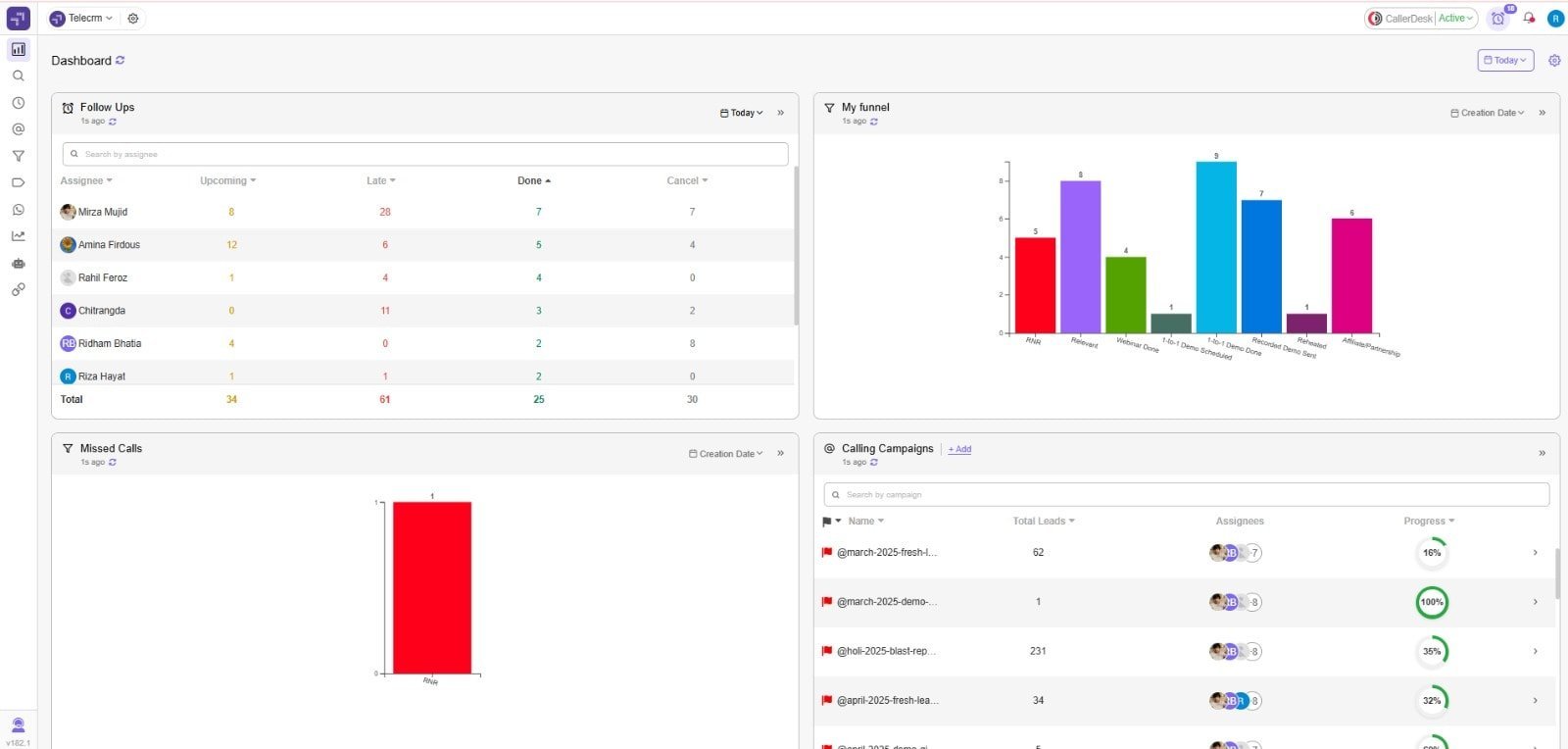
Here’s how it supports effective customer data management every day:
telecrm supports customer data management by auto-capturing leads, storing interaction history, assigning leads, tracking follow-ups, integrating WhatsApp and SMS, managing sales pipelines and giving teams a live dashboard to monitor customer activity.
Book a demo now to see how telecrm can work as your customer data platform and makes it easier for your teams to analyse customer expectations without switching between tools or losing track of conversations.
Getting your team to overcome CRM adoption resistance is not just about ticking a box. It is a transformation in how you track, serve and grow your customer base. Too many SMBs invest in CRM without seeing real impact because adoption is not embedded in data quality and daily habits.
Focus on the two core areas and you’ll set your CRM up for success: keeping clean records and putting smart data management into action.
Good CRM adoption begins with trust in your data. If records are outdated, duplicated or inconsistent, even the best systems fail. High‑quality data gives your team confidence and momentum.
Before importing or cleaning records, map your customer data model. Define key entities like leads, contacts, deals and activities, then align fields, remove duplicates and set required relationships so your CRM data stays consistent across tools. Define CRM custom fields for the information your team needs, using consistent names and data types.
Once your data quality is strong, you need the CRM best practices to keep it that way. With defined processes, automation and governance, your customer relationship management software becomes a tool that scales, adapts and delivers results.
When your team struggles to manage leads and follow-ups, it directly affects your business growth. Missed conversations, delayed responses and disorganised customer data can quietly hold your team back.
What your sales and marketing teams need is a clear, reliable system that helps them focus on engaging current and potential customers at the right time, with the right message.
That’s where telecrm comes in. It works as a complete data management platform, allowing you to analyse customer data, track customer behaviour and manage customer relationships more efficiently. Whether you’re looking to fine-tune your marketing strategies or streamline team coordination, telecrm gives you the control and visibility you need.
CRM customer data management helps SMBs keep customer information organised, accessible and actionable. It reduces missed follow-ups, improves team coordination, protects customer context and helps sales and marketing teams make better decisions from one shared system.
Book a demo now to see how telecrm helps your team manage customer data, track follow-ups and improve sales visibility from one place.
CRM customer data management is the process of storing, organising, updating and using customer information inside a CRM. It includes contact details, call records, WhatsApp chats, notes, purchase history, deal stages and follow-up activity in one central system.
CRM customer data management is important for SMBs because it prevents scattered data, missed follow-ups, repeated conversations and dependency on individual team members. It gives sales and marketing teams one shared view of every customer and lead.
The main benefits are centralised customer records, faster follow-ups, better team coordination, cleaner sales pipelines, improved customer experience, easier reporting and stronger control over customer interactions.
SMBs can improve CRM data quality by removing duplicate records, standardising names and phone numbers, assigning data owners, making key fields mandatory, training teams on data entry and reviewing CRM records regularly.



© Copyright 2026 telecrm.in (Flamon Cloudtech Pvt Ltd) - All Rights Reserved • Privacy Policy • T&C



© Copyright 2026 telecrm.in - All Rights Reserved • Privacy Policy • T&C