

If you run a small business, every lead matters. But without a proper system, here’s what usually happens:
It’s not that your team isn’t working hard. The real issue is the lack of a clear, shared sales process inside your CRM.
A proper CRM sales process helps you:
In this article, you’ll learn how to build a CRM sales process that’s simple, practical and actually works for small teams. Let’s see how.
The CRM sales process is a series of defined steps followed within a CRM system to turn a new lead into a customer. It helps sales teams track every interaction, manage follow-ups and move deals forward in an organised way.
Without it, everyone does things differently. One rep might call a lead twice, another might forget to call at all. Notes are all over the place. You end up losing leads not because they weren’t interested, but because there was no proper system to guide your team.
With a CRM sales process in place, every lead follows the same path. Your team knows what to do at each stage. The CRM reminds them to follow up, helps them stay on time and keeps everything in one place. It’s a simple way to bring order to your sales and stop leads from slipping through the cracks.
Every successful sale follows a path. Whether you’re selling software, real estate or online courses, there’s a clear journey from a new enquiry to a closed deal. A CRM helps you map that journey into simple, repeatable steps — so your sales reps don’t miss anything, and your sales team works in sync.
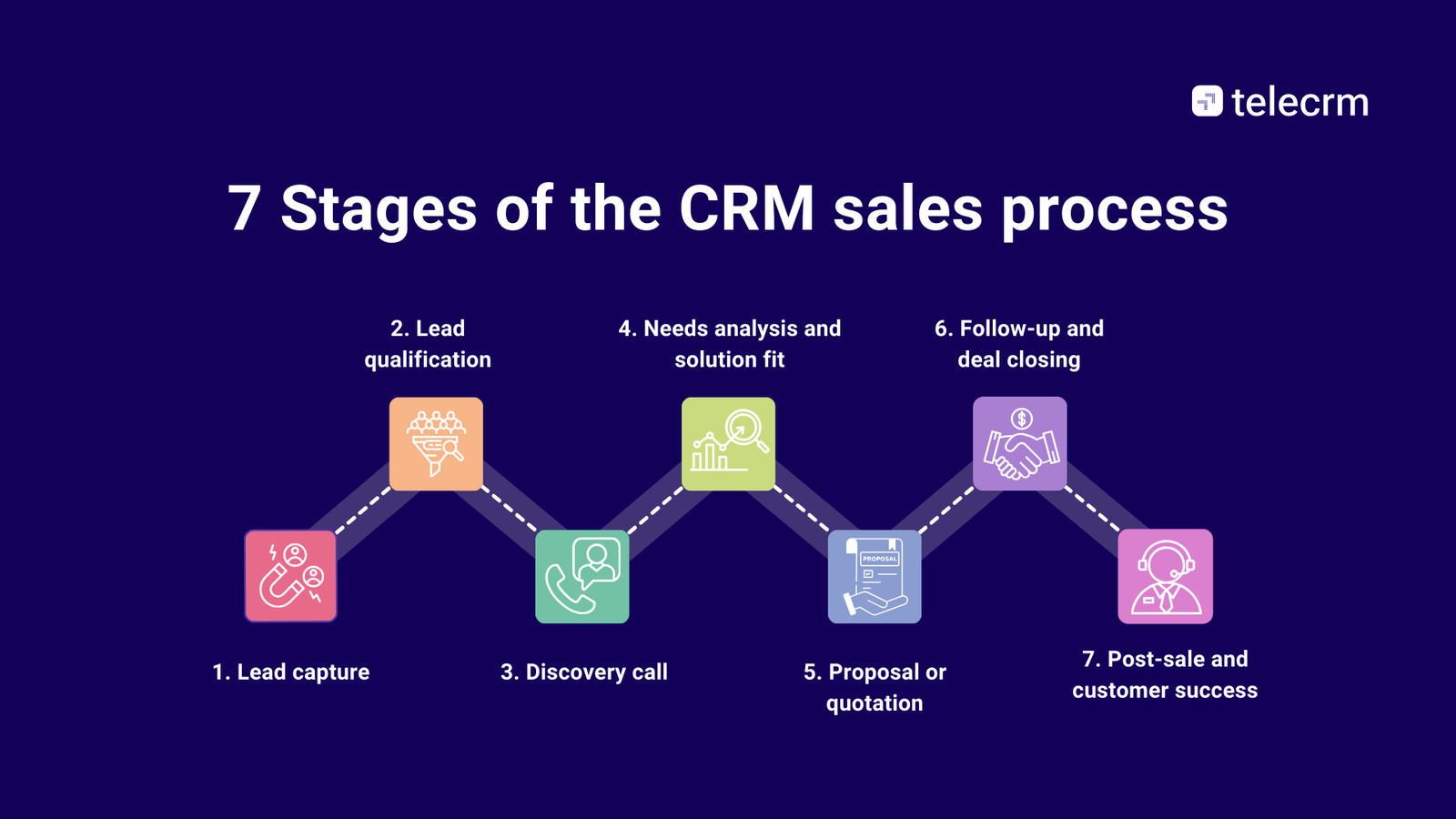
Below are the seven stages of a typical CRM sales process. These steps can be customised to suit your business, but the structure remains useful for anyone looking to simplify sales and close more deals consistently.
This is where it all starts. Someone shows interest in what you offer. Maybe they filled out a form on your website. Maybe they sent you a WhatsApp message. Maybe they just called your number.

Now, the important part is this
A CRM helps you do that. It collects information on lead generation from all sources in one place. Website forms, Facebook ads, Justdial, incoming calls — you don’t have to copy anything into a sheet. It’s all saved automatically with the name, number and message.
The faster you capture a lead, the faster your sales team can follow up. And the sooner you reply, the better your chances of turning that enquiry into a real sale.
If this part is messy, everything else falls apart. So getting lead capture right is step one.
Not every lead that comes in is worth chasing. Some people are just browsing. Some don’t have the budget. Some aren’t ready to buy. If your team follows up with everyone the same way, they’ll waste time and lose focus.

That’s why this qualifying lead stage is about figuring out which leads are actually worth your time. You look at a few basic things:
You don’t need to overthink this. You just need a few questions that help your sales reps understand if the lead has potential or would require further nurturing. This can be done through a quick call or sometimes just by looking at the information they submitted.
A good CRM can help here by giving you lead tags or scores based on certain answers or behaviours. For example, if someone clicked on pricing or filled a detailed form, they might be more serious than someone who just asked a general question.
The goal is simple: help your sales team focus on the right people. That way, they spend less time chasing cold leads and more time closing the ones that are actually interested.
This is the first real conversation your sales rep has with the lead. Until now, it’s just been forms, messages or basic info. The discovery call is where you actually talk to the person, ask questions and find out what they really need.
Think of it like a doctor’s first check-up. You’re not selling yet. You’re listening. You’re trying to understand their problem, their goal, and whether your solution fits.

The best discovery calls are not sales pitches. They’re honest conversations. You ask simple questions like:
These questions help your team figure out if the lead is serious, what matters most to them, and what objections might come up later.
The CRM helps here by letting reps take quick notes during the call. That way, the next person who speaks to the lead — whether it’s a manager or a support person — has the full context and doesn’t have to ask the same things again.
Done right, the discovery call sets the tone for the rest of the typical sales process. It shows the lead that you’re paying attention, and that you actually want to help, not just make a sale.
Once the discovery call is done, your job is to go a bit deeper. The lead has told you their basic problem. Now you need to understand the details, what exactly they need, how urgent it is and what kind of solution will actually work for them.

This is where your sales rep becomes more of a guide. You’re not just listening, you’re connecting the dots. You look at what you’re customers are saying:
For example, if you’re selling a CRM and the lead says they lose track of follow-ups, that tells you they don’t have a clear sales process. If they mention managing a large team, they likely prioritise accountability and reporting. These small details help you recommend the right features or plan.
A good CRM helps your team record all these pain points, who’s involved in the decision and any concerns that might come up. This makes sure you’re not guessing later, and that your pitch actually fits their needs.
The goal at this stage is simple: stop offering one-size-fits-all solutions. Instead, use what the lead told you to offer something that actually makes sense for them.
Related read: CRM metrics
By now, you’ve had a proper conversation with the lead. You’ve understood their needs, asked the right questions and noted their pain points. Now it’s time to show them how you can help and what it will cost.
This is where you send a proposal or quotation. For some businesses, this could be a detailed PDF with pricing, timelines and deliverables. For others, it might just be a WhatsApp message with a short breakdown of the offer. The format doesn’t matter as much as the clarity.
Your goal here is simple:
A CRM helps your sales reps stay organised at this stage. It keeps a record of what was sent, when it was sent and any replies that came in. If the lead opens the proposal but doesn’t respond, your team knows when to follow up.
What matters most here is timing and relevance. Don’t rush the proposal. But don’t wait too long either. Once the lead has shown serious interest, a clear offer helps move things to the next stage — closing the deal.
This is where most deals are either won or lost. And often, it comes down to one simple thing: did your team follow up properly?
Most leads won’t say yes the moment they get a quote. They need time to think. They might have questions or be speaking to other providers. If your sales reps don’t check in or follow up at the right time, that lead can go cold quickly.

This is where your CRM tool helps. It reminds your reps when to follow up, what’s already been discussed and what’s still pending. Some tools can even send automatic WhatsApp messages or email nudges to keep the conversation going without manual effort.
At this stage, your sales rep should be ready to:
The goal is to keep things moving without pushing too hard. When follow-ups are done right, they show the lead that you’re reliable and still listening.
And once the lead is ready, your CRM software should make it easy to close the deal — no delays, no confusion, just a smooth handover to onboarding.
Just because the deal is closed doesn’t mean the work is done. In fact, what happens after the sale is just as important, especially if you want repeat business or referrals.
The first step is onboarding. Your team needs to make sure the customer understands how to use the product or service. If this part is rushed or messy, the customer can lose interest or feel regret, even if they were excited during the sales call.

This is also the stage where real trust is built. Your CRM system should help track follow-up calls, support requests and any issues that come up. Everything should be recorded so the next person who speaks to the customer knows what’s going on. No one wants to repeat themselves again and again.
Once the customer is set up and happy, there’s room for more, like asking for feedback, offering upgrades or suggesting other services. This isn’t about being pushy. It’s about staying helpful and keeping the relationship going.
A good CRM sales process doesn’t end with the sale. It makes sure your customers feel supported long after they’ve paid.
Most businesses don’t lose deals because their product is bad. They lose them because of something much simpler — disorganisation. A lead slips through the cracks. A rep forgets to follow up. Someone promises to call back but never does. The lead goes cold, and the sale is gone.
Without a CRM, your sales process is scattered. Some leads are sitting in your inbox. Some are saved in your phone. Others are on WhatsApp, and a few are stuck in a forgotten spreadsheet. There’s no clear place where everything comes together.
This causes real problems:
It also hurts your team. They spend more time chasing updates and fixing mistakes than actually selling. It’s frustrating for them, and it affects their confidence. Over time, the same small issues repeat again and again — lost leads, unclear status, missed calls.
A CRM stops this cycle. It puts everything in one place. Every lead, every call and every follow-up is tracked. Your team knows what to do and when to do it. You get visibility into the entire sales pipeline, not just what reps tell you.
Without a CRM, you’re running your sales on hope. With a CRM, you’re running it on a system.
If you want your sales team to close more deals, they need more than just a CRM. They need a clear process inside the CRM — a path they can follow every time a new lead comes in. Here’s how to build that process, step by step.
Before setting up anything, take a proper look at how your team handles leads right now.
You’ll likely find a few gaps — maybe no follow-up system, unclear roles or zero visibility after a proposal is sent. Note these issues down.
This is the foundation. Work with your team to define the key stages in your sales process. Keep it simple.
For example:
Lead in → Qualified → Discovery call → Proposal → Follow-up → Closed
Make sure everyone understands what each stage means and when a lead should be moved from one stage to the next.
Now, take those stages and build them into your CRM pipeline. Each stage should match your team’s real-world actions. Avoid fancy names or too many steps. Just keep it clear and easy to follow.
Most CRMs let you drag and drop leads from one stage to the next. Once the setup is done, your team should be able to see the full sales pipeline at a glance.
Make sure everyone knows who’s doing what. Who will call the lead first? Who sends the proposal? Who handles follow-ups? Without this clarity, you’ll have confusion, delays and repeated calls.
Set rules inside the CRM for lead assignment so that no one misses their turn or overlaps with another rep.
Don’t rely on memory. Use your CRM’s features to create simple workflows:
CRM automations save time, reduce human error and make sure nothing slips through.
Once your process is live, don’t assume it’s perfect. Check in regularly:
Use CRM reports to spot bottlenecks. Talk to your team to get their feedback. Then adjust the process as needed.
Building a CRM sales process isn’t about making something complex. It’s about making something clear, repeatable and useful. Once set up properly, it becomes a system your team can rely on every single day.
A CRM is supposed to make your sales team’s job easier, not store contacts. That means fewer missed follow-ups, fewer leads slipping through the cracks and fewer hours spent chasing updates.
Here are the CRM features that actually help, not the fancy ones, just the ones that make your sales process smoother and your team more organised.
Leads don’t come from one source. Some fill out your website form, others message you on WhatsApp, and a few just call out of the blue. If your team has to collect all that manually, things will be missed.
A good CRM pulls in leads from all your sources — forms, ads, missed calls, even old Excel sheets — and keeps them in one place. That way, your team doesn’t need to check five different apps to figure out who to call next.
Every business has its own way of selling. Some need four stages, some need eight. A CRM should let you set that up clearly, not force you into a one-size-fits-all flow.
You decide what each stage means, lead in, follow-up done, proposal sent, deal closed — and your team moves leads through those stages. Everyone knows where things stand, and there’s no confusion.
Let’s be honest — people forget. A lead says, “give me a call tomorrow,” and the rep says, “sure,” but tomorrow they get caught up in something else and it’s gone.
That’s where CRM reminders help. You can set simple alerts like “call back at 11 am” or “send quote next Tuesday,” and the system won’t let your team forget. It shows the task, sends a ping, and keeps everyone on track.
Switching between apps wastes time. Your CRM should let your team make calls or send WhatsApp messages without jumping to another screen. The number is already there, and the message history stays saved.
This makes life easier for your reps and helps you see what was said, when, and by whom — no more “he said, she said” confusion.
Not all leads are equal. Some are hot, some are just browsing, and some never pick up. With lead scoring or tags, your team can spot the serious ones faster.
You can also filter leads by where they came from, how long they’ve been waiting, or which rep is handling them. It’s like sorting your desk before you start working — it saves time and keeps things clear.
At some point, you want to know how your team is doing. But you don’t want to open ten spreadsheets or ask for updates every day.
CRM reports show you what you need — how many leads came in, how many moved forward, who’s closing deals and where things are getting stuck. It helps you run reviews faster and fix problems before they grow.
When your team talks to a lead, they should know the full story. Has someone already called them? Did they ask for a discount? Did they go cold last month and come back now?
A CRM gives you a timeline of every call, message and note on that lead. So no matter who picks up the phone, they can pick up the conversation from the right place, without making the potential customer repeat everything.
Related read: What is CRM?
Setting up your CRM process is only half the work. The other half is making sure your team uses it properly and it actually helps you close more deals. That’s where a few simple habits can make all the difference.
These are not fancy tricks. Just real, practical things you can do to keep your sales process clear, consistent and easy to follow — even when your team is growing.
Don’t overcomplicate things. Your sales stages should be clear enough that a new rep can look at the pipeline and understand what to do next. Use plain names like “Qualified,” “Demo done” or “Follow-up pending.” If your team needs a manual to understand the process, it’s too complex.
One rep can’t be using the CRM properly while another keeps everything in a notebook. That breaks the system. Set clear rules for moving leads, logging calls and marking deals as closed. Train your team and make sure they stick to it. A CRM only works when everyone uses it the same way.
Your reps might be smart and hard-working, but they’re still human. They will forget things. Use your CRM to set simple reminders: follow-up calls, proposal deadlines and demo schedules. It keeps the process running smoothly without anyone needing to remember everything.
A big part of sales is knowing where things are getting stuck. Your CRM reports can show you how many leads are moving forward, how many are getting cold and where deals are dropping off. Look at this customer data every week — it helps you spot problems early and fix them before they hurt your numbers.
The best process is one that works in the real world. Ask your reps:
Take their feedback seriously. Update the process if needed. A sales process is not something you create once and forget. It’s something you shape as your team grows.
Following these best practices helps you keep the process simple, the team accountable and the CRM useful, not just another tool that people ignore.
These few mistakes can quietly ruin your entire selling process, even if you’re using a CRM. Here’s what to watch out for:
Mistake | What Happens | How to Avoid It |
No clear sales stages | Leads pile up in one place with no order | Define each stage and explain when to move a lead |
Using CRM as just a phonebook | No follow-ups, no tracking, no progress | Use it to track every step, not just save numbers |
No reminders or tasks | Reps forget to follow up, and leads go cold | Set daily follow-up tasks and alerts in the CRM |
Messy, outdated lead data | Team wastes time on junk leads or duplicates | Regularly review and archive cold or dead leads |
No standard process across the team | Everyone works differently, and reporting is a mess | Train your team to follow one clear, shared process |
Most teams don’t fail because they’re not working hard. They fail because their basic sales process is a mess — scattered notes, forgotten follow-ups and no clear next step. And when that happens, even the best CRM won’t help.
But if you’ve read this far, you already know that a CRM sales process can fix all of that. It gives your team a simple, repeatable system they can follow every day. No more guessing, no more chaos — just a clear path from lead to sale.
With the right setup, your CRM becomes more than a tool. It becomes your sales team’s guide. It tells them who to call, when to follow up and what’s already been said. It helps you close more deals, reduce confusion and build better relationships with your customers.
If you’re looking for a CRM that’s built exactly for this — one that’s simple, practical and designed for small and growing teams — telecrm is your best bet. From inbuilt calling and WhatsApp to full funnel tracking and real-time reminders, it gives your team everything they need in one place.
Book a free demo of telecrm and see how the right sales process (and the right CRM) can completely change the way your team sells.



© Copyright 2026 telecrm.in - All Rights Reserved • Privacy Policy • T&C



© Copyright 2025 Telecrm.in - All Rights Reserved • Privacy Policy • T&C