
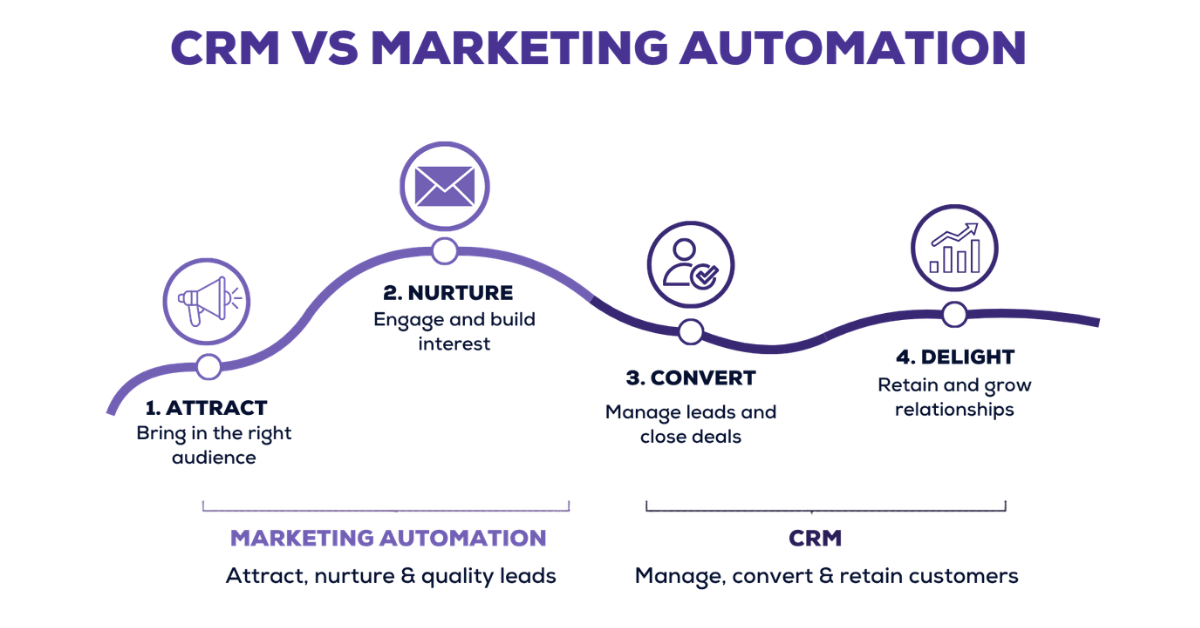
When people compare CRM vs marketing automation, the answer is rarely as simple as “choose this one, not that one.”
Both tools help businesses manage leads and improve revenue. But they do it in very different ways.
A CRM helps your sales team manage leads, track conversations and close deals. Marketing automation helps your business run campaigns, nurture prospects and generate demand at scale.
The right choice depends on where your growth is getting stuck.
Is your sales team missing follow-ups, losing customer data or struggling to manage customer relationships? Or are your leads not being nurtured properly before they reach sales?
To understand that clearly, let’s first look at what a CRM actually does
A CRM is customer relationship management software that helps sales teams capture leads, track conversations, manage follow-ups, update deal stages and close customers from one organised system.
In simple words, it helps your sales team see who the lead is, where they came from, what they need, who last spoke to them, how the conversation went and what the next step of action is.
Instead of keeping lead details in Excel, call notes in diaries and follow-up reminders in someone’s head, a CRM system brings everything together into one organised customer database.
For example, when a new lead comes in from your website, WhatsApp, ads or a landing page, the CRM can capture the lead, assign it to the right sales rep, store the conversation history and remind the team to follow up on time. This makes the sales process easier to manage because your team does not have to depend on memory or manual updates for every small task.
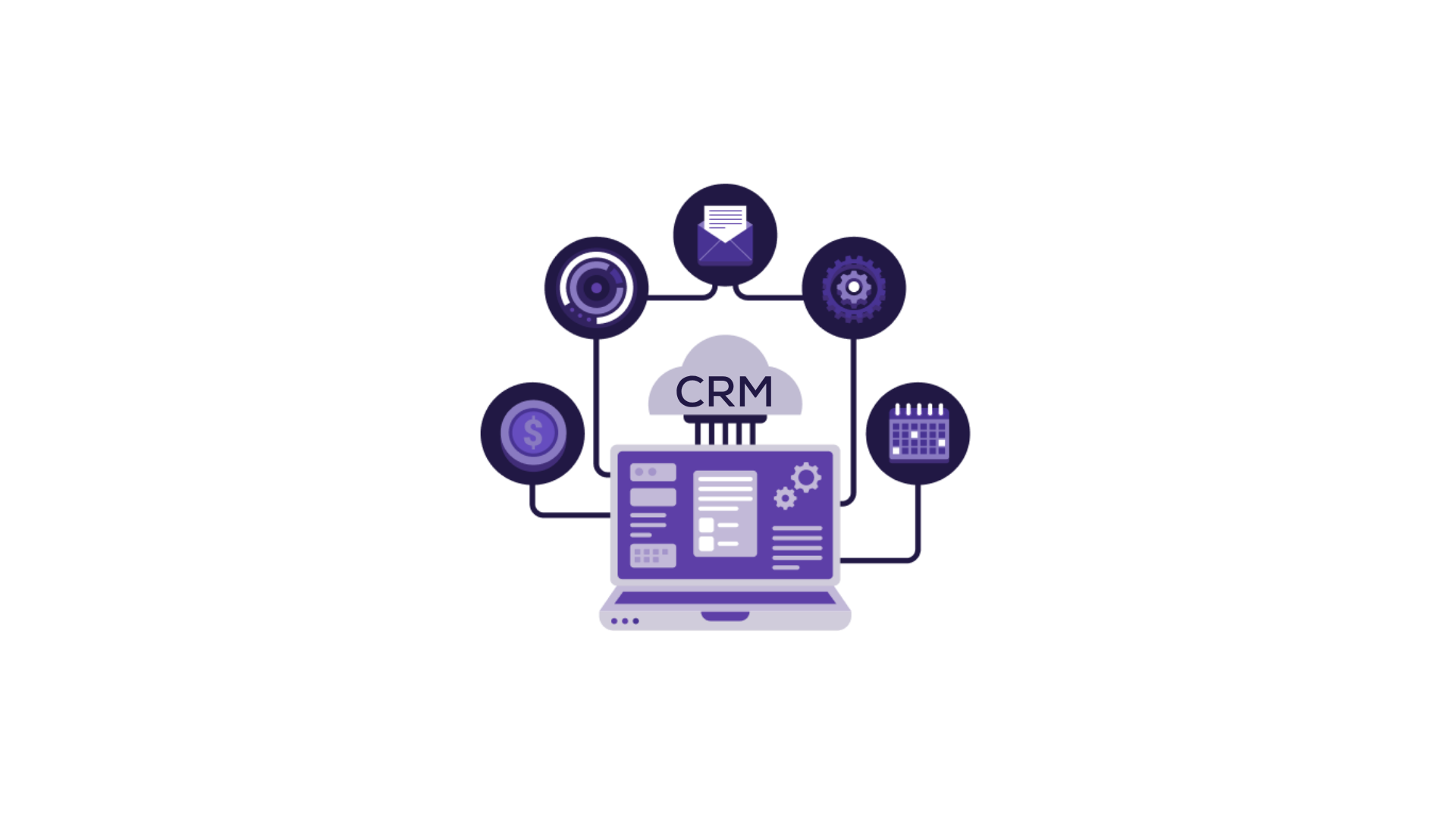
A CRM mainly focuses on the sales side of the business. It helps sales teams track leads, manage the sales pipeline, record customer interactions and move qualified leads towards closure.
So, when comparing CRM vs marketing automation, remember this: CRM software is useful when leads are already coming in but follow-ups, tracking, ownership and sales processes feel messy.
Marketing automation is software that helps businesses automate campaigns, lead nurturing, WhatsApp or email follow-ups, segmentation, lead scoring and repetitive marketing tasks based on customer behaviour.
Instead of manually sending the same message to every lead, a marketing automation system helps marketing teams create journeys based on customer behaviour.
For example, if someone fills out a form, downloads a guide or clicks on an ad, the system can automatically send the next relevant message.
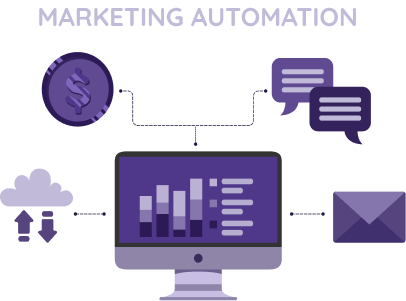
Marketing automation primarily focuses on the top and middle stages of the sales funnel. It helps businesses generate leads, nurture leads, score lead interest and pass marketing-qualified leads to the sales team when they are ready for a conversation.
So, when comparing CRM vs marketing automation, remember this: marketing automation software is useful when you want to run campaigns at scale, reduce repetitive tasks and keep potential customers engaged across multiple channels before they enter the sales pipeline.
Difference | CRM | Marketing Automation |
Main role | Helps sales teams manage & close leads | Helps marketing teams attract & nurture leads |
Primary Users | Sales reps, managers & leaders | Marketers & campaign teams |
Journey stage | Middle to bottom of the funnel | Top & middle of the funnel |
Data used | Lead details, calls, notes, follow-ups, deal stages | Campaign activity, website behaviour, email engagement, interests |
Common tasks | Calling, tracking, reminders, pipeline management | Email campaigns, WhatsApp journeys, segmentation, lead scoring |
Success metrics | Follow-up completion, pipeline value, conversion rate | Lead generation, engagement, MQLs, nurture performance |
The biggest difference is ownership.
A CRM takes over once a lead needs direct sales action. Marketing automation works before that, when the lead still needs education, nurturing or repeated touchpoints.
So instead of seeing them as competing tools, see them as two systems working on different parts of the same revenue journey.
Difference | CRM | Marketing automation |
Main role | Helps sales teams manage and close leads | Helps marketing teams attract and nurture leads |
Primary users | Sales reps, sales managers and sales leaders | Marketers, campaign managers and marketing departments |
Customer journey stage | Middle to bottom of the funnel | Top middle of the funnel |
Data used | Lead details, call notes, deal stage, follow-ups and customer interactions | Campaign activity, website behaviour, email engagement and customer interests |
Common tasks | Calling, lead tracking, deal movement, task reminders and pipeline management | Email campaigns, WhatsApp journeys, segmentation, lead scoring and repetitive marketing tasks |
Success metrics | Follow-up completion, sales pipeline value, conversion rate and sales team performance | Lead generation, campaign engagement, marketing-qualified leads and nurture performance |
Example | Assigning an interested lead to a sales rep for a call | Sending a follow-up email after someone downloads a brochure |
In simple terms, marketing automation prepares the lead. CRM helps your team convert that lead.
CRM and marketing automation work best when they are connected instead of being treated as separate systems.
Marketing automation handles the early part of the journey. It captures leads, sends email campaigns, runs WhatsApp journeys, tracks customer behaviour and identifies which leads are showing interest.
Once a lead becomes sales-ready, the CRM takes over. It assigns the lead to the right sales rep, stores customer data, tracks calls, records notes, schedules follow-ups and shows where the lead stands in the sales pipeline.
For example, suppose someone fills out a form to download your pricing guide. Marketing automation can send them a follow-up email, add them to a nurture journey and track whether they click or reply. If the lead shows strong interest, the CRM can automatically create a task for the sales team, assign the lead and help the rep continue the conversation with full context.
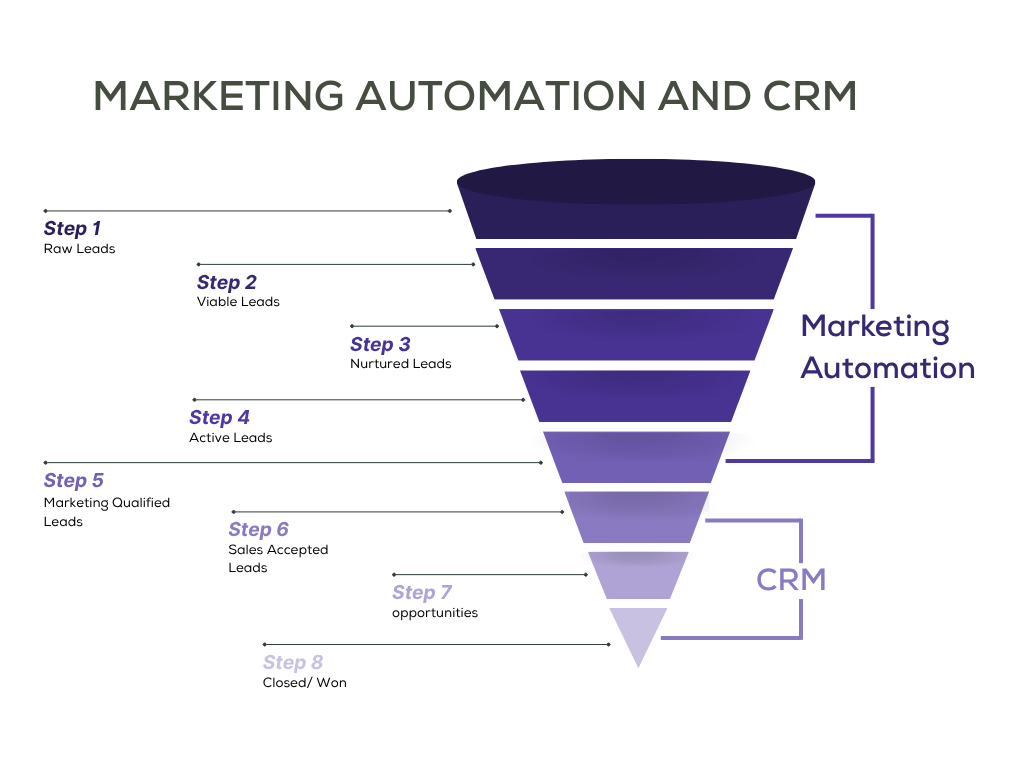
This creates a smoother handover between marketing and sales. Marketing knows which campaigns are creating qualified leads. Sales knows what the lead has already seen, clicked or asked for. The result is better timing, fewer missed follow-ups and a cleaner customer journey.
Now that the difference is clear, let’s look at some CRM and marketing automation tools that can help you put this into action.
Not every tool is purely a CRM or purely a marketing automation platform.
Some tools offer both, but usually lean more towards sales or marketing. So, before comparing features, it helps to group them by how they are commonly used:
Tool | Category | Works best when you need | Key features | Starting price |
telecrm | CRM + marketing automation | Sales and marketing teams need lead tracking, calls, WhatsApp, follow-ups and simple automation in one place | Lead tracking, lead capture, auto-assignment, calling workflows, WhatsApp workflows, follow-up automation, reporting | ₹799 per user/month, billed annually |
HubSpot | CRM + marketing automation | You want CRM, forms, email marketing, automation and reporting inside one connected platform | Contact management, lead capture, marketing automation, sales pipeline tracking, reporting | Free tools available, paid plans start at $9 per user/month |
Zoho CRM | CRM + marketing automation | You want CRM, workflow automation, reporting and access to a wider business app ecosystem | Lead management, workflow automation, sales pipeline tracking, marketing integration, analytics | ₹800 per user/month |
Pipedrive | CRM-heavy | Your main focus is deal tracking, follow-ups and sales pipeline visibility | Pipeline management, activity tracking, automation, contact management, reporting | $14 per user/month |
Freshsales | CRM-heavy | You want CRM software with built-in calling, lead tracking and sales visibility | Contact management, built-in calling, lead scoring, sales pipeline tracking, reporting | ₹749 per user/month |
Salesforce Sales Cloud | CRM-heavy | You need a scalable CRM system for large teams and complex sales processes | Lead management, opportunity management, workflow automation, custom reporting, integrations | $25 per user/month |
ActiveCampaign | Marketing-heavy | Your focus is lead nurturing, email journeys and behaviour-based marketing automation | Email automation, lead scoring, segmentation, workflow automation, campaign reporting | $15/month |
Mailchimp | Marketing-heavy | You need simple email campaigns, newsletters and basic marketing automation | Email campaigns, audience management, templates, basic automation, campaign reporting | ₹385/month |
Klaviyo | Marketing-heavy | You run e-commerce campaigns focused on retention, repeat purchases and personalisation | Email and SMS campaigns, customer segmentation, personalised automation, revenue attribution, e-commerce integrations | Free plan available, paid plans start at $45/month |
These tools are useful for businesses that want one platform to connect sales and marketing teams. They help reduce manual work, improve lead handover and ensure smoother data flow between marketing campaigns and sales processes.
telecrm works well for businesses that need both CRM and marketing automation in a simple, practical setup.
It helps you manage leads, customer data, calls, WhatsApp conversations, follow-ups and sales pipeline activity from one place. At the same time, it supports marketing automation through lead capture, auto-assignment, WhatsApp workflows, follow-up reminders and activity-based tracking.
This makes telecrm a useful middle ground for teams that want to connect their sales and marketing processes without using multiple disconnected tools.
telecrm is useful for teams that want CRM and simple marketing automation in one place. It helps capture leads, assign them to reps, track calls, manage WhatsApp conversations, automate follow-up reminders and view sales performance from one dashboard.
Check the pricing here
HubSpot works well for businesses that want CRM, marketing automation, forms, email, sales pipeline tracking and reporting inside one connected platform.
It helps teams manage customer data, capture leads, run marketing campaigns, automate follow-ups and track sales activity from one place. This makes it useful for businesses that want their sales and marketing teams to work from the same system instead of using separate tools.
HubSpot is especially useful when a business wants to connect lead generation, lead nurturing, sales activity and reporting across the customer journey.
Pricing varies based on selected hubs, marketing contacts, seats, add-ons and billing cycle
Zoho CRM works well for businesses that want customer relationship management, automation and reporting at a flexible price point.
It helps teams manage leads, customer interactions, sales processes, workflows and analytics from one place. Since Zoho also has a wider ecosystem of tools for campaigns, helpdesk, finance, forms and business operations, it can support both sales and marketing processes as the business grows.
Zoho CRM is useful for teams that want a customisable CRM system with automation options, but do not want to start with a heavy enterprise platform.
Pricing is generally billed annually. Monthly billing, add-ons and bundled Zoho products may change the final cost
These tools are better suited for businesses where the main problem is sales execution. They help teams manage the sales pipeline, track follow-ups, organise customer data and improve visibility into the sales team’s performance.
Pipedrive works well for businesses that want a simple CRM tool for managing deals, follow-ups and sales pipeline activity.
It is built around visual pipeline management, which makes it easier for sales teams to see where every deal stands, what needs attention and which follow-ups are overdue.
Pipedrive is useful for teams that want better sales discipline without adding too much complexity to their daily work.
Pricing is based on annual billing. Monthly plans usually cost more
Freshsales works well for businesses that want CRM software with built-in calling, lead tracking, automation and reporting.
It helps sales teams manage customer interactions, qualify leads, track pipeline activity and follow up from one place. This makes it useful for businesses that want a cleaner CRM system without the weight of a large enterprise setup.
Freshsales is especially useful when a team wants calling, contact management and sales visibility in one platform.
Pricing is based on annual billing. Monthly billing may vary
Salesforce Sales Cloud works well for larger businesses that need a highly customisable CRM system for complex sales processes.
It helps teams manage leads, customer relationships, sales opportunities, workflows, reporting and customer data across departments. It is powerful and scalable, but usually needs proper setup, admin ownership and training.
Salesforce is useful when a business has large sales teams, multiple processes and deeper reporting needs.
Pricing depends on edition, users, add-ons and billing cycle
These tools are better suited for businesses where the main problem is lead nurturing, campaign execution and marketing automation. They help teams run email marketing, track customer behaviour, automate repetitive marketing tasks and keep potential customers engaged before they move deeper into the sales funnel.
ActiveCampaign works well for businesses that want deeper marketing automation with email journeys, segmentation, lead scoring and behaviour-based workflows.
It helps teams nurture leads based on actions like form submissions, email clicks, website visits and engagement levels. This makes it useful for businesses where timely follow-ups and personalised campaigns directly affect conversions.
ActiveCampaign also includes CRM features, but its stronger side is marketing automation.
Pricing varies based on contacts, features and billing cycle
Mailchimp works well for small businesses that want simple marketing automation software for newsletters, email campaigns and basic customer journeys.
It helps teams create emails, manage audiences, use templates and automate simple marketing tasks without a heavy setup. This makes it a good starting point for businesses that are new to marketing automation.
Mailchimp is useful for simple campaigns, but businesses with complex automation needs may eventually need a more advanced marketing automation platform.
Pricing depends on contacts, email limits, features and billing cycle
Klaviyo works well for e-commerce businesses that want marketing automation focused on retention, repeat purchases and personalised customer journeys.
It helps brands use customer behaviour, browsing activity, purchase history and engagement data to send more relevant email and SMS campaigns. This makes it useful for businesses that want to improve repeat sales and customer lifetime value.
Klaviyo is especially strong for e-commerce brands because it connects marketing data with revenue and purchase activity.
Pricing depends on active profiles, email volume, SMS usage and billing cycle
Even after understanding the difference between CRM and marketing automation, the choice may still feel confusing. That is normal because many businesses need a bit of both.
The easiest way to decide is to look at where your current process is breaking.
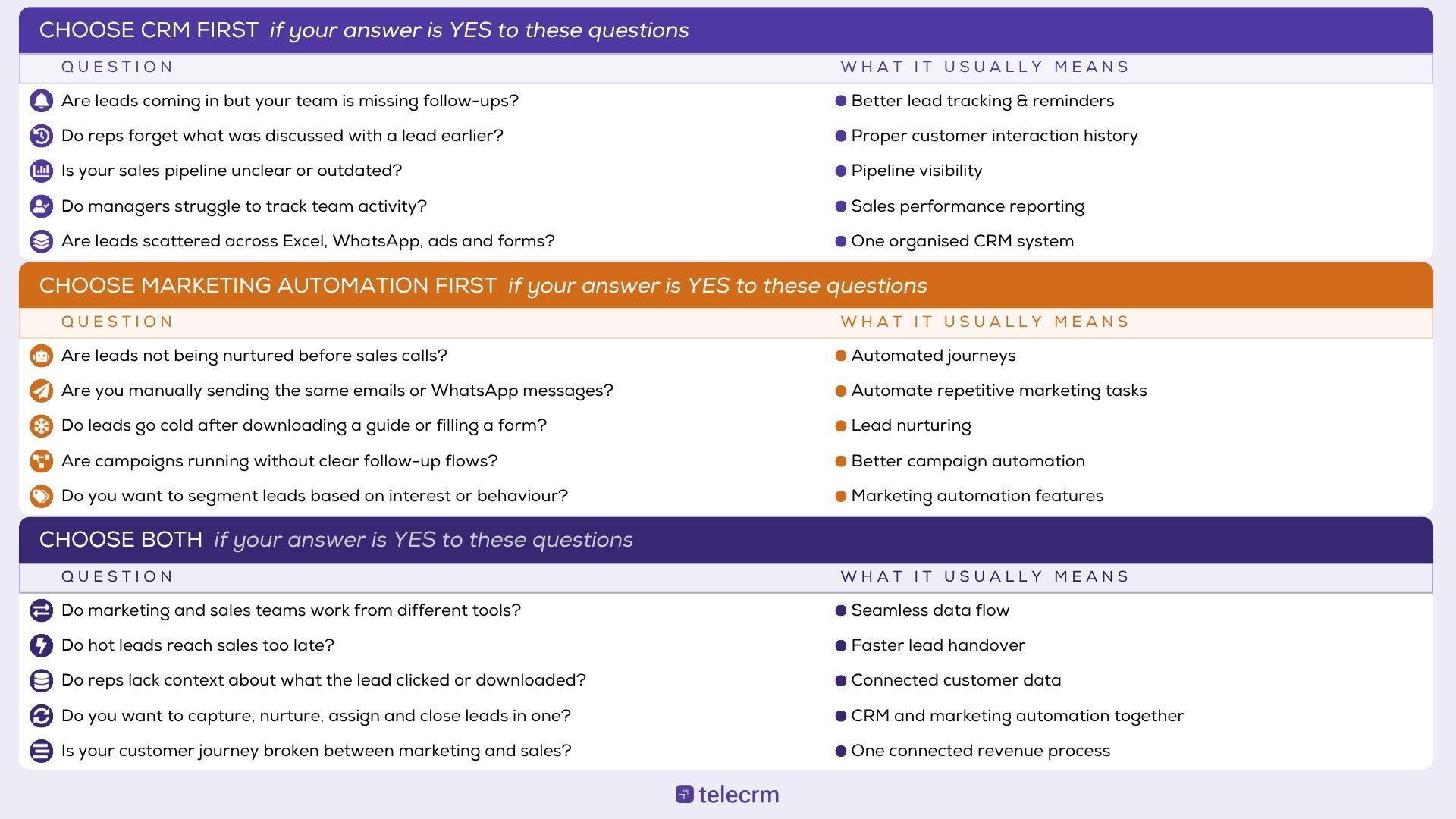
The real challenge is not understanding CRM and marketing automation separately. It is making them work together in your daily process.
Because leads do not move in a straight line anymore. Someone may click an ad, message you on WhatsApp, speak to a sales rep, go silent for a week, come back after a reminder and then ask for pricing again.
If these actions live in different tools, your team loses context. Marketing does not know what sales are discussed. Sales does not know which campaign the lead came from. And managers only find the gap after the lead has already gone cold.
That is where telecrm can help. It brings your leads, calls, WhatsApp conversations, follow-ups, assignments and reports into one place, while helping you automate the parts of the journey that usually slow teams down, like lead capture, auto-assignment, reminders and WhatsApp workflows.
That means every new lead reaches the right person faster. Every follow-up has a clear next step. Every conversation stays attached to the lead, so your team does not lose context when speed matters most.
And the longer these gaps stay open, the more leads quietly slip away.
So if your team is already handling leads across calls, WhatsApp, ads, forms and spreadsheets, this is the right time to bring everything together.
Want to connect lead capture, WhatsApp follow-ups, sales calls, reminders and pipeline tracking in one place? Book a telecrm demo and see how your sales and marketing process can become faster, clearer and easier to manage.
CRM helps sales teams manage leads, follow-ups, conversations and deals. Marketing automation helps marketing teams run campaigns, nurture leads and automate repetitive communication.
Choose CRM first if leads are being missed after enquiry. Choose marketing automation first if leads need more nurturing before sales contact.
Yes. Marketing automation can capture and nurture leads, while CRM assigns sales-ready leads to reps and tracks calls, follow-ups and deals.
telecrm is primarily a CRM with automation features for lead capture, auto-assignment, WhatsApp workflows, reminders and reporting.
CRM is usually better for sales teams because it helps manage pipeline, calls, follow-ups and deal progress.


© Copyright 2026 telecrm.in (Flamon Cloudtech Pvt Ltd) - All Rights Reserved • Privacy Policy • T&C



© Copyright 2026 telecrm.in - All Rights Reserved • Privacy Policy • T&C