
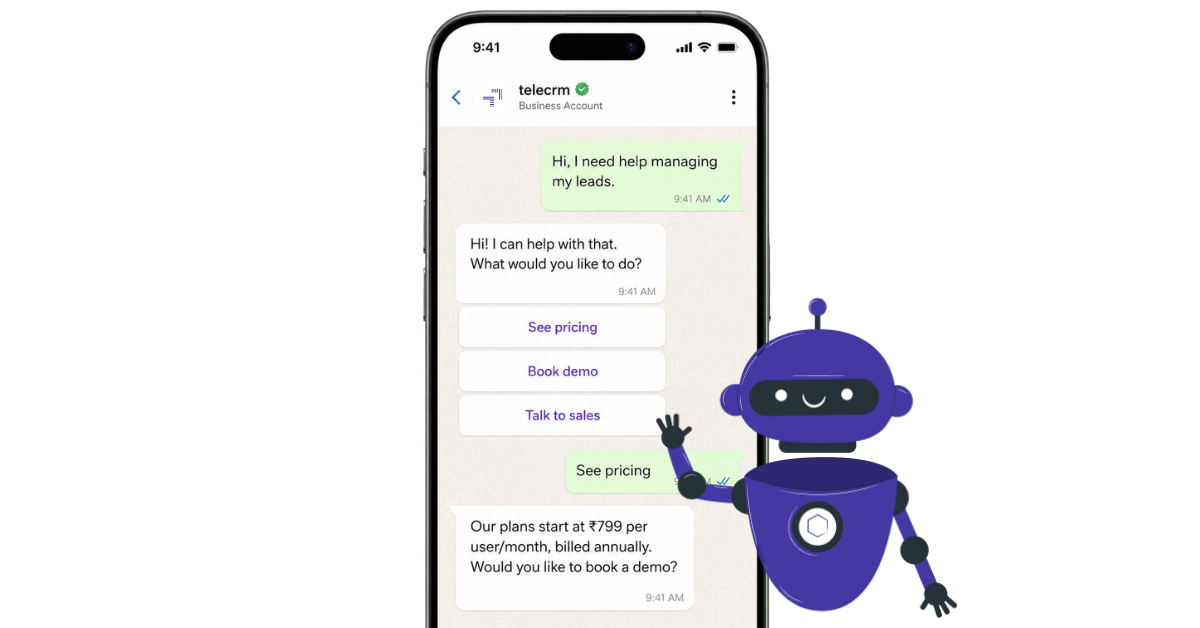
A WhatsApp chatbot is an automated tool that replies to customer messages on WhatsApp using rules, AI or both. For businesses, it can answer common questions, collect lead details, route chats to the right team and connect conversations to a CRM for follow-up.
Think about the last time a customer messaged your business on WhatsApp.
Maybe they asked about pricing. Maybe they wanted to check availability. Maybe they just said, “Can someone call me?”
At that moment, they were ready. Interested, active and waiting.
If your team was in a meeting, on another call or simply offline, that moment passed. And here’s the number that makes that uncomfortable: Customers expect quick replies when they message a business on WhatsApp. The longer your team takes to respond, the higher the chance that interest cools down and the lead moves elsewhere.
A WhatsApp chatbot solves exactly this problem. It responds instantly — at 2 am, on a Sunday, during a product launch and so many other instances when your team is overwhelmed — so no enquiry goes unanswered just because no one was available.
But a fast first reply is only the beginning. This guide covers what a WhatsApp chatbot actually is, how to choose the right type for your business, what it costs, how to set one up and — critically — what happens after the chatbot captures a lead, which is where most businesses leave money on the table.
A WhatsApp chatbot is an automated software programme — powered by rules, artificial intelligence or both — that communicates with customers directly inside WhatsApp. It can answer questions, collect contact details, share updates, book appointments and route conversations to the right team member, all without a human agent doing anything.
The keyword is “automated.” When a customer sends a message, the chatbot matches it against a set of rules, a keyword trigger or — in more advanced setups — processes it using natural language processing to understand what the customer actually means before sending a reply.
A chatbot is not a replacement for your team. It is the layer that handles the first moment of contact so your team can focus on conversations that actually need a human.
Before getting into types and setup, it’s worth being honest about this.
You probably don’t need a chatbot yet if:
You do need one if:
For most growing Indian businesses — coaching institutes, real estate teams, insurance brokers, healthcare clinics — the second list describes reality within six to twelve months of growth.
WhatsApp chatbots broadly fall into three categories. Which one is right for your business depends on how your customers communicate and how complex your sales process is.
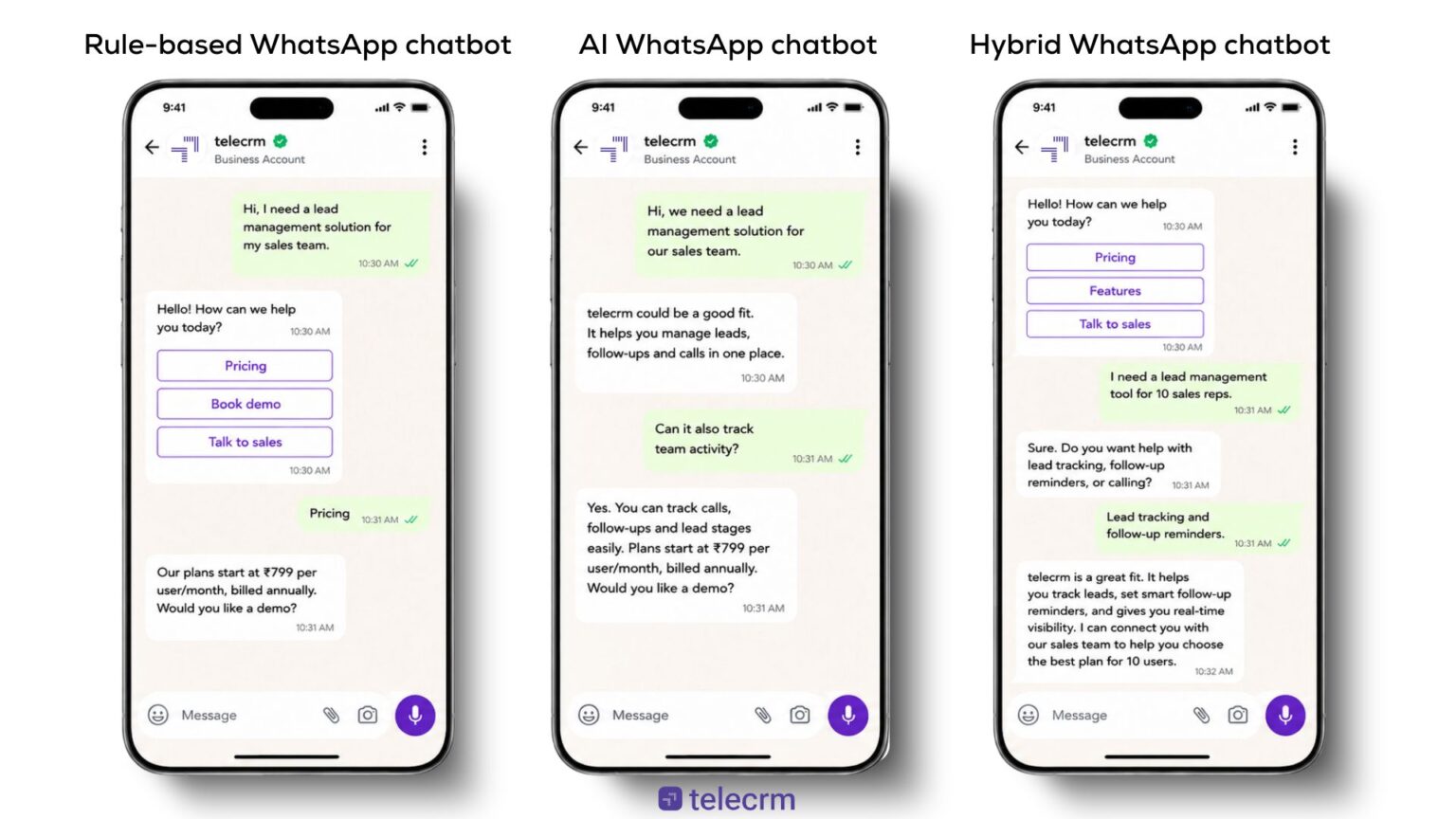
A rule-based chatbot follows fixed conversation paths. The customer taps a button or types a specific word, and the chatbot responds with a preset answer or the next question.
This works well when your customers choose from clear options:
Rule-based chatbots are easier to set up, cheaper to run and more predictable. The limitation is that they break the moment a customer types something outside the expected path — “I want to know about the EMI option for the third plan” will confuse a rule-based bot that only recognises “pricing.”
A WhatsApp AI chatbot uses natural language processing to understand what a customer means, not just what they literally typed. It can handle flexible, open-ended messages that don’t follow a script.
For example, “I want to shift my appointment to next Thursday afternoon” — a rule-based bot would fail here, but an AI chatbot can understand the intent and guide the customer through rescheduling.
The WhatsApp Business API allows businesses to connect advanced AI chatbots and AI agents, enabling far more sophisticated interactions than basic button-based automation. The trade-off is cost and complexity — AI chatbots require more setup, more training data and more ongoing maintenance.
A hybrid chatbot uses rule-based flows for structured actions and AI for flexible conversations. When a customer follows the expected path, the rules handle it efficiently. When they go off-script, the AI steps in.
For most growing Indian businesses, the hybrid approach is the practical sweet spot. It’s more capable than a purely rule-based system without the full cost and complexity of a pure AI implementation.
These three things are often used interchangeably, but they serve different purposes. Here’s the actual difference:
WhatsApp Business app | WhatsApp chatbot | WhatsApp automation | |
What it does | Let your team manage chats manually | Replies to customer messages automatically | Sends messages based on time, action or lead status |
Best for | Small businesses with low chat volume | Businesses with repeated enquiries or high inbound volume | Teams needing follow-ups, reminders and sequences |
How it works | Your team replies from the app | Bot responds based on what the customer says, clicks or selects | Messages trigger automatically from CRM conditions |
Lead tracking | Basic labels | Collects lead details | Tracks next steps when connected to a CRM |
Human handoff | Manual | Can route to a human agent | Can alert the team when intervention is needed |
Main limitation | Doesn’t scale beyond a small team | Can’t call, negotiate or close alone | Needs CRM integration to work properly |
The WhatsApp Business app is where most businesses start. A chatbot becomes necessary when enquiry volume outpaces what your team can handle manually. Automation becomes essential when follow-ups need to happen consistently across hundreds of leads without someone remembering to send each one.
This is the section most guides skip, but it’s the most important one for setting realistic expectations.
Understanding this boundary is what separates businesses that use chatbots well from those that set one up, watch it collect leads and then wonder why nothing converted.
This is a distinction most guides bury or skip entirely, but it determines whether you can build a proper chatbot at all.
The WhatsApp Business app is a free mobile app available on the Play Store and App Store. It gives you a business profile, basic automation (greeting messages, away messages, quick replies) and manual chat management. It does not support proper chatbot flows, approved message templates at scale, multiple team members or CRM integration at the level a growing sales team needs.
The WhatsApp Business Platform (accessed via the WhatsApp Business API) is what enables everything beyond the basics — chatbot flows, template messages, multi-agent access, CRM integration and campaign automation. You access it through a Business Solution Provider (BSP) or through a Meta Tech Partner like telecrm that manages API access on your behalf.
The simple rule: if you want a chatbot that captures leads, routes conversations and connects to your CRM, you need WhatsApp Business Platform access, not just the app.
Below are the steps that you need to follow in order to learn and set up a WhatsApp chatbot for your business
This sounds obvious but most setups go wrong here. Before choosing a platform or building any flow, answer one question: what should happen in the first 60 seconds after a customer messages you?
If the answer is “collect their name and number and ask what they need,” your chatbot is simple. If the answer is “qualify their budget, check their location and route them to the right sales rep based on geography,” it’s more complex. Getting specific about this before you build saves significant rework later.
To build a proper chatbot — one with conversation flows, approved templates and CRM integration — you need WhatsApp Business Platform access via the WhatsApp API.
You can get this through:
Note: this is different from the WhatsApp Business app, which supports only basic automated messages and quick replies, not full chatbot flows.
Once you have API access, you need a platform to build and manage your chatbot flows. If you have a technical team, you can build directly on the Cloud API. Most sales teams prefer a no-code builder — something where flows can be created, edited and tested without a developer.
The right question to ask when evaluating platforms is not “can this send automatic replies?” Every platform does that. The right questions are:
A chatbot that only replies is useful for a few minutes. One that connects to your sales workflow is useful until the deal is closed.
Keep the first version simple. Your chatbot does not need to handle every possible scenario — it needs to handle the three or four most common ones reliably.
A solid starting flow for most Indian sales teams:
Do not turn the chatbot into a long form inside WhatsApp. Ask only what your team needs to take the next action. Every extra question increases the chance the customer drops off.
WhatsApp Flows is a Meta feature that lets customers fill in structured information inside WhatsApp — similar to a form, but native to the chat interface.
A chatbot is better for guiding a conversation. A Flow is better for collecting specific, structured data cleanly.
Use Flows for: appointment booking, quote requests, site visit scheduling, loan pre-checks, admission enquiries, feedback collection. The best setup combines both — the chatbot starts the conversation, the Flow collects the structured details and your CRM receives everything for follow-up.
WhatsApp requires pre-approved templates for business-initiated messages — messages your business sends first, rather than replies to a customer who messaged you. These need to be created and approved before use.
Templates are useful for: callback confirmations, appointment reminders, payment reminders, order status updates and follow-up messages to leads who went quiet after the initial chat.
Keep templates specific and useful. “Hi [name], confirming your demo call for [date] at [time] — let us know if you need to reschedule” converts better than a generic “We’ll be in touch soon.”
Note: customers must have opted in to receive template messages from your business. Sending to non-opted-in contacts violates WhatsApp’s policies and risks your account quality rating. For Indian businesses, this also aligns with the DPDP Act requirements on consent for personal data collection and communication.
The chatbot should know when to step aside. If a customer asks something complex, expresses frustration or explicitly asks to speak to someone, the conversation should move to a human agent immediately — with the full chat context included.
A good handoff gives the agent: what the customer asked, what details they provided, which option they selected and what the recommended next step is. The customer should never have to repeat themselves.
This step is where most businesses leave the most value unrealised. When a chatbot captures a lead, those details cannot sit inside WhatsApp alone. They need to flow into your CRM immediately — with the customer’s name, phone number, requirement and chat history attached.
Without this connection, your chatbot is a lead capture tool with no downstream action. With it, every chatbot conversation becomes an actionable lead record your team can call, track and follow up on.
Test the chatbot as a real customer would. Check: Does the first message make it immediately clear what to do? Are the button options obvious? Does the bot collect the right details? Does human handoff happen at the right moment? Are leads reaching the right team member?
After launch, check where customers drop off in the flow and simplify that step. Your first version does not need to be perfect — it needs to be clear, fast and easy for your team to act on.
The WhatsApp Business app is free. Basic automation — greeting messages, away messages, quick replies — comes with it at no cost. But these are not chatbot features. They’re static automations with no conditional logic and no CRM integration.
A proper WhatsApp chatbot typically involves:
Free plans exist across several platforms. They typically cap at 100–2,000 messages per month, often include provider branding in conversations and lock advanced features like conditional flows, CRM sync and analytics behind paid tiers. For a business handling more than 30–40 daily enquiries, a free plan is a starting point, not a solution.
Do not compare platforms only on headline price. The cost of a chatbot that captures leads but doesn’t connect to your CRM is the cost of all the leads your team never followed up on.
For current Meta conversation pricing, check the WhatsApp Business Platform pricing page.
A chatbot works best when it’s designed around how your specific customers communicate — not a generic “How can I help you?” that works for nobody in particular.
For coaching institutes, colleges and edtech businesses, most enquiries are about course details, batch timings, fees and admission dates. The chatbot handles these before a counsellor needs to get involved.
What makes a difference here specifically: many student enquiries come in the evening, when counsellors are offline. A chatbot that collects the student’s name, course interest, city and preferred callback time means counsellors start each morning with qualified leads to call — not a backlog of unanswered messages from the night before.
Most property enquiries start with price, location and availability — but not every lead is ready for a sales call. A significant portion are early-stage researchers comparing options across three or four builders simultaneously.
What makes a difference here: the chatbot can quickly identify where a buyer is in their journey (“Are you planning to buy in the next 3 months or exploring options?”) and route urgent buyers to an agent immediately while placing explorers in a nurture sequence. This alone can double the efficiency of a property sales team’s time.
Patients message clinics for appointment slots, doctor availability, timings and report queries. Many of these are routine and don’t need staff attention from the first message.
What makes a difference here: for healthcare specifically, the human handoff rule matters more than in any other vertical. Any message involving symptoms, diagnoses or treatment must reach a qualified human immediately. Design the handoff trigger before you design the chatbot flow.
These conversations need trust. A chatbot cannot build trust — but it can handle the administrative first step so the advisor can focus entirely on the relationship.
What makes a difference here: renewal reminders and document collection are where insurance chatbots save the most time. An advisor spending 40% of their day chasing customers for KYC documents or renewal confirmations is an advisor spending 40% of their day not selling. Automate those touchpoints and that time goes back to the advisor.
Customers asking for “package details” still need qualifying before you can give them a useful answer. The chatbot collects the specifics — destination, dates, group size, budget — so the agent can send options that are actually relevant rather than a generic brochure.
Most queries are repeated: availability, size, price, delivery timeline, order status and returns. A chatbot handles all of these without human involvement, freeing your team for the queries that actually need judgment.
The specific value here is post-purchase — order status updates, delivery confirmations and return initiation can all be automated, which reduces incoming support volume significantly.
Buyers compare multiple dealerships before visiting a showroom. A chatbot that quickly identifies serious intent (“Are you looking to buy within the next month?”), collects vehicle interest and books a test drive gives your sales team a significant advantage over competitors that make customers wait hours for a reply.
Here’s the gap that most chatbot guides don’t address honestly: a chatbot captures a lead. What happens next determines whether that lead converts or disappears.
Picture a real scenario. An insurance team runs a WhatsApp campaign. 120 leads respond over a weekend. The chatbot captures all of them — name, phone number, product interest, callback preference. On Monday morning, those 120 leads sit in WhatsApp. Three agents open their phones. Nobody is sure which leads were already called. Two leads get contacted twice by different agents. Thirty get no follow-up at all because they were buried under newer messages. By Wednesday, the campaign’s conversion rate is a fraction of what it should have been — not because the chatbot failed, but because everything after the chatbot failed.
This is where telecrm changes the outcome.
The chatbot is the front door. telecrm is the sales process that runs behind it. One without the other handles part of the job. Together, they handle the whole thing — from the first message to the closed deal.
Yes, when built on the official WhatsApp Business API and operated in compliance with Meta’s messaging policies. Businesses must obtain explicit opt-in consent from customers before sending template messages. For customer-initiated conversations, no prior opt-in is required. Under India’s Digital Personal Data Protection (DPDP) Act, businesses are also required to handle customer data collected through the chatbot in accordance with consent and data minimisation principles.
A WhatsApp chatbot is an automated software programme powered by rules, artificial intelligence or both that communicates with customers directly inside WhatsApp. It can answer questions, collect lead details, share updates and route conversations to a human agent when needed.
Yes, for any meaningful chatbot capability. The WhatsApp Business app supports basic automated messages (greeting, away, quick replies) but not proper chatbot flows, conditional logic, approved templates at scale or CRM integration. The WhatsApp Business Platform — accessed via the API through a BSP or a platform like telecrm — is what enables all of that.
Yes, through a no-code chatbot platform. Most BSPs and CRM platforms that include WhatsApp Business Platform access offer visual flow builders that don’t require coding. Building directly on the Cloud API does require developer resources.
A basic chatbot — a welcome message, two or three button flows and a lead capture form — can be live in a few days once API access is confirmed. A more complex setup with CRM integration, multi-agent routing and custom flows typically takes one to three weeks, depending on the platform and how much customisation is needed.
A well-configured chatbot has a fallback — either a message that tells the customer a human will follow up, or a direct handoff to an available agent. The key is to configure the handoff before launch so customers are never left in a dead end.
Yes, if the platform supports integration. This allows lead details, chat history and follow-up status to flow directly into your CRM so your team has full context without logging anything manually. telecrm handles this natively for WhatsApp Business Platform users.
WhatsApp Chatbot replies inside the 24-hour window are service messages: the first 1,000 a month per business number are free, then ₹0.115 each.
To set up a WhatsApp chatbot, define the chatbot goal, get WhatsApp Business Platform access, choose a chatbot platform, build the conversation flow, add message templates, configure human handoff, connect the chatbot to your CRM and test before launch.



© Copyright 2026 telecrm.in (Flamon Cloudtech Pvt Ltd) - All Rights Reserved • Privacy Policy • T&C



© Copyright 2026 telecrm.in - All Rights Reserved • Privacy Policy • T&C