
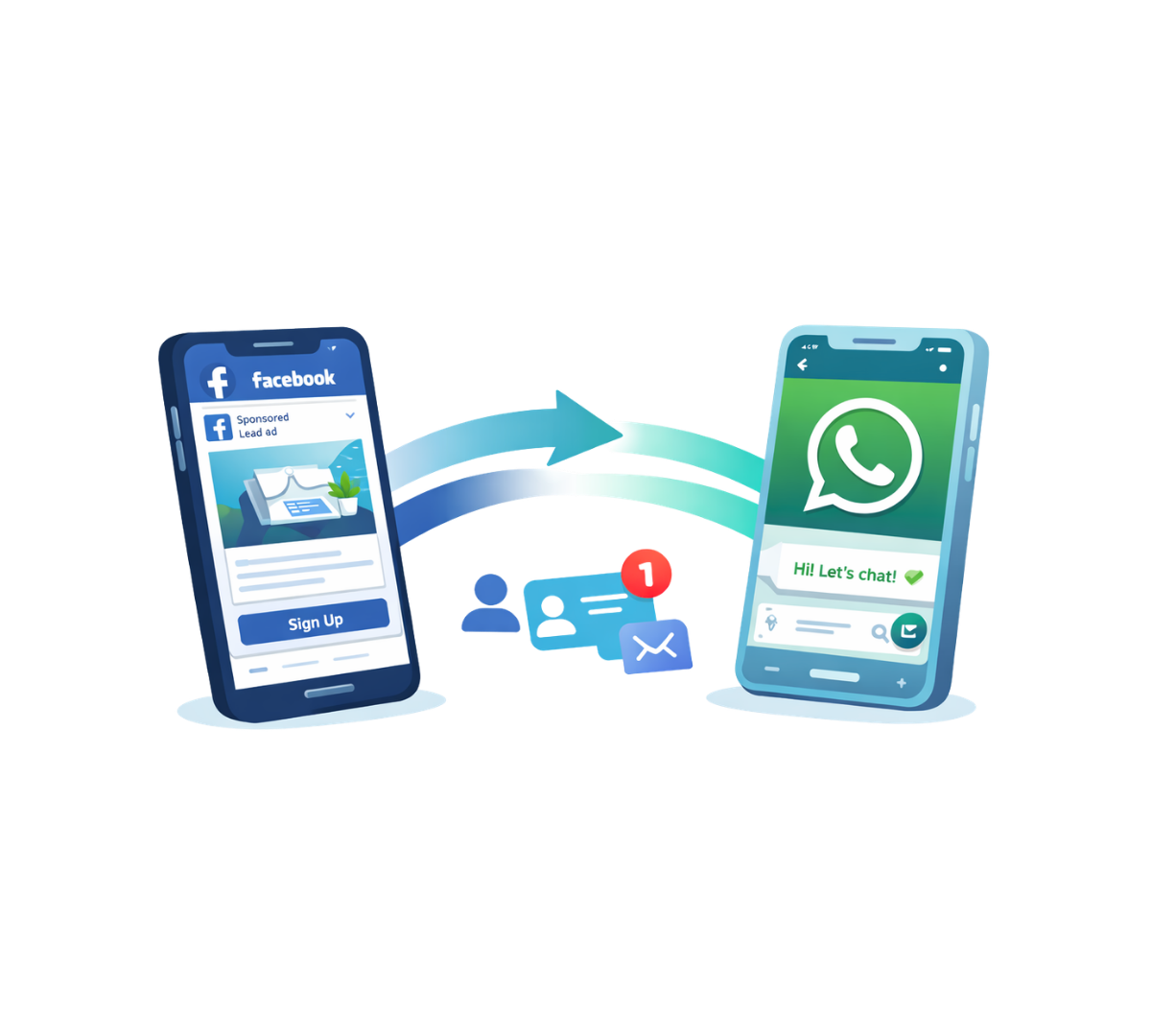
Is your Facebook marketing campaign not giving you the expected sales? Ads from Facebook may get the reach they deserve, but the overall selling process is long and indirect, often causing customers to lose interest before completing the purchase.
Hence, as a business owner, you need to find a hassle-free way for new leads to place orders when they see your Facebook ads. This is where your business can connect Facebook lead ads directly to your WhatsApp business to overcome such inefficiency.
In this blog, we will take a look at:
“Facebook lead ads to WhatsApp” means that incoming leads who click on your Facebook ads get directed to your WhatsApp chat. It essentially means turning your ads into instant conversation starters instead of sending people to websites or forms.
So basically, when a user clicks your ad, they are redirected to your WhatsApp chat with a pre-filled message, allowing them to enquire about products, ask questions or place orders quickly.
But why would you want your ads to lead to WhatsApp?
This is because WhatsApp is the most widely used communication platform. It is a great way to sell, especially for small and medium businesses, as the overall selling process is simple and effective.
On the other hand, Facebook, with over 3 billion users globally, is one of the best platforms to display your ads in front of the world. With its great reach, your scope to advertise to newer audiences is higher.
Big businesses usually prefer WhatsApp over traditional methods of outreach and customer support, like forms, emails and calls. This is because there are around 175 million messages that are sent to businesses on WhatsApp on a daily basis. And interestingly, over 80% of these messages are opened in the first 5 minutes.
Therefore, it becomes important to direct your leads from Facebook to WhatsApp to make use of such a powerful selling platform. This can be highlighted using the following points:
Facebook lead ads to WhatsApp lets your new leads directly enquire or place orders via WhatsApp messages. This acts like your business’s first line of defence. The process of communicating with a business is as simple as texting your friend for a long drive.
This becomes the bridge between your business and the lead and eliminates the need for lengthy processes like filling out forms.
The strong combo of your Facebook ad campaigns (with greater reach) and your WhatsApp business (with direct customer engagement) makes the overall buying experience easy for your customers, directly affecting your sales.
The complete sales process is easier with WhatsApp, as it lets your customers scroll through your catalogue, place orders, make payments and track their orders. Moreover, the entire process feels personal and familiar due to the user’s familiarity with WhatsApp.
The main motive of “Facebook lead ads to WhatsApp” is to ensure that almost every click made on your Facebook ad converts into a paying customer. Your ideal redirection process should emphasise starting conversations.
Here is how you can use Facebook lead ads to WhatsApp to generate substantial results:
Your funnel begins with the process of lead generation. For this, you need an eye-catching Meta ad that immediately captures attention. This ad should contain:
The main aim here is not just building reach but also initiating conversations with new leads.
Once the leads click the ad, they should be redirected instantly to WhatsApp chat with your business. The chat must immediately trigger message templates with prompts like:
Such pre-filled messages reduce hesitation in clicking and encourage interaction.
As soon as your leads land on WhatsApp, they should receive an automated greeting message. This helps qualify leads instantly without manual effort. Such an automated message could include a welcome message, product catalogue list, rate list, common questions and more.
Right after the initial automated response, chatbots can be assigned the task of asking basic qualifying questions to make sure that the lead is at the right place using WhatsApp API and CRM integrations. This saves time and shortlists leads with high intent to buy.
Once a useful lead is generated, your sales rep can jump in to interact with them and segment them into hot, warm, cold and more categories based on their interests and needs.
You can share product details, send payment links, confirm order and more using WhatsApp before your lead finally gets converted. The entire process happens within WhatsApp, creating a smooth buying journey.
Apart from messaging, your leads and your sales reps can connect with each other via phone calls directly through WhatsApp.
Even after the conversion, your business needs to stay in contact with the clients. This contact can be in the form of order updates, feedback, repeat purchase, discounts or exclusive loyalty perks. This converts one-time buyers into loyal repeat customers.
Pro Tip: Apart from this, drip marketing campaigns can also be implemented for your existing customers. Drip marketing is where you send a series of automated messages over time to nurture customer interest in your other products and services. For example, a gym can automatically send a welcome message after signup, a diet plan after 3 days and then a personal training offer after 10 days to gradually encourage upgrades for its customers.
The process of setting up your click-to-WhatsApp ads is simple. Meta’s ads manager has an easy-to-understand process for users to link their Facebook and Instagram profiles with their WhatsApp for a seamless lead redirection process.
Disclaimer: this process can only be used by businesses that are already registered on Meta Ads and use it for their marketing campaigns.
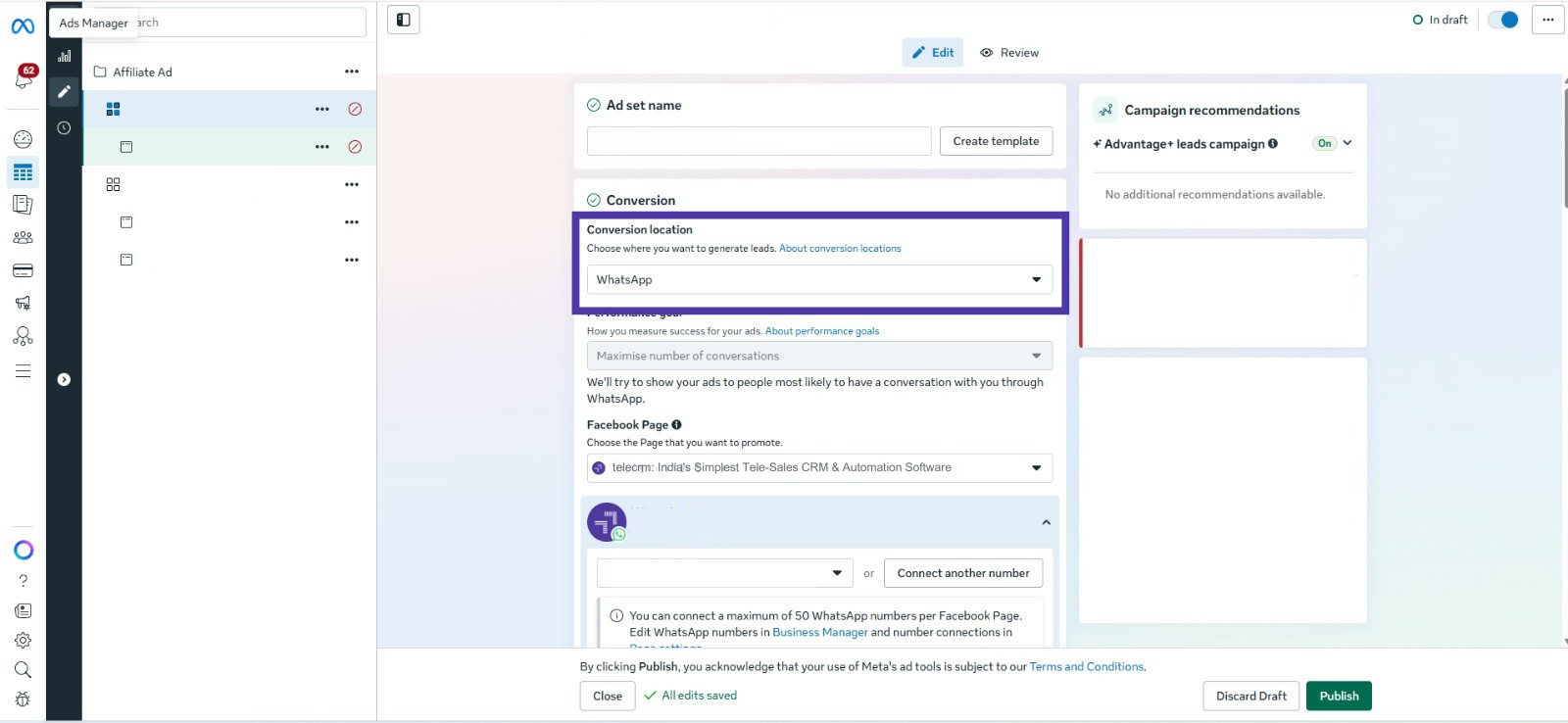
In your Meta Ads Manager, select “WhatsApp” as your conversion location for your ad set from the drop-down menu. This means that leads that click any of your ads will be redirected to your WhatsApp for further conversion process.
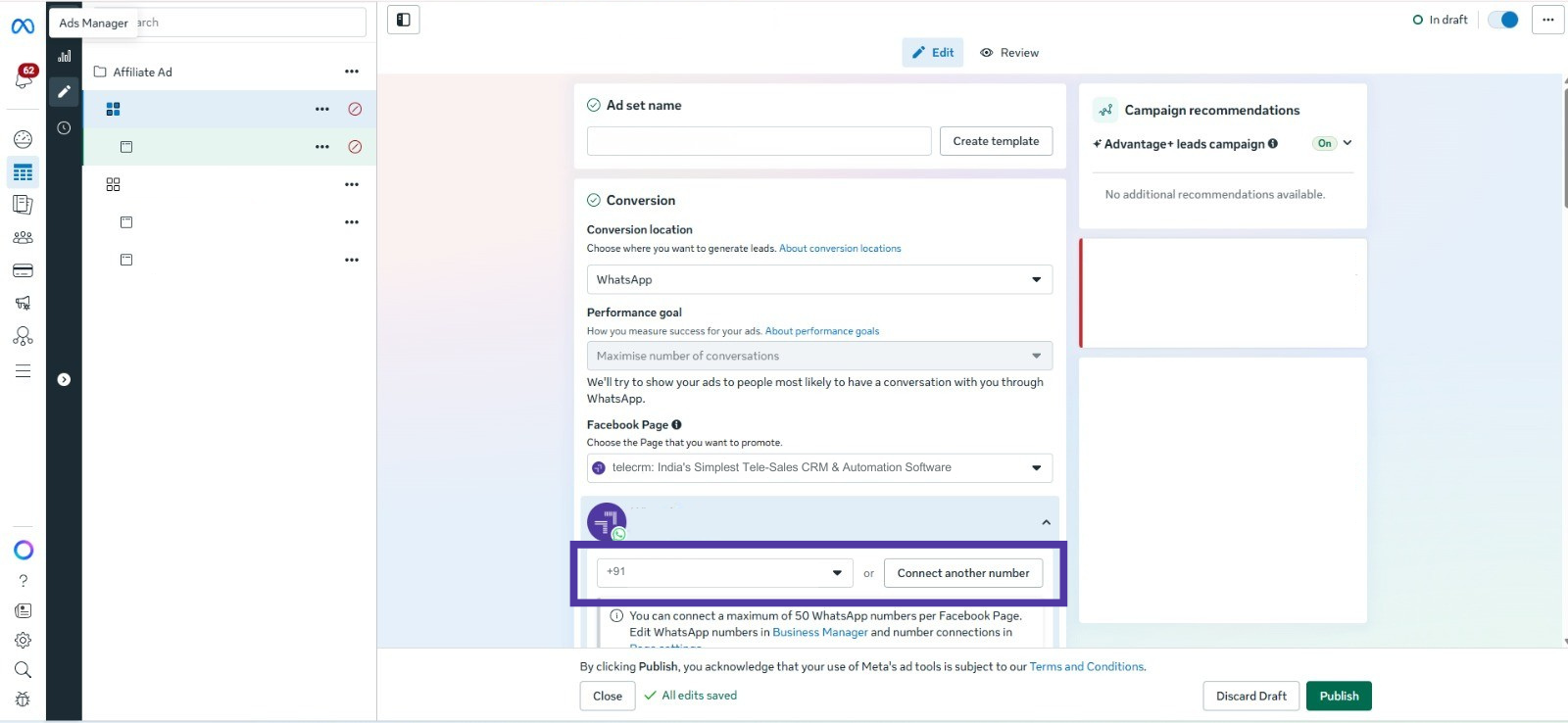
Next up, you are required to select the WhatsApp number that will be linked to your ads. The selected WhatsApp number is where the lead will be redirected to for further communication.
Make sure this number is already linked to your WhatsApp Business or API account.
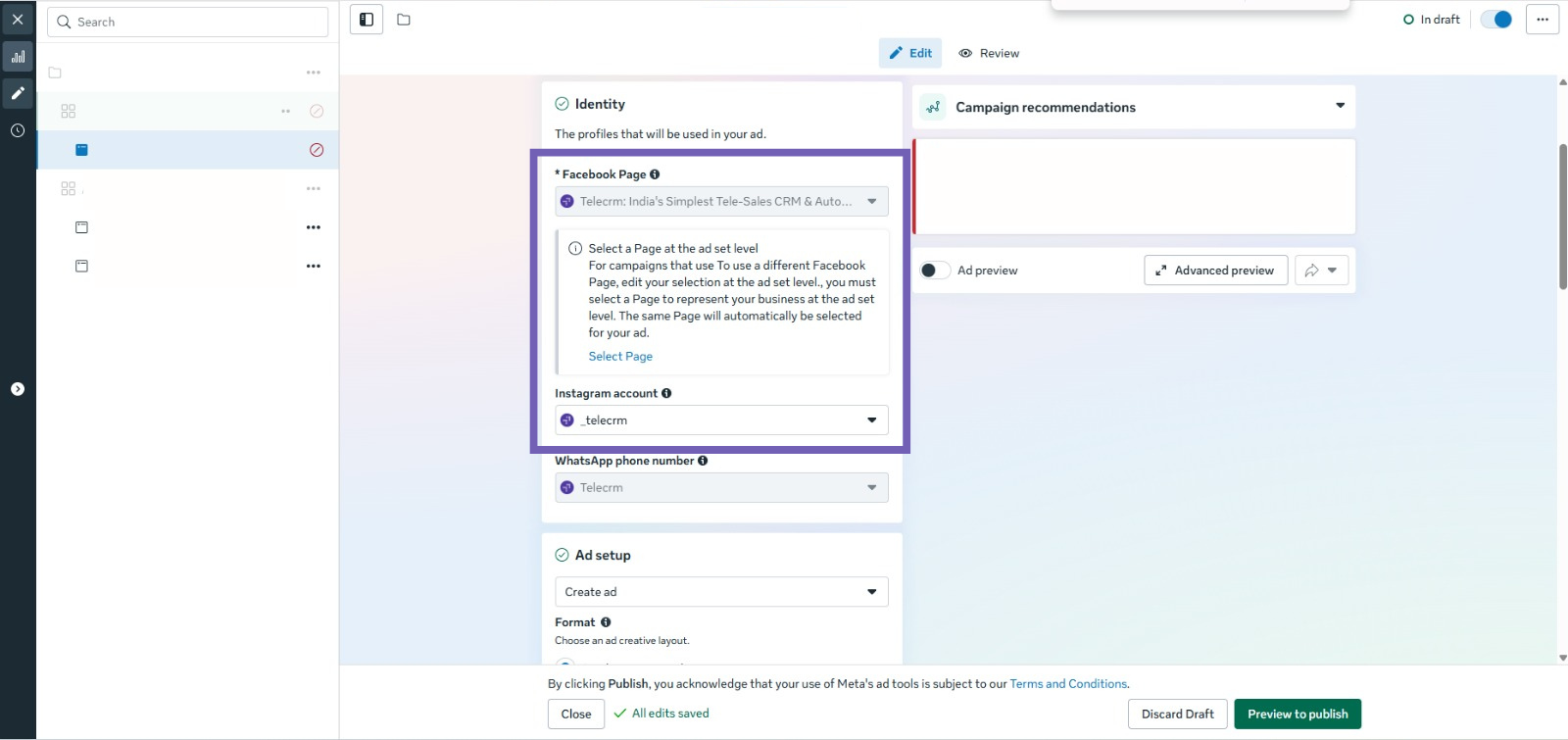
Then you select the desired Facebook and/or Instagram profile where you want to run these ads. This feature makes it easier for businesses with multiple profiles to determine which profile to link an ad with. This can also help them determine which ads to run just on Facebook, which ones to run on just Instagram and which ones to run on both.
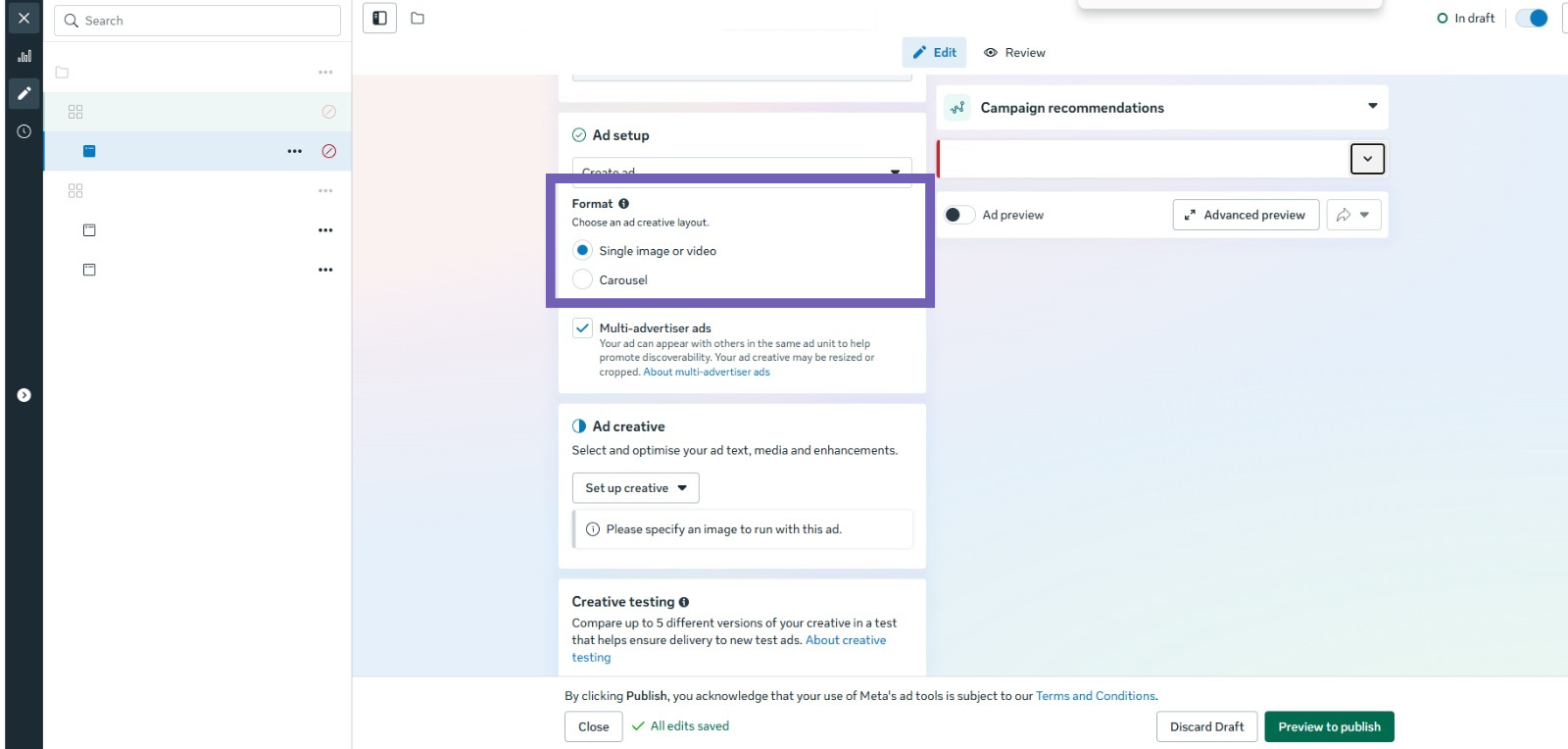
Then you select the format of your ad content and creative. You need to select whether the ad is in the form of an image, a video or a carousel.
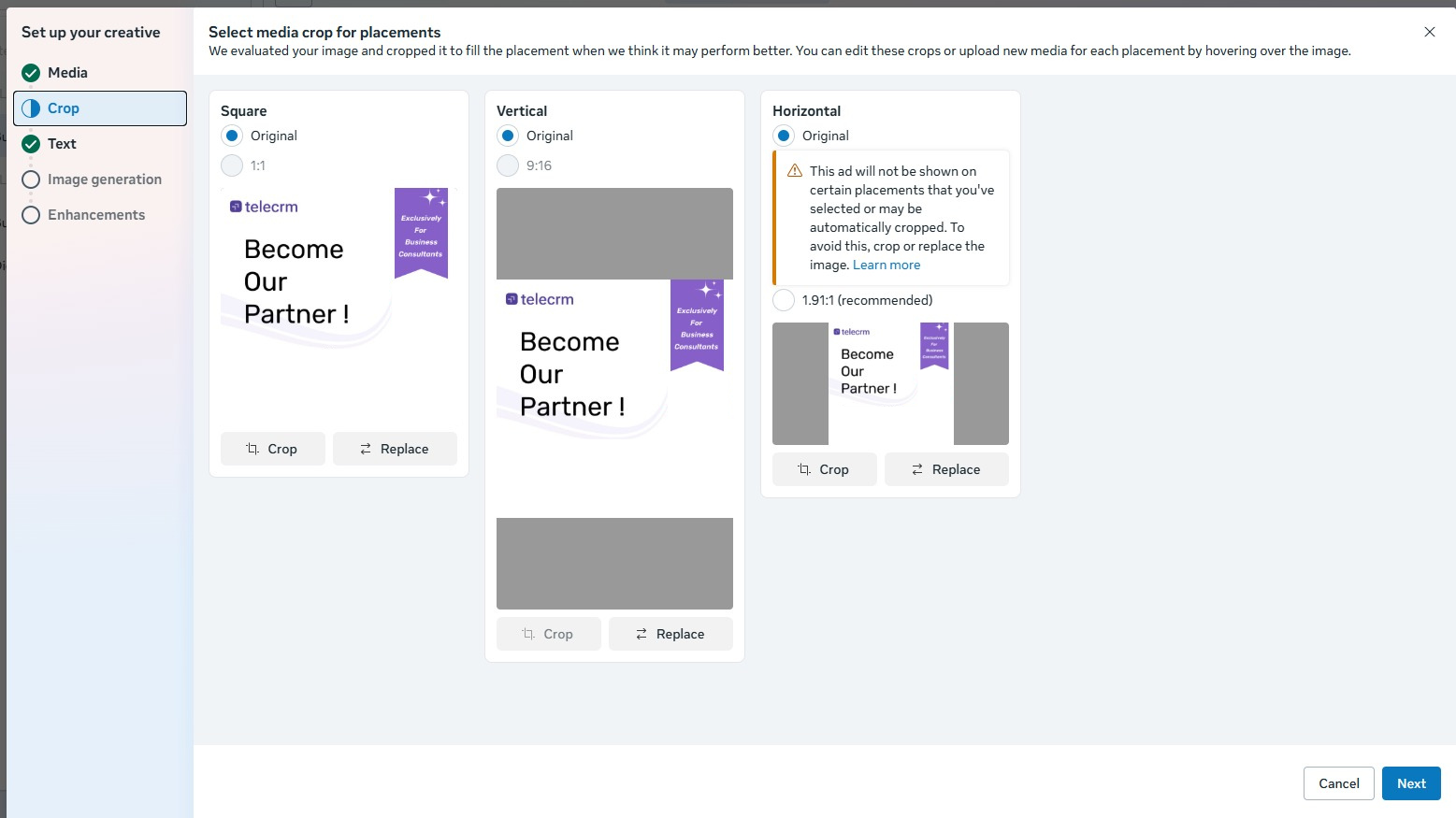
The next step includes cropping your creative media as per the ratios in which they will be displayed in different display orientations. This helps in making sure that the important content in your creative does not get cropped away in a square (Facebook and Instagram posts), vertical (Facebook and Instagram stories) or horizontal display orientation.
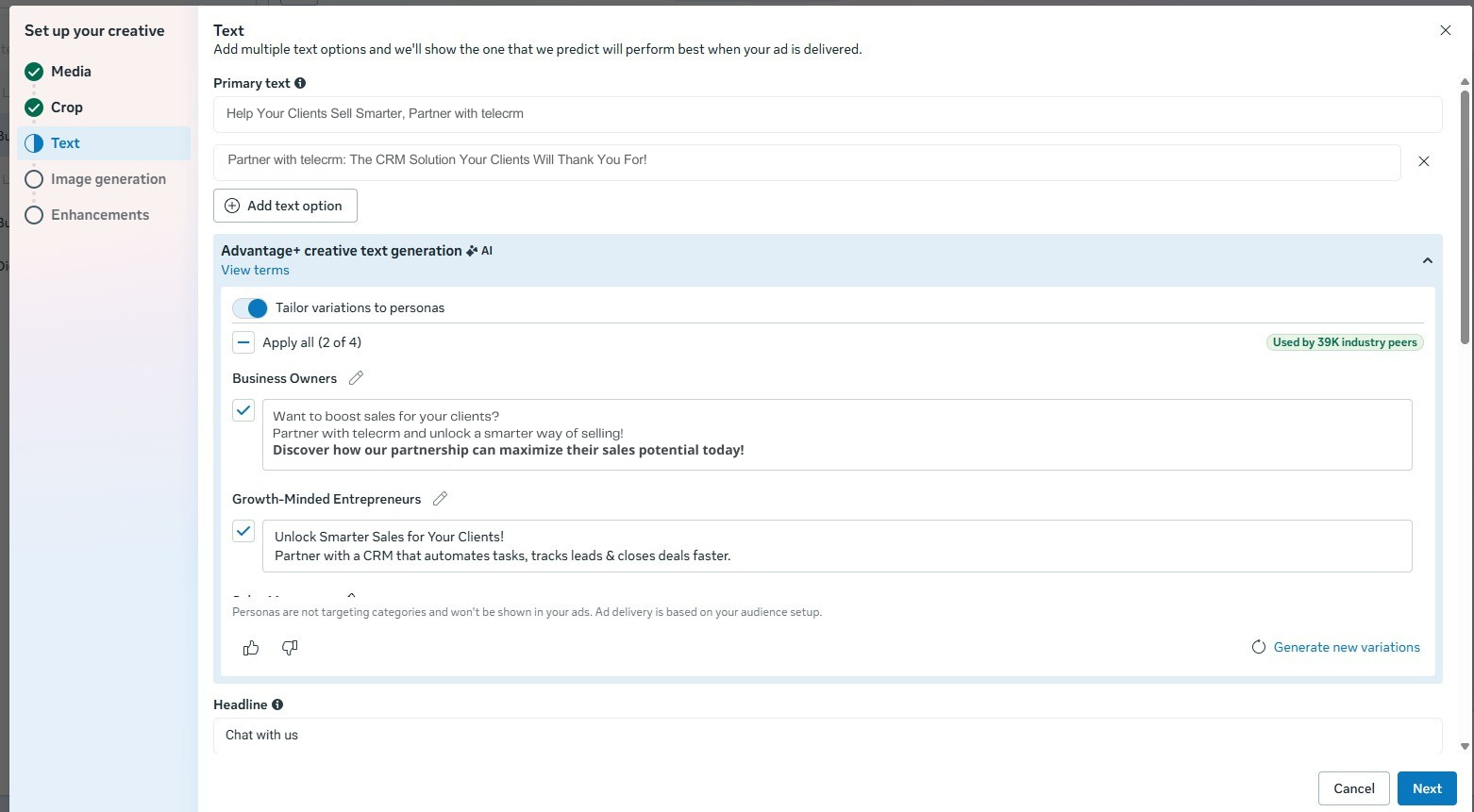
Then you add the “ad copy” of your ad. It comprises of the primary and secondary text associated with your ad. This is the text that will be shown with your ad when somebody comes across it on Facebook or Instagram. You can also add additional texts like a headline, description and more.
You need to make sure that this text is crisp and catchy and grabs the attention of the viewer as soon as their eyes land on it. Users tend to skip or ignore ads with longer texts that do not connect with them.
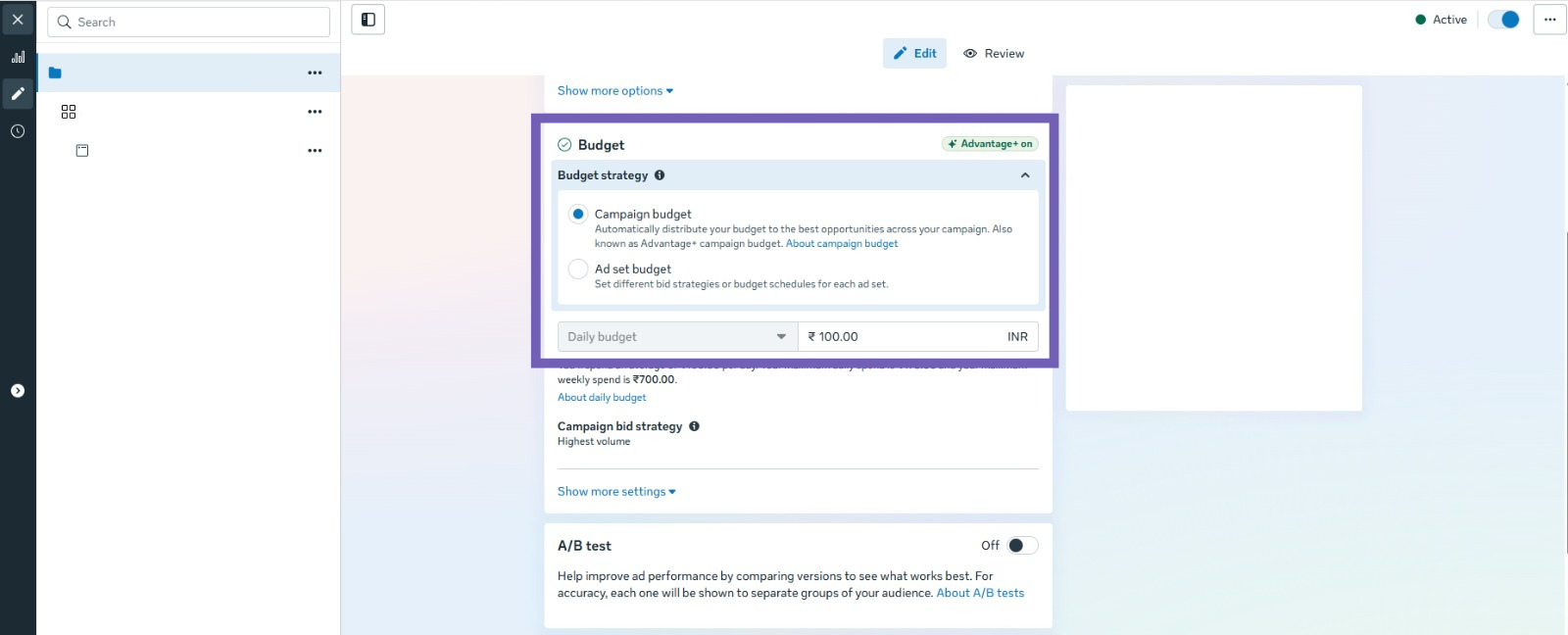
Now is the time when you need to decide how much money to spend on your ads across Meta (Facebook and Instagram). This step is very crucial. You need to determine which campaign is worth how much investment.
The ideal way to determine the budget is to start with a small testing budget to test the effectiveness of the ad campaign. Then divide the budget across audiences and different ad sets to determine which ad sets and audiences give the highest returns. Once you have all the insights, you can gradually scale the budget based on performance.
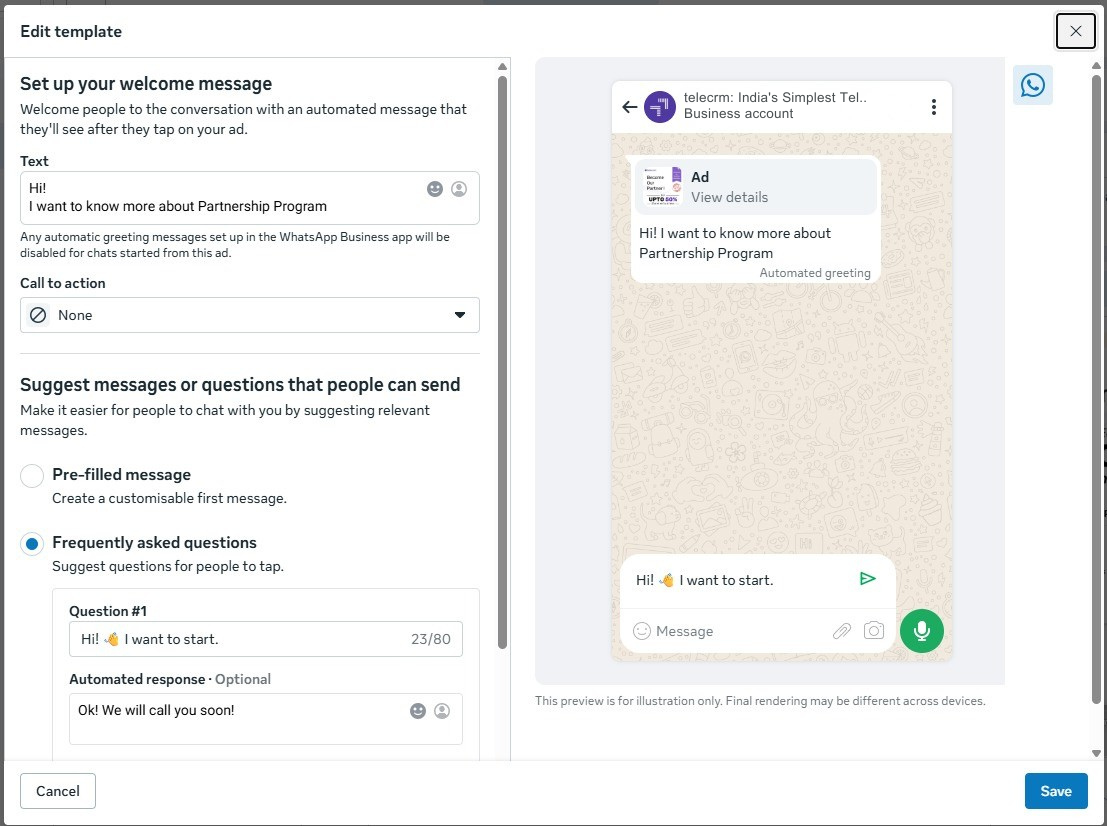
At last, you need to create your desired welcome messages, pre-filled messages and FAQs. You can draft pre-filled message templates with multiple answer options that the lead can click on. Based on the answers that a lead gives, you can determine the next step, which may be another follow-up question, a welcome message or a list of FAQs.
Running Facebook lead ads that open on WhatsApp is a great way to generate enquiries. But if you truly want more sales, faster replies and better organisation, you need a smarter system behind it. A lot of businesses are unable to achieve the most out of WhatsApp’s potential for businesses.
To unleash the full potential, WhatsApp has a special service called WhatsApp API. This is a business version of WhatsApp that allows companies to automate messages, send instant replies, manage large volumes of chats and connect WhatsApp with tools like ads and CRM. In click-to-WhatsApp, it helps businesses respond instantly, manage a huge number of enquiries and automate conversations at scale.
But to avail these benefits, you need a third-party service provider like telecrm to make the entire process of setting up your WhatsApp API and CRM seamless and affordable. With telecrm you get several features like:
telecrm allows businesses to send instant welcome messages, product catalogues, price lists and answers to common queries automatically via chatbots. These chatbots are programs that interact with leads and answer their questions or guide them through the buying process, even when your sales reps are not around.
This also ensures that qualified or relevant leads are shortlisted and every such lead receives an immediate response even outside working hours, reducing manual workload while improving customer experience.
telecrm provides detailed insights into your sales and marketing performance. You can track the number of leads generated from ads, conversion rates, response time, team performance and campaign return on investment.
These insights help you understand what is working and allow you to optimise your strategy for better results and higher returns.
Consistent follow-ups are crucial for conversions. telecrm enables automated follow-up messages, reminders for sales teams, broadcast campaigns and re-engagement messages for existing leads.
This keeps your business connected with potential customers and helps increase revenue from the same leads without additional ad spend.
telecrm’s WhatsApp chat sync allows you to track all the WhatsApp messages sent by your sales reps to a client using their personal WhatsApp number. This feature allows you to review what the different sales reps have sent to and received from the leads.
This keeps the entire process transparent and gives you the power to oversee the entire lead conversion process.
telecrm automatically assigns leads to sales reps based on criteria such as location, interest or availability.
This helps balance workload across your team, ensures faster replies and improves the chances of conversion because customers receive timely responses from the right person.
With such lead nurturing backed by automations and integrations, telecrm gives your business an edge and streamlines your entire conversion process.
With telecrm, you can boost your WhatsApp selling journey and enjoy the benefits of a complete CRM solution tool, at the price of a fancy cup of coffee.
Read more: Complete WhatsApp Business API Pricing Breakdown [2026]
Advertising on Facebook generates huge reach and visibility for your business, but does not guarantee sales. The real challenge is how you convert these interested users into real paying customers efficiently.
Facebook lead ads to WhatsApp helps you overcome this gap by connecting potential leads from ads directly into a conversation with your business on WhatsApp. Instead of making them fill out lengthy forms and go through complicated procedures, this approach lets your business instantly communicate with leads efficiently. By combining Facebook’s powerful targeting capabilities with WhatsApp’s conversational selling experience, businesses can create a highly effective sales funnel.
However, to truly scale this system, automation is the key. Integrating WhatsApp API with a CRM ensures that leads are captured, nurtured and converted efficiently. Tools like telecrm make this entire setup seamless by offering instant lead syncing, automated replies, analytics and follow-up automation, all in one place.
So book your free demo today!



© Copyright 2026 telecrm.in - All Rights Reserved • Privacy Policy • T&C



© Copyright 2025 Telecrm.in - All Rights Reserved • Privacy Policy • T&C