
Imagine a real estate firm in Mumbai spending ₹1,00,000 per month on Google Ads and ₹80,000 on Facebook and Instagram promotions. Dozens of fresh leads pour into their sales team via forms, WhatsApp and cold calls-but nobody can reliably say whether Google search or Instagram actually drives enrolled site visits. Without tracking, the team guesses, scales the wrong channel and watches ROI flatten despite rising budgets.
Lead source tracking solves this by connecting every new lead in your CRM to the original source, campaign or touchpoint that brought them in. It applies across both digital and offline lead generation efforts, from a paid ad click to a missed call from a newspaper insert.
For telecalling-heavy teams, not tracking lead sources means wasting time on low-quality leads and misreading which campaigns work. telecrm acts as the central hub where leads from multiple channels land with their source information intact, from first touch to deal closure. This article covers what lead source tracking is, why it matters (including how CAPI enriches data) and much more.
Lead source tracking is the process of consistently recording and reporting the exact channel and campaign that generated each new contact. For example, a lead might be tagged as “Organic search – Google” or “Paid social – Facebook Lead Ad – Diwali 2025.” A lead source is the channel where leads first learn about a business, and lead sources can be digital or traditional channels.
It is important to clealry mention the distinction between a lead source (the channel, like organic search, paid social, referral, or telecalling) and a campaign (a specific promotion like “Education Loan Campaign – Jan 2026”). Both should be stored in separate CRM fields for different levels of analysis.
Tracking a lead means following it from first contact-a form fill, missed call or WhatsApp message-through all telecalling, WhatsApp, SMS and email follow-ups until the deal is won or lost, while attributing revenue back to the original source.
In practice, this uses UTM parameters, tracking URLs, form hidden fields, call tracking numbers and CRM software to automatically capture where leads came from. Automated tagging and direct customer feedback together capture the exact channel bringing a prospect to your business.
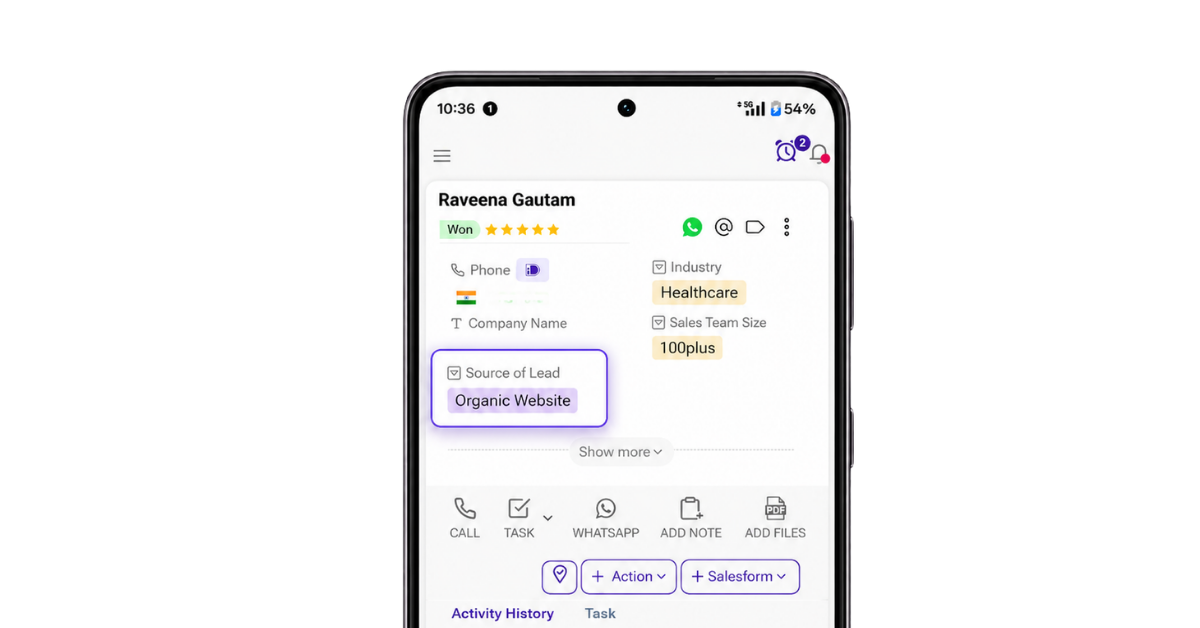
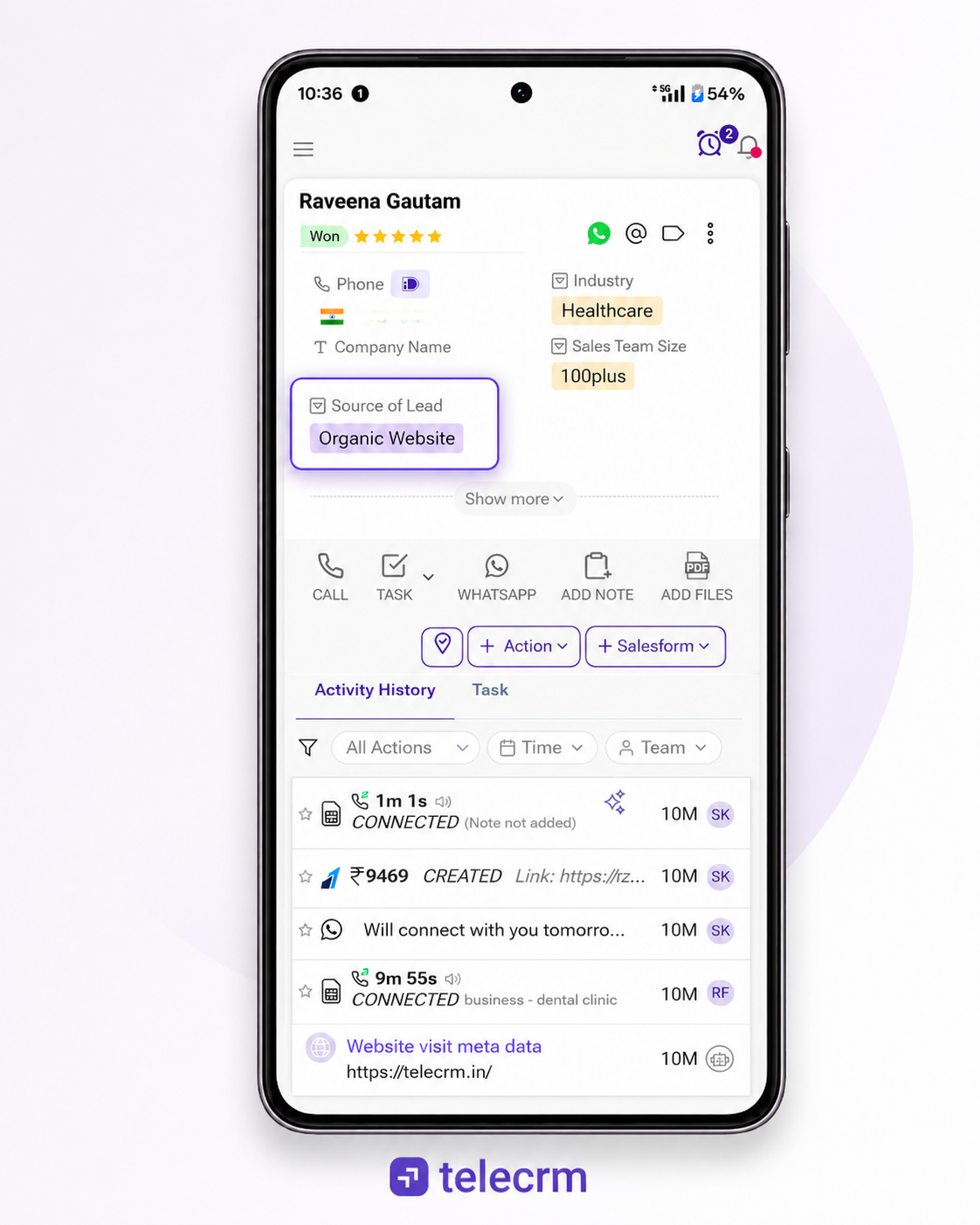
In telecrm, each new record gets a clear “Lead Source” and optionally “Source Detail / Campaign” field that stays with the lead across the entire pipeline, call recordings and follow-up history. Implementing a unified CRM like this maps the entire customer journey and assigns attribution to first touch.
Lead source tracking tells you which channels bring leads and which ones bring actual customers.
Without this data, businesses may continue spending on campaigns that generate many leads but very few sales. At the same time, channels bringing fewer but more qualified leads may not receive enough attention.
Here is why tracking lead sources matters:
Lead source reports show how many leads come from Google Ads, organic search, social media, referrals, email marketing and other channels.
You can then compare which sources bring the most leads, qualified leads and customers.
Knowing where your best leads come from helps you decide where to spend your marketing budget.
For example, one paid ad may generate 100 leads but only two customers. Another may generate 40 leads and ten customers. Lead source data helps you focus on the campaign that brings better results, not just more leads.
Lead source tracking tells sales reps how a potential customer discovered the business.
A lead who requested a demo from a landing page may be more interested than someone who filled out a general social media form. This information helps the sales team start the right conversation.
Tracking only the number of leads does not show the full result of your marketing efforts.
You should also track how many leads were contacted, qualified and converted from each source. This helps connect your lead generation campaigns with pipeline and revenue.
Use automated lead scoring to prioritise individual enquiries alongside your source-level reporting.
Conversion API, also known as CAPI, sends sales updates back to advertising platforms.
For example, when a lead from a Meta or Google campaign becomes qualified or converts into a customer, that information can be sent back to the ad platform. This helps the platform understand which types of leads are valuable and improve future campaigns.
In telecrm, businesses can capture leads from different channels, track their progress and send conversion data back to ad platforms. This helps marketing teams optimise campaigns based on qualified leads and customers instead of only form submissions.
Conversions API, or CAPI, allows telecrm to send lead-stage and conversion events directly to Meta from the CRM, reducing reliance on browser-based tracking alone. For example, when a lead captured through a Facebook or Instagram Lead Ad later becomes qualified, completes a demo or converts after phone and WhatsApp follow-ups, telecrm can send that outcome back to Meta as a CRM conversion event.
This gives Meta feedback about which leads progressed beyond the initial form submission. When the integration, event matching and campaign optimisation goal are configured correctly, Meta can use this data to optimise campaigns towards leads that are more likely to become qualified prospects or customers.
telecrm can therefore serve as the central record of outcomes such as completed demos, booked site visits or issued policies and connect those outcomes with their original Meta campaigns. This gives businesses a clearer view of lead quality while helping Meta make better-informed delivery decisions over time.
Most Indian SMBs use a mix of digital and telecalling-heavy channels, and each should be tracked separately. Lumping different channels under vague labels like “Social Media” or “Online” destroys insights. Lead sources include social media, email, and direct mail, among other channels. Notably, 54% of B2B leads come from customer referrals, making word of mouth one of the most valuable lead source categories to track.
Digital sources should use UTM parameters for precise attribution. Attaching UTM codes to digital links allows tracking of the exact campaign or source. Key digital sources include:
Creating standalone landing pages for campaigns ensures accurate lead source tracking. Distinguish organic from paid traffic using utm_medium and utm_source, and configure Google Analytics (GA4) to track conversion events like form submissions and WhatsApp clicks. Store the landing page URL as an additional CRM field for deeper campaign analysis.
For telecalling-heavy teams, many leads originate from calls, missed calls, WhatsApp chats and SMS replies rather than web forms. These must be treated as valid lead source channels:
Assigning unique tracking phone numbers to marketing channels captures offline leads effectively. A simple dropdown menu can capture how customers heard about a business during the first call. telecrm’s call tracking and recording features connect lead source data with actual conversation quality.
Separate “Telecalling – Cold database” from “Telecalling – Warm reactivation” as two different lead sources because they typically have different conversion rates and required scripts.
Capturing a vague “Online” or “Facebook” field is not enough. You need structured fields to build useful lead source reports. Core fields for every lead include:
| Field | Example |
|---|---|
| Lead Source (channel) | Organic search, Paid social, Referral |
| Source Detail / Medium | Google Ads, Instagram Story, Broker referral |
| Campaign Name | “Festive Offer Oct 2025” |
| Date/Time of first touch | 15-Jan-2026, 10:32 AM |
| UTM Source / Medium / Campaign | utm_source=facebook, utm_medium=paid_social |
For telecalling and offline sources, also capture: entry phone number (which number the lead called), agent who first handled the call, IVR route, and a “How did you hear about us?” self-reported field. Using UTM parameters helps capture lead source data effectively for digital leads. Lead tracking systems compile and analyse leads through the funnel when these fields are properly connected to downstream metrics like pipeline stage, won/lost status, and deal value inside telecrm.
telecrm uses Custom Actions to capture lead source data from your website and automatically add it to the lead profile.
Here is how the process works:
A potential customer may visit your website through:
The link may contain UTM parameters such as the source, medium, campaign name and ad name.
For example: utm_source=google, utm_medium=paid-search, utm_campaign=crm-demo
These details tell you which campaign brought the visitor to your website.
When the visitor lands on your website, telecrm records the available source data through the Custom Action setup.
This can include original lead source, marketing channel, campaign name, ad or keyword, first landing page, date of the first visit and referring website.
This first interaction is important because it shows how the person originally discovered your business.
For example, someone may first find telecrm through an organic Google search. That would remain their original source even if they return later through another channel.
The visitor’s source information is stored through a cookie in their browser.
This allows the system to recognise the same visitor when they return to the website later. It can continue recording the pages and campaigns they interact with during their buyer’s journey.
This tracking works as long as the visitor has cookies enabled and continues using the same browser and device.
Most potential customers do not convert during their first visit.
For example, a visitor may:
telecrm can record these interactions instead of showing only the final campaign.
This helps businesses understand both:
The original source shows where the buyer’s journey started. The final touchpoint shows which campaign encouraged the person to take action.
The visitor eventually fills out a form on your website, such as contact form, demo request form, callback form, download form, enquiry form, e.t.c.
Along with the details entered by the visitor, the Custom Action sends the recorded lead source data to telecrm.
The form may capture visible details such as the name, phone number and email address. Source information such as UTMs, landing pages and campaign details can be passed in the background.
Once the form is submitted, a new lead is created in telecrm.
The lead source data is automatically added to the relevant lead fields. Your sales team does not need to check Google Analytics, copy UTM parameters or enter the source manually.
The lead profile can include fields such as lead source, campaign name, first landing page, utm sourcem utm medium, utm campaign and other related parameters.
When the lead reaches telecrm, the assigned sales rep can see where the enquiry came from.
For example, the rep may see that the person:
This gives the sales team more context before making the first call. It also removes the need to ask every lead, “How did you hear about us?”
After the lead is captured, telecrm continues recording its sales activity, including calls, follow-ups, important notes, WhatsApp conversations, lead status changes and many more detailed pieces of information that give the sales team a head start when they actually make a call to a lead.
Instead of only checking which channel generated the most leads, businesses can see which channels generated qualified leads, completed demos and paying customers.
Since the source data is stored in lead fields, businesses can filter leads and create reports based on marketing channel, campaigns, lead qualitym sales stages, lost reasons, e.t.c.
This helps marketing teams compare campaigns and decide where to spend their budget.
For example, Meta Ads may bring more leads while Google Ads brings fewer but more qualified leads. Source tracking makes this difference visible.
The complete journey can only be recorded when the required tracking data remains available.
Some interactions may not be connected when the visitor:
In such cases, telecrm may still capture the form and create the lead, but parts of the earlier website journey may be missing.
Lead source tracking turns scattered marketing strategies and telecalling activities into measurable funnels. It shows exactly which channels, campaigns and partners generate both more leads and more high-quality leads from the same budget. Lead source tracking can improve marketing ROI by reallocating budgets toward what actually works.
Combining Google Analytics, UTMs, Facebook CAPI and a CRM like telecrm allows businesses to move beyond guesswork and see a complete picture from first click or call to final revenue. For telecalling-centric Indian SMBs, telecrm simplifies this: it captures lead sources automatically from calls, WhatsApp, landing pages and ads, then ties them to call recordings, follow-up reminders and pipeline stages via its lead management system.
Audit your current lead source tracking, define a clean source taxonomy and configure telecrm accordingly so you can start making data-backed decisions about future campaigns in the next 30–60 days. As privacy rules evolve and browser-based tracking gets harder, owning clean first-party lead source data inside your CRM will become a lasting competitive advantage for every small business and specific business alike. Book a demo with telecrm now to get that advantage!
Start with a minimal setup: define 5–8 core lead source values in telecrm’s picklist, enable UTMs on all digital campaigns, and configure telecrm to auto-fill Lead Source based on integration or phone number. Don’t try to track every micro-detail on day one. Generating leads with basic source tags gives you enough data to refine your taxonomy and expand later. This lean approach suits any small business or startup exploring lead generation strategies for the first time.
Use both: keep analytics-based Lead Source in telecrm from UTMs, and also add a “How did you hear about us?” field for self-reported data. When they conflict, look at patterns across many leads rather than a single data point. Over time, these patterns reveal whether your digital tracking tools are missing certain touchpoints or whether customers simply recall marketing materials differently than what analytics records.
Yes. Assign unique phone numbers, short URLs, or QR codes to each offline campaign. When prospects call or scan, telecrm auto-tags them with the correct offline source. This makes offline vs online performance comparable in a single lead source report and helps you evaluate whether traditional advertising is worth the spend alongside your digital lead generation campaigns.
A lean stack works best: Google Analytics 4 for website and organic search insights, Meta Ads Manager with CAPI via telecrm for paid social, Google Ads with UTMs for paid search campaigns, and telecrm as the central CRM to store and analyze all lead source data. This covers most marketing channels without overcomplicating the setup.
Some insights appear within 2–3 weeks-like which source sends inbound leads that your sales team responds to fastest. However, meaningful patterns for reallocating budget typically require 2–3 months of consistent tracking for small teams, and up to 6–12 months for more stable, long-term decisions about which lead generation efforts deserve investment.



© Copyright 2026 telecrm.in (Flamon Cloudtech Pvt Ltd) - All Rights Reserved • Privacy Policy • T&C



© Copyright 2026 telecrm.in - All Rights Reserved • Privacy Policy • T&C