
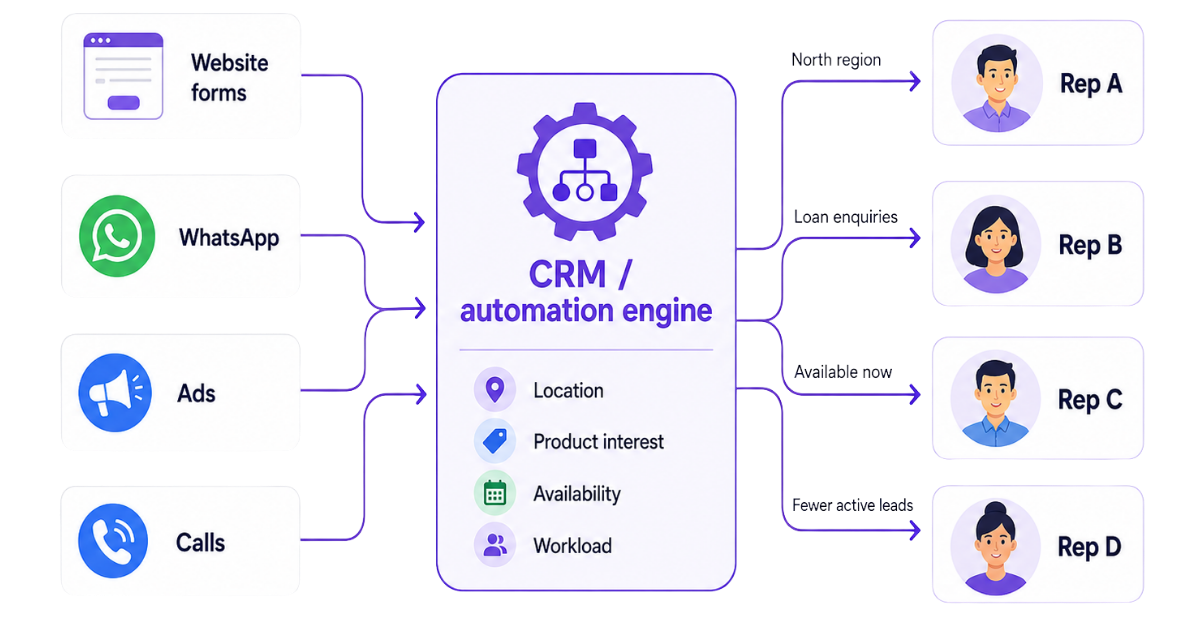
Lead distribution is the process of assigning new leads to the right sales reps.
For example, a lead looking for a home loan should go to a rep who handles loans. A lead from Delhi may need to go to the Delhi sales team. Similarly, a high-value lead may be assigned to a more experienced sales rep.
Every lead should reach the person who is best suited to handle it. However, this does not always happen.
In many businesses, incoming leads are still assigned manually. A manager checks new leads, decides who should receive them and then shares them with the sales team. This takes time and leaves room for mistakes.
Some reps may receive too many leads while others receive very few. Hot leads may remain unassigned for hours. The same lead may be contacted by multiple reps or may not be contacted at all. By the time someone follows up, the potential customer may have already moved to a competitor.
This is where lead distribution rules help. In this guide, we will explain the different lead distribution rules, how the lead distribution process works, how to build a lead distribution framework and how you can automate lead distribution using telecrm.
Lead distribution rules are the logical conditions inside a sales or CRM system that decide which rep gets which lead. They evaluate data fields like city, budget, product interest, lead score and current workload to make instant assignment decisions. Lead distribution rules assign incoming leads to sales representatives based on various criteria and they ensure leads are assigned based on predefined rules.
These rules sit between lead capture and follow-up. Once an inbound lead enters your system from any source, the rules engine triggers: it evaluates criteria, finds the first matching rule and sets lead ownership by assigning the lead to a specific rep, team, or queue.
Here are the most common lead distribution rules:
Round robin distribution assigns leads to sales reps one after another in a fixed order.
For example, the first lead goes to Rep A, the second to Rep B and the third to Rep C. The next lead is assigned to Rep A again.
This approach gives every rep a similar number of leads. It works well when all sales representatives handle the same type of customers and have similar experience.
However, it does not consider whether a rep is available, already has too many leads or is better suited to handle a particular enquiry.
Weighted round robin also distributes leads in rotation, but some reps receive more leads than others.
For example, an experienced rep may receive 40% of the incoming leads while two newer reps receive 30% each.
This method is useful when sales reps have different experience levels, targets or lead-handling capacity. It allows businesses to maintain fair distribution without treating every rep in the same way.
Location-based rules assign leads according to their geographic location.
A lead from Delhi can be assigned to the Delhi sales team while a lead from Mumbai goes to a rep handling the western region. Businesses can create routing rules based on country, state, city, district or PIN code.
This works well for real estate, automobile, financial services and other businesses where sales representatives handle specific areas.
These assignment rules distribute leads based on where they came from.
Leads coming from Google Ads may go to one team while leads from Meta Ads, website forms, referrals or events may go to another.
This approach works when reps have experience handling leads from particular channels. For example, inbound leads from a demo form may require a different conversation than leads collected at an event.
Businesses with multiple products or services can assign leads based on what the potential customer is interested in.
For example, a bank can send home loan enquiries to the home loan team and business loan enquiries to another team. An education business can distribute leads based on the course selected by the student.
Matching leads with reps who have the right product knowledge can improve the customer experience and increase conversion rates.
Deal size-based rules assign leads according to their expected value.
High-value or enterprise leads may be assigned to experienced sales reps while smaller deals go to the general sales team.
Businesses can use information such as budget, company size, number of users or expected order value to decide who should receive the lead.
Lead scoring helps businesses identify which leads are more likely to buy.
A lead may receive a higher score after visiting the pricing page, requesting a demo or responding to previous messages. Hot leads can then be assigned to senior or experienced sales representatives for faster follow-up.
Lower-scoring leads can be sent to a nurturing process until they show stronger interest.
Availability-based rules assign leads only to reps who are currently available.
The lead distribution system may check working hours, shifts, leave status or login activity before assigning leads.
This helps businesses avoid sending new leads to reps who are unavailable and supports instant lead assignment, especially when response time matters.
Workload-based distribution checks how many leads each rep is already handling.
A rep with fewer active leads receives the next lead while someone with a full workload is temporarily skipped.
This supports workload balancing and prevents some sales reps from receiving more leads than they can manage. It also reduces delayed follow-ups caused by uneven lead assignment.
Some leads need a rep with a particular skill, language or industry knowledge.
For example, a Hindi-speaking lead may be assigned to a rep who speaks Hindi. A lead from the healthcare industry may go to someone with experience selling to healthcare businesses.
These rules help match leads with the right sales representatives based on the support or knowledge they require.
When an existing customer submits a new enquiry, the lead should usually go to the rep who already manages that account.
Maintaining the same lead ownership gives the rep access to previous conversations, requirements and purchase history. It also prevents multiple sales reps from contacting the same customer.
Under this approach, a new lead is offered to a group of available sales reps. The first rep to accept it becomes the lead owner.
This can work for teams where speed is more important than equal distribution. However, businesses should monitor how many leads each rep accepts to prevent an uneven distribution process.
The right lead distribution strategy often combines several rules. A business may first check the lead’s location, then its product interest and finally use round robin distribution among the matching reps.
Lead distribution rules don’t work in isolation. They are part of a pipeline: lead capture → qualification → rule evaluation → assignment → tracking.
Lead Capture: New leads from Facebook/Google ads, website forms, missed calls, WhatsApp and marketplaces like 99acres or IndiaMART are instantly pushed into your CRM-not Excel sheets or WhatsApp groups.
Lead Qualification: Mandatory fields, drop-downs and scoring (budget, intent, timeline) mark leads as hot, warm, or cold before the lead distribution process begins.
Rule Evaluation: Every new lead is checked against ordered rules. For example: “IF City = Pune AND Product = ‘Coaching’ THEN assign to Pune Coaching Team.” The first matching rule is applied.
Assignment Execution: The CRM sets the “Assigned To” field, triggers notifications (SMS, WhatsApp, in-app alerts) and starts SLAs or follow-up workflows. They help maintain clear ownership of leads within sales teams, so there is no confusion about who owns what.
Follow-Up and Tracking: Managers monitor speed-to-first-call, missed SLAs and idle leads. Reassignment rules (e.g., after 15 minutes of no action) kick in to prevent lead leakage. Tracking and optimising lead distribution increases sales team performance.
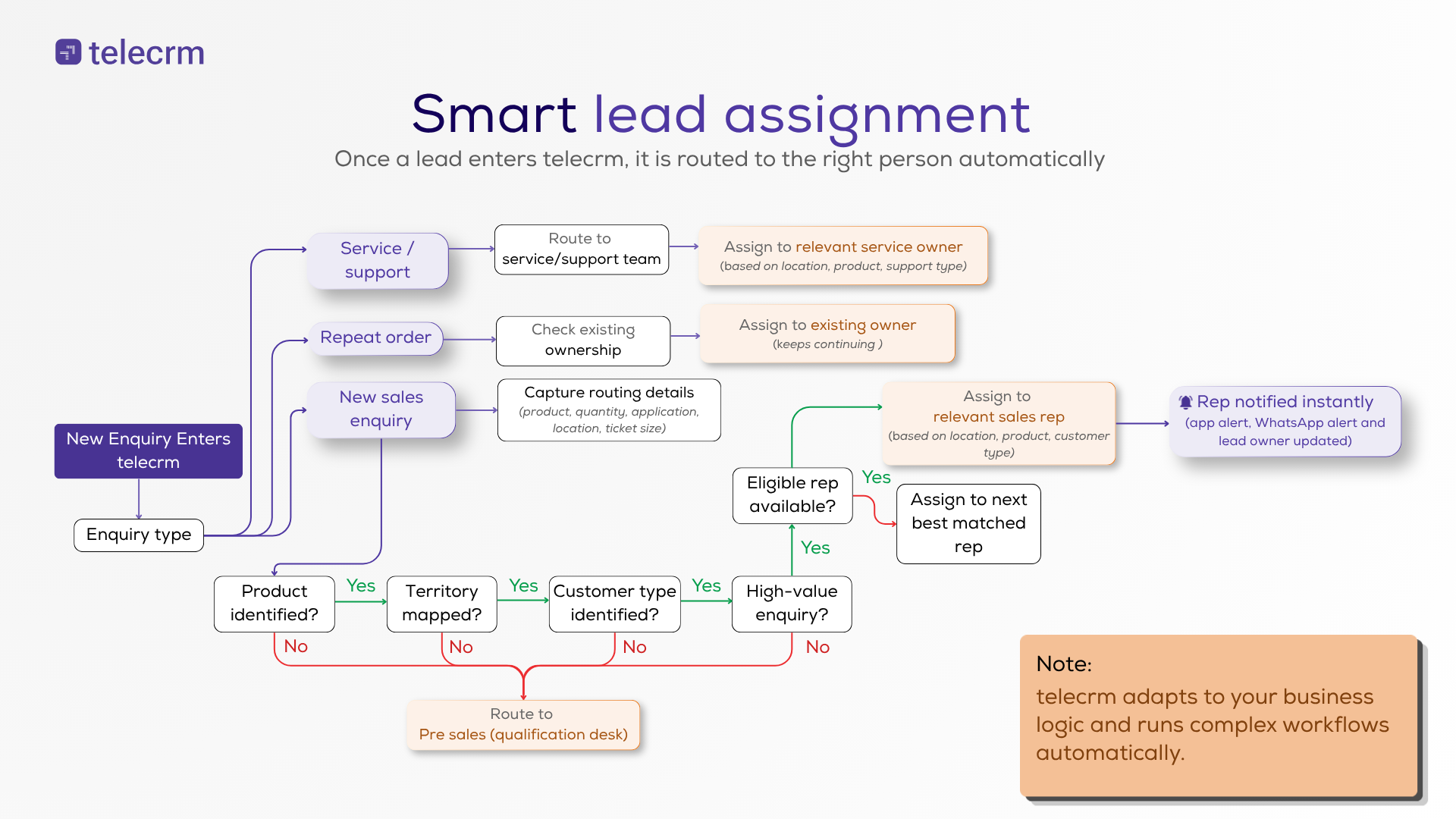
Example: An insurance agency receiving 100 inbound leads per day from Google Ads uses rules to assign within five seconds per lead, drastically improving contact rates and conversion rates.
Think of this as a practical checklist for any sales leader building rules for the first time.
Manual lead distribution means a manager assigns leads by hand, or reps pick from a shared pool. It offers control and flexibility for very small teams but introduces pain points: slow speed, bias and high lead leakage once volumes grow. Manual processes simply cannot keep up when leads are coming from multiple channels at scale.
Automatic rule-based distribution is the opposite. Leads are auto-assigned by the CRM using assignment rules like round robin, territory or skill-based routing. Automated lead distribution reduces manual errors and speeds up assignments. Automated lead distribution reduces response time significantly. Automated systems can handle increased lead volumes efficiently. It eliminates manual errors in lead assignment processes. Automated lead distribution improves response times and reduces manual errors. Watch this video to know how automated lead distribution saves time:
Hybrid models work well too. High-value or strategic accounts get assigned manually by a manager, while most inbound leads are auto-assigned via round robin or geographic rules-reducing manual effort where it matters least.
When to shift: If you handle more than 30–40 inbound leads per rep per day, manual distribution will cause delays. You should move to at least round robin lead distribution in your CRM. An automated lead distribution strategy removes bottlenecks and lets your team focus on selling, not sorting.
telecrm is designed for telecalling-heavy SMB teams that want to start simple (basic round robin) and gradually layer in more advanced rules without hiring an IT team.
Here is how telecrm (a lead management software) users can capture inbound leads from multiple channels, set up assignment rules and fully automate routing with minimal configuration.
Lead Capture: telecrm captures leads from Facebook/Google Ads, website forms, WhatsApp, missed calls and CSV imports into a single lead management dashboard. No more manual copy-paste across spreadsheets. This is how your lead capture process feeds directly into distribution.
Round Robin Setup: An admin creates a round robin pool, adds selected calling agents and enables or disables agents as needed. Each new inbound lead goes to the next available rep automatically.
Geographic and Territory Rules: Route “City = Delhi, Noida, Gurgaon” to North Team, “City = Mumbai, Pune” to West Team. telecrm’s rule builder matches leads to the right reps based on location fields.
Advanced Assignment Rules: Combine conditions like lead source + product interest + budget. For example: “Source = Meta Ads AND Budget > ₹80L” routes to a senior closer group. You can layer multiple rules without writing code.
Availability and Workload: telecrm skips agents marked as offline, uses auto dialer status to estimate workload and avoids assigning more leads to reps who are already overloaded. This is how lead distribution software can automate routing based on predefined rules.
Follow-Up and Reassignment: telecrm auto-creates tasks, sends WhatsApp/SMS templates and reassigns leads if there is no outgoing call within a set SLA (e.g., 15 minutes for hot inbound leads). CRM workflows handle this without manager intervention.
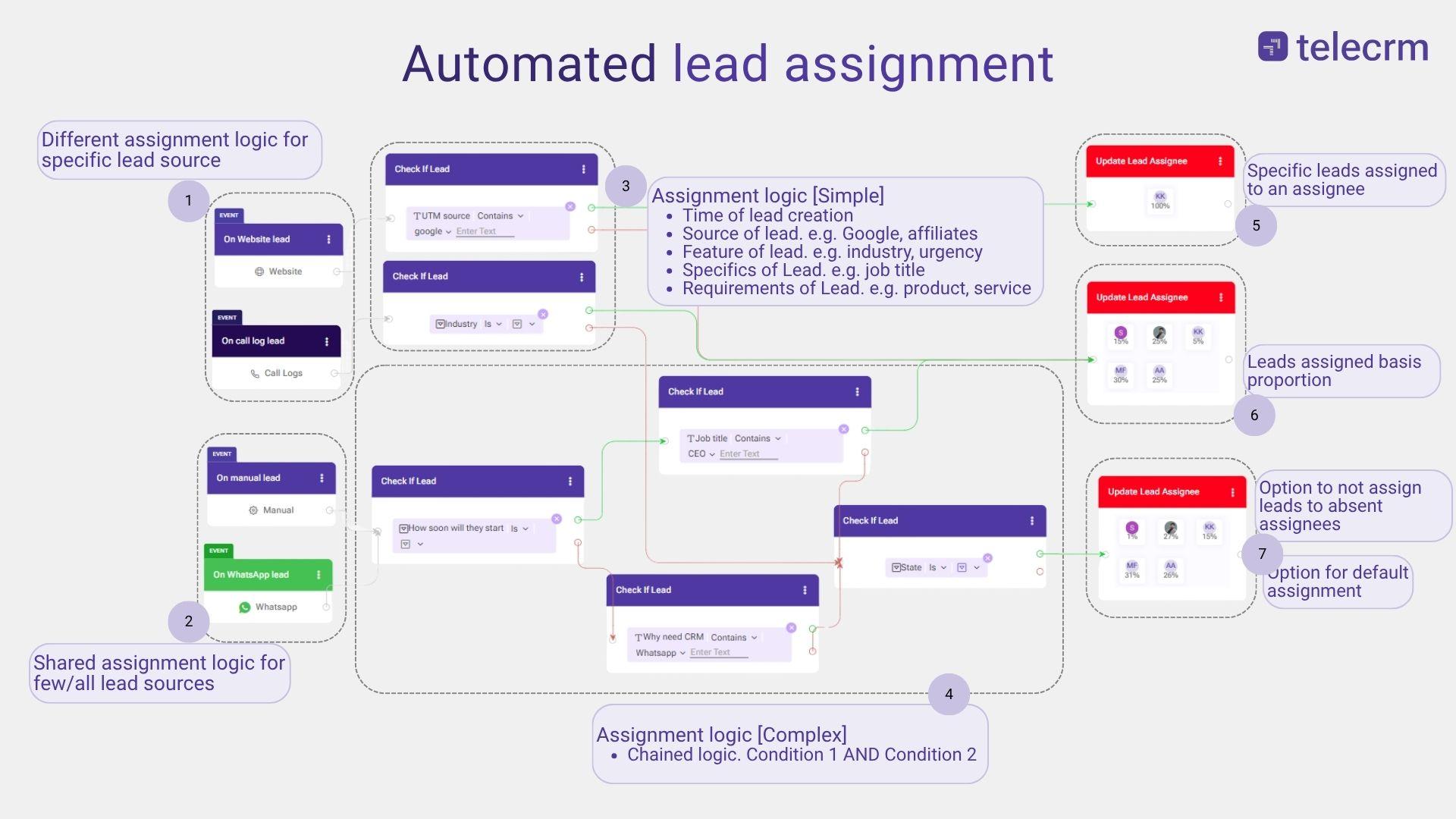
Automating lead distribution increases the chances of closing deals dramatically. Automated lead distribution improves sales team productivity. An education institute in Pune reduced average first-call time from one hour to five minutes using telecrm’s auto-lead assignment rules-enabling instant lead assignment and helping them close more deals from the same ad spend.
Lead distribution software like telecrm helps businesses gain speed and consistency. If you want to see how this works for your team, explore telecrm’s lead management features
Lead distribution rules help ensure that every new lead reaches the right sales rep without delay. Businesses can assign leads based on location, source, product interest, deal size, availability, workload or other conditions that match their sales process.
The right lead distribution framework reduces manual work, prevents lead leakage and helps sales reps follow up faster. With telecrm, businesses can automate lead distribution, create custom assignment rules and manage incoming leads from multiple channels in one place. Book a demo with us to see how easy it can be
For teams with up to 10 reps, 5–15 well-thought-out rules are usually enough-covering territory, product line and a default fallback. Hundreds of micro-rules tend to create confusion and routing errors. Start with a small set and only add new ones when there is a clear business need backed by data, such as a new city launch or consistent misrouting showing up in reports
First, check whether your CRM has hidden or advanced options like custom fields, workflows or webhooks that extend routing logic. If limitations remain, simplify your real-world routing model by grouping regions or products. If that still does not work, consider moving to automated lead distribution software that supports multi-condition rules and round robin without custom code.
Do a light monthly review of metrics-speed-to-lead, unassigned leads, conversion by rule-and a deeper structural review every quarter. Any major business change (new campaign type, city expansion or product launch) should trigger an immediate revisit of your rules instead of waiting for the scheduled review cycle.
Short-term spikes during festival offers or flash campaigns can overwhelm manual processes fast. Having at least basic automated round robin distribution ready as a fallback is safer. Keep a simple “emergency” auto-assignment rule that can be enabled during high-volume campaigns to ensure no inbound leads wait for manual allocation while the team is busy calling.
Transparent, fair rules like clean round robin distribution with clear exceptions for high-value leads reduce internal conflict. Reps stop fighting for more leads and focus on closing. Use performance dashboards to tie rule outcomes to incentives, so top performers see that efficient handling of assigned leads results in more responsibility, rewards or access to higher-quality opportunities.



© Copyright 2026 telecrm.in (Flamon Cloudtech Pvt Ltd) - All Rights Reserved • Privacy Policy • T&C



© Copyright 2025 telecrm.in - All Rights Reserved • Privacy Policy • T&C