

More than 3 billion people now use WhatsApp worldwide. For businesses, WhatsApp ads can do two different jobs: bring people from Facebook or Instagram directly into a WhatsApp conversation, or help businesses get discovered inside WhatsApp itself.
For most Indian sales teams, Click-to-WhatsApp ads are the more immediate opportunity: someone taps the ad, WhatsApp opens and the conversation starts without a website, landing page or lead form in between.
But “WhatsApp ads” isn’t one thing. There are two distinct formats; they work differently and most Indian SMBs only use one of them — often without knowing about a 72-hour pricing window that could be saving them real money on every single lead.
This guide covers both formats properly, walks through setup in Meta Ads Manager step by step and shows what to do after the click. Because here’s the part most guides skip: an ad that starts a conversation is only valuable if that conversation actually turns into a customer.
Let’s be precise, because the phrase gets used loosely.
Click-to-WhatsApp ads run on Facebook and Instagram — news feed, Stories, Reels, Marketplace. Someone clicks, a WhatsApp chat opens with a pre-filled message ready to send. You need a WhatsApp Business Account linked to a Facebook Page to run them and they’re set up through Meta Ads Manager.
In-app ads are newer and live inside WhatsApp itself — between Status updates and in the channels directory within the Updates tab. They look similar to Instagram Stories: image, video or voice notes, with a swipe or tap leading somewhere.
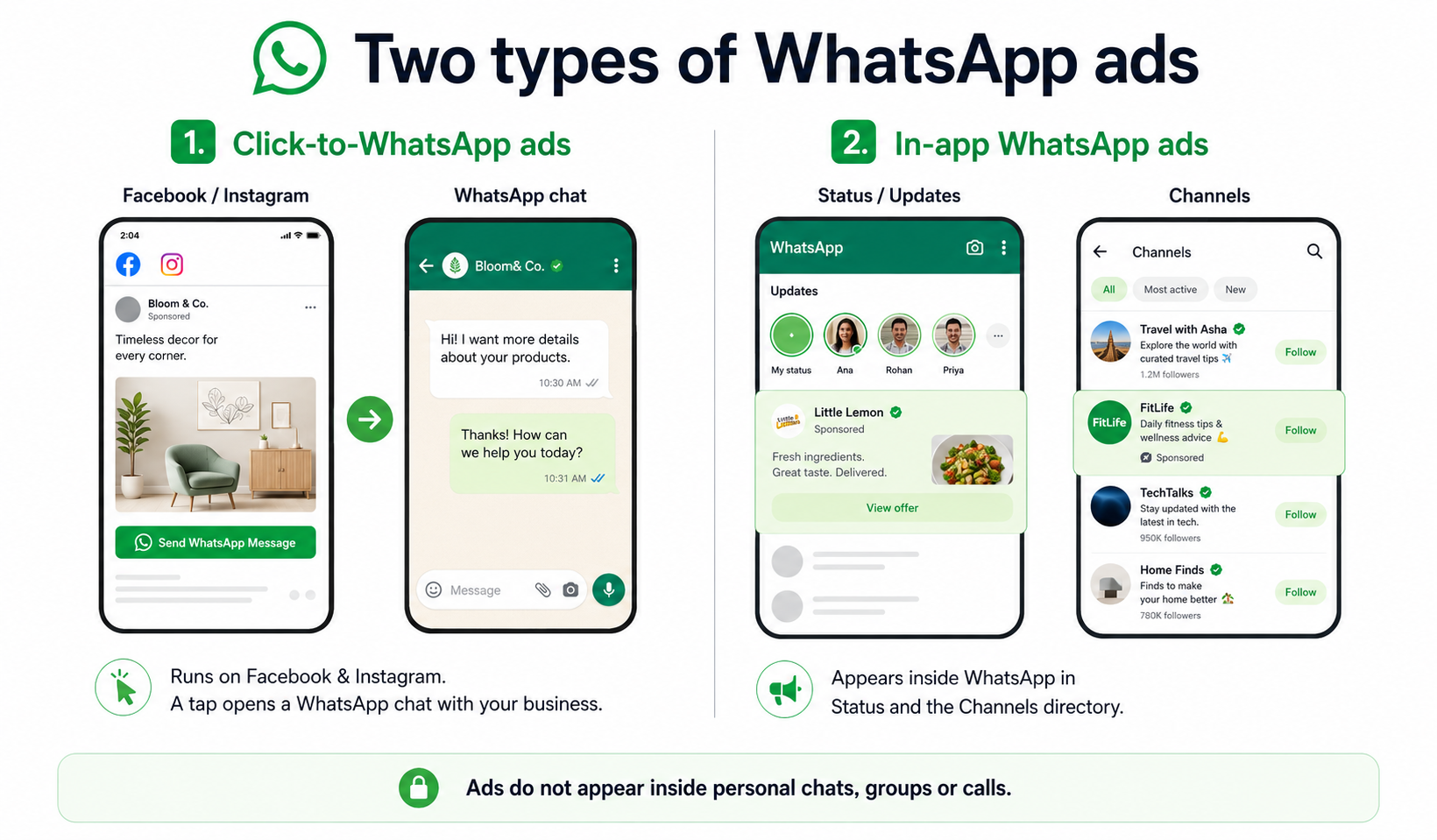
Both formats share one boundary: ads never appear inside personal chats, group conversations or call screens. Targeting draws on Meta profile data — age, interests, device, language, general location and how someone has engaged with channels or past ads. What it never draws on is the actual content of your messages. Meta has no access to read encrypted message content in the first place, so this isn’t a policy promise — it’s a structural fact about how the product is built.
Click-to-WhatsApp | Ads in Status/channels | |
Where shown | Facebook, Instagram | WhatsApp Updates tab |
Best for | Lead generation, sales | Brand discovery, reach |
Taregeting | Full Meta ad targeting | Location, language, channel engagement |
Where it leads | WhatsApp chat | Chat, website or app install |
For Indian sales teams, the real opportunity isn’t the ad itself — it’s what happens after the click. That’s where telecrm comes in, turning every chat into a tracked, followed-up lead instead of a conversation that quietly goes cold somewhere on a phone.
There isn’t one fixed price for running a WhatsApp ad in India. Click-to-WhatsApp ads are bought through Meta’s ad auction, so what you spend depends on your audience, competition, campaign objective, creative and bidding strategy. There are really two costs to think about: the ad spend that gets someone into WhatsApp and the messaging cost after that conversation starts.
For eligible Click-to-WhatsApp conversations, replying within 24 hours can open a 72-hour Free Entry Point window where message delivery is free. We’ll break down exactly how that works in the next section. That’s why CPC alone doesn’t tell you whether the campaign is working. Track cost per conversation, cost per qualified lead and, eventually, cost per sale.
This is the part of WhatsApp advertising that gets the least attention and can save the most money but only if you understand how the two messaging windows work. Here’s the mechanic:
Practically, this means speed affects more than conversion. Reply fast enough and you get roughly three days to qualify the lead, send pricing or brochures and follow up without adding normal WhatsApp message-delivery charges to that sequence. Miss the first 24-hour reply deadline and the Free Entry Point window never opens. That’s where slow follow-up starts costing you twice: first in lost intent, then in paid follow-up.
This is exactly where telecrm’s instant auto-reply and lead-assignment workflows matter making sure a new ad lead doesn’t sit unattended long enough for that window to disappear.
Click-to-WhatsApp ads remove the contact form entirely. Someone taps “Send Message,” and a conversation starts while their interest is at its peak — no typing a name and number, no waiting for a confirmation email.
WhatsApp is already a normal part of how Indian customers talk to businesses. Meta, citing a 2025 Kantar study, says 91% of online adults in India chat with a business every week. Click-to-WhatsApp ads remove another step from that behaviour.
Instead of asking someone to fill a form and wait for a callback, the ad moves them straight into a conversation while their interest is still fresh. And because that conversation already carries the customer’s contact and message context, your sales team starts with more information than it would get from a basic lead form.
A real estate broker in Noida runs Reels ads for a new project — someone taps “Get Floor Plan” and has it in WhatsApp within seconds. A coaching institute in Pune offers a free syllabus PDF through the same format — one tap, instant PDF, a follow-up question and the conversation is already moving toward enrolment.
You’ll need: a verified WhatsApp Business Account, a Facebook Page you’re an admin of and linked to that account, access to Ads Manager and, ideally, a telecrm account connected to WhatsApp so every lead is captured automatically rather than sitting inside a chat.
Campaign level. Open Ads Manager, click Create, then choose your objective — this decision matters more than most guides suggest:
Set your Special Ad Category if relevant (credit, housing, employment have restricted targeting under Meta’s policies) and name the campaign clearly — something like “CTWA-RealEstate-Jun26” — so performance is easy to track later.
Ad set level. Set conversion location to Messaging apps, then choose WhatsApp as your primary messaging app. Define your audience: location (India, tier 1 and tier 2 cities or wherever your customers actually are), age and language, matching your audience — Hindi, English or regional.
Set a daily budget; ₹500–₹1,500 per day is a sensible starting point for most small businesses.
On targeting strategy: start with detailed targeting, not Meta’s broad Advantage+ option. Advantage+ performs best once you have meaningful conversion data — generally once you’ve crossed around 50 conversions — because the algorithm needs real signal to find people who resemble your actual converters. Starting cold with Advantage+ before you have that data usually wastes early budget on an audience the algorithm hasn’t learned to refine. Build detailed targeting first, gather conversions, then test Advantage+ as a smaller slice of the budget once the data supports it.
For placements, manually select Facebook news feed, Instagram Feed, Stories and Reels if you want more control over where your budget actually goes.
Ad level. Choose your format — single image, video or carousel. Write creative and primary text with a clear reason to chat: “Get EMI options in two minutes on WhatsApp” gives someone an obvious, immediate reason to tap, rather than a vague “Contact us today.”
Configure your pre-filled message so people can ask for exactly what they want with one tap — “Hi, I want the 2026 fee structure PDF,” for example. This is what the customer sees pre-loaded when the chat opens, so make it specific to that ad’s offer, not generic. Keep your profile photo and display name aligned with your brand — it’s the first thing a prospect sees and it affects whether they trust the chat enough to engage at all.
Click Publish. Ads can take up to 24 hours to be approved.
WhatsApp ads typically improve after the first two days, as Meta’s algorithm gathers performance data — give campaigns five to seven days before judging results or making major changes. Test different calls to action (“Send message” vs “Get a quote”), rotate creatives every two to three weeks to avoid fatigue and cap frequency at two to three impressions per person per week — seeing the same ad too often is one of the fastest ways to tune an audience out before they ever click.
You can also create ads directly from the WhatsApp Business app (boost a status, catalogue item or image) or WhatsApp Web, both with simpler controls than Ads Manager. Meta changes these screens often, so check your own app rather than relying on a fixed guide.
These work fine for quick local boosts. For real targeting, testing and lead tracking, Ads Manager paired with telecrm is the better long-term setup.
In-app ads on Status and channels sit inside the Updates tab — image, video or voice-note creatives between friends’ Status updates or boosted channels in the directory. The same privacy rule applies: no access to personal chats, ever. Good for brand discovery and product launches; Click-to-WhatsApp remains the stronger format for direct lead generation.
Running the campaign is the easy part. The quality of what happens after the click is what actually decides ROI.
Creative: Use clear, offer-driven copy — give people a specific reason to tap rather than a generic “Contact us.” Keep creatives visually simple and built for mobile; heavy text and small fonts get lost on a phone screen.
Audience strategy: Start with interest-based and lookalike audiences, then layer in retargeting — site visitors, video viewers — aimed specifically at people who’ve already shown intent.
Conversation design: Prepare three to five pre-written replies covering your most common questions, so your team isn’t typing the same answer from scratch every time. A chatbot can handle routine queries — pricing, availability, location — instantly, freeing your team for conversations that need real judgement.
Speed of response: Reply within minutes during business hours. This isn’t just about not losing the lead’s attention — it’s also what opens your 72-hour free messaging window in the first place. telecrm can alert agents and auto-assign new WhatsApp leads, so no chat sits unanswered long enough to lose that window.
Testing: Run simple A/B tests — image versus video, short versus long copy, different pre-filled messages — and give each test five to seven days of real data before deciding a winner.
A click implies opt-in for that conversation — not blanket permission to message someone forever after.
Get this wrong and customers block your number, your quality rating drops and Meta restricts what you can send — killing ROI on every campaign that follows.
Clicks and chats aren’t the full picture — the real question is which ads produce paying customers.
Here’s the catch: a normal Meta Pixel tracks what happens on a webpage. With Click-to-WhatsApp, the “conversion” happens inside a chat the Pixel can’t see. That’s why this format needs the Conversions API (CAPI) — sending events like “lead qualified” or “purchase made” back to Meta from your CRM.
In Ads Manager: impressions, click-through rate, cost per click and conversations started.
With CAPI connected: real outcomes — qualified leads, bookings, sales — feed back to Meta so it optimises for customers, not just chats.
Review your top creatives monthly, pause what’s underperforming and shift budget to what’s working.
This tracking is only as good as what feeds it. If leads live on personal phones and screenshots, there’s nothing reliable to measure — which is exactly the gap telecrm closes.
Most ad budgets don’t leak because the ad failed. They leak after the click — once the chat opens and nobody is watching what happens to it.
Here’s the honest problem most Indian businesses run into. The ad works. The chat opens. The lead asks a question, maybe shares a requirement. And then it just sits there — inside WhatsApp, on someone’s phone, with no record of who’s supposed to follow up, no reminder if the lead goes quiet, no visibility for the manager into whether it was ever worked at all. Multiply that across 50 or 100 leads a day from a single campaign and a meaningful chunk of your ad spend is leaking out through a gap nobody can actually see.
telecrm exists to close that gap. Here’s what changes the moment a WhatsApp ad lead enters it.
Chat sync: The instant someone messages your business from an ad, that conversation syncs directly into telecrm — no manual copying, no agent forwarding a screenshot, no lead sitting unrecorded on a personal phone. Every ad-generated conversation lands in the same place, every time, with the full message history attached from the very first reply.
One complete history, not a fragmented one: Once a lead is in telecrm, every interaction with them — the original WhatsApp chat, every follow-up message, every call made, every note an agent added — sits on a single timeline against that one lead record. This is the difference between “I think someone called them last week” and actually knowing. An agent opening the lead sees exactly what ad they clicked, what they asked for, what was sent, when they were called and what’s due next — instead of piecing it together from WhatsApp, a separate call log and someone’s memory.
Lead overview: One screen shows every lead’s current stage — new, contacted, qualified, demo booked, negotiating, won or lost — without a manager having to ask a single agent for an update. Across multiple campaigns running simultaneously, this is what makes ad spend genuinely accountable: you can see at a glance which leads are moving forward, which are stuck and which are at risk of going cold before they actually do.
The funnel from click to customer, end to end:
That last step is the one that actually matters. It’s the difference between asking “how many chats did this campaign generate” and being able to answer “how much revenue did it generate and at what cost.” That second question is the only one that tells you whether to scale a campaign or kill it — and it’s only answerable if every lead is tracked properly from the very first click.
Expect Meta to deepen the connection between Facebook, Instagram and WhatsApp — sharper targeting for Status and channel ads, better measurement through CAPI, tighter CRM integration.
The businesses that win won’t be the ones blasting the widest audience. They’ll be the ones treating the first reply as the start of a relationship — using tools like telecrm to own the conversation and follow-up, so every click has a real shot at becoming a customer.
No. Ads never appear inside one-to-one or group personal chats — those stay end-to-end encrypted and private. Ads appear around Status updates, in channels, and on Facebook and Instagram as Click-to-WhatsApp units that open a chat with a business.
No — a standard WhatsApp Business Account linked to a Facebook Page is enough to run the ads. The API becomes useful once you want multi-agent access, broadcasts or CRM integration. Most Indian SMBs start simple and move to the API plus telecrm once lead volume grows.
When someone messages your business from an ad, that conversation syncs into telecrm automatically. A lead record is created, assigned to a rep, and every future message and call is logged against it — so managers see exactly which campaigns and agents convert, without digging through chat history.
Click-to-WhatsApp ads target new or lookalike audiences, not your existing contact list. The real risk is how you message people after they reach out — too many promotions or odd-hour messages get you blocked. Clear opt-in, sensible frequency and useful messages, managed through a CRM rather than ad hoc broadcasts, avoid this.
₹500–₹1,500 per day is a reasonable starting point. Track cost per qualified lead and cost per sale, not just cost per chat. Costs vary by category — a local service costs less per lead than real estate — so judge against your own margins, not a generic benchmark.
The pattern holds across verticals: a real estate developer gets floor plan and pricing enquiries logged straight into a pipeline with site-visit tracking. A coaching institute drives syllabus and fee enquiries into automated nurture sequences ahead of each batch. A salon or clinic turns same-day booking requests into confirmed, reminded appointments — all without anyone manually managing the follow-up.



© Copyright 2026 telecrm.in (Flamon Cloudtech Pvt Ltd) - All Rights Reserved • Privacy Policy • T&C



© Copyright 2026 telecrm.in - All Rights Reserved • Privacy Policy • T&C