
Banks and NBFCs in India manage thousands of customer interactions every day — loan enquiries, EMI reminders, KYC follow-ups and cross-sell calls. A CRM built for banking centralises every interaction, automates follow-ups and gives relationship managers the context they need before every call.
This guide covers what banking CRM software does, the key benefits for Indian teams, how to choose the right one and the six best options available in 2026.
A banking CRM is customer relationship management software that helps banks and financial institutions store customer profiles, track every call or message, manage service requests, automate follow-ups, segment customers, support loan or account journeys, and give teams a unified view of each customer relationship.
| Term | Meaning |
|---|---|
| CRM | Customer Relationship Management, the full form of CRM in banking |
| Banking CRM | Software that helps banks and NBFCs manage customer data, track interactions and automate sales or service workflows from a single platform |
| RM | Relationship Manager, the bank staff member who owns the customer relationship and handles calls, queries and cross-sells |
| BFSI | Banking, Financial Services and Insurance, the industry segment banking CRM tools primarily serve |
| KYC | Know Your Customer, the regulatory process of verifying customer identity; often tracked and automated inside a banking CRM |
| NBFC | Non-Banking Financial Company, financial institutions that use CRM for lead management, EMI follow-ups, collections and customer communication |
| Pipeline | The tracked journey of a loan application, account opening or product offer from first enquiry to closure |
A banking CRM stores all interactions with current and potential customers. This helps agents deliver personalised experiences and improve their sales numbers as they can gather contextual insights from within the CRM.
Beyond its core functions, a banking CRM automates repetitive tasks — such as sending WhatsApp reminders — for:
Updating KYC details
Issuance of new ATM card
Relevant personalised offers like a car or home loan
See: Learn more about WhatsApp automation
Relationship managers handling hundreds of accounts need more than a spreadsheet to keep up. A banking CRM gives each RM the customer context, automation and visibility they need to respond faster, follow up consistently and help managers track team performance without chasing their reps.
Relationship managers who have the full interaction history before a call deliver faster, more personalised service from the first moment of contact.
With information centrally stored in the CRM, reps can access a client’s conversation history and understand their preferences and needs before answering their query. This means:
Personalised interactions
Faster issue resolution
Happier, more loyal customers
The client calls to block their ATM card. The rep notices (on the CRM) that the customer’s credit card has also expired. So after blocking the ATM card, the rep offers to renew the card. The end result: Issue solved! Customer satisfied! Profits maximised!
CRM data also helps your reps pitch contextual upsells. If a client calls to enable international transactions — the rep can offer an international credit card, maximising value for the bank as well as the client.
Plus, a CRM in banking acts as a debt collection software and helps you settle outstanding debts by tracking them throughout the loan process.
EMI reminders, KYC follow-ups and query update notifications can all run automatically, freeing every RM for higher-value relationship conversations.
A capable CRM system boosts your bank’s efficiency by automating routine tasks and workflows such as the following:
Sending personalised reminders for loans, EMIs, overdue bills, etc.
Sending updates about query resolution status
Marketing new loan and insurance offers to existing clients
Accomplishing tasks, resolving queries and setting up automation frees up your rep’s time so they can focus on:
High-value work like pitching upsells and relationship-building
Engaging customers without compromising on the human touch
In banking, there are so many documents at so many places that it’s impossible to find the right one at the right time. CRM stores all documents in a central, secure, searchable place.
As a result:
Reps can find the right document quickly
They will never lose important documentation
Document management, therefore, enables your representatives to be better and more efficient at their jobs.
Banking involves strict regulatory compliance. A CRM helps by maintaining detailed logs of every customer interaction, document upload, and transaction update.
So when the auditors come knocking, your bank doesn’t scramble. It already has:
Less panic, more control and peace of mind for your compliance team.
A new customer signs up for a savings account. The CRM triggers an onboarding flow:
No manual hand-holding. No missed steps. Just a smooth, professional first impression right from day one.
That’s how banks turn signups into relationships.
Let’s say a customer applies for a loan at one branch but walks into another to ask about it. Without a CRM, the second branch is clueless. With a banking CRM, they have full visibility.
This anywhere access helps banks operate like one unit, not disconnected islands. It leads to faster responses, better coordination, and more trust from customers.
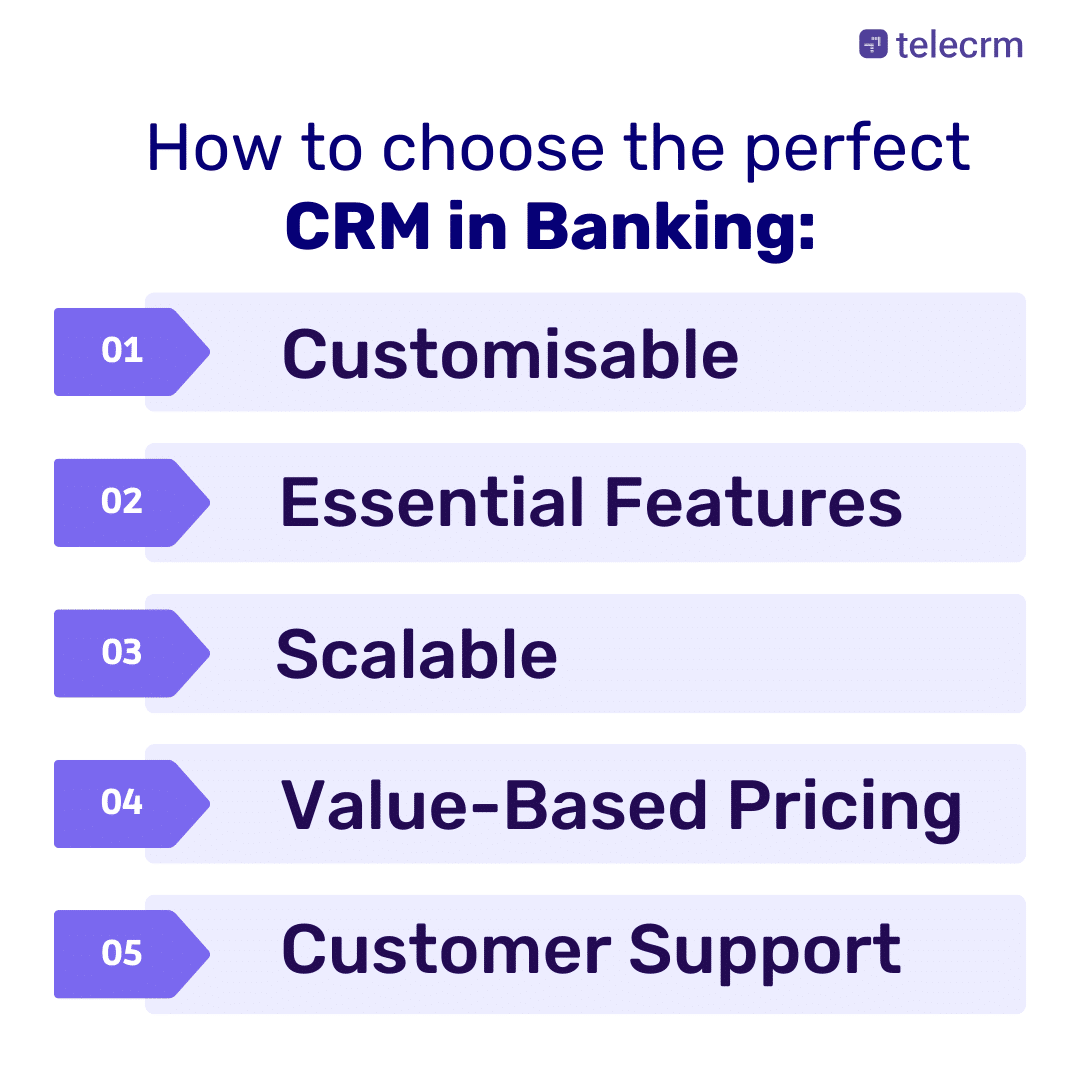
Choosing a banking CRM is a long-term decision. Before evaluating vendors, get clear on the specific workflow problems you need to solve — whether that is lead tracking, RM accountability, compliance logging or customer follow-up automation.
What problem are you trying to solve with it?
What kind of experience are you trying to create for your customers?
What features would you need for that?
The features can range from customer data management and workflow automation to advanced analytics. Thus, having a clear understanding of your needs will help you select the most suitable CRM for your bank.
Things such as flexible integration capabilities, robust security measures, a fully functional mobile app and customisable dashboards are a must. These features will enhance your bank’s efficiency and improve customer service experience.
Choose a CRM that can scale with your bank. As your customer base expands and your business needs evolve, the CRM should be able to adapt accordingly. This will prevent the need for frequent adjustments, ensuring long-term stability.
You want your CRM to be stable and secure with reliable updates and accessible support.
Start by asking:
Has the vendor worked with banks like yours or bigger for a similar use case in the past?
What was their experience like?
The price mentioned on the website versus what it’s actually going to cost you including implementation, training and maintenance is very different. Make sure that you know:
What you are going to pay in advance
The decision isn’t based on the cheapest or most expensive
You get very close to or exactly what you want within your budget
PRO TIP: CRMs are very modular in nature, so too much haggling upfront means you might end up paying hidden costs for modules down the line.
Attending a demo isn’t just about checking out the features. When you are looking for a CRM in banking, you are trying to address one or two key issues and the most critical aspect is whether it is powerful enough to solve those issues.
Before making a decision you need to know the following:
Does the CRM support all your key workflows, including the interdepartmental ones?
Does it have all the features that you need right now or in the near future?
Does it accommodate all your security and compliance needs?
What are the support modalities and channels?
Use this checklist when evaluating whether a CRM meets Indian banking and NBFC regulatory requirements:
For Indian banking workflows, RBI’s KYC framework requires Customer Due Diligence. India’s Digital Personal Data Protection (DPDP) Act covers the responsible processing of digital personal data.
| CRM | Best suited for | India-ready | Calling built-in | WhatsApp support | Starting price |
|---|---|---|---|---|---|
| telecrm | Indian SMBs, NBFCs and telesales teams | Yes | Yes | Yes | ₹799/user/month, billed annually |
| LeadSquared | BFSI teams needing end-to-end automation | Yes | Via CTI | Yes | From $60/user/month, billed annually |
| Salesforce FSC | Large banks with complex enterprise workflows | Partial | Via integration | Via third party | From $325/user/month, billed annually |
| Microsoft Dynamics 365 | Enterprise banks on the Microsoft ecosystem | Yes | Via integration | Via third party | From ₹5,410/user/month, paid yearly, GST extra |
| Monday Sales CRM | Teams needing visual pipeline management | Limited | Via integration | Via integration | From $10/user/month, plans start from 3 users |
| Zoho CRM | Teams automating loan and service processes | Yes | Yes | Yes | Free for 3 users; paid plans from ₹800/user/month, billed annually |
telecrm is a cloud-based CRM for Indian sales, relationship management, and customer engagement teams. For banking and financial services workflows, telecrm is best suited for teams that need structured calling, WhatsApp follow-ups, customer interaction history, lead segmentation, automation, reporting, and custom integrations with existing systems. It is not a core banking system; it works as a CRM layer for customer communication, sales follow-ups, and relationship management. It comes with the following features out of the box:
Telesales management
Leads and relationship management
WhatsApp and voice automation
Now, let’s evaluate it based on the banking industry’s needs
A loan enquiry comes in via a website form or a missed call. telecrm captures it automatically and assigns it to the relevant RM based on pre-set rules. The RM sees the lead in their dashboard, calls directly from within the CRM and the call is logged automatically.
If there is no answer, a WhatsApp follow-up message is triggered. The branch manager can see the full pipeline in real time — without having to ask the RM for an update. At each stage, the lead moves from ‘new’ to ‘contacted’ to ‘application submitted’ to ‘closed’.
See: telecrm features for loan management workflows

Monday Sales CRM is a comprehensive, customisable customer relationship management platform known for its visual sales pipeline feature. So if sales pipeline management is one of your main use cases, Monday should be your go-to option.
Besides, the CRM in banking offered by Monday is part of a suite of offerings:
Monday Dev: Designed for software development teams
Monday Work OS: For teams to create workflow apps in a code-free environment
Monday Project Management: To plan and execute projects in real-time
Integration with existing banking solutions: Supports a wide range of integrations with popular business software such as Slack, Gmail, HubSpot and Mailchimp — so probably not the best fit for Indian banks
Customer interaction tracking: Has a visually pleasing dashboard that makes tracking interactions simple and fun
Telesales management: Predominantly an email marketing platform but can be effective for telesales with features like call logging and telephony
Automation: Monday follows the ‘when this happens, this is the action you need to take’ form of automation which makes it very easy to automate for even folks without any technical expertise
Central secure data management: According to Monday, critical data is backed up every five minutes while non-critical data is backed up daily with other security measures in place
Scalability: Has features that allow 1TB file storage and 250K actionable automation in its enterprise plan. So even if the scale of your operation, Monday is designed to adjust.
Credibility: Trusted by over 100,000 organisations worldwide, including high-profile companies like Adobe, Unilever, Universal Music Group, etc.
Budget friendliness: Monday Sales CRM’s Standard plan starts at $12 per user per month and the Pro plan at $19 per user per month, billed annually.
Intuitive and visually appealing Kanban boards that give you a comprehensive overview of your sales process and help you pinpoint the scope for improvement
A high level of customisation ensures the CRM adapts to your bank, not the other way round
Though simple, your team will require extensive training to get used to it
Immediate customer support is not available through meetings or calls

An industry-specific software by Salesforce designed primarily for banking, insurance and asset management institutions. It thrives on its ability to automate tasks including, but not limited to:
Updating customer info automatically
Issuing debit and credit cards
Customer interaction on due payments
Custom integration with existing banking solutions: Leverages Salesforce’s own suite of applications like Sales Cloud and Service Cloud as well as MuleSoft for integration with third-party applications (very Salesforce-centric).
Customer interaction tracking: One of the best CRM in banking when it comes to providing a complete history of every interaction, including in-person meetings, phone calls and virtual meetings conducted via video conferencing tools.
Telesales management: With its AI tool, Einstein, you can automatically record details of each call, such as duration, participants and key points discussed. You can even integrate with their telephony solution to make calls but it’s not a calling software.
Scalability: Infosys and Wipro use Salesforce Financial Services Cloud, so yes, it will adjust to your growing needs
Credibility: Trusted by over 150,000 companies worldwide and serves millions of users daily
Budget friendliness: Salesforce Financial Services Cloud is a premium-priced option at approximately $325 per user per month, making it most suitable for large banks with complex enterprise workflows and a dedicated implementation team.
Designed specifically for financial institutions with account and contact management features that make segmentation easy for banks
You can get access to well-documented help guides and videos on YouTube as well as their website to help you guide throughout the implementation process
Not the most user-friendly CRM in the market — requires extensive training and adjustment period
Not very budget-friendly when compared to other almost equally capable software, which retail for a lesser price

The term ‘Dynamic’ here is not for show. It has a suite of offerings concerning finance, sales, customer service, supply chain management and much more! Some relevant options for banks are:
Microsoft Dynamics 365 Sales (Best for banks): To understand, segment and target your prospects and customers regarding loans, issues of debit and credit cards etc.
Microsoft Dynamics 365 Customer Service: Designed primarily for keen insights on existing customers
Microsoft Dynamics 365 Finance: Use this tool only if your bank deals with forecasting the probability of loan payments and tracking finances
Custom integration with existing banking solutions: Integrates with Microsoft’s suite of applications like Microsoft 365, Azure and other third-party platforms through Microsoft Dynamic 365 APIs
Customer interaction tracking: You can track engagement throughout the customer journey and optimise the software to process more loans and get a better understanding of your customers
Telesales management: Each call made through the CRM is automatically logged, capturing essential details such as call time, duration, outcome and any follow-up actions required
Automation: Interact with your customers on autopilot through emails and send updates about due payment, new offers, EMI processes and much more!
Scalable:I s scalable, but then you’ll have to integrate with other Microsoft offerings as well if you want to onboard all your teams
Credibility: It’s Microsoft, so it’s as credible as it can get
Budget friendliness: Affordable if you just go for one product (Microsoft Dynamics 365 Sales), but costlier than Salesforce if you go for more than one offer
It is suitable for banks of all sizes in the banking industry and has a great adoption rate along with a reasonable learning curve
Again, since it’s a popular platform, the company provides ample resources including articles, video tutorials and email support for you to set up your workspace
Different products for sales and support make it almost a compulsion to purchase both platforms
The base plan is perfect for your bank, with one exception: if you’re not high on AI and Copilot because it is only available from the ‘Pro’ version

LeadSquared Finance CRM earns its place on the list because it’s purpose-built for financial institutions that need to automate end-to-end processes.
It brings together lead management, onboarding, field sales, service workflows and collections, making it extremely powerful for BFSI teams that want to eliminate manual coordination. Its biggest advantage is its automation engine, which helps you streamline everything from application submission to verification, approvals, servicing and renewals.

The only reason why Zoho CRM software is at the bottom of the list is because it is too comprehensive for banks. Having said that, it is hands down one of the most dynamic CRMs in the market.
The primary use case of Zoho’s CRM in banking is concerned with its automation capability; it helps you automate the complete loan process — from loan form submission to loan approvals to tracking and processing payments.
Custom integration with existing banking solutions: With Zoho, you can use custom API to integrate with your applications and get access to a wide range of integrations through the Zoho marketplace.
Customer interaction tracking: Get a 360°view of all customer interactions in one dashboard.
Telesales management: Normally in India, you either call your leads/customers or send them an SMS, a WhatsApp message or an email. With Zoho, you can do everything from one dashboard.
Automation: Send reminders about pending payments and procedures to your existing customers and also promote additional services through email automation.
Central secure data management: Zoho safeguards your data with features like encryption, access controls and by complying with industry regulations.
Scalable: Zoho is a global MNC with over 50 software products to help businesses scale and improve processes
Credibility: Over 250,000 businesses across 180 countries rely on Zoho CRM to manage their sales, marketing and customer support activities.
Budget friendliness: Zoho offers an affordable CRM solution relative to other software giants such as Microsoft Dynamics and Salesforce
Zoho has a free forever version which will help you figure out if it’s the right fit for your business needs
You can easily collaborate with your team right from the dashboard by creating groups and tagging concerned team members
Since the CRM is feature-rich, some users may find it complicated to use
There have also been occasional issues with third-party integrations and customer support responsiveness
CRM systems are more than just digital address books. Modern banking organisations power customer-centric strategies, drive customer acquisition and streamline complex banking processes. Let’s explore how real banks use CRM solutions every day:
Banks run marketing campaigns across multiple platforms — social, email, and even local outreach. But without a proper CRM, lead tracking becomes chaotic. A banking CRM:
This not only improves the sales process but also boosts campaign performance and customer engagement.
High-value customers expect more personalised customer experiences. CRM solutions allow relationship managers to:
This is how banks reduce churn and invest more time in fostering client relationships.
Opening a savings account or starting an investment shouldn’t feel like paperwork punishment. With a CRM:
This ensures customers expect consistency, whether online or at a local bank branch.
In a customer relationship management CRM setup, resolving issues fast builds trust. CRM systems:
This results in better risk management, fewer support delays, and happier customers — not just entirely computer-generated support.
Feature | Why banks need it | telecrm relevance |
Customer interaction history | Gives teams full context before calling | Single customer timeline |
Call tracking | Improve sales and service follow-ups | 1-click dialer + call recording |
WhatsApp follow-ups | Supports reminder and update workflows | WhatsApp automation and chat capture |
Leads Segmentation | Helps target relevant offers | Filters & Segmentation |
Custom Integrations | Connects CRM with existing systems | On-demand custom integration |
Reports | Track teams, sales reps & campaign performance | Analytics, reports & dashboards |
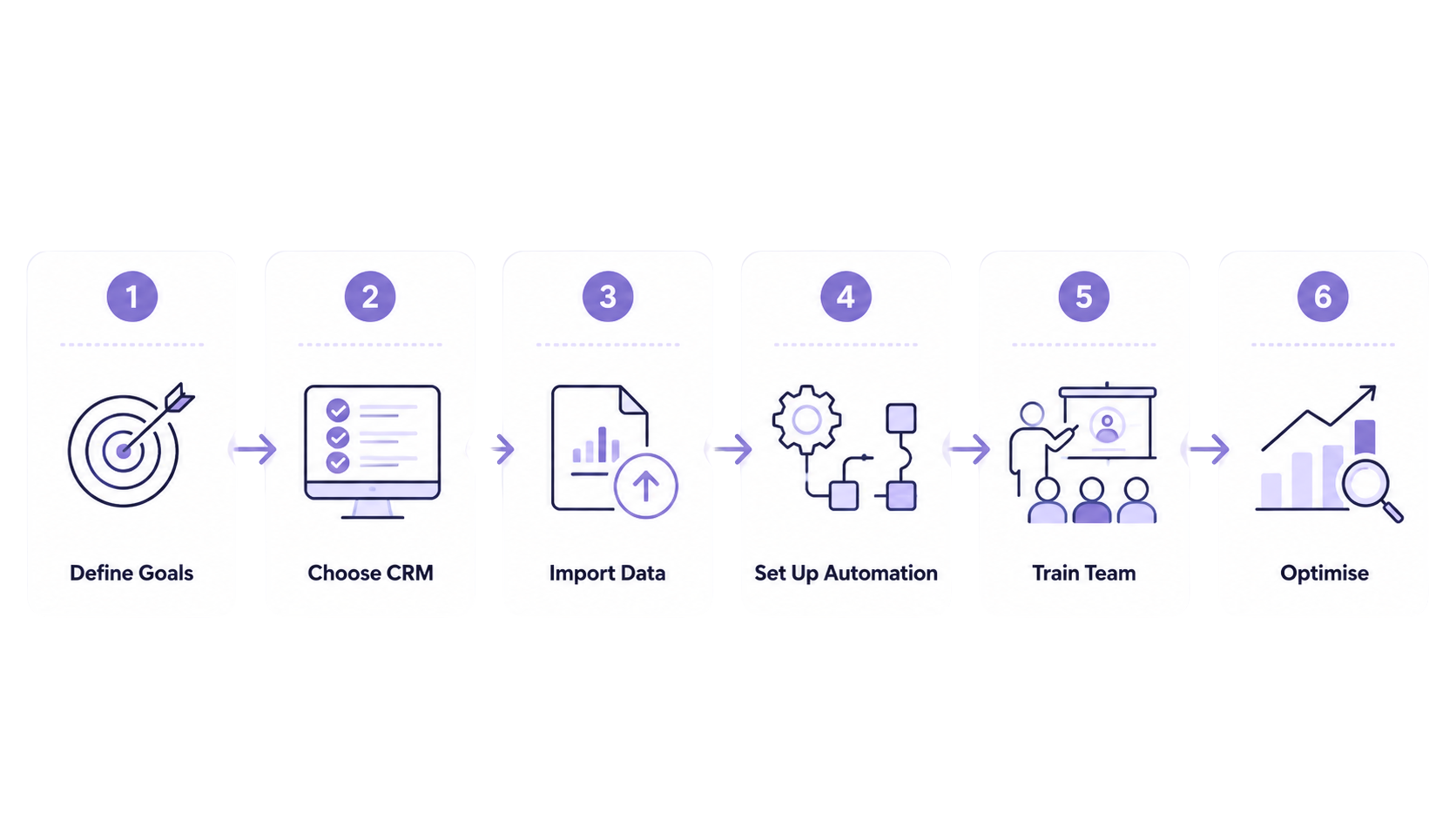
Most banking and NBFC teams can get a cloud-based CRM running within four to eight weeks. The timeline depends on team size, data migration volume and the number of integrations required.
Start by identifying what your banking CRM software should solve — do you want to track customer interactions better, improve customer retention, streamline processes, or gain deeper insights into customer behaviour?
Pick a CRM system built for banking organisations — one that enables banks to store customer data securely, record customer notes, manage customer profiles, and offer personalised services at scale.
Clean, migrate, and structure all customer account data from spreadsheets or other banking software programs into a unified system. This step ensures data management is accurate and ready for automation.
Modern CRM systems allow you to:
Train teams to use the CRM platform to foster client relationships, track customer contacts, and stay updated on every customer interaction — whether online, over the phone, or at the local bank branch.
Use the CRM to identify trends, segment existing customers, and launch future marketing efforts that are hyper-personalised. In a customer-centric industry like banking, this is what drives long-term loyalty.
A banking CRM is useful for any bank, NBFC or financial services team that handles daily inbound leads, relationship management calls, WhatsApp follow-ups or cross-sell workflows. If leads are being lost in spreadsheets, follow-ups are being missed or managers cannot see the pipeline without asking their reps, a CRM is the right next step.
For teams considering telecrm, a product walkthrough can show how it fits a specific banking or NBFC workflow, Book a demo with us today!
CRM in banking is software that helps banks and financial institutions manage customer relationships, track interactions, automate follow-ups, segment customers, and improve sales or service workflows.
Banks need CRM software to maintain customer context, improve service quality, support relationship managers, automate reminders, manage leads, and track customer journeys across branches and teams.
A banking CRM should include customer interaction history, call tracking, WhatsApp or message workflows, segmentation, automation, secure document storage, audit trails, custom integrations, and reporting.
telecrm can be useful for banking, NBFC, and financial-services teams that need calling, WhatsApp follow-ups, lead management, customer segmentation, automation, and reporting. It is a CRM layer, not a core banking system.
telecrm Core CRM starts at ₹1,099/user/month quarterly or ₹799/user/month annually.
CRM stands for Customer Relationship Management. In banking, it refers to software that helps banks and NBFCs store customer profiles, track every interaction, automate follow-up messages and reminders and give relationship managers a complete view of each customer account.
A customer calls to block their ATM card. The RM sees in the CRM that the customer’s credit card is also nearing expiry. They resolve the ATM issue and offer a card renewal in the same call — using interaction history already stored in the CRM.
For Indian banks and NBFCs, telecrm and LeadSquared are the most India-ready options. telecrm suits telesales-driven teams handling WhatsApp and calling workflows. LeadSquared suits larger BFSI organisations needing end-to-end automation across sales, onboarding, servicing and collections.
Yes. A CRM built for Indian banking teams can log phone calls, record conversations, capture WhatsApp messages and show every interaction in a single customer timeline. telecrm supports this natively for banking and NBFC sales and relationship management teams.
No. Core banking software manages accounts, transactions and ledgers. A CRM manages customer relationships, sales follow-ups and communication history. Banks typically use both — core banking for operations and a CRM for customer engagement, lead management and relationship tracking.



© Copyright 2026 telecrm.in (Flamon Cloudtech Pvt Ltd) - All Rights Reserved • Privacy Policy • T&C



© Copyright 2026 telecrm.in - All Rights Reserved • Privacy Policy • T&C