

A healthcare insurance CRM helps insurance providers manage leads, policy enquiries, claims, renewals, follow-ups, customer communication and team activity from one central system. It improves customer engagement by keeping every interaction visible, helping agents respond faster and supporting policy sales with timely reminders and personalised communication.
When people reach out for healthcare insurance, they expect timely answers and clear guidance before buying a policy.
Yet many providers often struggle to give replies on time and keep the lead history handy, along with all the details needed to clear their doubts, which weakens customer engagement.
The main reason is that when data and communication are scattered across multiple tools like spreadsheets, chat apps and call logs. Connecting the dots between them becomes an additional challenge in itself. As a result, teams lose clarity on which leads to prioritise, what was last discussed and when to follow up.
This lack of coordination often causes customers to lose interest or turn to other providers — directly impacting policy sales.
But a healthcare insurance CRM fixes this by bringing every interaction, policy updates and administrative tasks into one system so your teams act fast and maintain steady contact. It really makes engaging new leads and policy conversions simple.
In this guide, you’ll discover how a healthcare insurance CRM helps you engage better, boost policy sales and strengthen customer trust that lasts well beyond a single policy term.
A healthcare insurance CRM is a centralised platform that helps health insurance teams manage customer interactions, policy enquiries, renewals, claims, documents, follow-ups and after-sales service from one system.
It enables insurance companies to predict the renewal patterns, identify cross-sell opportunities(like health+life insurance cover) and personalise communication based on each policyholder’s health and claim history.
So you are actually able to guide each customer through their journey, knowing when to follow up, when to remind them about renewals and when to suggest additional coverage that genuinely benefits them. This way, customers feel supported, not ignored or overwhelmed.
Note here that many insurance and healthcare professionals often confuse a CRM with an AMS. Although both are useful, they serve different purposes. It is important to understand how each system differs so you can select the right solution for your organisation and create smoother coordination across teams.
A healthcare insurance CRM provides a way to truly understand and guide your customers through every step of their journey. It captures every interaction, question and update, giving you a complete picture of who your customers are, what they need and when they need it.
An AMS, on the other hand, is all about what happens behind the scenes. It manages policy records, commissions, accounting and compliance. It ensures operations run smoothly, but it doesn’t give your team the tools to engage customers or guide them through their policy journey.
In simple terms, an AMS manages internal insurance operations such as policy records, commissions, accounting and compliance, while a healthcare insurance CRM manages customer relationships, communication, follow-ups and engagement across the policy journey.
Engaging customers and selling policies becomes far easier when the right features are in place. Here’s what you get with a good healthcare insurance CRM solution:
A healthcare insurance CRM should include lead tracking, automated follow-ups, policy tracking, claims management, renewal alerts, client communication, quote generation, document management, analytics, integrations, compliance tracking, segmentation, collaboration and data security.
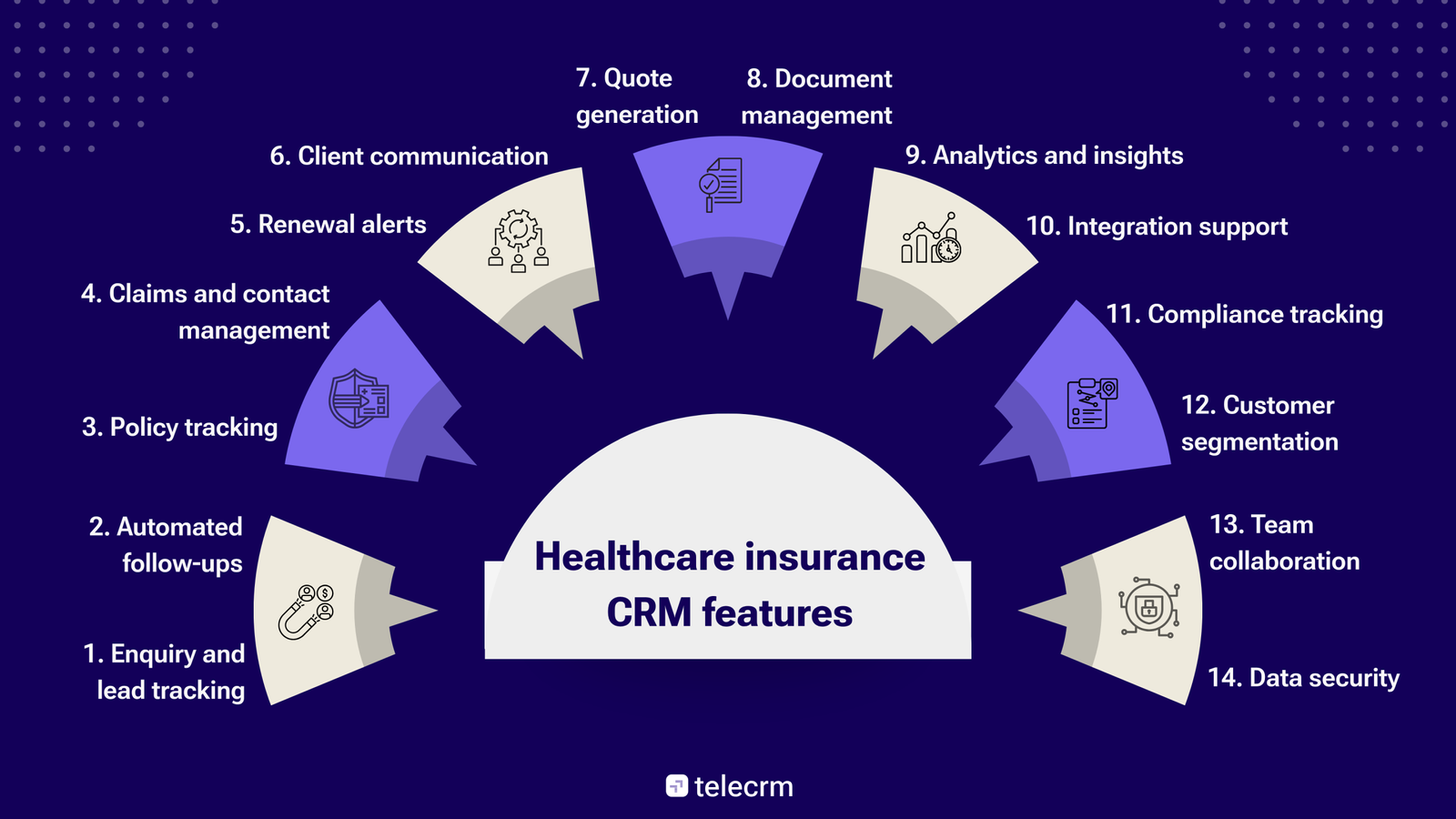
Track every new policy enquiry in one place. Whether leads come from calls, emails, WhatsApp or your website, the CRM automatically captures and organises them for quick follow-up.
Reduce missed customer interactions with timely reminders for new enquiries, renewals and pending documents, helping your team stay consistent without manual effort.
View complete policy information at a glance. You can monitor policy status, coverage details and expiry dates in real time to manage renewals and updates efficiently.
Handle claim requests smoothly from submission to approval. Keep records organised and customers informed throughout every stage of the claims process.
Get automatic alerts for upcoming policy renewals. This helps your team reach out in advance and prevent accidental lapses.
Related Read: Top Ways to Boost Insurance Policy Renewal with Automation in 2025
Communicate directly with clients via calls, WhatsApp or SMS from within the CRM. All messages and call logs are stored in one place for easy reference.
Create personalised insurance quotes in seconds. The system automatically applies client details and eligibility criteria to generate accurate proposals.
Store all key documents securely, including KYC forms, medical reports and policy papers. Quick access ensures smoother verification and compliance.
Get a clear view of performance with built-in dashboards. Track sales metrics, monitor conversion rates and identify growth opportunities using real-time data.
Connect the CRM with your existing accounting, marketing and healthcare tools. This ensures smooth data flow and unified operations across departments.
Stay audit-ready with logged activities, role-based permissions and organised records that help teams meet healthcare and insurance compliance requirements.
Group clients by policy type, renewal date or demographics to tailor communication more effectively. This allows agents to send personalised offers that strengthen engagement and retention.
Enable teams to work together in real time. Sales, marketing and support can share updates, assign tasks and coordinate efficiently, improving the overall customer experience.
Safeguard sensitive customer data with strong encryption and multi-level access controls. The system ensures that only authorised users can view or modify information, maintaining full compliance and protecting client trust.
The biggest healthcare insurance CRM challenges are disconnected systems, delayed follow-ups, weak long-term engagement, limited performance insights, compliance risks, poor team coordination, complex policy customisation and inefficient claim communication.
In many healthcare insurance teams, information still sits across different tools and spreadsheets. Agents spend valuable time piecing together details just to understand a customer’s status, and even then, they rarely get the full picture.
This lack of visibility slows responses and increases errors.
A healthcare insurance CRM makes every policy, conversation and claim update visible in a single customer view. So agents can see the entire customer journey at once and ensure every customer interaction is based on complete, accurate information.
In most insurance setups, follow-ups depend on manual tracking. Agents make notes or set reminders, but when workloads rise, callbacks and responses slip through. Customers waiting for quotes or claim updates often lose interest and move on, leaving sales teams unaware of missed opportunities.
With a healthcare insurance CRM, every follow-up is automated and tracked. When a new enquiry arrives, the system schedules reminders and assigns tasks. Agents know exactly who to contact and when, while managers can see which leads need attention.
Many providers do well at winning new clients but struggle to maintain contact after the first policy is sold. Without regular communication or renewal reminders, customer relationships can easily fade. And this lack of ongoing engagement reduces renewal rates.
But with a healthcare insurance CRM, agents can track renewal dates and conversation history in one place. They can reach out to customers with relevant updates or reminders. Over time, this consistent engagement builds trust and encourages repeat business.
Also read: Insurance Policyholder Engagement: The Key to Customer Satisfaction and Retention
Insurance teams often make decisions based on intuition rather than data. Managers cannot easily see which products sell best, which agents close the most renewals or where customers drop off.
Without clear insights, it’s hard to improve sales performance or customer engagement.
A healthcare insurance CRM changes that with detailed reports and dashboards. It tracks conversion rates, claim resolutions and agent performance in real time. Managers can identify strong areas, find what needs improvement and make evidence-based decisions that drive better outcomes.
Healthcare insurance operations handle sensitive personal and medical information every day. When data is shared through emails, spreadsheets or unsecured storage, it increases the risk of leaks and non-compliance with data protection laws.
But a health insurance CRM secures data storage within a controlled system. Access is permission-based, all activities are logged and files are encrypted. Teams can share or retrieve information safely while staying compliant with regulatory standards.
This not only protects customer trust but also reduces the risk of costly security breaches.
In many insurance operations, sales, support and marketing teams work on separate tools. Sales may not know if support has resolved a client query and marketing might send offers that don’t align with a client’s policy. This creates confusion and inconsistent experiences for customers.
A healthcare insurance CRM connects all teams on one platform with shared dashboards. This allows every department to see client interactions in real time. Teams can coordinate follow-ups, share updates and deliver consistent communication that improves policy sales.
Insurance policies are rarely standard. Variations in coverage, premiums and eligibility rules make it easy for agents to recommend incorrect plans when handling them manually. Errors here can result in client dissatisfaction.
However, a healthcare insurance CRM simplifies policy management by storing templates and automating eligibility checks. Agents can quickly match the correct plan to each customer, ensuring accurate, tailored recommendations every time and reducing mistakes in policy issuance.
Customers often do not know the status of their claims or which documents are missing. This lack of transparency causes repeated inquiries and thus increases the workload for support teams.
A healthcare insurance CRM centralises claim tracking and communication. Teams can update claim statuses in real time, notify customers automatically and maintain a clear record of pending documents. This cuts back on unnecessary calls, improving trust in the claims process.
Also Read: 17 Best Insurtech Companies in India Transforming the Insurance Industry
A CRM plays an important role in how healthcare providers manage customers and policies.
With growing competition and higher customer expectations, using the right insurance CRM system has become essential for better operational efficiency and service quality.
The main benefits of healthcare insurance CRM are smoother customer journeys, faster policy conversions, stronger data control, better team efficiency, smarter decisions, long-term customer trust, streamlined policy administration, improved claim handling, agent performance tracking and system integrations.
Customers expect agents to know their history and respond quickly. A CRM gives a complete view of each client, including previous queries and active policies. This means agents can answer questions accurately without making the customer repeat information.
Having all interactions in one place also helps maintain consistency. Every email, call or message can be tracked, so clients experience a seamless, personalised journey from the first enquiry to policy renewal.
In insurance, the right response at the right time can make the difference between a lead and a sale. A CRM highlights which prospects need follow-ups and when, ensuring no opportunity is lost.
It also streamlines quote preparation by storing client details and policy options in one place, allowing agents to respond quickly with accurate information. When clients get fast, accurate responses, they are more likely to commit. And this improves conversion rates and increases overall sales.
Healthcare insurance deals with sensitive data. A CRM tool helps you manage health and financial information securely while staying compliant with insurance and data protection standards.
You can:
Your team works better when everyone has clarity.
CRM software takes care of repetitive work so your agents can focus on helping customers instead of juggling calls or messages.
It also clearly assigns tasks to reduce confusion. Agents always know their responsibilities, which improves productivity and prevents delays in customer communication.
Managers need accurate insights to guide business growth strategy.
So a CRM helps in:
Having this data in real time allows managers to spot trends and make informed decisions. They can identify which products are performing well and adjust team focus accordingly.
Customers remember how you make them feel. With a CRM, you can stay connected even after a policy is sold and show that you value long-term customer satisfaction.
But how?
CRM allows you to send helpful reminders and offers; Assist during renewals and claims; Collect and act on feedback; Run targeted retention campaigns
Managing policies manually takes time and increases the chance of error. A CRM simplifies this by handling the entire policy lifecycle automatically.
It helps insurance teams monitor policy status from issuance to renewal, reducing missed deadlines. In addition to this, automated alerts notify agents of upcoming expiries, ensuring nothing is overlooked. This keeps clients informed and policies up to date without extra effort.
When a claim arises, speed and transparency matter most. A CRM allows agents to monitor each claim’s progress in real time.
Clients receive instant notifications for status changes, which reduces uncertainty and the number of inbound inquiries. This speeds up the process and improves satisfaction.
Knowing how your team is performing helps you guide them better. A healthcare CRM software monitors conversion rates, response times and lead management for each agent.
Managers can identify who needs support and who excels, enabling targeted coaching and recognition. This improves overall team effectiveness and morale.
As we have already discussed, disconnected tools slow operations. So one can always link a good CRM with their existing tools, such as billing, medical or policy systems. This not only saves time but also ensures the following two major aspects:
With so many CRM systems in the market, it’s easy to feel unsure about which one fits your insurance business best.
These healthcare insurance CRM solutions were selected based on lead management, policy tracking, renewal reminders, claims communication, document handling, reporting, integrations, compliance support and suitability for insurance teams of different sizes.
telecrm helps healthcare insurance providers manage leads, policies and customer communication from one central hub. It allows teams to build stronger connections with clients through faster responses and personalised interactions, ultimately improving conversion rates and renewals.
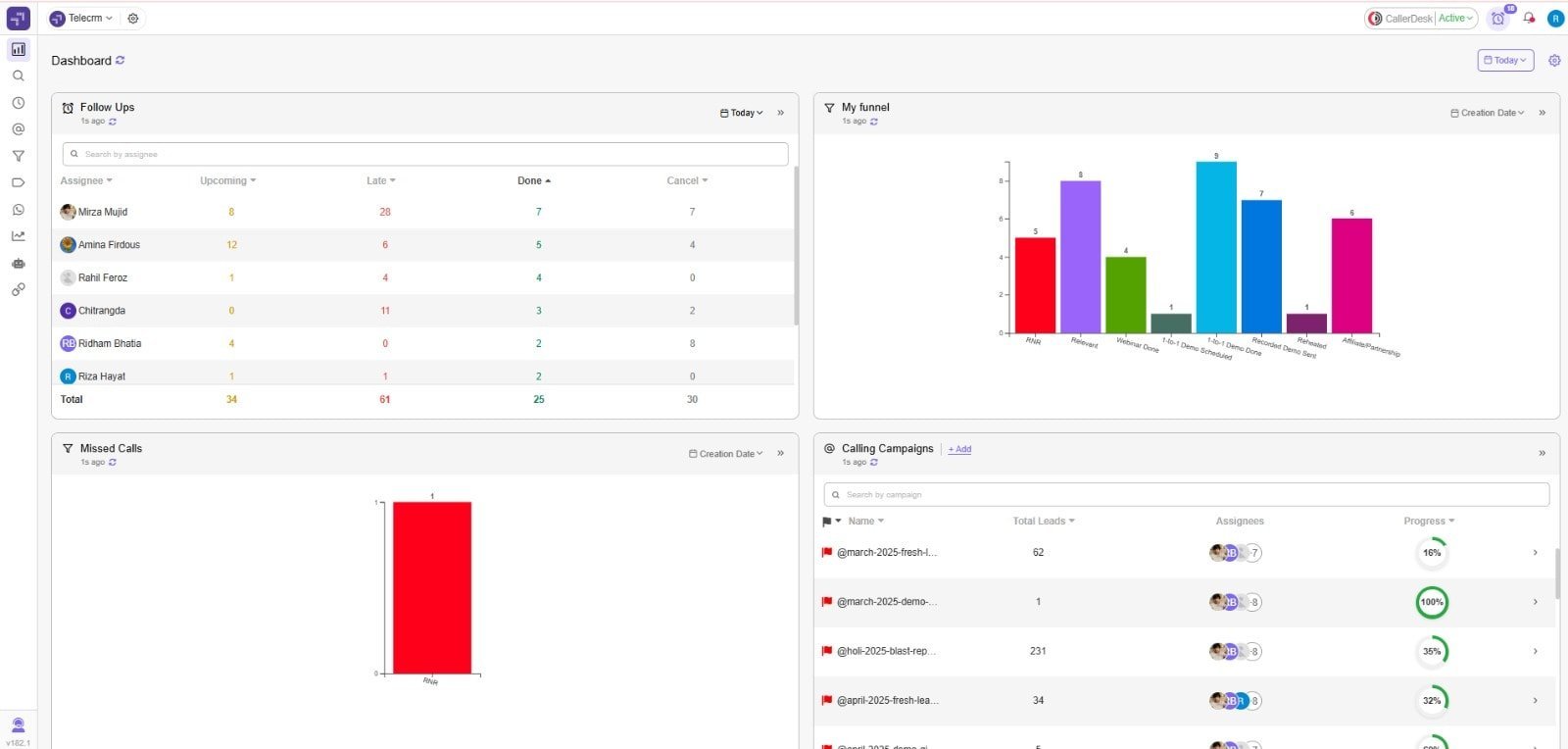
telecrm helps healthcare insurance providers manage contacts, documents, WhatsApp communication, policy workflows, lead capture, pipeline visibility, follow-up reminders, call tracking, conversation insights, performance dashboards, team collaboration and mobile access from one CRM.
Book a free demo now or see complete details about telecrm here.
HubSpot‘s CRM for insurance agents delivers a unified view of policyholders and supports marketing, sales and service teams together for better patient engagement.
Key features include:
See complete details about Hubspot.
Bigin by Zoho CRM is focused on smaller healthcare teams or agencies. It offers simplicity with the necessary tools for insurance workflows and patient data management.
Key features include:
See complete details about Bigin.
LeadSquared provides a CRM platform geared toward insurance lead management, renewals and digital sales across multiple channels with a focus on improving patient satisfaction.
Key features include:
See complete details about LeadSquared.
Salesforce offers a comprehensive suite aimed at large insurers and agencies, harmonising front-end healthcare CRM system with back-office policy and claims workflows.
Key features include:
See complete details about Salesforce.
Getting started with a healthcare insurance CRM may seem complex at first, but with the right approach, it can be a smooth transition. A structured plan helps you avoid disruptions, ensures staff adoption and brings faster results.

To implement a healthcare insurance CRM, assess business needs, choose the right CRM, plan data migration, customise workflows, train the team, integrate existing systems, monitor performance and maintain data security and compliance.
Take a look at the step-by-step process to help your company implement it successfully:
Start by understanding your company’s unique requirements. Are you aiming to improve customer engagement, streamline renewals or track policy sales more effectively? Pinpointing the primary goals ensures the CRM you choose actually manages customer relationships efficiently.
Selecting a CRM built specifically for healthcare insurance is critical. telecrm, for example, is designed to handle insurance workflows with features like automated renewals, lead management and HIPAA-compliant data handling.
Look for a CRM provider who offers:
Focusing on a tool tailored for insurance ensures that your team can leverage features that match everyday processes, rather than adapting workflows to generic software.
Clean, accurate data is the foundation of any CRM implementation. Reviewing existing records helps prevent duplicates, outdated information or errors from being transferred during data entry.
Start with small batches to test:
Every insurance company operates differently. A CRM should adapt to your workflow, not the other way around. Customisation ensures agents can work efficiently without breaking their usual processes.
Key customisation areas:
telecrm supports these adjustments smoothly, letting each team access the information they need without clutter.
Even the best CRM fails if staff do not use it properly. Training builds confidence and ensures adoption.
A CRM adds the most value when it connects seamlessly with billing, policy and marketing platforms. Integration eliminates duplicate work and ensures real-time data consistency.
Once the CRM is live, monitoring ensures it drives real results. Track how teams update leads and complete follow-ups to spot bottlenecks.
Key focus areas include:
Since healthcare insurance involves sensitive data, maintaining strict security is crucial. Regular checks and updates help keep your CRM safe and compliant while securely syncing with electronic health records.
So you must:
The day-to-day struggles for any health insurance agent include missed follow-ups and fragmented client interactions, which make it difficult to keep customers engaged.
These gaps directly slow down policy conversions and further renewals.
Choosing the right healthcare insurance CRM helps teams centralise leads, messages, calls, policy updates, renewals and customer follow-ups. With telecrm, healthcare insurance providers can respond faster, follow up consistently, use WhatsApp automation and keep every customer interaction visible in one dashboard. Book a free demo with telecrm today.
A healthcare insurance CRM is a centralised platform that helps health insurance teams manage customer interactions, policy enquiries, renewals, claims, documents, follow-ups and after-sales service from one system.
A healthcare insurance CRM should include lead tracking, automated follow-ups, policy tracking, claims management, renewal alerts, client communication, quote generation, document management, analytics, integrations, compliance tracking, segmentation and data security.
A CRM helps healthcare insurance providers improve policy sales by capturing enquiries, tracking conversations, sending timely follow-ups, managing quotes, reminding agents about renewals and giving managers visibility into conversion performance.
telecrm helps healthcare insurance teams manage leads, documents, WhatsApp communication, policy workflows, follow-up reminders, calls, dashboards, team collaboration and mobile access from one CRM.



© Copyright 2026 telecrm.in (Flamon Cloudtech Pvt Ltd) - All Rights Reserved • Privacy Policy • T&C



© Copyright 2025 telecrm.in - All Rights Reserved • Privacy Policy • T&C