
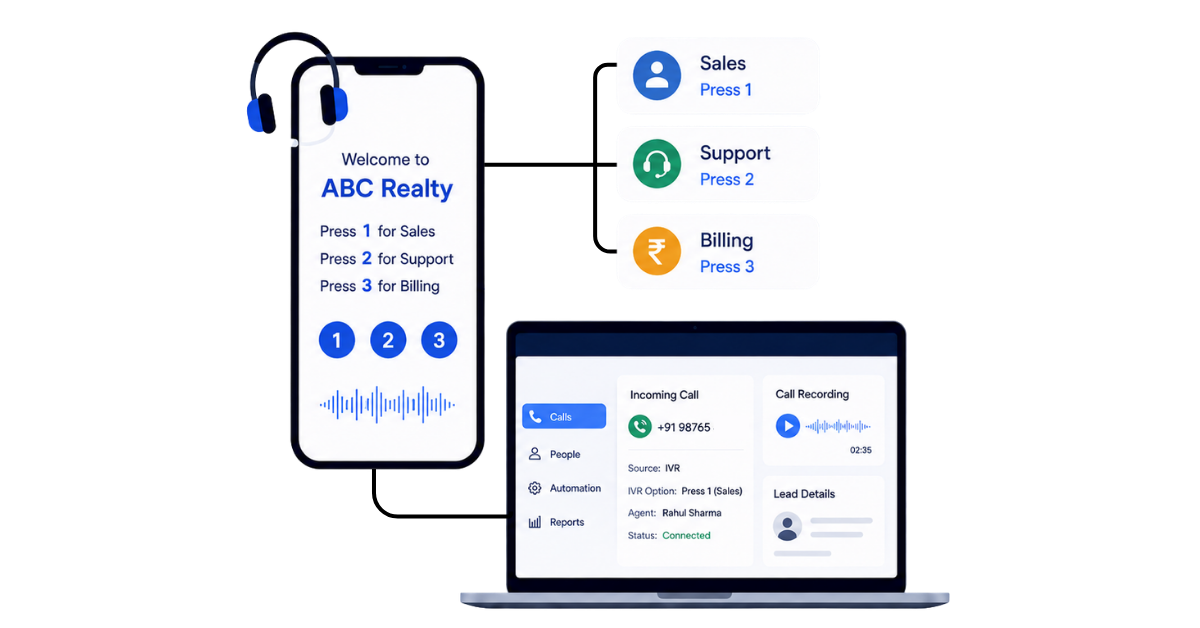
An IVR should help customers reach the right person faster. But if the IVR set up is done poorly, it can do exactly the opposite.
A long greeting makes callers wait. Too many menu options make them guess. Incorrect routing sends them from one team to another. And if nobody answers, the enquiry may disappear without anyone knowing it was missed.
That is why setting up IVR is less about recording a “Press 1 for sales” message and more about deciding what should happen at every stage of the call.
You need to get a few things right: the call flow, menu options, routing rules, fallback handling and call tracking. This guide will take you through the common IVR setup problems first, show you how to avoid them and then walk you through the actual configuration.
An interactive voice response system, or IVR system, is a phone system that automatically interacts with people calling a business and determines what should happen to each incoming call. It uses voice prompts, an IVR menu and predefined routing logic to collect caller input before connecting the caller to the right person, department or next step. Instead of every customer call first reaching a human operator, the IVR becomes the first layer of the call flow.
Caller input is commonly collected through keypad inputs, such as “Press 1 for sales” or “Press 2 for support”. These inputs use dual-tone multi-frequency (DTMF) signals generated by the phone keypad. More advanced IVR systems can also use voice recognition or voice commands, allowing callers to state what they need rather than moving only through automated menus.
Once the system understands the caller’s requirement, its call routing rules determine where to route the call. It may send the caller to the correct department, a particular agent, a call queue or another level of a multi-level IVR.
Here’s a quick overview of how does IVR work:
Also read: Virtual Phone Number India: Why Your Business Needs One
Before you start configuring your IVR setup, map the complete call journey on a whiteboard or sheet of paper. You should be able to see where a caller enters, what choices they hear and where each choice eventually leads.
Start with the simplest version: Incoming call → greeting → menu option → department → agent. Do this before recording prompts or configuring routing rules.
Choose the language your customers are most comfortable with. For Indian businesses, this may mean English, Hindi or a regional language, or giving callers a language choice at the beginning.
Look at your actual incoming calls and identify the most common enquiries, prioritizing the main menu paths around the most frequent customer needs and customer questions. Typical options may include new sales enquiries, existing customers, billing or payments, support and appointments.
Keep the IVR menu short and based on customer intent. Prompts should be written for listening, not reading. For example: Press 1 for sales, Press 2 for existing customers, Press 3 for billing and Press 4 for support, using conversational wording instead of corporate jargon for an effective IVR system. Where relevant, a menu option can also lead to direct self-service for simple tasks such as bill payments.
Map every menu option to the correct department, agent or call queue. Then decide how calls should be distributed when more than one salesperson is available.
Decide the fallback before going live. The call may move to another agent, a backup team, voicemail or a missed-call workflow that creates a follow-up.
Also read: Auto Dialer Vs Manual Dialer: Key Differences & Tools To Use
To set up an IVR system, you first need a cloud telephony or IVR provider that provides the calling infrastructure, virtual number and call-routing controls.
Depending on your requirements, you can choose from IVR providers such as CallerDesk, TeleCMI, MCube or Knowlarity. The provider handles the telephony layer, while you configure how incoming calls should move through your business.
Once you have selected a provider, the setup is fairly straightforward.
Choose the business or virtual number customers will call and activate it through your IVR provider.
This number will serve as the entry point for all incoming calls and needs to be connected to the call flow you create inside the provider’s dashboard.
Configure what should happen from the moment a call reaches your number.
Add your greeting, menu options and any language selection you want callers to hear. Keep the flow aligned with the menu and caller journeys you planned earlier.
Map each IVR option to the relevant department, agent or call queue.
Then choose how calls should be distributed within that team, such as sequential routing, round-robin routing or routing to available agents.
Define how long a call should ring before moving to the next destination.
Configure fallback routing for situations where an agent is busy, unavailable or does not answer so the call does not simply disconnect.
Set different routing behaviour for working hours, after-hours, weekends and holidays.
Decide whether unavailable calls should move to another team, voicemail or a callback process.
Call the IVR number from an external phone and test every route before making it public. Check the menu, routing, agent availability, fallback behaviour, missed calls and after-hours flow to make sure the complete journey works as intended. At this point, your IVR system is set up to receive and route incoming calls.
But routing calls correctly is only one part of managing business calls. You also need a system to track who called, who answered, which calls were missed, where recordings are stored and what follow-up needs to happen next. That is where connecting your IVR with a CRM becomes important.
At this point, your IVR provider is already handling the telephony side of the setup: receiving the call, playing the IVR menu, routing it to the right agent and generating the relevant call data.
Connecting it with telecrm adds the sales context around that call. Instead of the call remaining only inside your IVR dashboard, it can be connected with the lead, salesperson, interaction history and follow-up process. telecrm currently supports IVR integrations with providers including CallerDesk, TeleCMI, Tata Tele, MCube, Knowlarity and Maqsam.
Start by selecting and connecting your existing IVR provider with telecrm.
The exact connection process depends on the provider. You may need credentials or configuration details from your IVR account to establish the integration.
Once connected, the IVR system and telecrm can exchange the relevant call information.
Match the agents or extensions in your IVR setup with their corresponding users in telecrm.
This is what allows an incoming call to be associated with the salesperson who handled it instead of appearing as an isolated telephony record.
Next, decide how telecrm should handle callers coming through the IVR.
For new callers, configure how the lead should be captured, assigned and categorised. For an existing lead, keep the incoming call connected with the same lead history so your team has the context of previous interactions.
telecrm is designed to keep customer interactions and lead history together rather than treating every interaction separately.
Configure the integration so the relevant call information from your IVR provider is available against the lead in telecrm.
Depending on the provider and integration, this can include call status, duration, agent details and call recordings.
The distinction here is important: the IVR provider handles the telephony and generates the IVR call data, while telecrm brings that activity into the customer and sales context.
telecrm supports managing IVR interactions within the CRM alongside the rest of the customer history.
Once the call activity is available in telecrm, decide what your team should do next.
You can use the lead and call activity to manage follow-up reminders, assignments, WhatsApp messages and other workflows. This is particularly useful for missed or unanswered calls, where the next action should not depend entirely on someone noticing the call inside the IVR dashboard. telecrm supports post-call workflows such as messaging and lead assignment alongside its calling features.
Finally, make a test call from an external number and follow the complete journey.
Check that:
You are not just testing whether the IVR works anymore. You are testing whether the complete flow works:
IVR receives the call → routes it → salesperson handles it → call activity reaches telecrm → lead history is updated → next action is managed
That is the main reason to connect your IVR with a CRM. The IVR manages the call infrastructure, while telecrm connects those calls with the rest of your sales process. See how telecrm can help you manage lead communication more efficiently:
Your IVR manages the call. Connecting it with a crm like telecrm turns that call into a complete sales workflow. Instead of calls, recordings, lead details and follow-ups sitting in different places, your team gets one connected system to manage the entire journey.
With telecrm, you get:
So instead of getting only a working IVR, you get a complete calling and follow-up system:
Call comes in → right agent answers → lead context is available → conversation is recorded → activity is tracked → follow-up is created → next action is clear
That is the additional layer a CRM brings to your IVR setup.
Many IVR systems fail not because of technology, but because of design mistakes and poor follow-up processes. Here are the most common errors:
On missed or unanswered IVR calls specifically:
Not reviewing call recordings or analytics is a silent killer. Set a weekly routine where managers listen to sample IVR calls, check hang-up points, review agent performance, and refine scripts. Regularly review IVR structure using contact center analytics to keep your system sharp.
Going live is not the end of your IVR setup. Once real customers start using it, the data will show where callers struggle, which routes work well and where the call flow needs improvement.
An IVR system can route incoming calls, but routing alone does not make the calling process effective. The real value comes when every call is connected with the right lead, salesperson and next action.
A well-planned IVR should make it easy for callers to reach the right team, handle missed calls properly and keep the entire interaction visible inside your CRM. With telecrm, IVR and cloud telephony can work alongside lead management, call recordings, follow-ups, automation and reporting in the same sales workflow.
So instead of stopping at “Press 1 for sales”, build a system that continues after the call is answered or missed. Want to see how telecrm can bring your IVR, calling and sales follow-ups together? Book a demo with us and see for yourself.
At minimum, you need a business phone or virtual number, an IVR or cloud telephony provider, voice prompts, menu options and agents or teams to receive the calls. If you want calls and customer information tracked together, you can also connect the IVR with a CRM.
There isn’t one fixed IVR setup cost in India because providers package numbers, agents, calling usage and IVR features differently. For reference, as of September 2026, Exotel lists its entry business-phone package at ₹9,999 for five months, while MyOperator lists its entry CPaaS plan at ₹5,000 per month billed annually. These are not like-for-like plans, but they show why comparing only the headline price can be misleading.
Your actual IVR cost can depend on:
When comparing providers, calculate the total cost for your expected call volume and required features rather than choosing only on the advertised starting price
A basic IVR with a few menu options and simple routing can usually be configured much faster than a complex multi-level system. The total setup time depends on the number of call flows, agents, languages, integrations and how much testing is required before launch.
Most modern business IVR systems are delivered through cloud telephony platforms, where the virtual number, IVR menu, routing and call records are managed online. Cloud platforms also make it easier to change call flows, add agents and integrate calling with other business systems.
Yes. You can create a multilingual IVR that lets callers select their preferred language before moving to the main menu. This can be particularly useful for Indian businesses serving customers across different regions.
Yes. Connecting IVR with a CRM can link incoming and missed calls with customer or lead records, depending on the telephony integration being used. telecrm supports IVR integrations alongside its calling and call-management capabilities, allowing calling activity to remain connected with the sales workflow.
Your fallback routing should determine what happens next. The system can try another agent, send the call to a backup call queue or voicemail and, when connected with a CRM, keep the missed call visible so the team can follow up.
Yes, provided your telephony setup has sufficient call capacity. Cloud IVR systems can route concurrent incoming calls across agents and call queues rather than forcing every customer through one phone line.
Yes. A small business can start with a simple IVR containing only a few options, such as sales, support and billing, and expand the call flow as volumes increase. Cloud telephony providers offer IVR and call-routing setups designed for smaller teams as well as larger contact centres.



© Copyright 2026 telecrm.in (Flamon Cloudtech Pvt Ltd) - All Rights Reserved • Privacy Policy • T&C



© Copyright 2025 telecrm.in - All Rights Reserved • Privacy Policy • T&C