


A WhatsApp auto reply message is an automated message that is sent when someone messages your business on WhatsApp. It helps you respond immediately to customer queries, even when your team is busy, offline or outside of business hours.
For example,if a customer sends a message post business hours, an away message can tell them that your team has received their query and will message them shortly. If someone contacts you for the first time, a greeting message can welcome them, share basic contact details and guide them to the next step.
You can set auto reply in the WhatsApp Business app using business tools like greeting messages, automated away messages, business hours and custom schedule. These basic auto replies are useful for small teams that want to save time, stay connected and maintain a better customer experience.
In this guide, we’ll explain what WhatsApp auto reply messages are, share ready-to-use auto reply messages for different business scenarios, show you how to set them up in WhatsApp Business and explain how telecrm helps you automate WhatsApp replies, follow-ups and lead tracking from one place.
There are different types of WhatsApp auto reply messages depending on when the customer messages you and what action you want them to take.
Some replies are used to welcome new customers. Some are used after business hours. Some are used for lead generation, support queries, appointment updates, payment reminders or customer feedback.
Here are the most useful types of WhatsApp auto reply messages for businesses.
A greeting message is sent when a customer messages your business for the first time or after a long gap.
It is useful for welcoming new customers, setting the right tone and giving them a clear next step.
Example:
Hi {{name}}, thanks for contacting us. We have received your message and our team will reply shortly. Please share your requirement so we can help you better.
This type of WhatsApp auto reply message works well for website enquiries, ad leads, new customer queries and general business communication.
An away message is sent when your team is not available to respond immediately.
This is usually used outside of business hours, during holidays or when your team is a bit busy.
Example:
Hi, thanks for your message. Our team is currently unavailable. We will get back to you during business hours. For urgent queries, please share your contact details and we’ll prioritise your request.
This helps customers know that their message has been received and gives them an estimated time frame for the next response.
A business hours auto reply is sent when someone messages your WhatsApp Business account outside the business hours mentioned in your profile.
It is especially useful for businesses that receive customer queries late at night, on weekends or during non-working days.
Example:
Hi, thanks for reaching out. Our business hours are Monday to Saturday, 10 AM to 7 PM. We have received your message and our team will reply once we are back online.
This keeps the communication clear and avoids the feeling that the message has been ignored.
A lead enquiry auto reply is sent when someone asks about your product, service, pricing or availability.
This is useful for sales teams because it acknowledges the enquiry instantly and helps move the lead into the sales funnel.
Example:
Hi {{name}}, thanks for your interest. We have received your enquiry and our sales team will contact you shortly. Meanwhile, please share your requirement, team size and preferred time for a call.
This type of auto reply is useful for lead generation campaigns, WhatsApp ads, website forms and other communication channels.
A support auto reply is used when customers message your business for help, complaints or service-related queries.
It confirms that the query has been received and tells the customer when they can expect support.
Example:
Hi {{name}}, we have received your support request. Our team is checking the details and will get back to you shortly. Please share your registered phone number or order ID so we can help faster.
This helps support agents save time and manage customer queries in a more organised way.
This auto reply is used when someone books a demo, consultation, appointment or meeting with your team.
It confirms the action and reduces confusion.
Example:
Hi {{name}}, your demo request has been received. Our team will confirm the available slot shortly. Please keep your phone available so we can connect with you easily.
This works well for clinics, real estate businesses, education companies, consultants and SaaS teams.
A missed call follow-up message is sent when a customer calls your business but the team is unable to answer.
It helps you reconnect quickly instead of losing the enquiry.
Example:
Hi {{name}}, sorry we missed your call. Please share how we can help and our team will get back to you shortly.
This is useful for businesses where calls and WhatsApp messages are both important parts of customer communication.
This auto reply is used when customers ask about their order, booking, delivery or service status.
Example:
Hi {{name}}, thanks for your message. Please share your order ID or booking details and our team will update you shortly.
This keeps the message short, clear and useful without overcomplicating the conversation.
A payment reminder auto reply is useful when customers need to complete a payment, renew a service or confirm a pending transaction.
Example:
Hi {{name}}, your payment is still pending. Please complete it to confirm your booking. If you have already paid, kindly share the payment screenshot and our team will verify it.
This type of automated response is helpful for education, real estate, healthcare, travel and service-based businesses.
A customer feedback auto reply is sent after a purchase, service, demo, appointment or support interaction.
Example:
Hi {{name}}, thank you for choosing us. We’d love to know about your experience. Please share your feedback so we can keep improving our service.
This adds a personal touch and helps improve customer engagement.
You can set auto reply in the WhatsApp Business app using built-in business tools like greeting messages and away messages. These automated messages help you respond immediately when a customer messages your WhatsApp Business account during a particular time frame, outside of business hours or after a long gap.
Here is how to set it up.
Before setting up WhatsApp auto replies, make sure your WhatsApp Business profile is complete.
Add your:
This is important because your auto reply message should match the business hours mentioned in your profile. For example, if a customer message is received post business hours, your away message can clearly tell them when your team will reply.
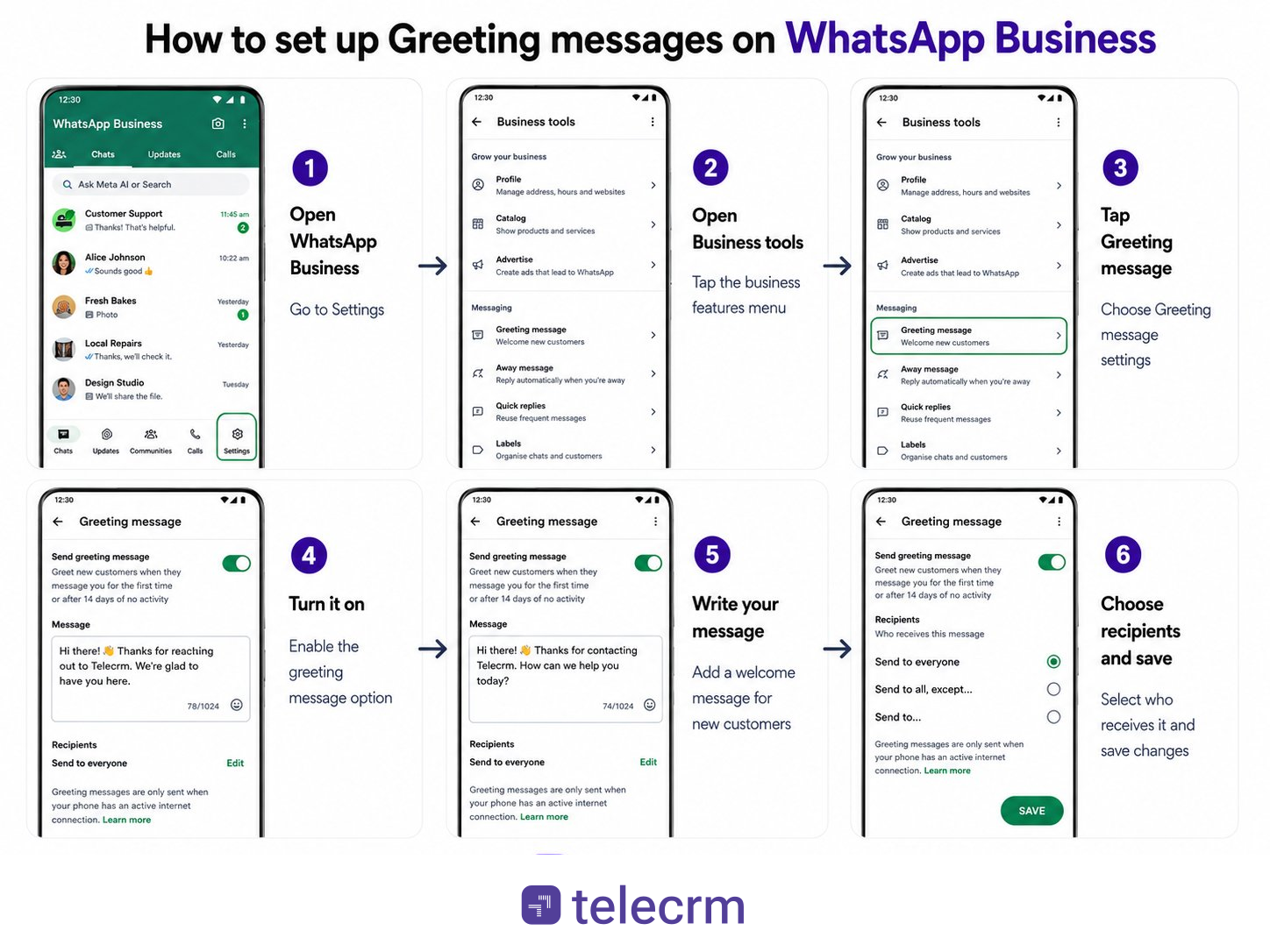
A greeting message is an automatic reply sent when someone messages your business for the first time or after 14 days of no activity. WhatsApp’s official help page says you can enable it from the Tools tab inside the WhatsApp Business app.
Steps:
Example greeting message:
Hi {{name}}, thanks for contacting us. We have received your message and our team will reply shortly. Please share your requirement so we can help you better.
This type of WhatsApp auto reply message is useful for new enquiries, lead generation campaigns, customer queries and first-time business communication.
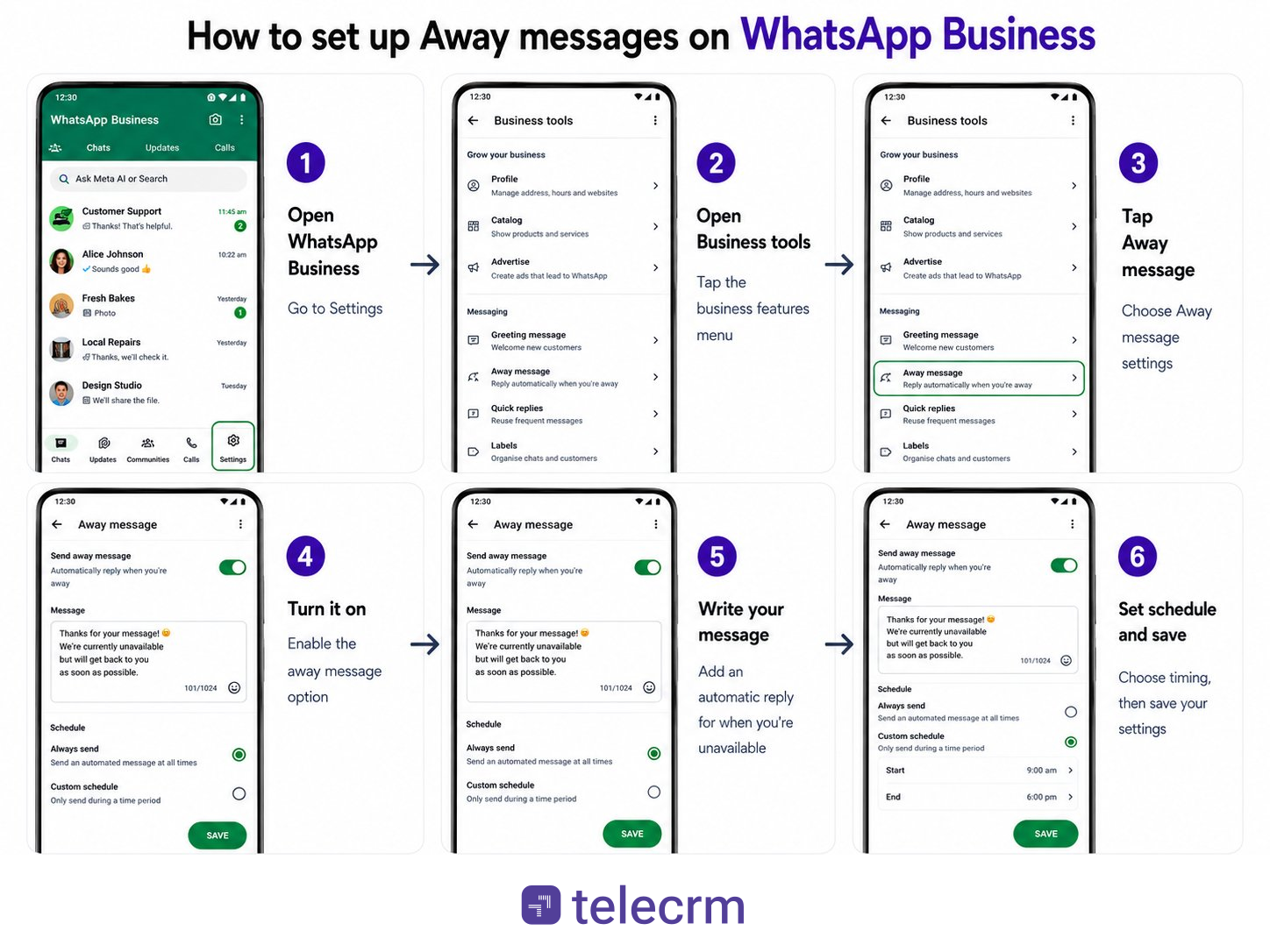
An away message is an automated away message sent when your team is unavailable, busy or outside business hours. According to WhatsApp’s official guide, you can turn on away messages from the Tools tab, edit the message, choose a schedule and select recipients.
Steps:
You can usually schedule the away message for:
A custom schedule is useful when you want to send automatic away messages only during a particular time frame. For example, during lunch hours, weekends, holidays or after office hours.
Example away message:
Hi, thanks for your message. Our team is currently unavailable. We have received your query and will reply during business hours.
This helps customers know that their message has not been ignored.
Quick replies are not fully automatic replies, but they help your team send messages faster. WhatsApp says quick replies let businesses create shortcuts for messages they send regularly to customers.
For example, instead of typing the same reply again and again, your team can type a shortcut like /pricing, /demo or /support inside the chat window and send a saved message.
Example quick reply:
Shortcut: /demo
Message:
Hi {{name}}, thanks for your interest. You can book a free demo here: {{demo_link}}. Our team will guide you through the next steps.
Quick replies are useful when support agents or sales reps handle repeated WhatsApp messages throughout the day.
The standard personal WhatsApp app doesn’t have a built-in auto-reply feature. However, if you are on Android, you can use highly-rated third-party apps from the Play Store like AutoResponder for WhatsApp or WhatsAuto.
(Note: iOS users on personal WhatsApp currently cannot auto-reply due to Apple’s strict privacy and background app restrictions.)
Also read: A Complete Guide on WhatsApp Blue Tick Verification Badge
Let’s take a quick look at how WhatsApp auto-replies help your business stay responsive, reduce lead drop-offs and improve the customer experience without adding extra manual work.
Reports show that 35% more customers respond quickly when businesses use auto-replies or chatbots for communication. Additionally, 95% of WhatsApp messages are seen within just 3 minutes, keeping the leads engaged.
Auto-replies can cut your support costs by up to 30% by automating routine queries like pricing, availability or booking confirmations. And that’s not all, they also help reduce cart abandonment significantly by sending timely follow-ups and nudges on WhatsApp when leads go cold or stop mid-way.
81% of consumers are willing to spend more with brands that offer good conversational experiences. WhatsApp auto-replies are the first step in creating that kind of consistent, instant and helpful engagement.
Basic WhatsApp auto replies are helpful when you want to acknowledge a customer message. But once your business scales and starts receiving leads from ads, website forms, landing pages, calls, IndiaMart, Justdial and other channels, simple auto replies are not enough.
Because replying is only one part of the job.
Your team also needs to know who the lead is, where they came from, what they asked, who is handling them, what was discussed on call, what was sent on WhatsApp and when the next follow-up is due.
That is where telecrm helps you automate WhatsApp replies, follow-ups and customer conversations from one place.
With telecrm’s WhatsApp chat sync, your team can sync WhatsApp conversations with the lead timeline.
So when a customer talks to your sales rep on WhatsApp, the chat does not stay hidden inside one person’s phone. It becomes part of the lead history inside telecrm.
This helps managers and team members see:
For example, if a lead asks for pricing on WhatsApp, then speaks to a sales rep on call and later shares documents on WhatsApp, all of this context stays connected to the same lead.
This improves customer experience because the customer does not have to repeat the same details again and again.
telecrm can also help businesses use WhatsApp flows to collect information in a structured way.
Instead of asking customers to type everything manually, you can guide them through a simple flow where they can select options, fill details and submit information directly on WhatsApp.
For example, a business can use WhatsApp flows to collect:
This is useful for lead generation because your team gets cleaner customer data before the first call.
For example, a real estate business can ask a lead to choose property type, budget and location. An education business can ask for course interest, intake month and preferred counselling time. A healthcare business can ask for appointment type and preferred clinic location.
This saves time for both the customer and your team.
Also Read: WhatsApp automation to learn how you can leverage WhatsApp to schedule automatic messages.
A WhatsApp chatbot helps answer common customer queries automatically.
Instead of making your team reply manually to every basic question, a chatbot can handle simple conversations and guide customers to the right next step.
For example, a chatbot can answer questions like:
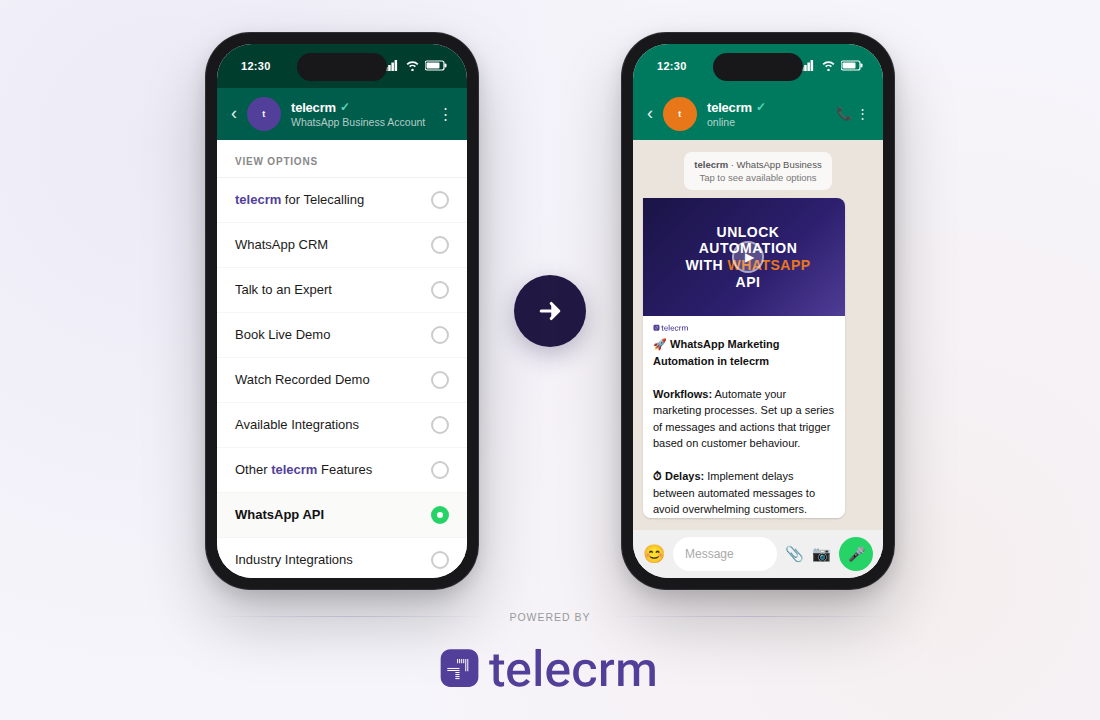
This helps your team save time and focus on high-intent leads instead of repeating the same answers again and again.
But the important part is this: the chatbot should not feel like a dead-end menu. It should help the customer move forward. With telecrm, chatbot conversations can be connected to lead tracking, follow-ups and team assignment so that every interested customer reaches the right person.
Button messages are useful when you want customers to take quick action without typing a full response.
Instead of sending a long message and expecting the customer to reply manually, you can give them simple clickable options.
For example:
Hi {{name}}, thanks for your interest. How would you like to continue?
Buttons:
This makes WhatsApp communication easier for the customer and cleaner for your team.
Button messages are especially useful for:
They reduce confusion because the customer knows exactly what to do next.
A basic auto reply can send one message. But telecrm can help you create a follow-up journey.
For example, when a new lead comes in, your team can send:
This is useful because most leads do not convert after one message. They need reminders, context and timely follow-ups.
telecrm helps businesses send automated WhatsApp messages based on the lead stage, customer action or follow-up status. This keeps the sales funnel moving without depending completely on manual reminders.
When leads come from multiple sources, they can easily get missed.
telecrm helps automatically capture and assign leads to the right sales rep based on your rules. This can be based on source, location, product, team, language, lead type or any other condition.
So when a WhatsApp enquiry comes in, it does not just sit in a chat window. It becomes a tracked lead inside telecrm.
Your team can see who owns the lead, when they followed up and what the next action is.
In many businesses, the customer journey does not happen only on WhatsApp.
A customer may first fill a form, then receive a WhatsApp message, then speak to a sales rep on call, then ask for details again on WhatsApp.
If these interactions are scattered across different tools, your team loses context.
telecrm brings calls, WhatsApp messages, notes, lead details, tasks and follow-ups into one timeline. This gives your team a complete view of every customer conversation.
So the next time a rep opens the lead, they know exactly what happened earlier and what needs to be done next.
For managers, the biggest problem is not just sending WhatsApp messages. It is knowing whether the team is actually following up.
With telecrm, managers can track:
This makes WhatsApp automation more useful because it is connected to sales tracking, not just messaging.
The goal of WhatsApp automation is not to make your business sound robotic.
The goal is to respond faster, guide customers better and make sure no enquiry gets missed.
With telecrm, you can automate WhatsApp replies, use chatbot flows, send button messages, sync WhatsApp chats, track follow-ups and still let your team step in when a real conversation is needed.
So your customer gets instant responses, and your team gets the full context to continue the conversation properly.
Auto-reply messages on WhatsApp offer a simple yet effective way to maintain continuous engagement with your customers, ensuring they always receive a timely response.
Auto replies are mainly of 3 types:
You can set only one greeting and away message at a time. On the other hand, you can set as many quick replies for different situations at the same time.
That covers everything you need to know about setting up WhatsApp auto reply messages. If you want to take it a step further, telecrm lets you set up advanced workflows, qualify leads automatically and track every WhatsApp conversation in one place. Book a demo to see how it works for your business.
Yes, you can set an auto response on WhatsApp using the WhatsApp Business app. It lets you create automated messages like greeting messages and away messages, so customers get an instant reply when they message your business.
However, the regular WhatsApp application does not have a built-in auto-reply feature. For auto replies, you need a WhatsApp Business account. Inside the WhatsApp Business app, you can go to Business tools, select Greeting message or Away message, turn on the toggle button and write the reply message you want to send.
This is useful when your team is busy, outside of business hours or unable to respond immediately.
To create an auto message on WhatsApp Business:
The best WhatsApp auto reply is short, clear, helpful and tells the customer what happens next. It should acknowledge the message, set the right expectation and still feel human.
Here is a simple WhatsApp auto reply message you can use:
Hi {{name}}, thanks for reaching out. We have received your message and our team will get back to you shortly. Meanwhile, please share your requirements so we can help you better.
This works well because it confirms that the message has been received, gives the customer a next step and keeps the conversation open. For better results, customise it based on your business hours, brand voice and the type of customer query.
To automate WhatsApp messages on Android, you can use the WhatsApp Business app to set up auto-replies for all incoming messages.
If you require more advanced automation, such as sending messages based on triggers or events, you’ll need to use WhatsApp Business API along with a third-party automation tool or service that integrates with it.
Yes, you can automate WhatsApp messages in two ways: through the WhatsApp Business app or through the WhatsApp Business API.
The WhatsApp Business app is useful for basic automation like greeting messages, away messages and quick replies. These help you send automatic replies when customers message you during a particular time frame or outside business hours.
But if you want to send automated messages at scale, create WhatsApp flows, use chatbots, send button messages, automate follow-ups or connect WhatsApp with your CRM, you need a more advanced setup using WhatsApp Business API or a CRM like telecrm.
With telecrm, you can automate WhatsApp replies, sync WhatsApp chats with lead timelines, assign leads to your team and track follow-ups from one place.



© Copyright 2026 telecrm.in (Flamon Cloudtech Pvt Ltd) - All Rights Reserved • Privacy Policy • T&C



© Copyright 2026 telecrm.in - All Rights Reserved • Privacy Policy • T&C