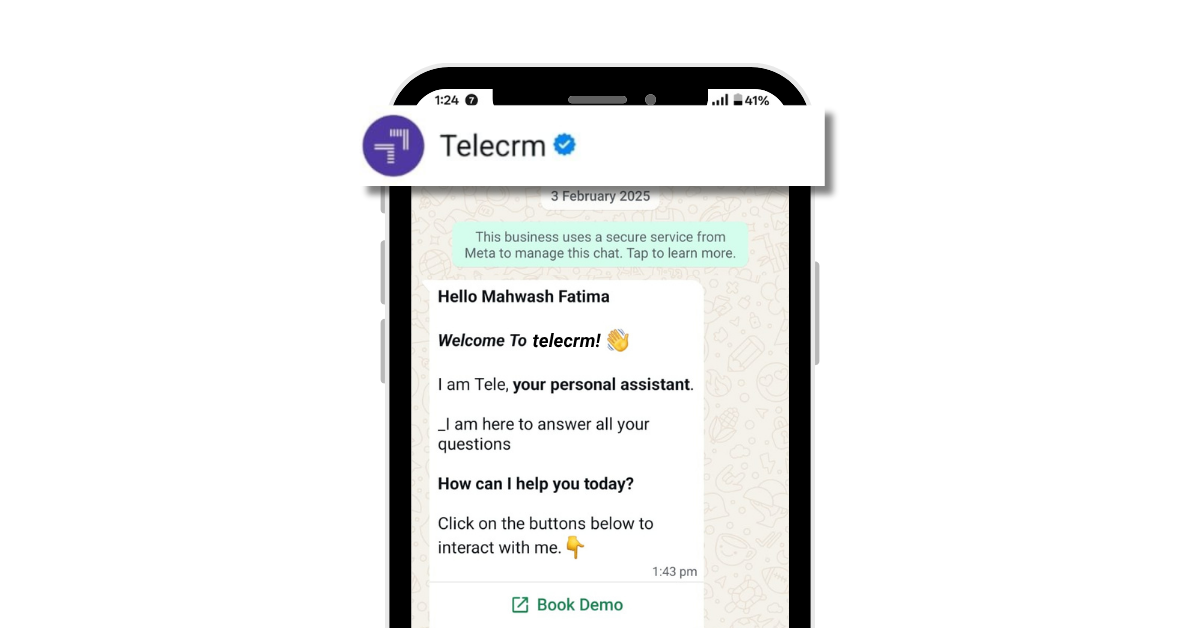
A Complete Guide on WhatsApp Blue Tick Verification Badge

  • What the WhatsApp blue tick really means
  • Two easy ways to apply for WhatsApp verification
  • Learn about the benefits of being Meta verified
a whatsapp blue tick verified whatsapp business
Table Of Contents

If you’ve been searching for how to get the WhatsApp blue tick for your business, you’ve probably landed on articles that all say roughly the same things — and have left you more confused than when you started.

This guide is different. It covers the two verification routes that exist in 2026, which one is right for your business, exactly what you need to apply, why applications get rejected and how to actually use the verified badge to drive better sales outcomes.

Let’s start with the one thing most guides get wrong.

There are two routes to the blue tick — and most blogs only cover one

In 2026, the WhatsApp blue tick is not a single programme. Meta now runs two completely separate verification paths and mixing them up is why so many Indian businesses apply for the wrong one and get rejected.

Meta Verified

Official Business Account (OBA)

Who it’s for

Any active WhatsApp Business account

API-based businesses with public notability

Cost

Paid subscription (pricing varies by region/tier)

Free

Route

WhatsApp Business App or API

WhatsApp Business API only

Approval basis

Identity documents + payment

Merit-based — Meta reviews notability

Timeline

1–3 business days typically

7–10 business days

PR requirement

Not required

At least 5 organic media mentions

Right for

Growing businesses, new entrants, teams without API

Established brands with media presence

The simple rule: if you’re a small or growing business that wants a verified badge now and hasn’t yet built up press coverage, start with Meta Verified. If you’re an enterprise or a brand people actively search for, pursue OBA. They’re not competing paths — they’re sequential. Many businesses start with Meta Verified and apply for OBA once they’ve built the foundation.

What the WhatsApp blue tick actually is

The blue tick is the verified badge that appears next to your business name in WhatsApp chats, the chat list and your business profile. It tells customers they’re speaking with the official account — not a fake account impersonating your brand.

WhatsApp Blue Tick indicates an official verified business account. Verified accounts display a blue tick next to the business name and Meta reviews business notability before granting the badge to OBA applicants.

Before 2023, this was called the WhatsApp green tick. Meta unified the verification badge colour across WhatsApp, Facebook and Instagram. In 2026, it’s the blue tick across all three platforms. If your business was verified under the old green tick system, your badge was converted automatically — no reapplication needed.
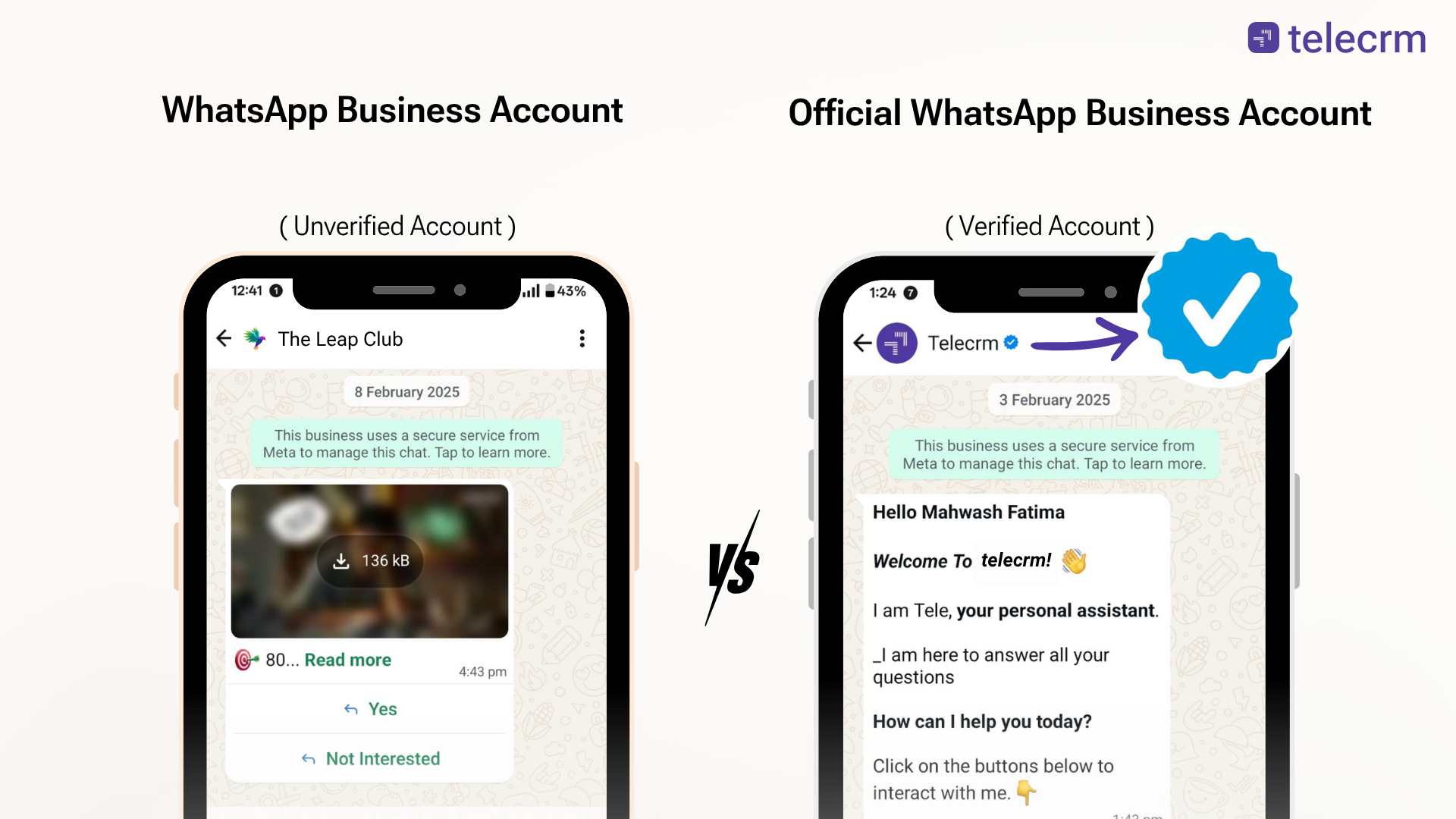
verified WhatsApp Business account vs unverified WhatsApp Business account

Quick Note on Message Ticks

A lot of people search “WhatsApp blue tick” meaning the read receipt on messages, not the business verification badge. To be clear:

  • Single grey tick: Message sent to WhatsApp’s servers
  • Double grey ticks: Message delivered to the recipient’s phone
  • Double blue ticks: The recipient has opened and read your message

In group chats, read receipts cannot be disabled. Double blue ticks appear when every group participant has read your message. You can also long-press a sent message to view the exact delivery and read times.

This guide is about the verified badge next to your business name — not message read receipts.

What the blue tick does — and what it doesn’t

What it does

Standard accounts show only the phone number by default. Customers don’t know who they’re talking to. Verified accounts show your approved display name, your business profile and the blue tick badge — even if the customer hasn’t saved your number.

The trust impact is real. 81% of consumers cite trust as a deal-breaker when choosing who to transact with. On WhatsApp, where messages land in someone’s personal inbox alongside messages from their family and friends, that credibility gap matters more than almost any other channel.

Messages from verified businesses receive higher response rates. Market data suggests the blue tick can increase read rates by up to 95%, particularly for opt-in based campaigns where the message is relevant and timed well. Verified accounts also show up higher in WhatsApp search results, which means new customers can actually find you when they search for your category.

Blue tick also reduces the risk of being marked as spam. When customers recognise your brand name rather than a random number, they’re less likely to block or report you — which in turn protects your messaging quality rating.

What it doesn’t do

The badge doesn’t bypass WhatsApp’s quality rules. It doesn’t guarantee delivery, automatically increase your messaging limits or fix a poorly run campaign. If you’re sending bulk messages to people who never opted in, the blue tick won’t save you. Spam behaviour will still get your account flagged and your quality rating downgraded — regardless of verification status.

Think of the badge as trust infrastructure, not a shortcut.


Route 1: Meta Verified — the accessible path for most businesses

Meta Verified is a paid subscription that gives you the blue tick on WhatsApp Business regardless of how well-known your brand is. It’s built for businesses that are real, active and growing — but haven’t yet accumulated the organic press coverage that OBA requires.

Who can apply

  • Any business with an active WhatsApp Business App or WhatsApp Business API account
  • Must have a profile name and profile picture set
  • Must not have an active WhatsApp Business Premium subscription
  • Must be located in a country where Meta Verified is available (India is included)
  • Must be at least 18 years old

How to apply via the Business App

  1. Open WhatsApp Business App → Settings → Meta Verified
  2. Select a plan. Meta offers tiered plans (Standard, Plus, Premium, Max) — pricing is listed inside the app and varies by region
  3. Enter your business name and display name
  4. Submit identity or business verification documents as prompted
  5. Complete payment
  6. Approval typically takes 1–3 business days. If Meta cannot verify your details, your payment is refunded

What Meta Verified gives you

  • Blue tick badge next to your business name
  • Enhanced account protection against impersonation
  • Access to Meta support (varies by plan tier)
  • Consistent display name across WhatsApp and Meta platforms

Route 2: Official Business Account (OBA) — the merit-based path

OBA is what most people think of when they hear “WhatsApp blue tick verification.” It’s free, but it’s selective. Meta grants it only to brands they consider notable — meaning your brand should be something people actively search for, not just a business that exists.

Eligibility requirements

Only registered businesses are eligible. Here’s what you need before applying:

Non-negotiable requirements:

  • Active on the WhatsApp Business API (not the standard Business App)
  • Completed Meta Business Verification or KYC on Meta Business Manager
  • Two-step verification (2FA) enabled on the specific number you’re applying for — this is a commonly missed step
  • Approved display name that matches your business name across your website, invoices and Meta Business Manager
  • Account must be in Tier 2 or above messaging level (meaning your number can send up to approximately 10,000 conversations per day — you reach this by maintaining good message quality over time on the API)
  • Active on the WhatsApp Business Platform for at least 30 days
  • No policy violations, spam flags or compliance issues in recent history

Notability requirements:

  • At least 5 organic PR or news articles published about your business — not paid advertorials or sponsored content
  • Active presence in search results when someone searches your brand name
  • Consistent brand identity across your website, social profiles and app listings

What “notability” means: Meta’s standard here is simple — if someone searched your brand name right now, would they find credible, organic references to it? Directory listings don’t count. Paid press releases don’t count. What counts is a local news feature, an industry blog mention, an award or a case study published by a partner. It’s not about how big your business is. It’s about whether you have a traceable public presence.

Applying for OBA

  1. Prepare everything first: Complete Meta Business Verification, enable 2FA, get your display name approved, confirm your account is at Tier 2
  2. Gather your proof documents: Legal business name, registered address, website, official email, GST or MSME registration and 3–5 strong external links (organic news, industry publications, award pages)
  3. Submit through WhatsApp Manager: Go to WhatsApp Manager → Account Tools → Phone Numbers → select your number → Request Official Business Account status
  4. Alternatively, apply via your BSP: If you use a WhatsApp Business Solution Provider, they can submit the application on your behalf and guide you through Meta’s current requirements
  5. Wait for review: The verification process takes 7–10 business days after submission

If denied, you can reapply for the blue tick after 30 days. Use that time productively — more on that below.


Why applications get rejected

Meta doesn’t just review your form. They review your entire business presence. Here are the most common reasons legitimate businesses get turned down:

  • Mismatched business name: Your display name in WhatsApp doesn’t exactly match your website, invoices or Meta Business Manager. Even a minor variation — “Pvt Ltd” vs “Private Limited,” or an abbreviation — can trigger rejection. Fix this across every touchpoint before applying.
  • Thin website: A website with only a homepage and a contact form isn’t enough. Meta wants to see About, Services, Terms of Service, Privacy Policy and ideally a blog or case studies. It signals that you’re a real operating business, not a front.
  • No organic press coverage: This is the most common gap for Indian SMBs. If Meta searches your brand name and finds nothing, the application fails. Five generic directory listings don’t help. One genuine media mention does.
  • Poor account health: If your number has high block rates, recent spam flags or was previously disabled, fix that first. Your account history is reviewed as part of the application.
  • Inconsistent NAP data: Your Name, Address and Phone number should be identical across your website, Google Business Profile, social media and Meta Business Manager. Discrepancies read as a trust signal to Meta.
  • Weak or paid PR links: Links marked “sponsored” or “advertisement,” generic citation sites or articles that are clearly paid placements don’t count toward notability. Meta is looking for editorial mentions.

How to improve your chances before reapplying

If you were rejected, treat the 30-day wait as a focused sprint, not a cooling-off period.

  • Strengthen your website: Add a proper About page with your founding story, team and mission. Add Terms and Privacy Policy pages. Publish two or three service-specific pages that explain what your business does in detail. If you have customer case studies or testimonials, add them.
  • Earn organic press: Reach out to local business journalists. Submit to industry award programmes. Write a guest post for a credible industry publication. Partner with another brand on a joint announcement. These are the references Meta is looking for.
  • Align everything: Check that your business name, address and phone number are identical everywhere — website footer, Google Business Profile, Instagram bio, Facebook page and Meta Business Manager.
  • Clean up your WhatsApp account health: Segment your contact lists. Remove people who haven’t opted in. Reduce broadcast frequency. Monitor your quality rating in WhatsApp Manager and bring it to “High” before reapplying.
  • Enable 2FA if you haven’t already: It’s a requirement and a frequently missed one.

What changes after you get verified

The badge is visible to customers the moment it goes live. Here’s what that actually changes in practice:

  • Your business name appears in chat instead of a phone number — even for customers who haven’t saved your contact
  • Verified accounts show up higher in WhatsApp search results, making you discoverable to new customers searching for businesses like yours
  • Customers see the blue tick next to your name in their chat list, increasing the likelihood they’ll open your message
  • Links, payment requests and offers you send carry more credibility — reducing hesitation and improving conversion

The biggest practical shift is that customers start reaching back. On cold outreach especially, the difference between a verified number and an unknown number showing up in someone’s WhatsApp can determine whether that message gets opened or ignored.


Best practices for keeping your verified status

Getting the blue tick is easier than losing it. Meta monitors account behaviour on an ongoing basis.

  • Send only to opted-in contacts: Every campaign should go to people who explicitly agreed to receive messages from you. In India, this also aligns with DPDP Act compliance requirements.
  • Use approved templates for outbound messages: Utility and service templates have far lower spam report rates than promotional broadcasts. Use promotional templates sparingly and ensure they’re targeted and relevant.
  • Respond promptly: WhatsApp measures response time and factors it into your quality rating. Set up routing rules and SLA reminders so no customer message goes unread for more than a few hours.
  • Don’t change your display name carelessly: If you change your approved display name after receiving OBA status, Meta reassesses notability for the new name. Your verified status is not automatically retained. Choose a display name you plan to keep long-term before applying.
  • Monitor your quality rating in WhatsApp Manager: If it drops to “Low,” address the cause immediately. A low quality rating disqualifies you from OBA and can affect your Meta Verified status too.

How combining the blue tick with telecrm drives real business outcomes

The verified badge opens the door. What happens after the customer walks through that door depends entirely on how your team operates.

This is where most businesses leave value on the table. They get verified, see a short-term bump in open rates, but then hit the same old problems — leads going cold, follow-ups falling through the cracks, no visibility into which agent handled which customer.

telecrm is built specifically for Indian SMBs running phone and WhatsApp-first sales. Here’s what changes when you combine a verified WhatsApp presence with telecrm’s infrastructure:

  • Every WhatsApp conversation is tied to a lead: When a prospect responds to your verified broadcast or clicks your Click-to-WhatsApp ad, the conversation is logged against their lead record automatically. Your team sees the full context — what ad they came from, what they were asked, what they said — before the first call.
  • Your team inbox runs from one verified number: Multiple agents can reply to customers from the same verified WhatsApp business number without losing context or duplicating messages. Customers always see your official verified identity, not individual agent numbers.
  • Calls and WhatsApp work together: telecrm’s auto-dialer and WhatsApp follow-ups run in sync. A prospect who missed your call gets a WhatsApp from the same verified business identity minutes later — consistent branding across every touchpoint.
  • Campaigns are structured and trackable: Bulk WhatsApp campaigns go out with segmentation by lead source, industry, pipeline stage or last activity. After the campaign, you can see open rates, reply rates and conversion at the agent level — not just aggregate numbers.
  • Follow-up automation fills the gaps: Reminders, re-engagement sequences and handoff workflows mean no lead sits unattended because someone forgot. For sales-heavy verticals like real estate, education, insurance and finance, this is where the verified badge’s trust premium actually converts to revenue.
  • Account health is protected: telecrm’s opt-in workflows and segmentation tools help you maintain the message quality standards that keep your verified status intact. Keeping block rates low and response rates high is not just good practice — it’s what protects your blue tick long-term.

The verified badge tells customers you’re legitimate. telecrm makes sure that first impression leads somewhere.

You’ve done the hard part — now make sure your verified number actually converts. telecrm connects your WhatsApp blue tick to a full sales system: lead tracking, auto-dialer, bulk campaigns and follow-up automation built for Indian SMBs. Book a free demo to have it start working for you now.

Frequently asked questions

It depends on the route. OBA (Official Business Account) is free but merit-based — your business needs to be on the WhatsApp Business API and meet Meta’s notability criteria. Meta Verified is a paid subscription accessible to any active WhatsApp Business account, including the standard app. Pricing for Meta Verified is displayed inside the app and varies by plan tier and region. Your BSP may also charge service fees for handling the OBA application.

Yes, through Meta Verified. The paid subscription route was specifically designed to make verification accessible to businesses that can’t yet meet OBA’s notability requirements. For OBA, small businesses can apply but approval is harder without a public media footprint. Fast-growing D2C brands, regional coaching institutes, and local chains with press coverage have better odds than brand-new businesses with no online presence.

For OBA, yes — your business must be live on the WhatsApp Business API. Meta Verified is available to both the WhatsApp Business App and the API. Serious sales teams in India typically move to the API regardless, because it’s the only route that supports CRM integrations, bulk campaigns, routing, and scale.

For OBA, yes — any change to your display name triggers a fresh Meta review, and your verified status is not guaranteed to carry over. Phone number changes require a full reapplication. Choose your display name carefully before applying, and update Meta Business Manager before making any changes to your WhatsApp account details.

telecrm connects with your WhatsApp Business Platform so every message, call, follow-up, and campaign is tracked against your lead records. The verified badge builds customer trust inside WhatsApp — telecrm turns that trust into structured sales activity, measurable outcomes, and a team that actually follows through.

Article Author

Mahwash Fatima

Mahwash Fatima is a technical content writer at telecrm with a passion for all things creative. When she's not writing, she's painting, drawing or just thinking about her next big blog post.

Boost Your Sales with Powerful
CRM Features of telecrm

© Copyright 2026 telecrm.in (Flamon Cloudtech Pvt Ltd) - All Rights Reserved Privacy PolicyT&C

Boost Your Sales with Powerful
CRM Features of telecrm

White logo

© Copyright 2025 telecrm.in - All Rights Reserved Privacy PolicyT&C

Book a demo

How many people are there in your sales team?*