
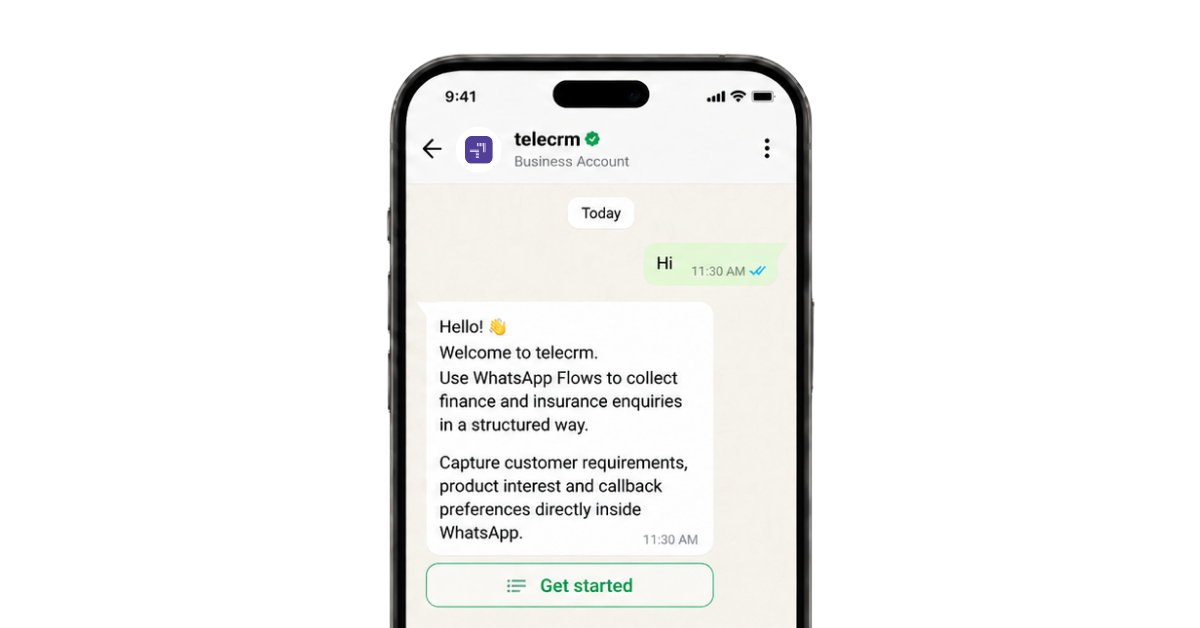
You send a prospect a form link on WhatsApp. They open it. Or they don’t. Most don’t.
It’s not that they aren’t interested. It’s that you asked them to leave WhatsApp, open a browser, wait for a page to load and fill a form on a small screen. Every one of those steps loses a few people, and by the end, most of your interested prospects have quietly disappeared.
WhatsApp Flows fix this. WhatsApp Flows are a Meta feature that lets your customers fill forms, book appointments and place orders right inside the WhatsApp chat. No links, no new tabs, no leaving the conversation. The customer taps a button, a form opens inside WhatsApp, they fill it and they’re done.
By the end of this post, you’ll know exactly what Flows are, what they can do for your business, how to create one yourself and where the data goes after someone taps submit. That last part is the one most guides skip, and it’s the part that decides whether Flows actually grow your business.
A WhatsApp Flow is an interactive form that opens inside a WhatsApp chat.
Here’s what it looks like from your customer’s side. They receive a message from your business with a button, something like “Book now” or “Get started”. When they tap it, a form slides up over the chat, a bit like a mini app opening inside WhatsApp. The form has the same fields everyone already knows from the internet: text boxes, dropdowns, date pickers, checkboxes. The customer fills it in, taps submit and lands back in the chat with a confirmation message. The whole thing happens inside WhatsApp, start to finish.
From your side, this is real-time data collection inside the WhatsApp conversation. Instead of sending customers somewhere else to collect information, the form comes to them, and their answers come back to you in a structured format: neat fields, not scattered chat messages you have to read through and copy out.
Let me show you a real one. This is the flow we use at telecrm to book product demos. When a prospect messages us saying they want a demo, they get one message with a “Book a demo” button. Tapping it opens a short form with three parts:
Without a flow, collecting these eight answers would take ten back and forth messages, or a form link that half our prospects would never open. With the flow, it takes under a minute, and it’s a genuinely seamless user experience. Nobody gets lost between the chat and a webpage, because there is no webpage.
Before we go further, one thing needs clearing up, because this is where most people get stuck.
There are two versions of WhatsApp for businesses, and they are very different products.
The first is the WhatsApp Business app, the free app you download from the Play Store or App Store. It’s built for one person replying to customers from one phone. It does not support Flows.
The second is the WhatsApp Business API, which Meta also calls the WhatsApp Business Platform. This is the version built for business messaging at scale. It isn’t an app you install. It runs through the platform of a solution provider, a company like telecrm (a WhatsApp CRM), Gupshup, Wati or Interakt. The provider gets your number approved by Meta and gives you a dashboard where your whole team can send messages, run broadcasts, use chatbots and, yes, use WhatsApp Flows, all from one number.
So the requirement is simple: to use Flows, your business needs to be on the WhatsApp Business API through a provider.
If you’re already on the API, you can start using Flows today. If you’re still on the free app, moving to the API is step one, and Flows won’t be the only thing you gain. You’ll also get broadcasts, chatbots, proper reports and a shared number your whole team works from.
If you want to automate customer replies beyond forms, explore how a WhatsApp chatbot works for business.
Now let’s look under the hood, because once you understand three things (screens, flow types and triggers), you understand Flows completely.
Screens are the building blocks. A flow is made of one or more screens, and each screen holds components: a heading, some explainer text, input fields, dropdowns and buttons. You decide how many screens your flow has, what sits on each one and what happens when the customer taps submit. Our demo flow above has three screens; a simple feedback flow might need just one.
Flow types come down to a single question: does the form change while the customer fills it?
The quick test: if the form would look identical for every customer, build a static flow. If it has to react to live data, you need a dynamic one. Start static. You can always go dynamic later, and most businesses never need to.
Triggers answer the last question: how does a flow reach the customer in the first place? A flow doesn’t start on its own. It travels inside a message, and there are three common ways to send that message:
And why go through all this instead of just sharing a link? Because people finish what they start when they don’t have to leave the chat. Meta’s own numbers show better task completion and fewer drop-offs with Flows compared to pushing users out of WhatsApp. The fewer doors a customer has to walk through, the more of them arrive.
Want to build more trust on WhatsApp? You can also read our guide on WhatsApp blue tick verification.
Flows are used across every industry: real estate, education, finance, e-commerce, SaaS, healthcare. Wherever a business needs a customer to complete an action, a flow can carry it. The six use cases below cover most of what businesses actually do with them, across the whole customer journey, from lead capture and customer onboarding to support.
A prospect messages you. Before your team even talks to them, a flow collects what you need to know: what they’re looking for, their budget, how soon they want to buy. A real estate business can ask preferred location, property type and budget. An edtech counsellor can ask which course the student wants and their current qualification.
This is one of the cleanest ways to generate leads on WhatsApp, because nobody gets redirected to an external page and lost along the way. And capturing leads is only half the value. The other half is lead qualification: the answers tell you who’s serious, so your team spends its time on qualified leads instead of blank enquiries.
In telecrm, this pays off immediately, because those answers sit on the lead itself. Your telecaller sees the budget and timeline before dialling. The call starts halfway done, and the pitch matches what the prospect actually needs.
Hosting a webinar or an event? Instead of sending people to a registration page, send the flow. They register in seconds: name, email, session choice, done. You get their details in a clean list, they get an instant confirmation, and far fewer people drop off, because there’s no link to open and no page to wait for. Event organisers can manage RSVPs the same way, and the same flow can go out as a broadcast, a chatbot reply and an ad follow-up all at once.
If you sell products or services with options, a flow turns the chat into a small storefront. The customer can browse products, choose the variant, add delivery details and place the order without leaving WhatsApp. A manufacturer can collect bulk requirements and reply with a quotation. A restaurant can take a complete order on one screen. And because the order arrives as structured fields rather than a paragraph of chat, nothing gets missed or misread, and your follow-up can even carry personalised recommendations based on what they picked.
After a purchase or a service interaction, send a flow with a few quick questions, right there in the chat where the customer already is. Customers submit feedback in a few taps, which is why response rates run far higher than emailed forms that sit unopened.
The format matters as much as the response rate. Because you collect responses as ratings and dropdown choices rather than free text, the answers add up to valuable customer insights you can actually act on: customer preferences, what worked, what needs fixing. Fifty structured responses tell you more than two hundred paragraphs.
Your happiest customers are your best sales channel, and timing is everything. Trigger a referral flow at exactly the right moment, right after a successful purchase or a positive interaction, and the customer drops in a contact or two without leaving WhatsApp. Your happiest customers quietly bring you new customers, and nobody on your team has to send an awkward email asking for referrals. When your CRM knows a deal just closed, this trigger can even fire on its own.
Flows can take over the routine half of customer support. A customer types “return” or “refund”, your chatbot automates the response and sends a flow that collects the order number and the issue. Simple requests get sorted through self-service, without anyone from your team touching them. Complex inquiries get routed to a live agent via WhatsApp, and by the time the agent opens the chat, the details are already collected, so the customer never repeats themselves. Faster answers with less back and forth, which is most of what customer satisfaction comes down to.
Most guides stop at “the customer taps submit”. But that’s exactly where the real work begins. Where does the data go? Who acts on it? How fast?
The honest answer: it depends on your provider. In many setups, submissions land in a dashboard or an exported sheet. Someone has to check it, copy the details and pass them to the sales team. The lead who filled your form at 9 pm gets a call at noon the next day. Maybe. Every hour of that delay costs you, because leads cool down fast.
Here’s how it works in telecrm. When a flow is submitted, it’s recorded on the lead’s page automatically, and that page holds everything about the lead in one timeline:
So a flow answer isn’t a row in a sheet somewhere. It’s part of the lead’s full story, and whoever picks up that lead sees the complete picture: what they asked for, who spoke to them, what happened next.
It goes one step further, and this is where Flows stop being a form tool and start being a growth tool. The answers inside a flow can start automations, and appointment booking is the clearest example.
Say a prospect books an appointment through a flow. That one submission sets off a chain, with no human touching any of it:
You can build entire follow-up sequences this way: a reminder the day before, a WhatsApp message an hour before, a call if they miss it.
Look closely at that last step in the chain. The flow captured the booking. WhatsApp automation protected the show-up. That’s the difference between collecting data and running a process on it.
And this isn’t theory. When the Brazilian lender Consorcio Magalu moved appointment booking from a web calendar into a WhatsApp Flow, bookings from paid traffic went up 49% and conversions jumped 2.9x. Fewer exits from the chat, higher conversion rates. That’s the whole idea, measured.
Before using advanced features like Flows, understand the key benefits of a WhatsApp Business account.
You don’t need complex coding for this. Most flows are built without writing any code at all, and each step below is something you can do yourself. Here’s how to build WhatsApp Flows from zero to live.
Step 1: Get on the WhatsApp Business API. If you’re not on the API yet, sign up with a provider. The provider verifies your business with Meta, gets your number approved and hands you the dashboard you’ll work from. This usually takes a day or two, and you’ll need basic business documents for the verification.
Step 2: Write down what the flow should collect. Do this on paper before you build anything. List every question you’d like to ask, then cut every question your team won’t actually use. Be ruthless here; extra questions cost you completions. Group what’s left into two or three screens of related fields. Our demo flow groups them as personal details, business info and slot, and that grouping works as a template for almost any flow.
Step 3: Build the screens. In your provider’s dashboard (or Meta’s Flow Builder inside WhatsApp Manager), add your screens one by one. For each field, pick the right type: text input for names, dropdown for fixed choices, date picker for dates. Mark the must-have fields as required. Then set what the final submit button says and write the confirmation message the customer sees after submitting.
One rule of thumb: use dropdowns instead of typing wherever you can. They’re faster for the customer, and you get clean, consistent answers instead of twelve spellings of the same city. (Developers who want more complex flows with live data can go deeper with the Flows API, but you won’t need it for anything in this post.)
Step 4: Attach the flow to a message. A flow reaches the customer inside a message with a button, so now you write that message, add the button and attach your flow to it. If this message is a template you’ll broadcast (most are), it first goes to Meta for a quick review, which is standard for all broadcast templates. Approval usually comes through within a few minutes to a few hours, though it can occasionally take up to a day.
Step 5: Pick the trigger. Decide how the flow goes out: as a broadcast to a list, as a chatbot reply when someone messages you, or connected to a click-to-WhatsApp ad. You can use the same flow in all three places, so you don’t need to rebuild anything to run it everywhere.
Step 6: Test it on your own phone. Send the new flow to your own number. Fill every field, tap through every screen, submit it and read the confirmation. Then check where the submission landed. If anything feels confusing to you, it will confuse your customers, so fix it now, before anyone else sees it.
Step 7: Go live and watch the data. Launch it, then keep an eye on two numbers: how many people complete the flow, and what happens to them afterwards. Completions tell you whether the flow itself works. What happens after tells you whether it’s growing your business. In telecrm you see both, because every submission sits on the lead’s page next to the calls and follow-ups that came after it.
If you’d rather not build it yourself, your provider’s team will set it up with you. Either way, you now know exactly what’s being built and why.
If you’re wondering how Flows compare with the tools you already use, here’s the short answer.
Comparison point | WhatsApp Flows | Google Forms | Chatbot Q&A |
Where it happens | Inside the chat | External link, new tab | Inside the chat |
Format | Screens with form fields | Web form | One question per message |
Drop-off risk | Low | High (user leaves WhatsApp) | Medium (long back and forth) |
Data you get | Structured fields | Structured, but in a separate sheet | Loose chat replies |
Best for | Bookings, qualification, orders | Long detailed surveys | Open-ended queries and support |
Chatbots are good at conversation. Forms are good at structure. Flows give you both, in the place your customer already is. And they work together: a chatbot can handle the open-ended part of a conversation and hand over to a flow the moment structured details are needed.
Flows are free. Meta doesn’t charge anything extra for the feature itself.
What you pay for is the message that carries the flow, under WhatsApp’s normal message pricing. WhatsApp charges by message category, so it helps to know the three that matter:
Your provider’s subscription sits on top of Meta’s charges.
WhatsApp Flows fix the biggest leak in WhatsApp selling: the moment you push a customer out of the chat to get something done. Bookings, orders, registrations, feedback, support requests and referrals can all happen inside the conversation now. Every one of those moments used to leak customers. Handled inside the chat, they build customer engagement instead. And as you’ve seen, creating one is a few careful steps, not a technical project.
But here’s the thing to remember from this post. The businesses winning with Flows aren’t just collecting submissions. They plug those submissions into a system where leads get assigned, follow-ups get scheduled and nothing sits unread in a sheet. The flow starts the journey; the system behind it finishes the sale.
Want to see it end to end, from the form to the lead page to the automation? Book a free telecrm demo and we’ll show you live.
Yes. Meta doesn’t charge for the feature. You only pay the normal WhatsApp message charges for the message that carries the flow, plus your provider’s subscription.
Yes. Flows don’t work on the free WhatsApp Business app. You need API access through a provider like telecrm.
Yes. Static flows need no code at all. Dynamic flows need a data connection at the back, but your provider handles that, so you still don’t need a developer.
Yes. You write the flow text yourself, so you can build flows in Hindi, Hinglish or any regional language your customers prefer.
Yes. Flow responses are encrypted while they travel, the same way WhatsApp messages are, and the answers go only to your business.
Depends on your provider. At minimum, you can view or export submissions. In a WhatsApp CRM like telecrm, every submission lands on the lead’s page automatically, next to calls, recordings and follow-ups, and can trigger automations like lead assignment.
Yes. A click-to-WhatsApp ad can open a chat where the flow is sent right away. Ad clicks become structured, qualified leads instead of cold “Hi” messages.



© Copyright 2026 telecrm.in (Flamon Cloudtech Pvt Ltd) - All Rights Reserved • Privacy Policy • T&C



© Copyright 2026 telecrm.in - All Rights Reserved • Privacy Policy • T&C