
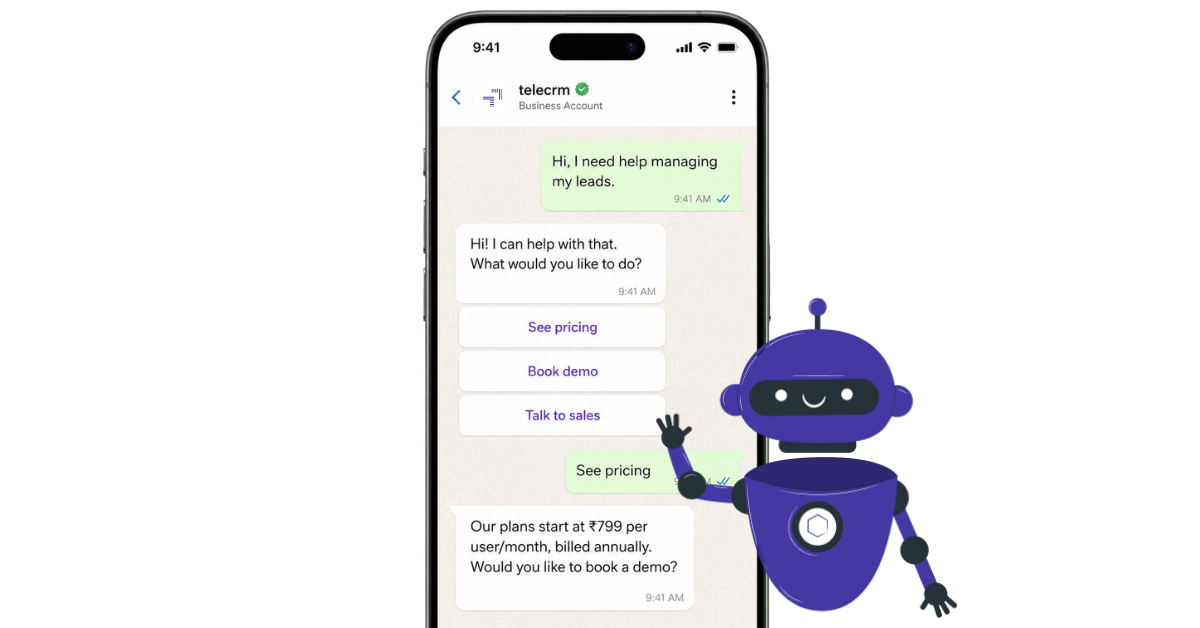
Your hottest lead is not always the one who fills a long form or books a meeting.
Sometimes, it is just someone who sends a simple WhatsApp message:
At that moment, the lead is fresh. They are interested, active and waiting for a reply.
But if your team is busy, that moment can pass quickly.
A WhatsApp chatbot helps you automatically respond before the lead goes cold. It can reply instantly, ask basic questions, collect details and guide the customer to the next step.
But a fast reply alone is not enough. Once the lead is captured, your team still needs to call, follow up and track the conversation properly.
In this guide, we will explain what a WhatsApp chatbot is, how it works, how much it can cost, where it helps and what to check before choosing the right platform for your business.
A WhatsApp chatbot is an automated chat system that replies to customers on WhatsApp. It can answer basic customer queries, ask questions, collect details, share updates and guide the customer to the next step without making them wait for a manual reply.
For example, if someone asks, “Can someone call me?”, the chatbot can collect their name, phone number and requirement. If the query is simple, it can reply directly. If the customer needs personal help, it can pass the chat to a human agent.
But not every WhatsApp chatbot responds in the same way. Some follow fixed buttons and rules. Some use AI to understand open-ended messages. And some use both. That is why it is important to understand the main types of chatbots in WhatsApp before choosing one for your business.
A WhatsApp chatbot works by connecting your WhatsApp Business account with a chatbot platform.
It can operate 24/7, providing customers with the ability to find information and self-serve at any time, which is crucial for modern customer service expectations.
For example, if someone asks for pricing, the chatbot can share the right option or ask one qualifying question before creating the lead.
The important part is what happens after the reply. A good WhatsApp chatbot should pass the lead details, chat context and next action to your CRM (customer relationship management) software, so your team knows exactly what to do next.
Also read: A Complete Guide on WhatsApp Blue Tick Verification Badge
There are three common types of WhatsApp chatbots: rule-based chatbots, AI chatbots and hybrid chatbots. Before we get into the explanation of all three chatbots, here is a simple example of how each type of WhatsApp chatbot looks in a real conversation.
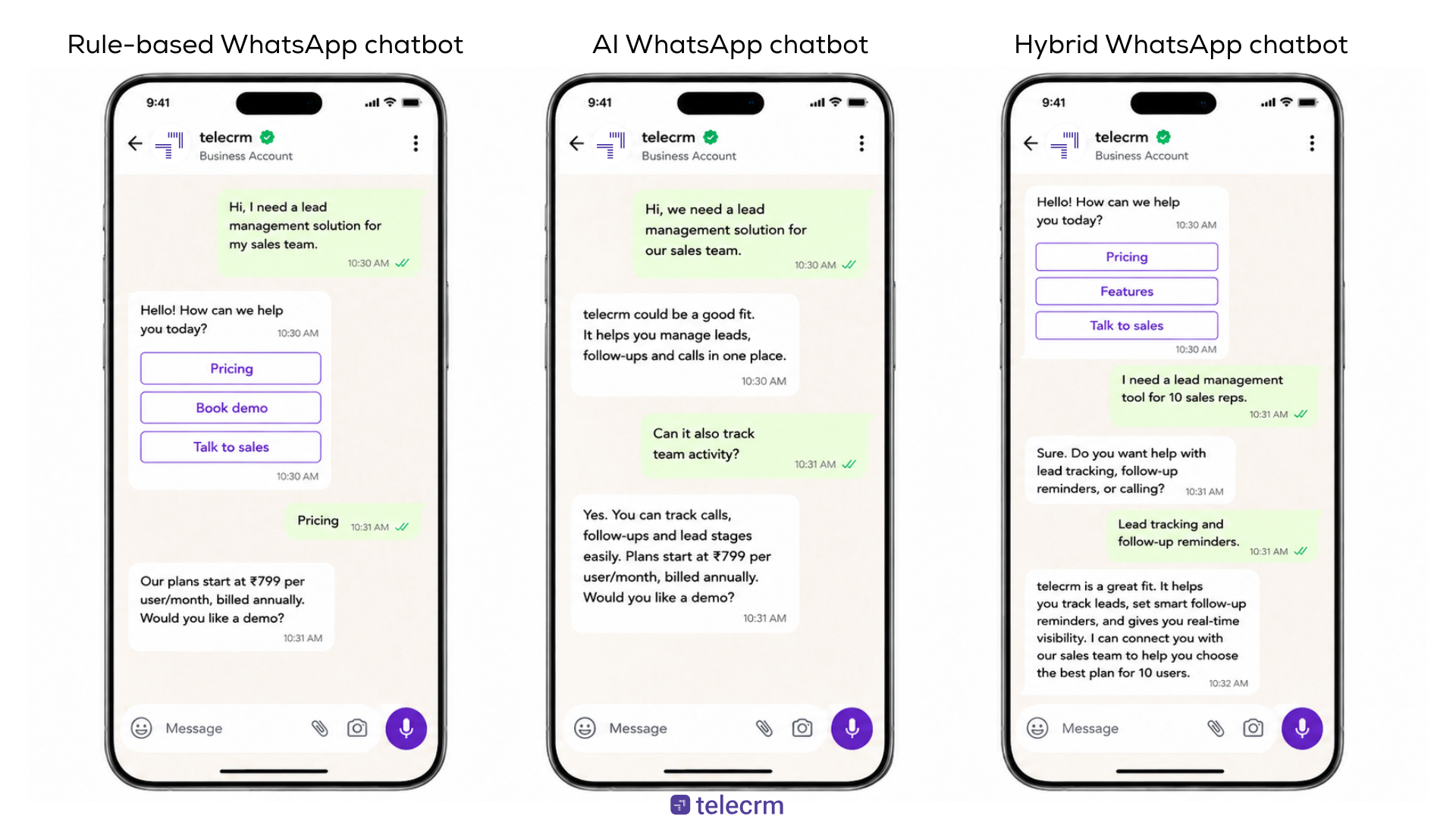
All three of these platforms are used to interact with leads on WhatsApp. But they are built for different purposes.
The WhatsApp Business app helps you manage chats manually. A WhatsApp chatbot replies to customers automatically. WhatsApp automation helps you send follow-ups, reminders and updates after the first conversation.
Here’s the simple difference:
Comparison point | WhatsApp Business app | WhatsApp chatbot | WhatsApp automation |
|---|---|---|---|
What it does | Helps you manage WhatsApp chats manually | Replies to customer queries automatically | Sends messages based on time, action or lead status |
Best for | Small businesses with fewer chats | Businesses that get repeated questions or new leads on WhatsApp | Teams that need regular follow-ups after the first reply |
How it works | Your team replies from the app | The bot replies based on what the customer says, clicks or selects | Messages are sent using triggers, reminders or message templates |
Common uses | Business profile, catalogue, greeting message, quick replies | Lead capture, FAQs, appointment booking, order tracking, callback requests | Payment reminders, appointment reminders, follow-ups, transaction alerts |
Team support | Limited | Depends on the chatbot platform | Works best when connected with CRM and team assignment |
Lead tracking | Basic labels | Can collect lead details | Can track next steps when connected with CRM |
Human handoff | Manual | Can pass chats to human agents | Can remind the team when human intervention is needed |
Main limitation | Not enough when enquiries grow | Cannot call, follow up or close leads alone | Needs CRM connection to work properly |
The WhatsApp Business app is useful when a small team handles chats manually. It gives you basic tools like a business profile, catalogue, quick replies, greeting messages and labels.
But if you want to create a proper WhatsApp chatbot, use approved message templates, support multiple team members and connect WhatsApp with your CRM, you usually need WhatsApp Business Platform access through WhatsApp API or a chatbot platform.
Meta’s WhatsApp Cloud API is built for businesses that want to communicate with customers at scale and connect WhatsApp with systems like CRM or marketing platforms.
In simple words:
Might like: Facebook Lead Ads to WhatsApp: The Complete Playbook (2026)
Creating a WhatsApp chatbot starts with one clear question:
What should happen after a customer sends you the first WhatsApp message?
If the answer is clear, the chatbot becomes easier to build. If the answer is unclear, the bot will only confuse customers.
Here is the simple process.
To build a proper WhatsApp chatbot, you need WhatsApp Business Platform access. You can get this through Cloud API or through a chatbot platform that provides API access.
This is different from the WhatsApp Business app, which is better suited for basic manual replies, greeting messages, away messages and quick replies.
If you want chatbot flows, message templates, multiple users and CRM with WhatsApp integration, platform access is usually the right route.
Once you have API access, you need a platform to build and manage the chatbot.
You can build directly with the Cloud API if you have a technical team. Most sales teams prefer using a chatbot for the WhatsApp platform because it is easier to create flows, edit messages and manage leads without coding.
At this stage, do not only ask, “Can this tool send replies?”
Ask:
A chatbot that only replies is useful for a few minutes. A chatbot connected to your sales process is useful until the lead is closed.
Also read: Guide to The Best WhatsApp Chatbot Tools for Businesses in 2026
A conversation flow is the path your customer follows inside the chatbot, so keep it short.
A simple flow can include:
Do not make the chatbot feel like a long form inside WhatsApp. Ask only what your team needs to take the next action.
WhatsApp Flows are useful when you want customers to fill structured details inside WhatsApp instead of answering everything one message at a time.
A chatbot is better for guiding the conversation. A Flow is better for collecting information in a cleaner format.
You can use WhatsApp Flows for:
For example, a real estate business can use a chatbot to ask what the customer needs, then use a WhatsApp Flow to collect budget, location, property type and site visit preference.
The best setup is simple: the chatbot starts the conversation, the Flow collects details and your CRM tracks the lead for follow-up.
WhatsApp message templates are approved messages businesses use for updates, reminders and follow-ups.
You can use them for:
Keep these messages simple. The customer should know what happened, what they need to do next or when your team will contact them.
A WhatsApp chatbot should not try to answer everything.
If a customer asks a complex query, the chatbot should pass the chat to a human agent.
The handoff should include context, such as:
This saves the customer from repeating the same details.
Once the chatbot captures a lead, the details should not stay only inside WhatsApp.
Send the lead details, chat context, phone number and next follow-up into your CRM, so your team can call, update the status and continue the conversation with full context.
A WhatsApp chatbot starts the conversation. A CRM helps your team continue it properly.
Before launch, test the chatbot like a real customer.
Check:
After launch, check where people drop off and improve the flow.
Your first version does not need to be perfect. It needs to be simple, useful and easy for your team to act on.
The cost of a WhatsApp chatbot depends on how you set it up.
If you are using only the WhatsApp Business app, there is no separate chatbot platform cost, but the features are limited. You can use greeting messages, away messages and quick replies, but you cannot build a proper chatbot flow for a growing sales team.
For a proper WhatsApp chatbot, most businesses need WhatsApp Business Platform access through Cloud API or a chatbot platform. WhatsApp charges are usually based on delivered messages and the cost can vary by country and message category, such as marketing, utility, authentication and service.
Your total cost may also include:
So, do not compare platforms only by the lowest price. Also, check whether the platform can capture leads, connect with your CRM, support human handoff, trigger follow-ups and help your team track what happens after the first chatbot reply.
Note: For the latest official rates, you can check the WhatsApp Business Platform pricing page by Meta.
A good WhatsApp chatbot platform should not only help you send automatic replies, it should also help your team capture leads, manage chats, follow up and track every customer properly.
Before choosing a platform, check for these features:
Feature | Why it matters |
|---|---|
WhatsApp Business Platform access | So you can use chatbot flows, message templates and team access |
No-code chatbot builder | So your team can create and edit flows without technical help |
Lead capture | So every new enquiry comes with name, phone number and requirement |
CRM and lead tracking | So WhatsApp chats do not stay scattered or forgotten |
Calling and chat history | So your team can call leads with full context |
Human handoff | So complex queries can move from chatbot to a real person |
Follow-up reminders | So leads do not go cold after the first reply |
Reports and team tracking | So managers can track leads, calls, chats and follow-ups |
The main thing to check is simple: does the WhatsApp messaging platform only reply to messages, or does it help your team manage the lead after the reply?
A WhatsApp chatbot can win the first reply. But CRM, calling and follow-up help your team convert the lead.
A chatbot can answer a question, ask basic details and create the first touchpoint. But after that, your team still needs to call the customer, understand the requirement, send the right details, update the lead status and track what happened.
If all of this happens in different disconnected systems, leads can still get missed.
That is where telecrm becomes useful. telecrm is not just a WhatsApp chatbot platform. It is a complete WhatsApp CRM solution where your team can manage chatbot replies, leads, calls, follow-ups, WhatsApp chat sync and reporting in one place. Here’s how you can boost your sales with WhatsApp CRM like telecrm
With telecrm, your chatbot can respond when a new lead messages your business.
It can ask basic questions, collect contact details and guide the customer to the next step. So your team does not have to start every chat from zero.
A chatbot may collect the lead.
telecrm helps your team track what happens next.
Your salesperson can check the customer’s details, see the chat history, update the lead stage and know what action to take next.
Many businesses already talk to customers on WhatsApp phone or WhatsApp Web.
With telecrm’s WhatsApp chat sync, you can bring those chats into telecrm through a Chrome extension. Once it is connected, your team can check WhatsApp conversations inside telecrm along with lead details, calls, follow-ups and reports.
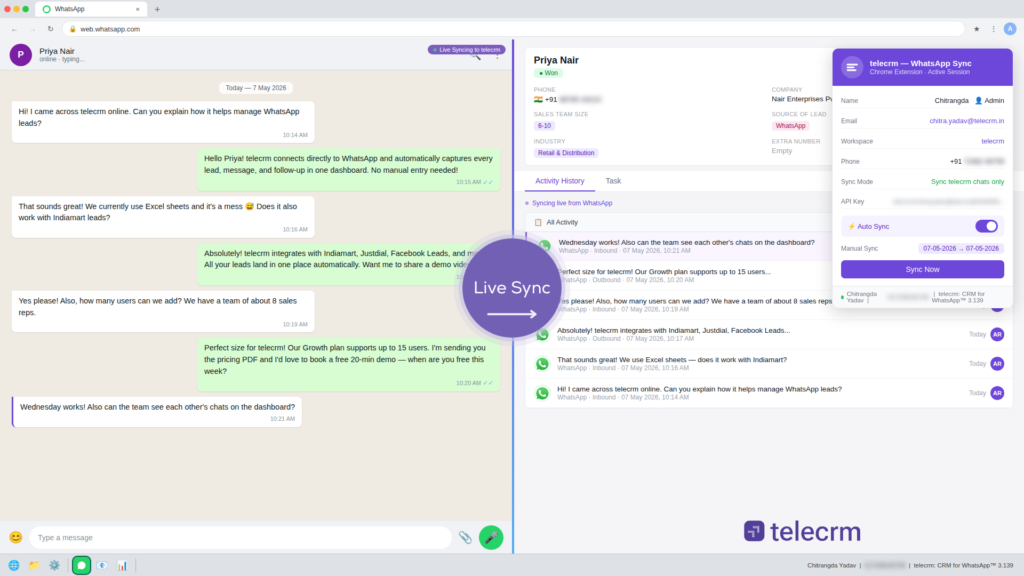
This gives your team one place to manage customer conversations instead of switching between WhatsApp, WhatsApp Web and CRM.
Not every lead that reaches out on WhatsApp will convert through messages alone. Some customers need more details, a clearer explanation and personal assistance before they make a decision.
With telecrm, your team can check the WhatsApp chat before calling the customer. They can see what the lead asked, what details they shared and what they need next.
That makes the call more useful because the customer does not have to repeat everything again.
A lead may not buy after the first message.
They may need a reminder, another call or more details later. telecrm helps your team set follow-ups so interested leads do not get forgotten after the first chat.
When leads are handled only on WhatsApp, managers often have to ask the team for updates.
With telecrm, they can track:
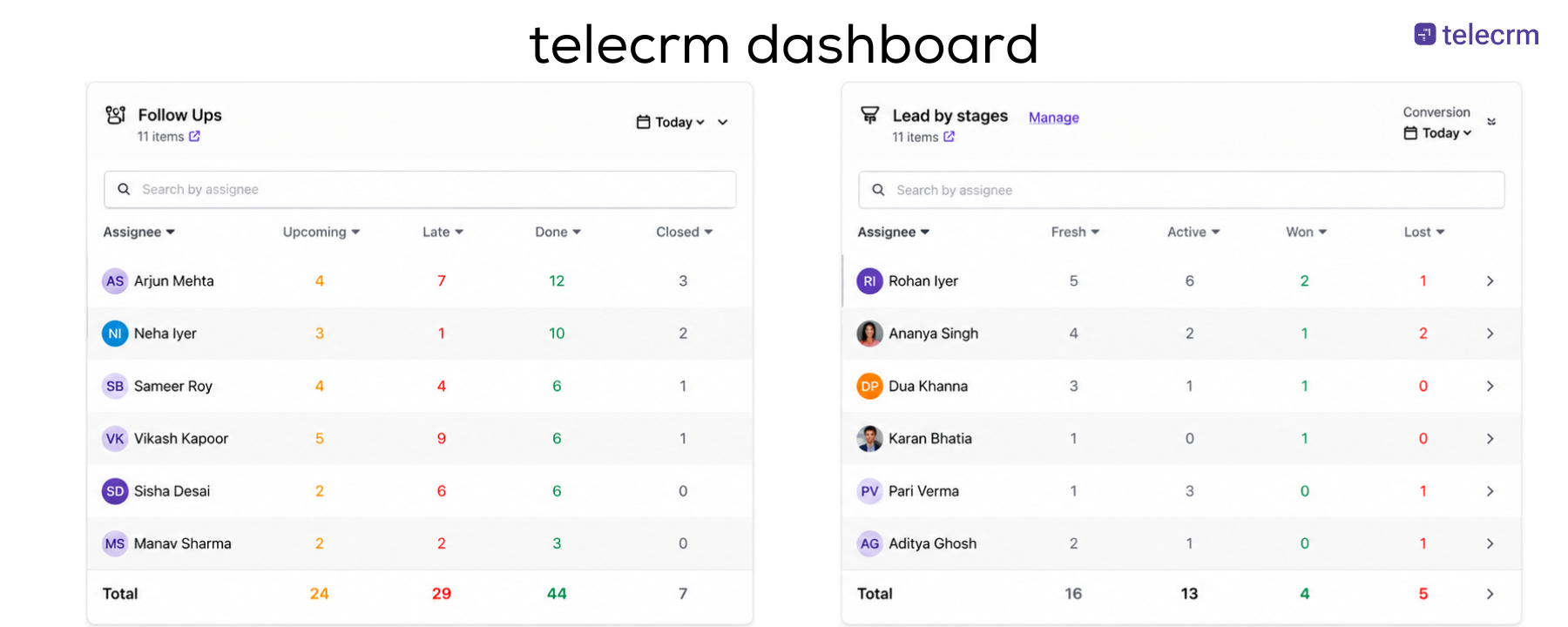
So managers do not have to guess what is happening. They can check leads, calls, chats, follow-ups and reports from one place.
A basic chatbot helps you reply.
telecrm helps you reply, capture leads, sync WhatsApp chats, call customers, set follow-ups, track progress and manage your team.
So if you only want automatic replies, a simple chatbot may be enough. But if you want to manage WhatsApp leads properly, telecrm gives you the chatbot plus the WhatsApp CRM, calling, chat sync, follow-up and reporting system around it.
A WhatsApp chatbot works best when it matches how customers contact your business.
A student does not ask the same questions as a property buyer. A patient does not need the same flow as an online shopper. So instead of using one generic “How can I help you?” message for everyone, your chatbot should collect the details your team actually needs before taking over.
A WhatsApp chatbot for education can help schools, coaching centres, colleges and edtech businesses respond faster to student and parent enquiries.
Most enquiries are around course details, fees, batch timings, eligibility, demo classes and admission dates. Instead of making counsellors ask the same first questions again and again, the chatbot can collect the basic details before the call.
It can collect:
This helps counsellors start the conversation with context instead of starting from zero.
A WhatsApp chatbot for real estate can help builders, brokers and property teams qualify buyers before an agent calls them.
Most property enquiries start with price, location, availability, brochure requests or site visit interest. But not every enquiry is ready for a sales call. The chatbot can collect basic buying details first, so the agent knows which leads need immediate attention.
It can collect:
This helps agents understand what the buyer wants before suggesting properties or booking a visit.
A WhatsApp chatbot for healthcare can help clinics, hospitals and healthcare providers manage routine patient communication faster.
Patients often message for appointment slots, doctor availability, clinic timings, report updates or reminders. These queries need quick replies, but not all of them need staff attention from the first message.
It can collect:
For urgent, sensitive or complex queries, the chatbot should quickly pass the conversation to a human agent.
A WhatsApp chatbot for travel agencies can help travel teams collect trip details before sharing packages.
When someone asks for “package details”, your team still needs to know where they want to go, when they want to travel, how many people are travelling and what kind of trip they are planning. The chatbot can collect these details before an agent shares options.
It can collect:
This helps your team send relevant packages instead of sharing generic options.
A WhatsApp chatbot for retail and e-commerce can help customers get quick answers before and after buying.
Most queries are repeated: product availability, size, price, delivery time, order status, return process or payment issue.
A chatbot can help with:
This reduces repeated support messages and helps your team focus on issues that need personal attention.
A WhatsApp chatbot for finance and insurance can help teams collect details, send reminders and prepare leads for an advisor call.
These conversations usually need trust, follow-up and documents. A chatbot cannot replace an advisor, but it can handle the first step.
A chatbot can collect:
It can also help with payment reminders, renewal reminders and document reminders, so advisors spend less time chasing basic information and more time speaking to interested customers.
Automobile businesses need to respond faster to enquiries around models, pricing, test drives, service bookings and insurance renewals.
Most automobile leads compare multiple dealerships before visiting a showroom. A chatbot can collect basic interest details quickly, so the sales team can call the customer with the right context.
It can collect:
This helps the sales team avoid cold follow-ups and continue the conversation with clear customer context.
A WhatsApp chatbot helps your business reply faster when a customer sends the first message.
It can answer basic queries, collect lead details, share updates and move the customer to the next step without making them wait for your team.
But a chatbot alone is not enough if you are serious about sales.
After the chatbot captures a lead, your team still needs to call, follow up, track the conversation and know what to do next. That is where a complete WhatsApp CRM setup makes a bigger difference.
With telecrm, you get a WhatsApp chatbot along with lead management, calling, WhatsApp chat sync, follow-ups and reporting in one place. So your team does not just reply faster — they manage every WhatsApp lead properly from the first message to the final outcome.
Ready to see how it works for your business? Book a demo of telecrm and explore how your team can manage WhatsApp leads, calls and follow-ups from one place.
A WhatsApp chatbot is an automated chat system that replies to customer messages on WhatsApp. It can answer common questions, collect lead details, share updates, book appointments and pass complex conversations to a human agent when needed.
A WhatsApp chatbot works by connecting your WhatsApp account with a chatbot platform. When a customer sends a message, the chatbot matches it with a rule, keyword, button or AI intent and sends the right reply or next step.
A basic WhatsApp Business app setup is free, but a proper WhatsApp chatbot usually needs WhatsApp Business Platform access and a chatbot platform. The final cost depends on message volume, message category, platform fees, setup support and CRM integration.
Yes, if you want proper chatbot flows, approved message templates, team access and CRM integration. The WhatsApp Business app is useful for basic manual replies, but growing teams usually need WhatsApp Business Platform or Cloud API access.
Yes, a WhatsApp chatbot can connect with a CRM if your platform supports integration. This helps your team store lead details, WhatsApp chat history, follow-up status, call notes and next actions in one place.
WhatsApp Flows is a feature by Meta that helps businesses collect structured details inside WhatsApp. They are useful for appointment bookings, quote requests, admission enquiries, site visit requests, feedback forms and other cases where customers need to submit information in a cleaner format.



© Copyright 2026 telecrm.in (Flamon Cloudtech Pvt Ltd) - All Rights Reserved • Privacy Policy • T&C



© Copyright 2025 telecrm.in - All Rights Reserved • Privacy Policy • T&C