
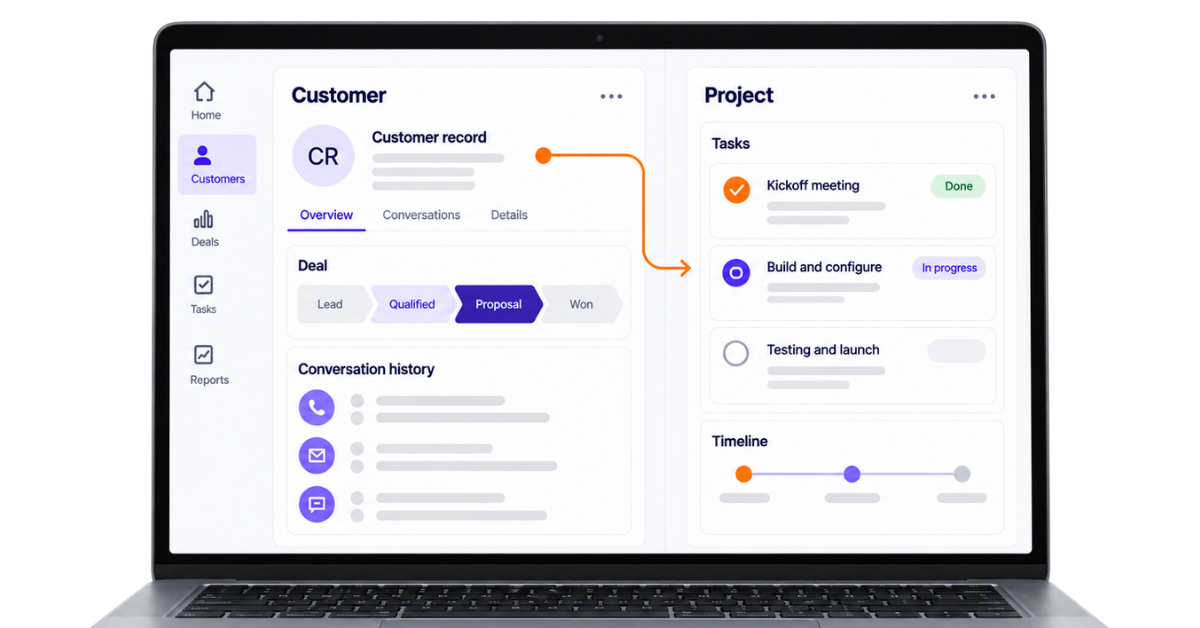
Closing a deal is only half the job. Once the sales team has captured the customer details, understood the requirement and marked the opportunity as won, the project team must deliver what was promised. When customer relationship management and project management operate in separate systems, this handover often leads to copied notes, repeated questions and missing context.
That is where CRM project management comes in. A CRM project management solution connects the customer data stored in CRM software with project tasks, timelines, team collaboration and resource allocation. The sales team can manage customer relationships while project managers track project progress without rebuilding the customer’s history from scratch.
The term CRM project can also describe a project to select, set up and implement a CRM system. In this guide, however, we will focus primarily on how CRM and project management work together to connect the sales process with project execution and service delivery.
We will explain the difference between CRM and project management, explore the key features of CRM project management software, compare 5 tools and help you decide whether your business needs CRM software, a project management tool or a unified platform offering both.
A CRM project is a structured piece of work that uses customer relationship management processes or CRM software to achieve a specific business goal. That goal could be implementing a new CRM system, improving the sales process or managing customer work from the first interaction through final service delivery.
In simple terms, a CRM project connects three things:
For example, a real estate company may start a CRM project to capture enquiries automatically, assign them to the right sales team, track calls and WhatsApp conversations and ensure every potential buyer receives a follow-up. The project has a specific goal: improve lead management and reduce missed opportunities.
A CRM project can refer to the process of introducing CRM software into a business. This involves understanding the organisation’s customer journey, selecting a suitable CRM solution, migrating customer data, configuring sales workflows and training the team.
A CRM project manager may coordinate the implementation by working with the sales, marketing, customer service and IT teams. Their responsibility is not limited to installing software. They must ensure the CRM system supports the company’s actual business processes and is used consistently by the people it was built for.
Common CRM implementation projects include:
A CRM project moves from understanding the business problem to launching and improving the CRM system. Each phase ensures the software supports the team’s actual sales processes, customer needs and business goals.
The business first identifies the problems the CRM must solve. These could include missed follow-ups, scattered customer data, slow lead assignment or poor visibility into sales performance.
The team maps how leads and customers currently move through the business. It then defines the required pipelines, fields, user roles, reports, integrations and workflow automation.
The business compares CRM software based on its requirements, budget and ease of use. The CRM project manager also creates the timeline, assigns responsibilities and defines key milestones.
The selected CRM is configured to match the company’s business processes. Existing customer details are cleaned, organised and transferred into the new system without unnecessary or duplicate records.
Before launch, project teams test the CRM using real business situations. Employees are then trained to manage leads, update customer interactions, complete tasks and use reports correctly.
After launch, managers track adoption, data quality, sales performance and customer satisfaction. Workflows, reports and permissions are improved based on user feedback and changing business needs.
A standalone CRM manages customer relationships, sales activities and communication. A CRM with project management handles the same customer journey but also manages the work that begins after a deal is won.
The simplest way to understand the difference is:
Area | Standalone CRM | CRM with project management |
Primary purpose | Manage customer relationships | Manage relationships and delivery |
Journey covered | Lead generation to conversion | Lead generation to project completion |
Main users | Sales, marketing and support teams | Sales, support and project teams |
Customer information | Contacts, conversations and deal history | Customer information linked with project details |
Task management | Follow-ups and sales activities | Sales tasks and project tasks |
Pipeline tracking | Tracks leads and deals | Tracks deals and active projects |
Project planning | Usually limited | Includes timelines and milestones |
Work dependencies | Usually unavailable | Connects dependent project tasks |
Resource allocation | Basic user assignment | Team capacity and workload planning |
Deal handover | May require manual project creation | Converts won deals into projects |
Reporting | Sales, activity and revenue metrics | Sales and project performance metrics |
Best suited for | Sales-focused businesses | Client delivery businesses |
Typical outcome | A converted customer | A converted and successfully served customer |
A standalone CRM follows the relationship side of the customer journey. It stores customer data, records calls and messages, schedules follow-ups and helps the sales team move opportunities through the sales pipeline.
It may include reminders, workflow automation and basic task management. However, these features mainly help users manage the next customer interaction. They are not designed to control detailed project timelines, dependencies or resource allocation.
A CRM with project management continues after the sale. When a deal is marked as won, the system can create a project, copy relevant customer details, assign work to project teams and track project progress until delivery.
The combined system reduces manual data entry and improves the handover between sales and delivery teams. Project managers can understand what was promised during the sales process, while sales teams can check the project status before communicating with the customer.
telecrm manages the complete sales and customer relationship journey. With telecrm apps, you can also use AI to build a project management app tailored to your business process and publish it directly inside telecrm.
Once a lead becomes a customer, your team can continue managing the work from the same platform. You can create an app to track project tasks, owners, deadlines, progress, documents and delivery status without forcing your process into a fixed project management structure.
The project management app works directly inside telecrm. When a task or project status changes, it can trigger the next action automatically, such as notifying a team member or creating a follow-up. This keeps customer information and project updates in one place.
For example, a marketing agency could build a client delivery app that tracks onboarding, campaign setup, approvals and reporting. The sales team retains the customer’s conversation history, while the delivery team manages the promised work inside the same CRM platform.
This gives businesses the best of both: a CRM for managing customer relationships and a custom project management app for managing delivery.
Also read: 7 Essential CRM Best Practices For Business Growth In 2025
CRM and project management work together by centralizing client information and project details while connecting the sales process with service delivery. The CRM manages everything that happens while winning and maintaining the customer, while the project management side controls how the promised work is planned and completed.
This setup also enhances cross-department collaboration and helps manage client communication throughout the project lifecycle.
Together, this combined approach streamlines processes into a single platform.
A potential customer submits an enquiry through a website, advertisement, phone call or WhatsApp. The CRM platform stores their contact information, source and initial requirements.
The sales team can then assign the lead, schedule follow-ups and record every customer interaction in one place.
As the conversation progresses, the CRM records what the customer needs, their budget, expected timeline and any specific commitments made by the sales team.
This customer data becomes important project information later. Without it, project teams may have to ask the client the same questions again.
Once the customer accepts the proposal, the business moves from sales management to project execution. In a unified platform, or through connected CRM and project management tools, the customer details and agreed scope can be transferred to the project team.
This reduces manual data entry and gives the team a clear understanding of what was sold.
Project managers break the agreed work into tasks, set deadlines, assign responsibilities and plan resource allocation. Collaboration features improve teamwork and can speed up project completion. The project management software shows the current project status, and crm tools can also track all project tasks and stages effectively, while shared workspaces support real-time team communication and stronger cross-department collaboration across project teams by highlighting work that is pending, delayed or completed.
At this stage, the project team focuses on managing projects effectively, while the CRM continues to maintain the wider business relationship.
Sales and account teams may need to know whether the project is on schedule, especially before speaking with the customer. Connected project data allows them to check progress and communicate proactively without repeatedly asking the delivery team for updates.
Once the work is complete, the CRM can support feedback, customer retention, renewals and future sales opportunities. This creates one connected journey from the first enquiry to final delivery and beyond.
Also read: Top 7 CRM Implementation Mistakes To Avoid In 2026
The most important features of CRM project management software connect customer data with sales, tasks, timelines, people and project reporting. A strong CRM project management solution should help teams move from winning a customer to delivering the promised work without losing information between departments.
Here are the 8 key features to consider.
Every CRM project begins with reliable customer information. The software should keep names, phone numbers, email addresses, company details, requirements and previous client interactions in one customer profile.
Contact management gives sales and project teams the same customer context. When project managers need to check what the client requested or what the sales team promised, they should not have to search through spreadsheets, personal WhatsApp chats or separate email threads.
Centralised customer data also supports better relationship management. Teams can personalise customer communication, respond with context and avoid asking customers to repeat information they have already provided.
Sales pipeline management tracks an opportunity from the first enquiry until it is won or lost. It shows the current stage of every deal, the expected value, the responsible salesperson and the next action.
This matters because project planning often starts before the deal officially closes. If project teams know which opportunities are likely to convert, they can prepare resources and avoid accepting delivery timelines they cannot meet.
Once the deal is won, the customer details, proposal and agreed scope should remain available for project execution. This creates a clearer connection between sales management and service delivery.
Task management turns an agreed project into specific actions. A project manager should be able to create project tasks, assign owners, set due dates, define priorities and check whether work is pending or completed.
For example, when a consulting project begins, the workflow may include collecting documents, holding a kickoff meeting, completing an assessment and sharing the final recommendation. Each task needs a responsible person and deadline.
Clear project workflows prevent work from depending on memory or repeated follow-ups. Every team member knows what they must do next and project managers can identify delays before they affect the customer.
Project timelines show when different stages of a project should begin and end. Milestones mark important outcomes such as customer onboarding, first delivery, client approval or final completion.
A CRM may provide reminders and basic tasks, but complete project management software should offer deeper project tracking. This may include dependencies, recurring tasks, calendar views and timelines for complex projects.
These features help teams track project progress against the original plan. When a delay occurs, the project manager can check its effect on later tasks and communicate a realistic update to the customer.
Sales, delivery and service teams need a shared record of internal updates and customer communication. Without it, project details become scattered across calls, WhatsApp messages, emails and meetings.
Team collaboration features can include internal comments, shared notes, file attachments, status updates and mentions, and they streamline project updates and document sharing for seamless communication. Customer communication features may record calls, emails, messages and approval requests against the relevant customer or project.
This shared context supports proactive communication. The sales team can check the project status before speaking with the customer, while the project team can review previous conversations before making a decision. Better coordination and communication help ensure client satisfaction throughout the customer journey.
Resource allocation helps project managers decide who should work on each task and whether they have enough time or capacity. This is particularly important for consulting firms, agencies, software development companies and other professional services businesses managing multiple projects.
A resource management view should show current assignments, availability and upcoming work. Without this information, businesses may assign too much work to one person while another team member remains underused.
Good resource allocation protects project timelines and service quality. It also allows the sales team to make commitments based on actual delivery capacity rather than assumptions.
Workflow automation reduces the repetitive work involved in moving information between sales and project teams. Depending on the platform, a won deal may create a project, assign standard tasks, notify the project manager or schedule a customer onboarding activity.
Process automation can also support follow-up reminders, approval notifications, recurring project tasks and marketing automation. The objective is to keep routine business processes moving without requiring someone to update every record manually.
Reducing manual data entry saves time and lowers the risk of incomplete or inconsistent project data. However, automation should support a well-defined process. Automating a confusing workflow will only make the confusion move faster.
Managers need visibility into both the sales pipeline and ongoing project execution, with reporting that uses advanced features like filtering, grouping data, custom fields or formulas, and dashboards to visualise key metrics. Reporting should show whether the business is winning enough work, delivering it on time and using its resources effectively.
Useful key metrics may include:
A unified platform can bring sales and project data into the same reporting system. This helps business leaders understand how sales promises affect delivery, which projects need attention and whether key operations are supporting sustainable business growth.
telecrm, monday CRM, Insightly, Vtiger and Flowlu are five useful options for combining CRM and project management. The right choice depends on whether you want a custom project workflow or a ready-made project management system.
telecrm combines sales CRM with custom project management through telecrm apps. Teams can use AI to build an app for tracking tasks, owners, deadlines and project status, then run automations when something changes.
Its core CRM manages leads, calls, WhatsApp conversations, follow-ups and sales pipelines.
Pricing: ₹799 per user per month annually or ₹1,099 quarterly, with a minimum of three licences
Best for: Indian teams wanting CRM and custom project workflows in one platform
monday CRM uses visual boards for managing sales pipelines and post-sale workflows. Teams can customise project stages, assign owners and automate updates.
Pricing: Starts at $12 per seat per month when billed annually
Best for: Teams wanting flexible sales and project workflows
Insightly can convert a won opportunity into a project while retaining customer details, emails and files. It also supports project pipelines, tasks and milestones.
Pricing: Starts at $29 per user per month when billed annually
Best for: Service businesses managing customer projects
Vtiger combines sales, marketing, customer service and project management. Its project features include tasks, milestones, Gantt views and Kanban boards.
Pricing: Free for up to 10 users, with paid plans starting at $12 per user per month annually
Best for: Small businesses wanting broad operational coverage
Flowlu combines CRM, project tracking, time management and project finance. Teams can convert won deals into projects and manage tasks, dependencies and client collaboration.
Pricing: Free for two users, with paid plans starting at $6 per user per month annually
Best for: Small businesses managing sales, projects and finances
You need CRM software when your main challenge is managing leads, customer interactions and sales. You need project management software when your main challenge is planning and delivering work. You need both when every won deal turns into a customer project involving tasks, timelines and multiple team members.
Use the following questions as a quick guide:
Business requirement | CRM | Project management | Both |
Capture and manage leads | ✓ | ✓ | |
Track calls and WhatsApp | ✓ | ✓ | |
Manage a sales pipeline | ✓ | ✓ | |
Assign project tasks | ✓ | ✓ | |
Track project timelines | ✓ | ✓ | |
Manage task dependencies | ✓ | ✓ | |
Plan resource allocation | ✓ | ✓ | |
Preserve sales context | ✓ | ✓ | |
Manage service delivery | ✓ | ✓ | |
Handle customer retention | ✓ | ✓ |
A successful CRM project should connect the work of winning a customer with the work of serving them. The right system keeps customer conversations, sales activities and project delivery visible without forcing teams to copy information between disconnected tools.
Traditional CRM project management software provides a fixed combination of sales and delivery features. This works for standard workflows, but it may not suit businesses with unique processes, project stages or customer requirements.
telecrm takes a more flexible approach. Its core CRM helps teams manage leads, calls, WhatsApp conversations, follow-ups and sales pipelines. With telecrm apps, businesses can use AI to build their own project management app inside telecrm for tracking tasks, owners, deadlines and project progress.
When a deal is won, the customer context remains available while the team moves into delivery. Sales knows what is happening, project teams understand what was promised and automations can trigger the next action when a project status changes.
Book a demo to explore how telecrm and telecrm apps can bring your sales and project workflows into one platform.
A CRM project is a planned effort to implement or improve a CRM system so a business can manage customer data, sales activities and communication more effectively. It usually covers goal setting, process mapping, software selection, data migration, configuration, team training and performance measurement.
CRM project management combines customer relationship management with the tools used to plan and deliver client work. It keeps customer details, sales conversations, project tasks, owners, timelines and progress connected in one workflow, from the first enquiry through to final delivery and ongoing customer service.
CRM manages leads, customer communication, deal stages and retention. Project management manages tasks, timelines, dependencies, resources and delivery. A CRM with project management connects both journeys, so the delivery team knows what sales promised and the sales team can track what happens after conversion.
Yes, but only when the CRM includes project features or supports a custom project app. Follow-up tasks alone do not provide full project management. With telecrm apps, businesses can use AI to create a project management app inside telecrm and connect its updates with CRM workflows and automations.
The main CRM implementation phases are discovery, requirement mapping, software selection, configuration, data migration, testing, training, launch and optimisation. Each phase prepares the system for real business use and reduces the risk of poor data quality, confusing workflows or low adoption across the team.
The best CRM project management software depends on how your business balances sales and delivery. telecrm suits Indian teams wanting sales CRM features with custom project apps. monday CRM, Insightly, Vtiger and Flowlu provide different combinations of pipelines, project tasks, timelines, automation and resource planning.



© Copyright 2026 telecrm.in (Flamon Cloudtech Pvt Ltd) - All Rights Reserved • Privacy Policy • T&C



© Copyright 2026 telecrm.in - All Rights Reserved • Privacy Policy • T&C