
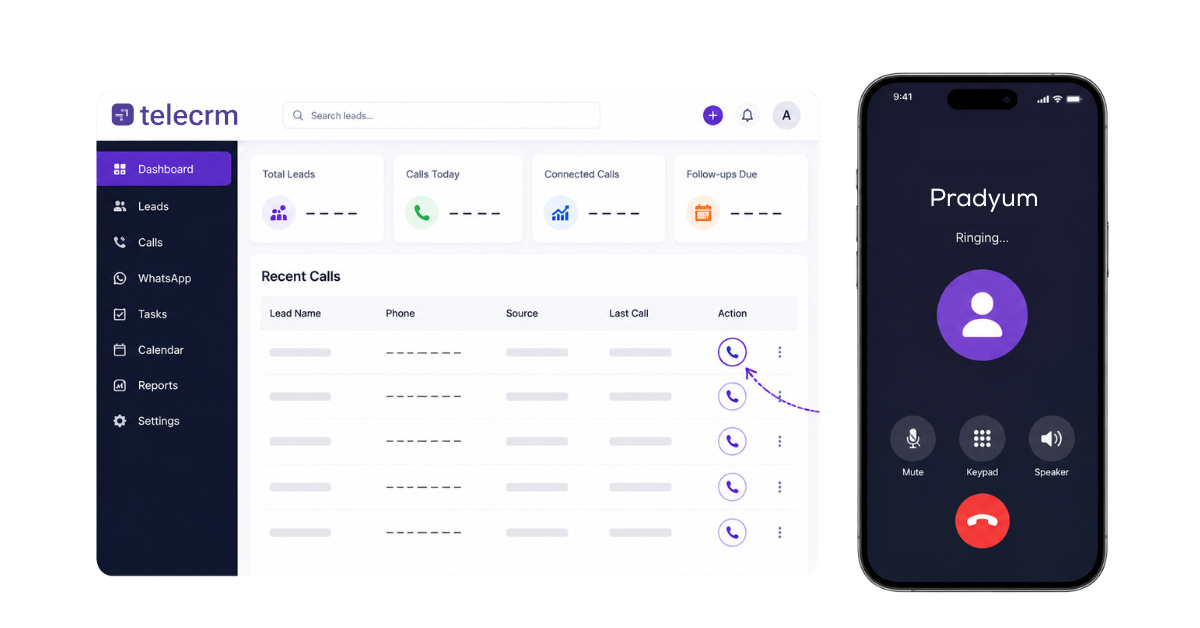

If your sales reps still copy numbers from spreadsheets and dial them manually, every misdialed digit and unlogged call is costing you leads. This guide breaks down exactly what a click to call CRM does, how it works under the hood and how to implement it for your telecalling team so that every call connects to context, outcomes and next steps.
A click-to-call CRM is a customer relationship management system that allows sales representatives to call a lead directly from the lead record by clicking a phone number or call button. Depending on the system, it can also log the call automatically, store the call recording, capture the outcome and schedule the next follow-up. Click-to-call technology eliminates manual dialling for agents and replaces it with a single action inside the CRM.
This matters because several ranking pages mix up website click-to-call (a button that lets a visitor on your web page call your business) with CRM calling (a rep initiating calls from inside their sales tool). These are different use cases. Here is a quick terminology table:
Term | Meaning |
Click-to-call CRM | A CRM from which a rep can initiate and track calls directly from lead records |
Click to dial | Usually another name for CRM-based click-to-call; emphasises dial initiation |
Website click-to-call | A button on a contact page or web interface that lets a site visitor call a business |
Auto dialer | Automatically moves through a list of numbers without rep intervention |
Power dialer | Calls the next lead when the previous call finishes |
Predictive dialer | Calls multiple numbers based on agent availability predictions |
Telecalling CRM | A CRM built around phone-based sales workflows |
Picture an inside-sales rep working at a real estate brokerage in Mumbai. They log into their CRM, see a list of leads captured from Facebook Ads, IndiaMART and JustDial and need to start calling. Here is what happens with a proper click to call workflow:
Think of it as three phases: before the call (context), during the call (capture) and after the call (next action). The real value of a CRM with 1-click dialer is not just saving a few seconds on dialing. It is connecting every call to the lead journey so nothing falls through.
Click-to-call can run over three main setups: SIM-based calling, cloud or IVR-based calling and browser or VoIP-based calling. Many Indian SMBs mix these based on whether reps are in the field or in the office and on how reliable their internet is.
The rep uses their existing mobile SIM. The CRM mobile app initiates the call through the phone’s native dialler, then tracks it via app permissions. This is ideal for field sales and insurance agents who need mobility. The caller ID is the rep’s mobile number unless masking is configured. Recording and logging depend on the device and Android version. You can learn more about how SIM-based call tracking works on Android devices.
If your team calls through employee SIMs and managers need visibility into that activity, see how SIM-based call tracking works.
The CRM sends the call request through a cloud telephony provider. Outgoing calls show a central business number. Click-to-call functionality employs intelligent call routing to direct calls to the correct department or agent. Central call recordings are stored in the cloud and personal numbers stay masked.
A softphone embedded in the desktop browser handles calls via internet protocol. Reps use a headset. This works well for desk-based outbound sales teams with stable broadband, and internet-based routing can make an international call feel like a local call for cost savings, but quality depends on bandwidth.
Metric | What it reveals |
Lead response time | Minutes from lead capture to first call attempt |
Calls attempted | Total outreach activity per rep |
Calls connected | How many attempts turn into actual conversations |
Connect rate | Percentage of calls that reach a person (Indian B2B average: ~2.3%, top quartile: ~6.7% per FreJun data) |
Missed calls | Leads that need retry |
Follow-ups completed on time | Are reps hitting scheduled callbacks? |
Call-to-appointment conversion | Calls that result in demos, meetings, or site visits |
Calls per rep per day | Activity volume by individual |
Leads with no next action | Pipeline leakage indicator |
Recording availability rate | Percentage of calls properly recorded and accessible |
A clickable phone number saves 3–4 seconds. A true click to call CRM can save deals.
Consider an education counselling team in Delhi following up with a JEE aspirant. If the counsellor doesn’t see that the student’s parent already asked about fee structures via WhatsApp, they repeat information. If no follow up is scheduled after the call, the lead drifts. The importance of follow-up in sales cannot be overstated here: it is the difference between a contacted lead and a converted one.
The ideal model puts calls, messages, notes and tasks in a single lead timeline. Managers do not need to chase reps for updates.
Indian SMBs in 2026 typically use one of three approaches to initiate calls: manual dialing from spreadsheets, click-to-call from within a CRM or auto / power / predictive dialers for high-volume campaigns.
Factor | SIM-based | Cloud / IVR | Browser / VoIP |
Device needed | Mobile phone | Mobile or desktop | Desktop + headset |
Caller ID | Rep’s SIM number | Business number | Business / SIP number |
Mobility | High | Medium | Low |
Recording | Device-dependent | Centralised cloud | Centralised cloud |
Ideal use case | Field agents, mobile reps | Structured calling teams | Office-based inside sales |
Click-to-call increases conversion rates by simplifying call initiation. For most small to medium sales teams in India, a click to call CRM offers the best balance between speed and context.
The key benefits of a click-to-call CRM are operational, not theoretical. Here is what changes in daily work:
Reps can call a newly captured lead from inside the CRM without switching applications. Click-to-call reduces response times by eliminating manual dialling. Organisations implement click-to-call to increase sales productivity precisely because of this speed advantage.
The CRM uses the phone number already stored against the lead. No more misdialed 10-digit Indian mobile numbers, no wasted calls to wrong contact details.
Call attempts, missed calls, durations and call outcomes are captured against the correct record. This makes call tracking reliable and gives managers real customer data to work with.
Reps schedule the next call while the sales conversation is still fresh, so no lead sits in the pipeline without a next action.
Full history of customer interactions including calls, WhatsApp, SMS and notes is visible before dialing, helping reps focus and sound prepared. Click-to-call improves response rates by simplifying engagement with the right information at hand.
Key features of click-to-call include call recordings and call monitoring. Managers can review conversations for quality assurance and coach reps. Click-to-call improves customer engagement by reducing wait times and keeping the communication process tight.
Indian SMBs face rising lead costs, distributed teams and WhatsApp-first buyers. If your business matches any of these situations, a click-to-call CRM is worth serious consideration.
If more than 30–40% of your new leads are handled over phone or WhatsApp, a click-to-call solution is usually justified. Click-to-call enhances customer engagement by reducing wait times and keeping every customer experience consistent.
Use this as a practical checklist when comparing crm systems. Some CRMs in 2026 still only open the device dialler and do not log outcomes or sync recordings.
Advanced analytics and AI features provide real-time conversation summaries and sentiment analysis in some platforms, which can be useful for coaching and quality reviews.
Warning: avoid CRMs that require a separate dialler app or browser extension with poor sync. Broken logging and partial data defeat the purpose of crm integration entirely.
Implementing click-to-call system is not just a tech switch. It requires mapping your existing processes, choosing the right setup and training reps on the full workflow. Here’s how you can call your leads in just one click:
Document how reps currently find numbers (spreadsheets, WhatsApp, old CRM), place traditional phone calls, record outcomes and plan follow ups. Spend a week observing before making changes.
Decide between SIM-based, cloud or browser calling based on your team’s location, internet quality and whether you need a central business caller ID. A team of field agents needs a mobile device-first approach; an office contact center may prefer browser VoIP. Whichever setup you choose should support seamless integration with any CRM system, so calls, recordings and outcomes sync inside the CRM without tab switching.
Create a clear list of dispositions: Connected – Interested, Connected – Not Interested, Callback – Date/Time, Invalid Number, Not Reachable. Align each with automated reminders and follow-up workflows.
Test with 3–5 reps for two weeks. Check call quality, correctness of logs, recording sync and ease of use. Adjust workflows based on feedback before rolling out to the full team.
Training should cover what happens after the call, not only how to click the call button. Teach reps to log call notes, schedule callbacks, use WhatsApp templates and update pipeline stages. Explore a broader sales automation approach to streamline communication across the team.
Track how many calls are made via CRM, what percentage have outcomes filled and how many leads have no next action. If reps bypass the CRM and call directly, data becomes incomplete and the investment is wasted.
Once your team is live, you need to prove that click-to-call is working beyond “we made more calls.” Here are the metrics that matter for crm reports and weekly manager reviews:
Factor | Manual dialing | Click-to-call CRM | Power / Predictive dialer |
How calls start | Rep dials manually | One click from lead record | System auto-dials next number |
Rep control | Full but slow | Full with speed | Limited |
Ideal daily volume | 30–50 calls | 50–200 calls | 200–500+ calls |
Auto logging | None | Yes | Yes |
Wrong-number risk | High | Low | Low |
Personalisation | Possible but hard | High | Lower |
Best for | Very small teams | Real estate, education, insurance | Loan recovery, political outreach |
These metrics should be visible in CRM dashboards and downloadable as CSV for review.
More calls alone should not be treated as success. Real impact is when calling activity connects to follow ups, stage movement and closed deals. Track call volume alongside call-to-next-stage conversion to see the full picture of your marketing campaigns and sales effectiveness.
telecrm is built for Indian sales and support teams. Here is how the click to call feature works in practice.
telecrm essentially brings calling, lead management, WhatsApp and follow ups into one system so that no lead, no call and no next step is lost.
See how telecrm works for your team. Book a free demo and experience click-to-call, call tracking and telecalling CRM features in action.
A click-to-call CRM lets sales reps initiate calls directly from a lead record with one click, while automatically logging the call, storing recordings, and scheduling follow ups.
Yes. Click to call and click to dial software refer to the same functionality: initiating a call from within the CRM rather than dialing manually. Some vendors use click to talk or click to chat for voice and messaging variants.
Click-to-call lets the rep choose which lead to call and click once. An auto dialer automatically moves through an entire list. Power dialers queue the next number after each call ends.
Yes. CRMs like telecrm support SIM-based calling where the rep clicks the button in the mobile app and the call goes through their SIM. The CRM logs the call automatically.
Recording depends on the setup. SIM-based recording varies by Android version and device. Cloud telephony setups offer centralised recordings. Always check device compatibility and local consent requirements.
In a proper click to call CRM, yes. Call attempts, connected calls, missed calls, duration, and outcomes are logged without manual input from the rep.
Yes. Most modern click to call software supports Android mobile apps and desktop web interfaces. telecrm, for example, works on both.
Not necessarily. SIM-based setups work without cloud telephony. Cloud or IVR integration is needed if you want a central business number, call routing, or masking.
Website click-to-call is a button on your web page for visitors to call or request a callback. CRM click-to-call is used internally by reps to initiate outbound calls from lead records. They serve different purposes in your sales processes.
Absolutely. Even a team of 3–5 reps benefits from automatic logging, recordings, and follow-up reminders. It reduces cost savings wasted on lost leads and boost sales outcomes by keeping every interaction tracked.



© Copyright 2026 telecrm.in (Flamon Cloudtech Pvt Ltd) - All Rights Reserved • Privacy Policy • T&C



© Copyright 2025 telecrm.in - All Rights Reserved • Privacy Policy • T&C