

CRM implementation is the process of deploying a customer relationship management system across a sales team. It covers goal-setting, data migration, pipeline customisation, team training and adoption tracking.
Most Indian sales teams that struggle with their CRM did not fail because of the software. They failed because they skipped the setup process.
This guide covers the 8-step CRM implementation process for growing SMBs, including:
CRM implementation is the structured process of setting up, customising and deploying a customer relationship management system within a business. It includes defining what the CRM must achieve, migrating existing lead and contact data, configuring the sales pipeline, integrating tools like WhatsApp or lead portals, training the team and tracking adoption after launch.
A CRM is not just software. Implementation is the process that determines whether the software works as a sales tool or sits unused.
Note: Before we break down the process, let’s quickly clear up a few CRM implementation terms that will come up often in this guide.
| Term | Definition |
|---|---|
| CRM migration | Moving existing lead and contact data from spreadsheets, WhatsApp exports or old databases into the new CRM system |
| Lead pipeline | A visual layout showing where each prospect sits in the sales process, from first enquiry to closed deal |
| CRM adoption | The degree to which a sales team uses the CRM consistently as part of their daily workflow |
| CRM automation | Rules set within the CRM that trigger tasks automatically, such as sending a WhatsApp message when a lead is assigned or creating a follow-up reminder when a stage changes |
| Stakeholder | Any team member whose daily work will change after CRM implementation, including sales reps, managers, ops and marketing |
Now that you know why effective CRM implementation is more than just a one-time setup, let’s get into the actual process.

Here’s a simple 8-step roadmap that helps you go from “just bought a CRM” to “fully set up and running smoothly.” Follow these steps in order to set up any type of CRM and avoid the usual chaos that comes with poor implementation.
Before you start setting things up, pause and ask — what do you actually want your CRM to do?
Because without clear goals, you’ll end up with a tool no one really uses and reports that don’t help.

Be specific. Skip vague ideas like “more sales.” Think real numbers:
Some practical goals you can set:
Now decide how you’ll measure this. A few simple CRM metrics:
Pro tip: Don’t try to measure everything. Start with 2–3 things that really matter to your team.
Your CRM process should align with your goals, not the other way around.
A common mistake? Leaving the CRM setup to just one person.
CRM implementations that involve one person from each department — sales, marketing, ops and management — from day one have significantly higher adoption rates than those built by a single ops or IT contact.
Usually, when someone from sales or ops is told, “Get this live by Friday.” They rush through it, set up a few lead stages, import a messy sheet and call it done.
Then weeks later, support isn’t using it, marketing can’t track leads and sales says it doesn’t work for them.

That’s why you must involve the right people from the start and build a proper CRM implementation team. CRM setup affects everyone, so everyone should have a say.
Here’s exactly who to include:
You don’t need a full team meeting. Just speak to one person from each team. Ask how they work, what’s broken and what they expect from the CRM.
This helps:
Pro tip: Choose one rep from each team to act as the point of contact during setup and after launch
Most people overthink this part.
For most Indian SMBs, five core CRM capabilities cover 90% of daily sales work: auto lead capture, lead assignment with reminders, in-app calling with recording, WhatsApp messaging and a mobile app. Everything else is optional until the team is fully adopted.
And for their sales teams, leads arrive from multiple sources simultaneously: IndiaMart and Justdial for B2B product enquiries, Meta Ads and Google Ads lead forms for financial and real estate businesses, WhatsApp for referral and repeat leads, and website contact forms for inbound digital campaigns. Choose a CRM that can auto-capture and attribute leads from all of these sources, not just one or two.
You don’t need a new CRM system packed with features you’ll never use. You need one that fits how your sales team actually works.
But many businesses get stuck here — picking a CRM just because it’s popular or promises “everything,” and then realising it’s too complex. Within weeks, no one’s using it and you’re back to Excel.
So before you set anything up, ask yourself:
Once you’re clear, focus on the essentials:
Must-haves for small teams:
Optional (only if you need it):
Email automation, API access, ticketing and role-based permissions.
Keep it simple. A clean, easy CRM is better than a bloated one no one uses.
Looking for a CRM that just works?
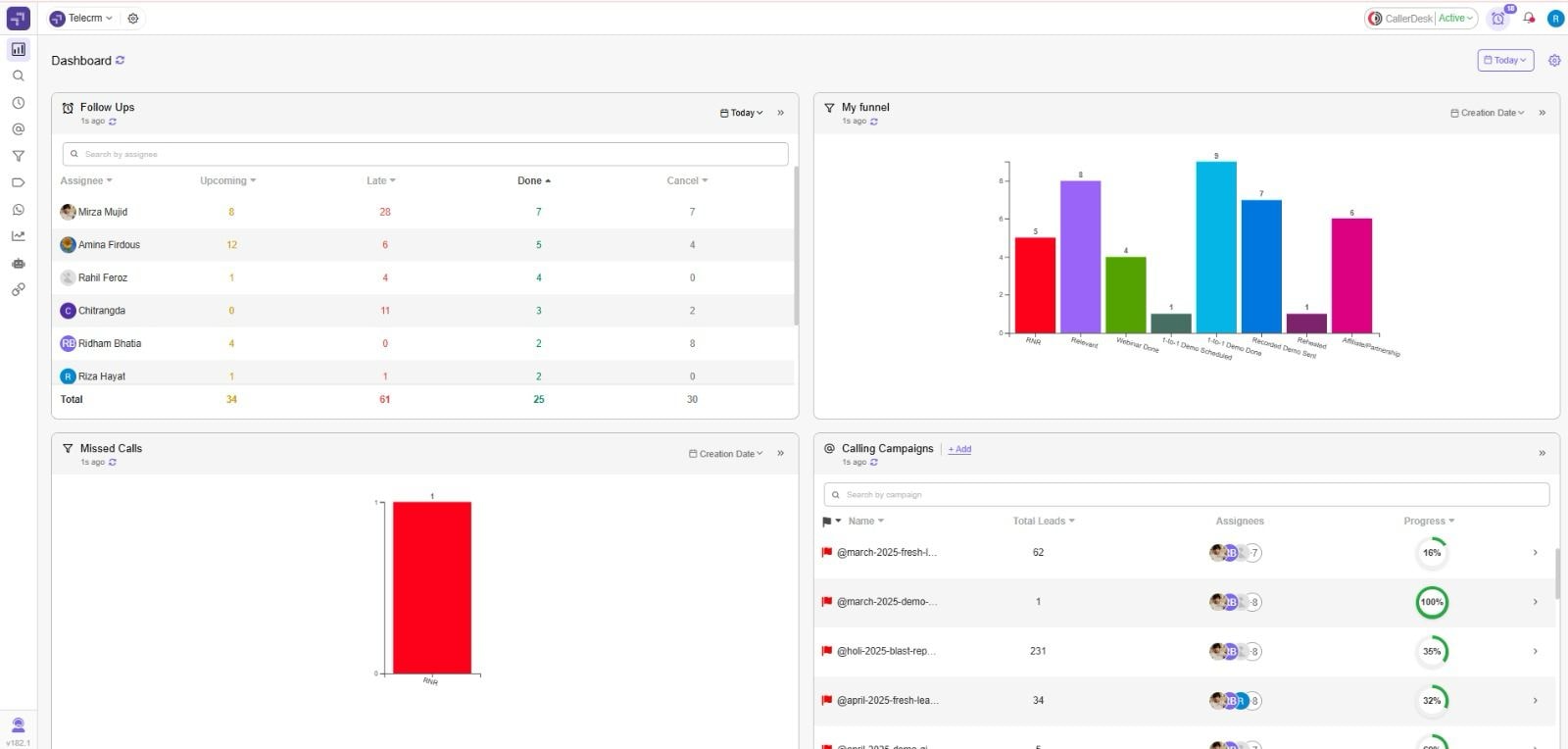
telecrm is a CRM platform built for Indian sales teams. It includes calling, WhatsApp messaging, lead automation and pipeline tracking in one place, with a guided setup process that most teams complete in under two weeks.
No clutter. No tech hassle. Just a CRM that your team will actually use.
This is the step most teams rush — and it’s often the one that causes the most mess later.
You’ve picked your CRM system and you’re eager to start. So, what happens? Someone dumps an old Excel sheet full of duplicate entries, outdated contacts and half-filled fields into the new CRM platform.

Now your CRM looks messy from day one.
Remember: if your data’s messy, your CRM will be too.
Data migration isn’t just copy-paste. It needs a bit of cleanup, planning and a small test before you go all in.
Here’s how to keep it simple:
1. Audit your data: Collect customer data from all sources — Sheets, forms, WhatsApp, ad platforms — and check if the fields are consistent.
2. Remove the junk: Delete empty rows, duplicates and cold leads that haven’t responded in years.
3. Standardise everything: Make sure field names match what your CRM solution expects. Don’t use three columns for phone numbers — pick one and clean it up.
4. Test with a small batch: Upload 20–30 leads first. Map the fields. Check if everything lands in the right place.
5. Import the rest: Once the test looks good, go ahead and import the full list.
Pro tip: Put one person in charge of the migration. Ideally, someone who understands both the business and the data.
It’s simple — clean data leads to a smoother CRM setup and fewer issues down the line. Don’t skip it.
This is where your CRM stops being a generic tool and starts becoming your sales team’s daily companion.
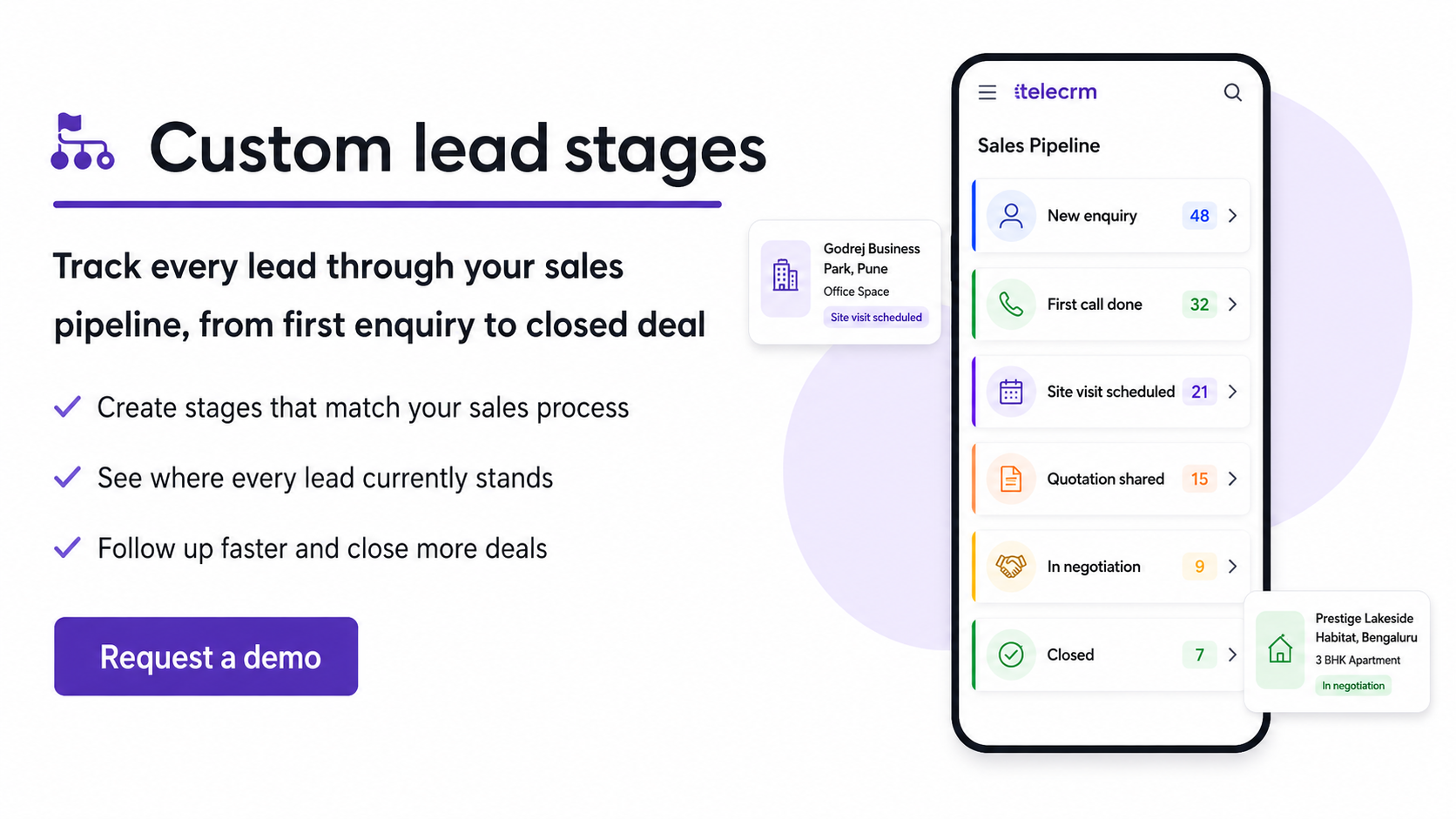
But here’s the catch — Default CRM settings rarely reflect how Indian sales teams actually work. Customising pipeline stages, required fields and user permissions takes one to two days and is the single step most associated with whether a team adopts the system or ignores it.
Don’t force your team to change how they work. Instead, make your CRM work the way it already does — but better.
Here’s how:
Ignore the default terms like “Prospect” or “Qualified.” Use stages that reflect your real-world sales flow:
Clear stages = better tracking across the sales pipeline.
Whether you’re in real estate, finance or B2B services, your customer data needs will vary. Add fields like “Budget,” “PAN,” or “Document Status” — but only if they’re essential.
The fewer fields you use, the more your team will actually fill them in. Create only the CRM custom fields that support qualification, follow-ups or reporting.
If your team handles different types of leads or services, use pipelines to stay organised:
Or use tags and colour codes if your CRM software doesn’t support multiple pipelines.
Your support team may not need to see every deal. Your sales reps should only see their assigned leads.
Setting the right permissions keeps your CRM platform clean and avoids confusion.
Customisation comes first. CRM automation can wait. Get the workflow right, build comfort and only then start automating repetitive tasks.
Your CRM should feel like a natural extension of your team’s daily routine, not a new system they have to figure out. And if none of the off-the-shelf options meet your needs, consider consulting a CRM development company to explore custom-built solutions.
When the setup mirrors your actual sales process, adoption becomes easy, tracking becomes consistent and your team starts seeing real value from day one.
Pro tip: If you’re going for a custom-built CRM solution, make sure to follow Site reliability engineering practices. These practices can guarantee your CRM system remains reliable and performs optimally.
Now that your CRM is set up, your data’s clean and your team is using it — it’s time to take things up a notch with automation.
Because let’s face it — if you’re still manually updating leads, reminding reps or sending welcome messages, you’re not getting the most out of your CRM software.
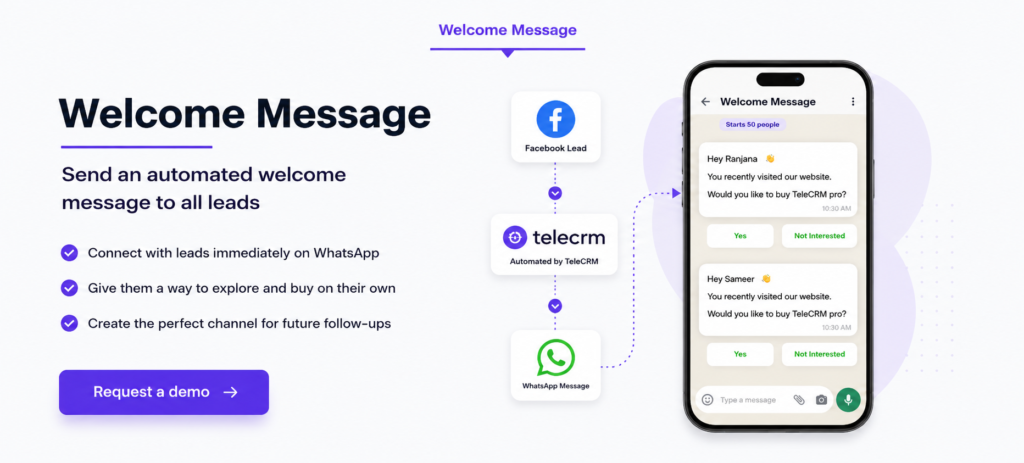
Start small. Automate the things your team often forgets or skips. Here are a few that work well for most Indian SMBs:
Now let’s talk CRM integrations. Your CRM system should work with tools you already use:
telecrm, includes WhatsApp messaging, IVR call integration, Facebook and Instagram lead form capture and automated follow-up reminders as native features, without requiring third-party integrations for each.
Start with just 2–3 smart automations and basic integrations. Once your team gets the hang of it, you can explore more advanced workflows.
When follow-up reminders, lead assignments and welcome messages are automated, sales reps spend their available call time on leads that are ready to engage rather than on manual admin tasks.
Your CRM is ready. Workflows are live. But here’s the real question — will your team use it?
Because even the best CRM platform fails if your sales reps stick to WhatsApp chats or scribbled notes.
CRM implementation only succeeds when your team adopts it. And that doesn’t happen by chance — it takes the right approach.

Here’s how to get it right:
Don’t dump everything on everyone.
Keep sessions short. One feature, one role, 15 minutes. Plan CRM onboarding around these role-specific tasks, then check that each user can complete them.
Use the CRM to assign tasks, track deals and review progress. Recognise regular users. When it’s part of their routine, usage sticks.
Use CRM analytics to see who’s stuck — not to blame, but to support.
Skip the classroom approach.
CRM adoption is a small cultural shift. Guide your team, show them the value and help them build confidence.
When your sales team sees how the CRM helps them close faster and follow up better, they’ll never want to go back.
Your CRM is live, your sales team is trained and things are running smoothly. But here’s the truth — CRM implementation doesn’t end at setup.
The first 30 days after go-live reveal where leads are getting stuck, which reps need additional support and which automated workflows are being skipped. A weekly usage review in this window prevents small adoption gaps from becoming permanent habits.
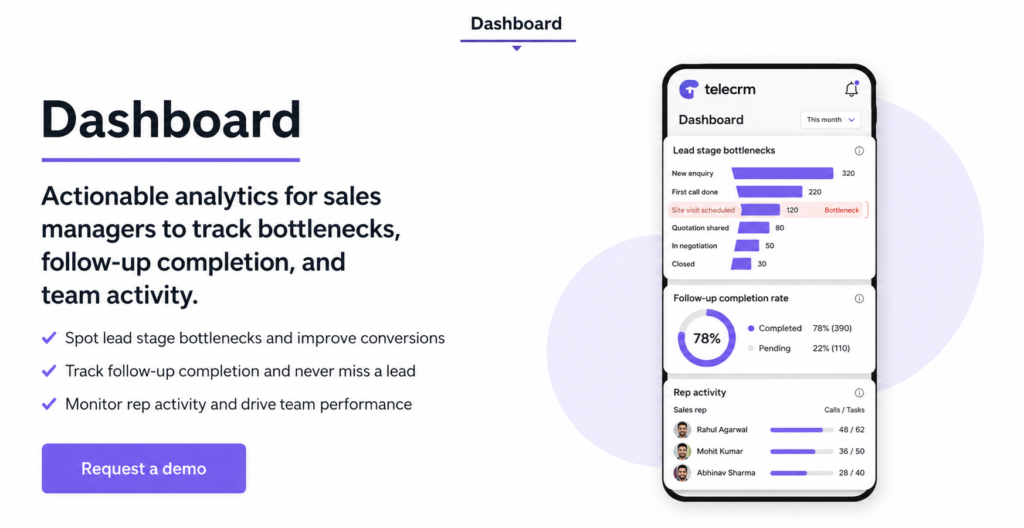
A good CRM system grows with your business. To get lasting value, you’ll need to review, tweak and improve it regularly.
Look beyond the setup. Is your team updating lead stages? Are follow-ups logged? Are reports showing delays?
Most platforms offer user reports. Use them to check:
A quick weekly review helps catch problems before they grow.
Started with one sales pipeline? Now you’ve got two teams? Update your workflows, automations and reports to reflect that.
CRM customisation is ongoing. Keep your system in sync with your business processes.
Regular feedback can save hours of confusion.
Try simple questions in team calls:
Even small tweaks — like renaming a dropdown — can improve CRM adoption.
Once your system is stable, use it to grow smarter:
A well-managed CRM strategy helps your team close more deals, follow up faster and improve customer relationships at every step.
Your CRM isn’t just a tool — it’s the backbone of how you scale your business. Keep improving it, and it’ll keep delivering results.
A lot of teams think CRM implementation is a complex job. But the truth is, it only feels that way when you skip the basics.
If you rush in, upload old data and leave the sales team to “figure it out,” your CRM system will never work the way it should.
But if you follow a clear, step-by-step CRM implementation process, it’s actually simple.
CRM implementation readiness checklist:
Do this right, and your CRM becomes part of your daily routine, not extra work.
Still confused? Try telecrm — the best CRM software that brings calling, WhatsApp, lead tracking and automation together in one platform.
No technical setup. No long wait. Just results.
Book a free demo today, and we’ll help your team go live in 2–3 days — no chaos, no confusion.



© Copyright 2026 telecrm.in (Flamon Cloudtech Pvt Ltd) - All Rights Reserved • Privacy Policy • T&C



© Copyright 2026 telecrm.in - All Rights Reserved • Privacy Policy • T&C