
How many times has a promising prospect reached out about your product or service, only for the deal to slip away or go cold because the follow-up was just a little too late?
It’s a scenario that happens all too often. Scattered spreadsheets, messy note-taking and disconnected tools mean enquiries inevitably fall through the cracks. The worst part isn’t just losing the business — it’s having zero visibility into where or how the lead was lost, leaving you with no clear way to improve.
To stop leaking revenue, you need complete control over the entire enquiry journey in one centralised place. That is where Enquiry Management Software comes in, acting as a unified command center that captures every lead, automates routing and tracks every interaction so no opportunity is ever missed again.
At its core, Enquiry Management Software is a central platform that helps businesses prevent lost leads and keep track of the entire enquiry journey, from the moment a prospect reaches out to the final deal closure.
By replacing manual data entry and disconnected tools with a single, automated workflow, it makes it easier for your team to capture, track and convert incoming leads.
Specifically, it helps you in:
Imagine an enquiry coming into your business right now. Here is how an enquiry management system transforms that single spark of interest into a closed deal, step by step:
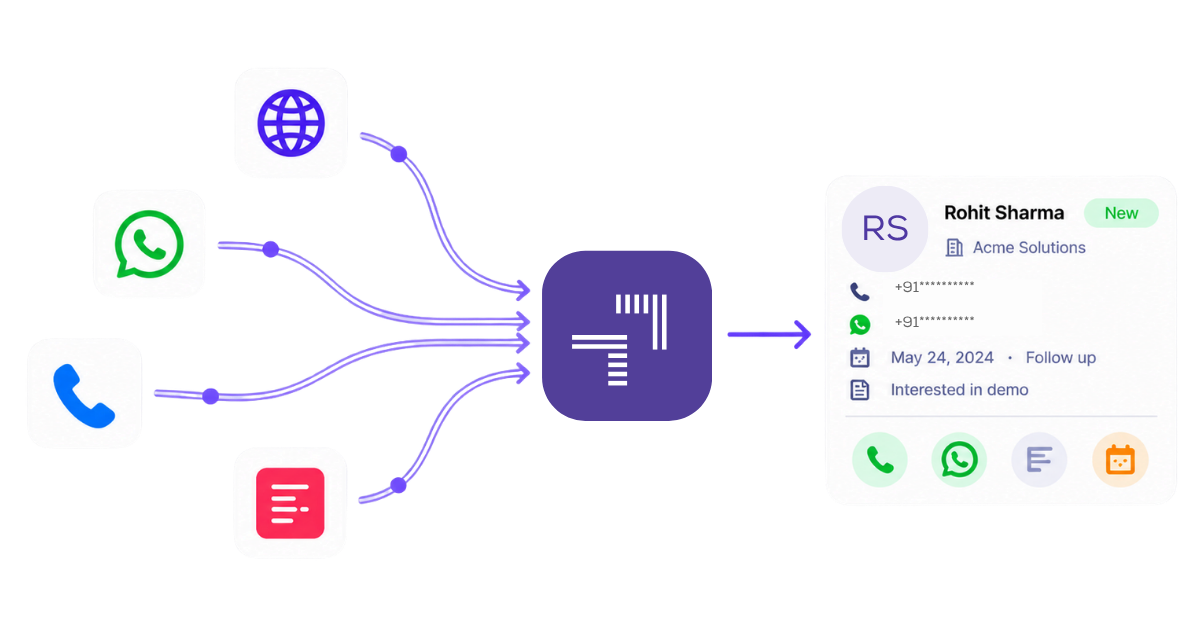
Picture your prospects reaching out through completely different channels: one fills out a form on your website, another sends a direct message on social media, someone else sends an email and another calls your main line.
Instead of these enquiries sitting in isolated inboxes or lost on random call pads, the system instantly captures every single enquiryl. It extracts the prospect’s details, automatically creating a clean, structured lead profile in your system the moment it happens.
The system then checks your preset enquiry assignment rules based on geographic territory, product specialisation or current rep availability and routes the new lead directly to the right sales rep.
Simultaneously, while your rep is being notified, the system fires off an automated, personalised response back to the prospect. Before they even have time to switch browser tabs and search for a competitor, they have a professional acknowledgement confirming their request is being handled.
When your team member opens the lead, they don’t see a blank screen or rely on memory. They see a complete, chronological timeline of every interaction: the exact web page the prospect was viewing before filling out the form, their original enquiry message, previous call notes and email history.
Anyone on your team can step in at any moment with full context, ensuring the prospect never has to repeat themselves.
Your sales rep can then call the lead with a single click and manage the conversation directly within the system. As the enquiry progresses, the lead can move through different pipeline stages, from Initial Contact to Quote Sent.
If a prospect doesn’t respond after receiving a proposal, the system can track inactivity and automatically create a follow-up task or send a reminder email to re-engage them. Similarly, if a prospect requests a callback or reschedules a call, your sales rep can set a follow-up reminder to ensure they are contacted at the agreed time.
When the deal crosses the finish line, the system logs the outcome and maps the entire journey from start to finish.
You gain immediate visibility into exactly which marketing channel brought in the lead, how many minutes it took your team to make first contact, where the conversation spent the most time and what specific steps led to a successful conversion — giving you a repeatable playbook for every future enquiry.
The right enquiry management software should help businesses capture, organise and track enquiries while making it easier for teams to respond, follow up and manage customer conversations.
Here are the key features to look for:
Feature | How it helps businesses |
Centralised enquiry management | Keeps customer details, enquiries and communication history in one place. |
Automated enquiry capture | Collects enquiries from website forms, calls, WhatsApp and other connected sources without manual entry. |
Enquiry assignment rules | Automatically assigns enquiries to the right sales reps based on location, availability or workload. |
Enquiry status tracking | Tracks each enquiry through different stages, from initial contact to closure. |
Follow-up reminders | Helps employees schedule callbacks, manage pending tasks and avoid missed follow-ups. |
Call and WhatsApp tracking | Keeps customer conversations, call records and WhatsApp interactions linked to each enquiry. |
Identifies duplicate enquiries and prevents multiple records for the same prospect. | |
Custom workflows | Allows businesses to create pipelines and automate activities based on their processes. |
Reports and analytics | Provides insights into enquiry sources, response times, conversion rates and team performance. |
Integrations and data migration | Connects with existing tools and supports importing customer data from Excel or other systems. |
Mobile access | Allows employees to manage enquiries, update statuses and track follow-ups on the go. |
User-friendly interface | Makes it easier for employees to access information and manage daily activities with minimal training. |
The right enquiry management software can help businesses capture customer enquiries, assign them to employees, manage conversations and track progress until closure. Here are six enquiry management systems worth considering in 2026.
telecrm is an AI-powered CRM that helps businesses manage the entire enquiry lifecycle, from capturing and assigning enquiries to communicating with prospects, managing follow-ups and closing deals.
It brings lead management, calling, WhatsApp, sales operations, automation and detailed reporting into a single platform, helping teams manage enquiries without switching between multiple tools.
Key features of telecrm:
Explore all these capabilities on the telecrm features page.
Industries served: telecrm caters to businesses across real estate, education, automobile, insurance, finance, healthcare, manufacturing, travel, recruitment and other industries. From managing property enquiries and site visits to student admissions, loan applications and customer quotations, businesses can customise pipelines, assignment rules and workflows to match their requirements.
Zoho CRM is a customer relationship management platform that helps businesses capture, organise and manage enquiries throughout the sales process.
It offers automated lead assignment, follow-up reminders, workflow automation and reporting to help teams manage customer interactions and track opportunities.
Best suited for: Small and growing businesses looking for a customisable CRM with lead management and sales automation capabilities.
Salesforce Sales Cloud is a CRM platform that helps businesses manage customer enquiries, sales activities and opportunities across teams.
It provides lead capture, automated assignment, pipeline management, AI-powered insights and reporting. Businesses can also customise workflows to manage complex sales processes.
Best suited for: Large businesses and enterprises with complex sales workflows, multiple teams and advanced reporting requirements.
LeadSquared is a sales execution and lead management platform that helps businesses capture, distribute and track enquiries across different channels.
It offers automated lead distribution, activity tracking, follow-up management, workflow automation and sales performance reporting to help teams manage enquiries throughout the sales process.
Best suited for: Businesses managing high enquiry volumes, field sales teams and structured sales processes.
Freshsales is an AI-powered sales CRM that helps businesses manage leads, customer conversations and sales pipelines from a central platform.
Its features include lead capture, lead scoring, automated workflows, email and phone communication, pipeline tracking and reporting.
Best suited for: Small and medium-sized businesses looking for an easy-to-use CRM with sales automation and customer engagement features.
Meritto is an education-focused CRM and admissions platform designed to manage student enquiries throughout the admission process.
It helps educational institutions capture enquiries, assign counsellors, automate communication, track applications and monitor student progress from initial enquiry to enrolment.
Best suited for: Schools, colleges, universities and educational institutions managing student enquiries, counselling and admissions.
Not every business manages enquiries in the same way. The right enquiry management system should match your enquiry volume, team size, communication channels and existing workflow.
Here are a few factors to consider before making a decision.
Start by understanding the challenges your team faces. Are enquiries getting missed, follow-ups being delayed or customer details scattered across different tools? Choose software that solves these problems instead of paying for features you may never use.
Identify where most of your customer enquiries come from, such as website forms, WhatsApp, phone calls or advertisements. Make sure the system supports these channels and keeps customer conversations and enquiry records in one place.
Look for features such as automated enquiry assignment, follow-up reminders, task creation and workflow automation. These can reduce manual work and help your team respond to enquiries faster.
Choose software with a user-friendly interface that employees can learn without extensive training. It should also integrate with your existing tools and support data migration from Excel or other systems.
Consider the total cost, including user licences, integrations, setup and additional features. Choose a system that fits your current budget and can support more users, enquiries and workflows as your business grows.
Request a demo or trial to understand how the system works. Test common activities such as capturing an enquiry, assigning it to a sales rep, scheduling a follow-up and generating reports.
This will help you determine whether the software fits your team’s daily operations and enquiry management process.
Every customer enquiry represents a potential business opportunity. But without the right system, even promising enquiries can get lost between missed calls, delayed follow-ups and scattered information.
That’s where telecrm makes a difference.
From capturing enquiries across multiple sources to assigning leads, managing calls and WhatsApp conversations, automating follow-ups and tracking conversions, telecrm brings your entire enquiry management process into one platform.
Whether you’re managing a small sales team or handling thousands of enquiries across multiple locations, telecrm helps you stay organised, respond faster and make the most of every opportunity.
Don’t let your next potential customer become another missed opportunity. Book a demo now and see how telecrm can simplify enquiry management for your business.
Enquiry management software is a system that helps businesses capture, organise, assign and track customer enquiries. It keeps customer details, communication history, enquiry status and follow-up activities in one place.
Enquiry management focuses on receiving, recording, responding to and tracking customer enquiries. Lead management covers the broader process of qualifying potential customers, nurturing their interest and moving them through the sales pipeline. The two processes overlap, and many CRM systems support both.
Yes. Enquiry management software with automation features can assign incoming enquiries to employees based on predefined rules such as availability, location, department or workload. The available assignment options depend on the software.
Yes. An enquiry management system with the required integrations can collect and manage enquiries from WhatsApp, phone calls, website forms and other connected sources. This helps businesses keep customer information and conversations organised in one place.
Yes. Small businesses can use enquiry management software to organise customer enquiries, assign responsibilities, track conversations and manage follow-ups. It can also support growing organisations handling enquiries across multiple teams.
Many enquiry management systems support importing records from Excel or CSV files. Before data migration, businesses should check required fields, remove duplicate entries and verify the imported information.
Enquiry management software can help businesses in education, real estate, manufacturing, healthcare, automobile, travel, insurance and other industries that regularly receive customer requests and need to track responses and follow-ups.
It helps employees access relevant customer information, understand previous interactions and respond with better context. Assignment rules, reminders and enquiry status tracking can also help reduce delays and missed follow-ups.



© Copyright 2026 telecrm.in (Flamon Cloudtech Pvt Ltd) - All Rights Reserved • Privacy Policy • T&C



© Copyright 2026 telecrm.in - All Rights Reserved • Privacy Policy • T&C