
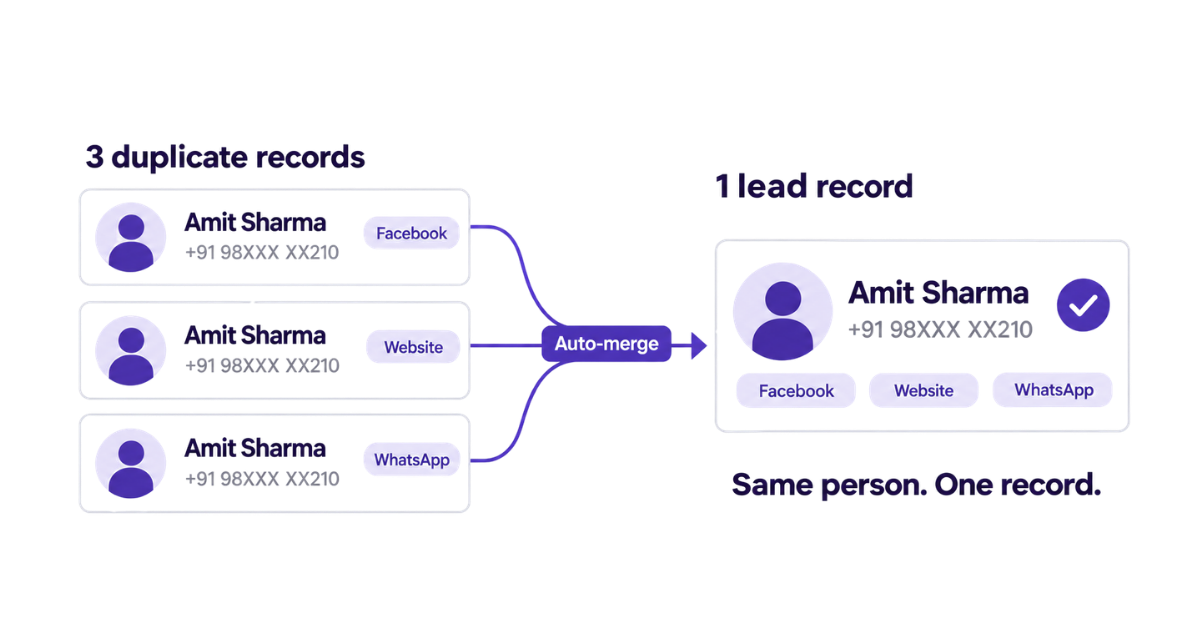
A lead receives three calls in a day from your company, each from a different sales rep asking the same questions. Lead deduplication helps prevent this by identifying repeated records of the same prospect, so your team doesn’t mistake one person for three separate leads.
By the third call, the prospect could be annoyed. They’ve already explained their requirement. Why does your team keep starting over?
The confusion starts when that person fills out your Facebook form, enquires through your website and sends a WhatsApp message. Each enquiry gets added as a new record and assigned to a different rep. None of them knows that a colleague is already speaking to the prospect.
This results in repeated calls, scattered conversation history and a lead count that makes your pipeline look bigger than it actually is. In this guide, we’ll explain why leads get duplicated, how to clean them up and have a cleaner sales pipeline.
Lead deduplication is the process of identifying duplicate records of the same lead and bringing their useful information together into one record.
Think of it this way: one record has the prospect’s phone number and requirement. Another has their email address and a note from yesterday’s call. Deleting either could mean losing information your team needs. When you merge records, you keep those details together so the next sales rep can understand the conversation without starting over.
To find duplicate leads, you compare details such as phone numbers and email addresses. Two records with the same email address could represent the same person. Matching rules help your system flag these records for review or handle them automatically, depending on its features and configuration.
But a match doesn’t always mean you should merge. A parent might use the same phone number to enquire about courses for two children. Those are separate requirements worth keeping.
The goal is simple: remove unnecessary duplication while preserving the information your team needs to follow up.
Duplicate leads usually build up through everyday work: someone submits another enquiry, a rep adds a contact or marketing imports a lead list. If nobody checks whether the same lead already exists, you end up with another record.
Here are the common reasons.
Your website, Facebook campaigns, WhatsApp and events can all bring in enquiries from the same person. If each source creates a new lead without checking existing records, one prospect can appear several times in your system.
For example, someone who enquired through your website last week might respond to a Facebook ad today. Their latest enquiry is worth keeping, but it doesn’t necessarily mean you’ve acquired a new prospect.
A prospect calls your office. The sales rep takes their details and creates a new lead without searching for their phone number first.
The person may already be assigned to a colleague, with previous conversations and pending tasks. Now two records hold different parts of the same lead’s history.
A phone number entered with +91 can look different from the same number saved without the country code. Extra spaces in email addresses or variations in company names can also make matching harder.
If your system compares only the values exactly as entered, it may miss duplicate records.
Marketing uploads an event attendee list. A manager adds an old Excel sheet. Some of those contacts already exist in your CRM.
Checking for duplicates within the new file isn’t enough. You also need to compare the incoming list with your existing data, or the import can create duplicate contacts.
Sometimes, duplication comes from the tools connecting your lead sources to your CRM. An integration may resend an enquiry after a failed response, or two integrations may capture the same web form submission.
Without a check for repeated submissions, your system can create another record even though the prospect submitted their details only once.
As lead volume increases, these small gaps become harder to catch manually. That’s why preventing lead duplication means checking how leads enter your system, rather than treating it as a one-time cleanup project.
Related Read: Lead Automation: How to Automate Your Entire Lead Journey
Cleaning your current list gives you a starting point. The next step is making sure tomorrow’s enquiries don’t bring the same duplicates back.
Here’s how to handle both.
Save a backup of your original file, then bring your lead lists into one sheet. Use consistent columns for names, phone numbers, email addresses, requirements, sources and notes.
Before checking for duplicates, standardise the data. Remove unnecessary spaces and use a consistent phone number format so small differences don’t hide a match.
To highlight repeated values:
Excel highlights matching values, but you need to check whether the rows represent the same person and requirement.
Suppose one record contains the prospect’s budget and another has their preferred callback time. Bring that information into one record before removing the extra row.
For confirmed duplicates that add no useful information, select your table and use Data → Remove Duplicates. Choose your matching columns carefully: selecting multiple columns requires their combined values to match. This feature removes rows; it doesn’t combine their information.
A file can contain no duplicates within itself and still include leads you already have.
For example, marketing shares 200 contacts from an event. Thirty of them previously enquired through your website. Checking only the event list won’t reveal that overlap.
Compare incoming phone numbers and email addresses with your master list before adding them. Preserve the new event interaction or requirement against the appropriate record.
When a prospect calls or walks into your office, search their phone number or email address first.
If a record exists, check the previous communication and current requirement before adding another one. This also helps sales representatives see whether a colleague is already handling the enquiry.
Make this part of your data entry process, rather than leaving each rep to decide when to check.
Web forms and integrations need the same checks your team performs manually.
Define the field your system should use to recognise an existing lead, such as a phone number, email address or customer ID. Then configure incoming submissions to check that field before creating a record.
Decide what happens when a match is found: update the existing information, record a fresh enquiry or flag the submission for review. The right action depends on whether it is repeated data or a genuinely different requirement.
Matching contact details don’t always mean two records should become one.
A parent may enquire for two children using the same number. An existing customer may ask about a different service. Another prospect may use separate personal and work numbers.
Review these cases before merging records. Preserve the requirements, useful notes and pending tasks and confirm who should handle the next follow-up.
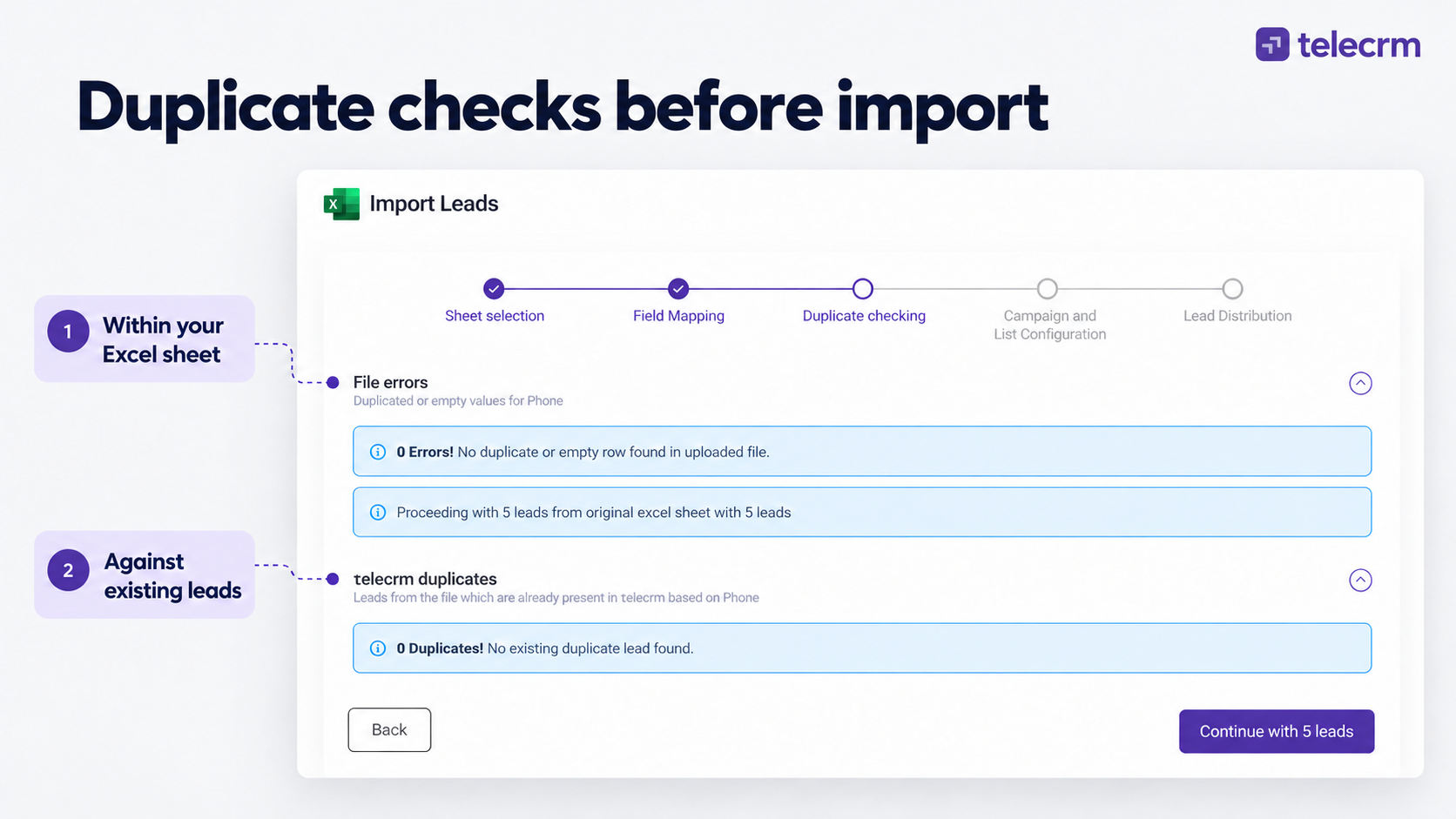
telecrm is an all-in-one platform which combines lead management, automation, communication and sales pipeline into one place, helping your team capture and assign leads, manage calls and WhatsApp conversations and track follow-ups. It also reduces manual duplicate checks as enquiries enter your CRM:
Your team spends less time comparing records and more time following up with the right context..
Keeping your lead list clean isn’t just about organising your lead data, it also saves your team time and stops your prospects from getting annoyed. When your sales reps aren’t accidentally calling the same person twice or asking the same questions, your team looks more professional and can close sales faster.
By building these simple habits and following preventive measures, like checking for existing numbers before adding a new contact and letting smart tools like telecrm automatically catch duplicate entries, you can keep your lead list neat effortlessly. Automate your entire process by letting telecrm clean up your current list today, set up clear lead capture and assignment rules and let your sales team focus on what they do best: turning leads into customers. Book a demo with telecrm today!
Lead deduplication is the process of identifying repeated records of the same prospect and combining useful information into one record. It helps your team avoid repeated outreach and keep conversation history together.
Compare phone numbers, email addresses and other identifying details. Standardise their formatting first, then review matching records to confirm they represent the same person and requirement. A shared name or phone number alone may not be enough.
Highlight repeated phone numbers or email addresses using Conditional Formatting. Review the matching rows and combine useful information before using Data → Remove Duplicates. Save a backup first, as removing rows does not merge their contents.
Deleting removes a record, including any information stored only in that record. Merging brings useful details from matching records together. Review conflicting values before merging so you don’t lose important notes or requirements.
No. Two enquiries may share a phone number but have different requirements. For example, a parent could enquire about courses for two children. Review the details before deciding whether to merge records or keep separate enquiries.
telecrm checks manually uploaded leads for duplicates within the file and against existing records. During automatic capture, matching phone numbers help it update the existing lead rather than create another record. It also flags duplicates on the lead view page so reps can check before calling.
Check every incoming list before importing it and use duplicate checks during automatic lead capture. Review uncertain matches regularly, especially after adding integrations or changing matching rules. Deduplication works best as an ongoing process.



© Copyright 2026 telecrm.in (Flamon Cloudtech Pvt Ltd) - All Rights Reserved • Privacy Policy • T&C



© Copyright 2026 telecrm.in - All Rights Reserved • Privacy Policy • T&C