
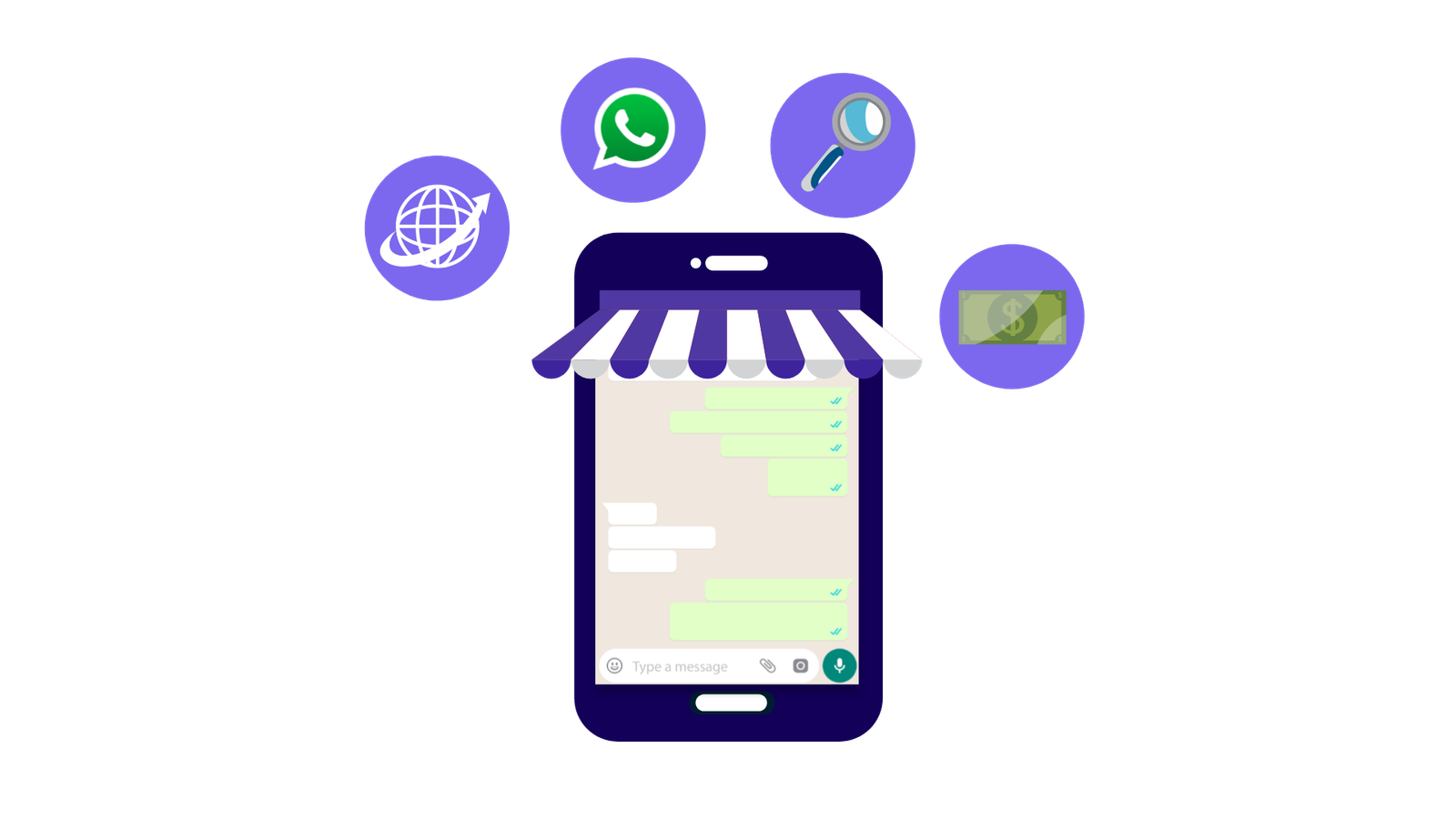

Managing sales on WhatsApp can quickly become overwhelming for businesses. Product enquiries, price checks, variant questions, delivery timelines and payment details all arrive through one messaging app, often at the same time. Important WhatsApp messages get buried, responses are delayed and follow-ups are missed, leaving customers waiting and directly impacting sales and customer satisfaction.
This is where a WhatsApp eCommerce store makes a difference. It combines conversation, trust and a simple buying process in one place. With the right setup, businesses can structure their product catalogues, orders, payments and support, turning everyday WhatsApp conversations into a smooth and scalable selling system without added complexity or high costs.
In this article, we will look at how you can set up your WhatsApp Business and WhatsApp API to upgrade your selling game.
A WhatsApp e-commerce store is a selling platform where businesses use WhatsApp to show and manage their product catalogues, orders, payments, delivery, etc. Instead of pushing customers to an external website or a traditional e-commerce platform, businesses can use a WhatsApp e-commerce store to:
This is your easiest way to start selling online as a small business or a startup. Whether you sell apparel or home-made pickles, a WhatsApp e-commerce store is the perfect way to start your business.
It allows your business to earn customer trust, enhance their experience and ultimately increase your revenue.
Traditional e-commerce platforms like Amazon and Flipkart rely heavily on ads. Although they work well at scales, they often fail to address the real pain points of the customers. There is a lack of interaction between the businesses and customers.
Apart from this, registering and maintaining your business on traditional platforms is a lengthy process and requires you to pay commissions on the sales. It is an ideal way to operate for large businesses but not for startups and smaller ones.
The second option is to build your own website. But for smaller online stores and startups, websites are not the perfect fit as they feel too transactional and create a sense of hesitation during checkouts. Websites are also expensive to create and maintain.
On the other hand, with a WhatsApp e-commerce store, customers can directly ask questions to your business. You can explain your entire product catalogue along with prices and build trust through conversations. This makes the buying process feel natural rather than transactional.
Using a WhatsApp e-commerce store can boost your business in a lot of ways. It builds trust and makes the buying process simpler. There are numerous benefits of using a WhatsApp e-commerce store, including:
Selling on WhatsApp provides a platform for your businesses to have real conversations with your customers, upgrading your customer support game. Also lets your customers clear their doubts instantly via direct messaging.
Creating a WhatsApp e-commerce store is far more cost-effective than creating and operating a website or using traditional e-commerce platforms. There are no costs associated with hosting or designing your e-commerce store.
With a WhatsApp e-commerce store, you can send direct personalised marketing messages and tailored product recommendations to customers based on their preferences and purchase history.
You can use product catalogues to easily showcase your offerings to customers. Customers can easily go through the products and services along with their descriptions and pricing. This makes the buying process simpler and enhances customer experience.
Even at a basic level, WhatsApp Business helps businesses track enquiries, manage orders and share updates through chat. This is far easier than handling calls, messages and emails separately.
You can simplify order management by bringing enquiries, confirmations and updates into one structured conversation flow, instead of spreading them across calls, spreadsheets and emails.
Below is a step-by-step guide for you to start your WhatsApp store.
(Pro-tip: If you already use WhatsApp and need to switch to WhatsApp Business, click here to know more.)
The first step is to download the WhatsApp Business App from either Google Play Store or Apple App Store.
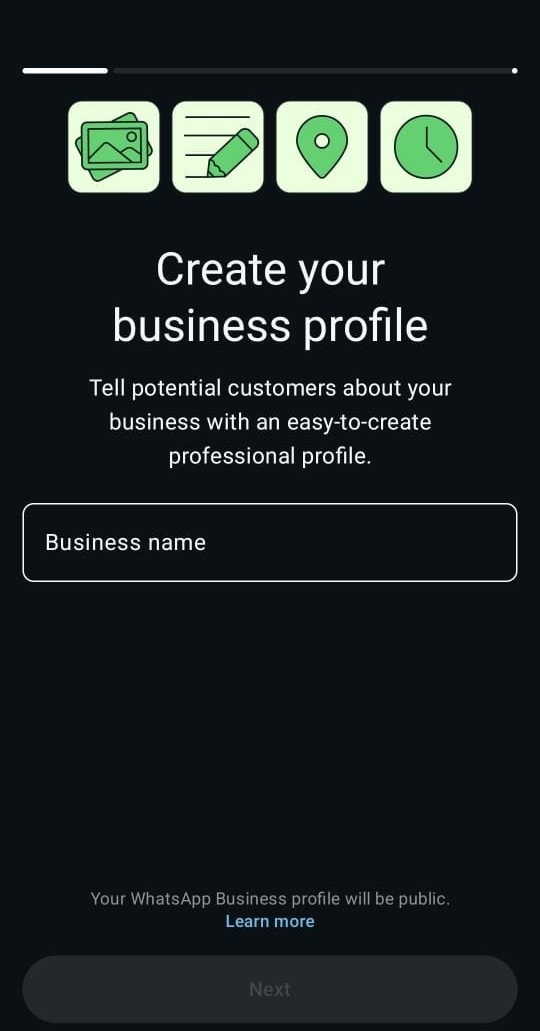
Create your WhatsApp Business profile and verify your business’s phone number via OTP. Furthermore, add details like the name and logo of your business.
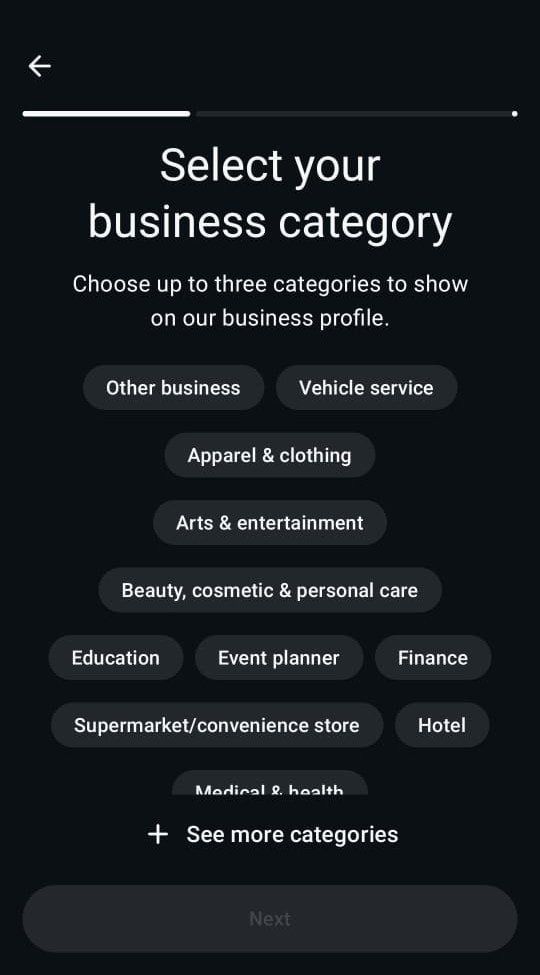
Choose the category of your business from the “choose categories” list. This adds a badge of your business’s category under your business’s name on your profile, giving an idea as to which industry your business is catering to. This badge builds clarity, credibility and reduces irrelevant enquiries.
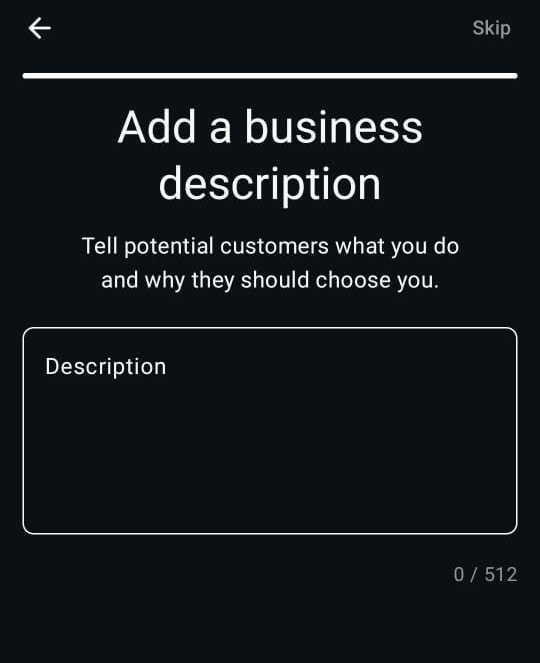
Add the description that best defines your business. Make sure it is brief, relevant and conveys your entire business offering in a simple manner.
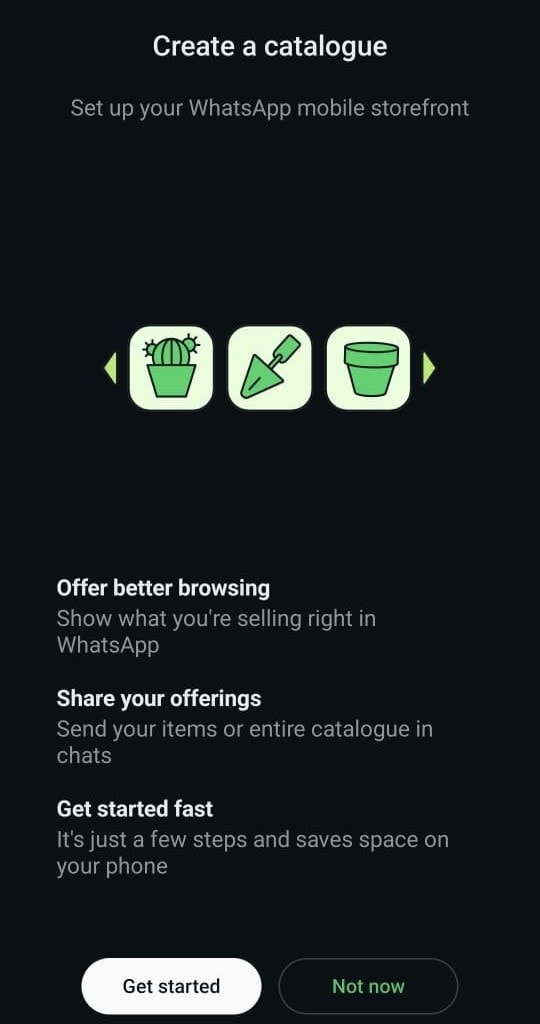
Using WhatsApp catalogues, you can effortlessly showcase products, eye-catching photographs and pricing information alongside product details, giving your customer a complete glimpse at your offerings.
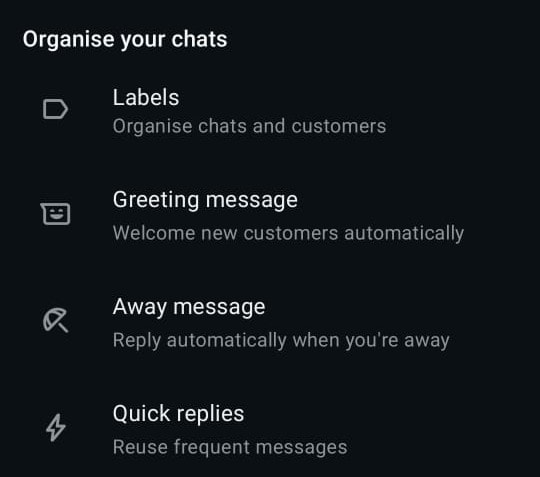
A greeting message is an automatic reply that is sent to leads instantly after they interact with your business for the first time or after a considerable gap. It connects your leads immediately with your business without waiting for you to reply manually.
An away message is a message that a lead receives when they reach out to your business after working hours. This ensures that leads get a response even when you are not around.
Click here for some great promotional message templates that you can use!
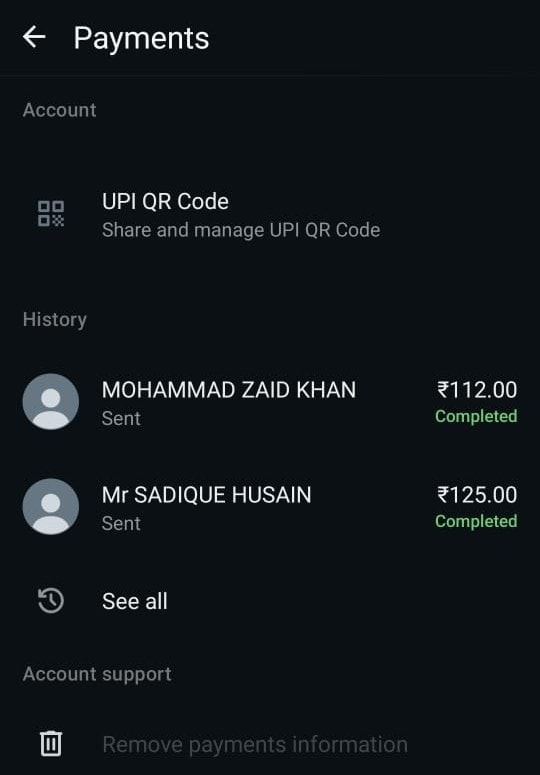
Make the buying process easier for your customers by adding different payment options within your WhatsApp. WhatsApp has an in-app payment gateway that accepts payments through the different modes, including UPI, debit cards, credit cards and more.
This makes the overall buying process seamless.
WhatsApp Business is a great way to start your online selling journey as a small business or startup as it is really simple and free to use. But as your business scales up, it gradually becomes a mess. Hundreds and thousands of simultaneous messages and orders are quite impossible to manage.
So, if your business receives high numbers of queries and orders, WhatsApp Business may not completely satisfy your needs. Let’s take a dive into why this can happen.
Sending business messages and pitches without a verification badge may end up with you getting blocked along with other spam accounts. WhatsApp Business does not give you a verification badge and your business may appear to be a scam. You need WhatsApp API setup to get a green tick verification for your business on WhatsApp.
As the business grows, enquiries grow too. Manually managing hundreds and thousands of messages about products, WhatsApp order updates, payments, deliveries and more, becomes a big challenge for your business. This often causes delays and frustrates customers.
Hence, you need a system that allows you to manage huge loads of enquiries without slowing down.This is where automations via chatbots and FAQs step in. These chatbots require WhatsApp Cloud API, which we will explain in the next section.
WhatsApp Business does not provide a detailed tracking of sales, enquiries and conversions. Hence, it becomes difficult to find out how well your boat is floating. But with WhatsApp API, you get a comprehensive tracking of all that matters. Now, let’s see what this WhatsApp API is and how it can help you upgrade your business!
WhatsApp Cloud API or WhatsApp Business API is a tool with advanced features for businesses. It is a paid service that can only be initiated through an official third-party provider.
Although WhatsApp Business is good when dealing with a small number of enquiries, WhatsApp API is better when dealing with large numbers of enquiries. It can deal with thousands of chats simultaneously without slowing down, using bulk marketing messages and broadcasts.
This allows you to never miss any messages and address all enquiries even after the closing time!
With the WhatsApp API, multiple users can access the same WhatsApp account through a shared WhatsApp inbox. This helps businesses with multiple sales reps to streamline their work.
This also allows admins and managers to keep track of everything that is going on from a single dashboard.
WhatsApp API enables automated replies, order updates, payment reminders, lead assignments and chatbot-enabled flows.
This makes the entire business management very structured. From answering the available colour options of your products to sending delivery details, the API will take care of everything!
WhatsApp API is a more structured way of selling as it can be integrated with most CRMs and order management software.
This helps businesses to make the best use of their CRM software by directly integrating their WhatsApp with it.
Hence, WhatsApp API enables quicker responses and a more structured and streamlined selling experience, providing a better customer experience.
There are some prerequisites that you need to keep in mind before starting your WhatsApp API.
You also need a third-party service provider like telecrm to enable your WhatsApp API without hassle.
Below is your step-by-step guide to upgrading your selling game with WhatsApp API with us.
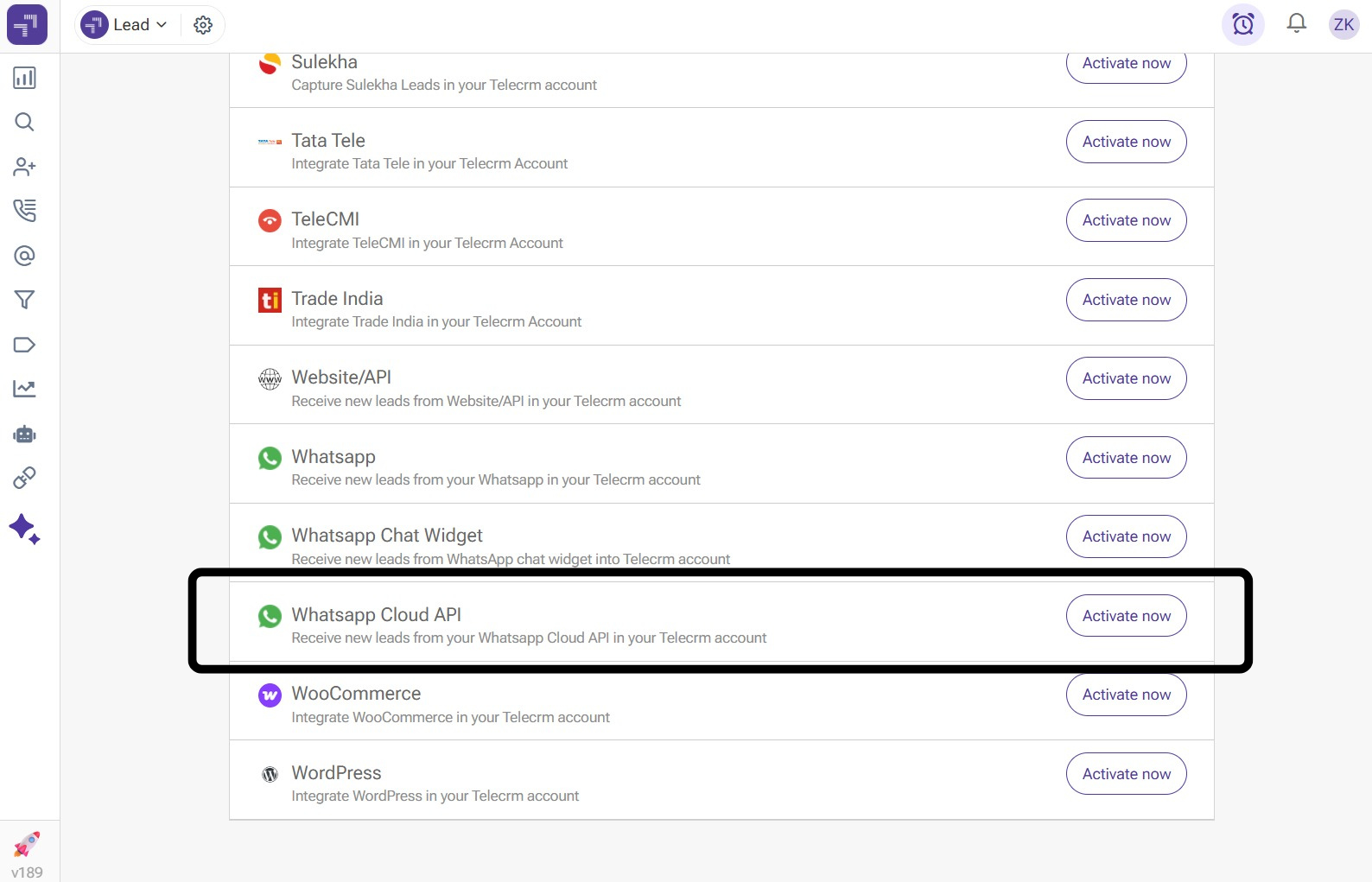
Open the “Integration” section on your telecrm dashboard and click on “Activate now” in front of “WhatsApp Cloud API”.
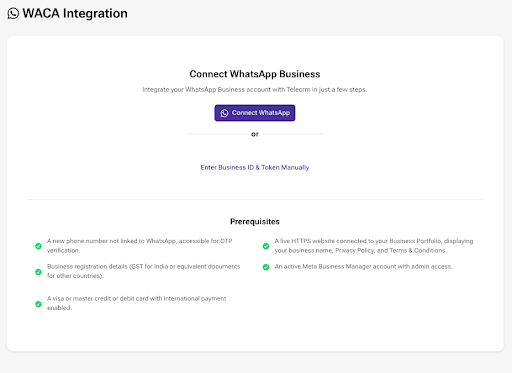
You need to click on “Connect WhatsApp” to connect your WhatsApp Business account to telecrm to access hassle-free use of the WhatsApp API. You can also enter your Business ID manually.
You will be redirected to a Facebook login page.
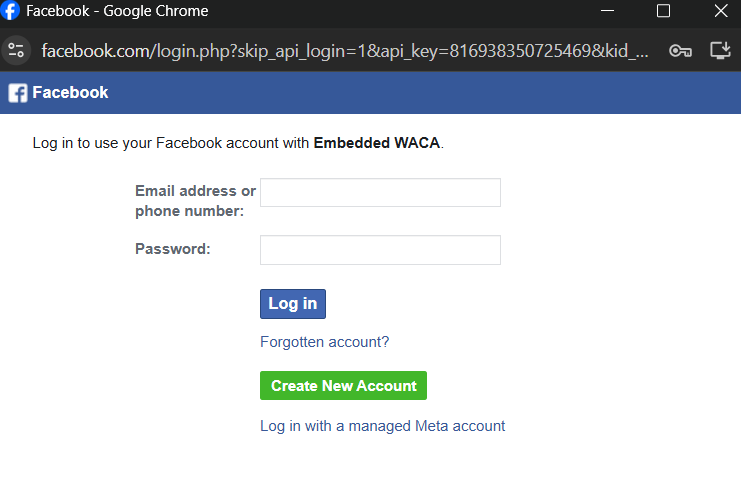
Log in to your Facebook profile to get started with WhatsApp API>
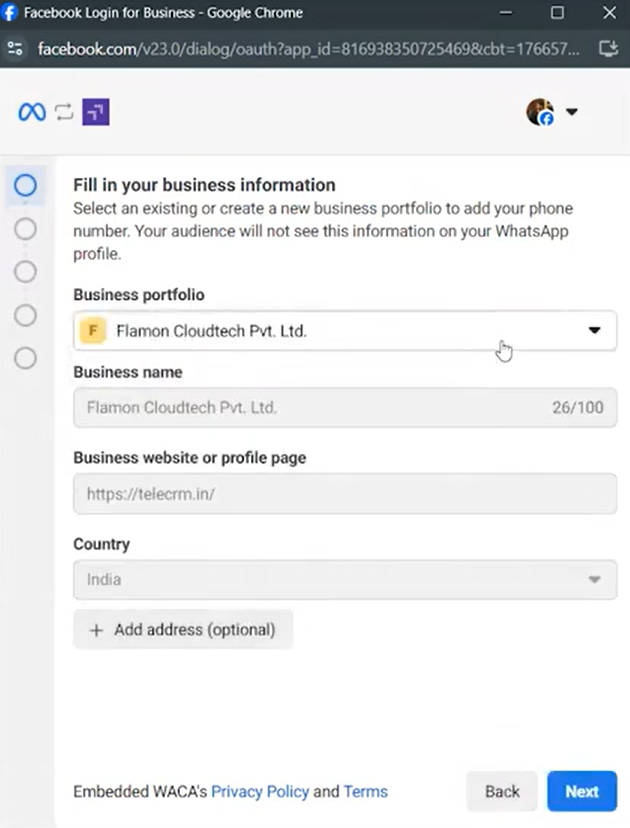
Create your business portfolio and enter your business’s name and a live https website that is associated with your business.
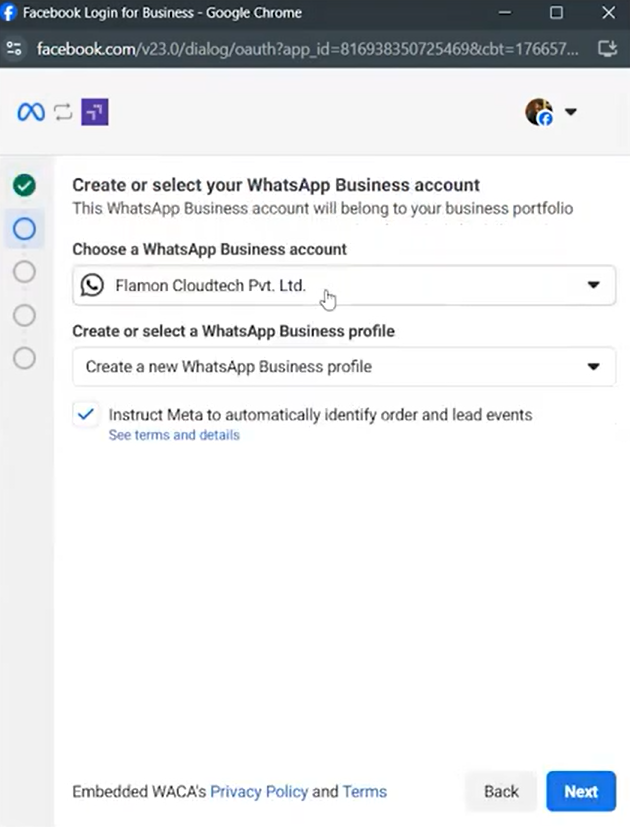
Choose the business account you created and then click on “Create a new WhatsApp Business Profile” to continue with the setup.
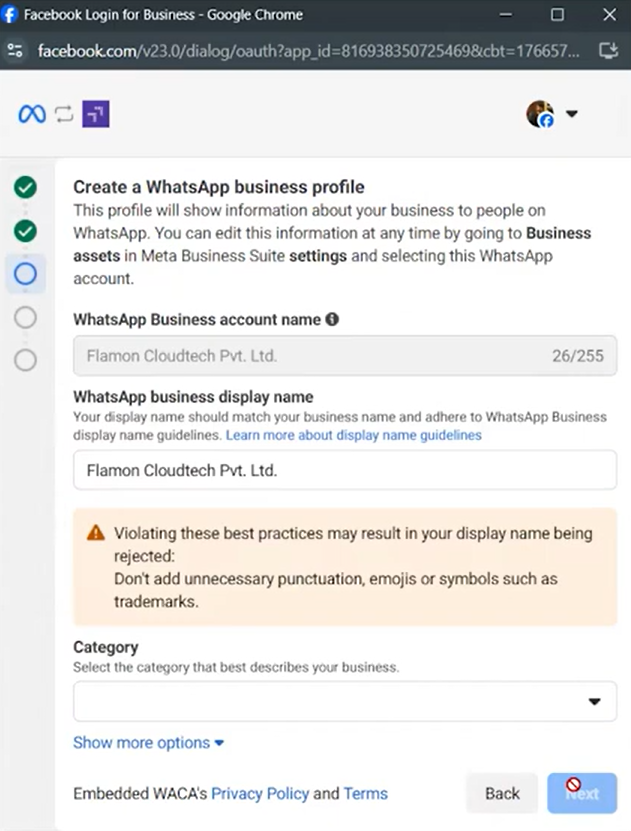
Click on the “Category” menu and choose your business category from the list.
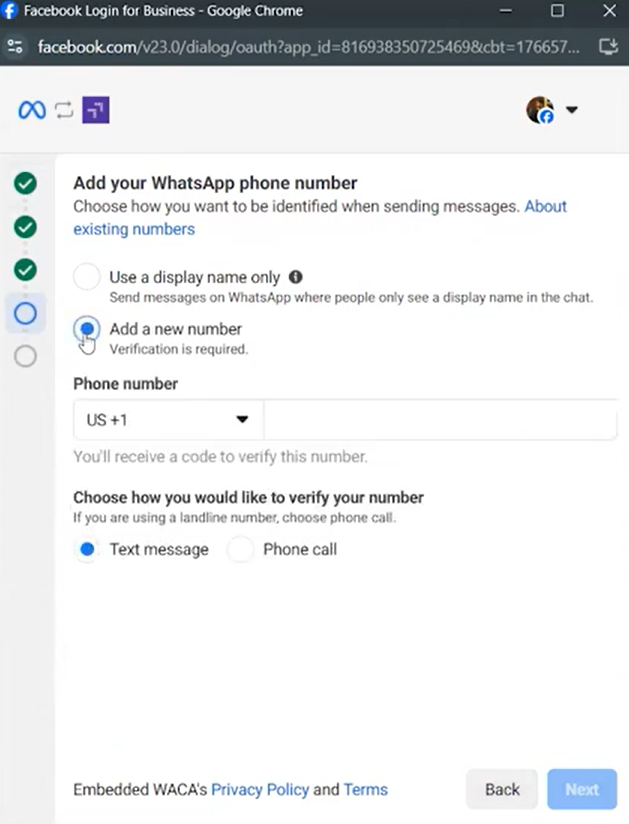
Choose your country code and add your phone number for verification. You can get your verification done via OTP or phone call. Enter your OTP to verify your WhatsApp number.
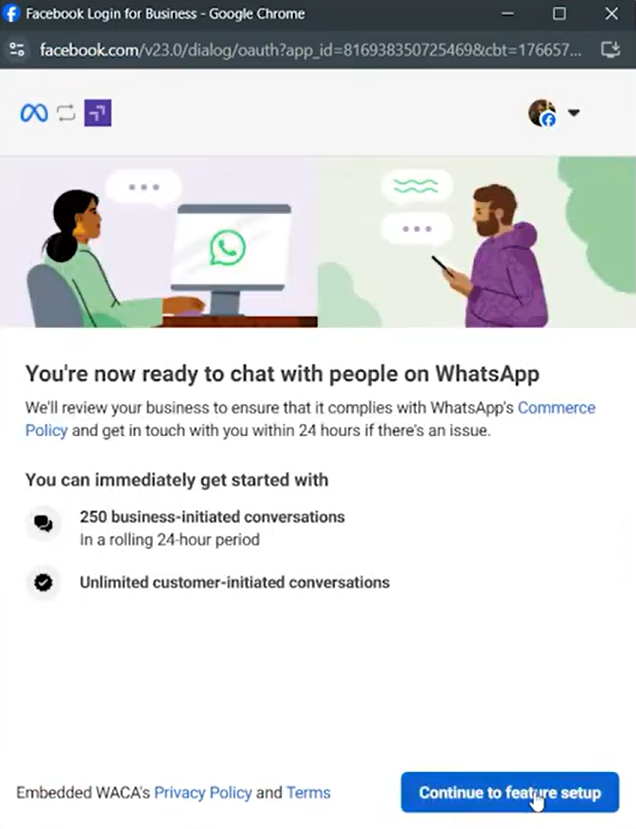
After you are done with the verification, click on “Continue to feature setup”.
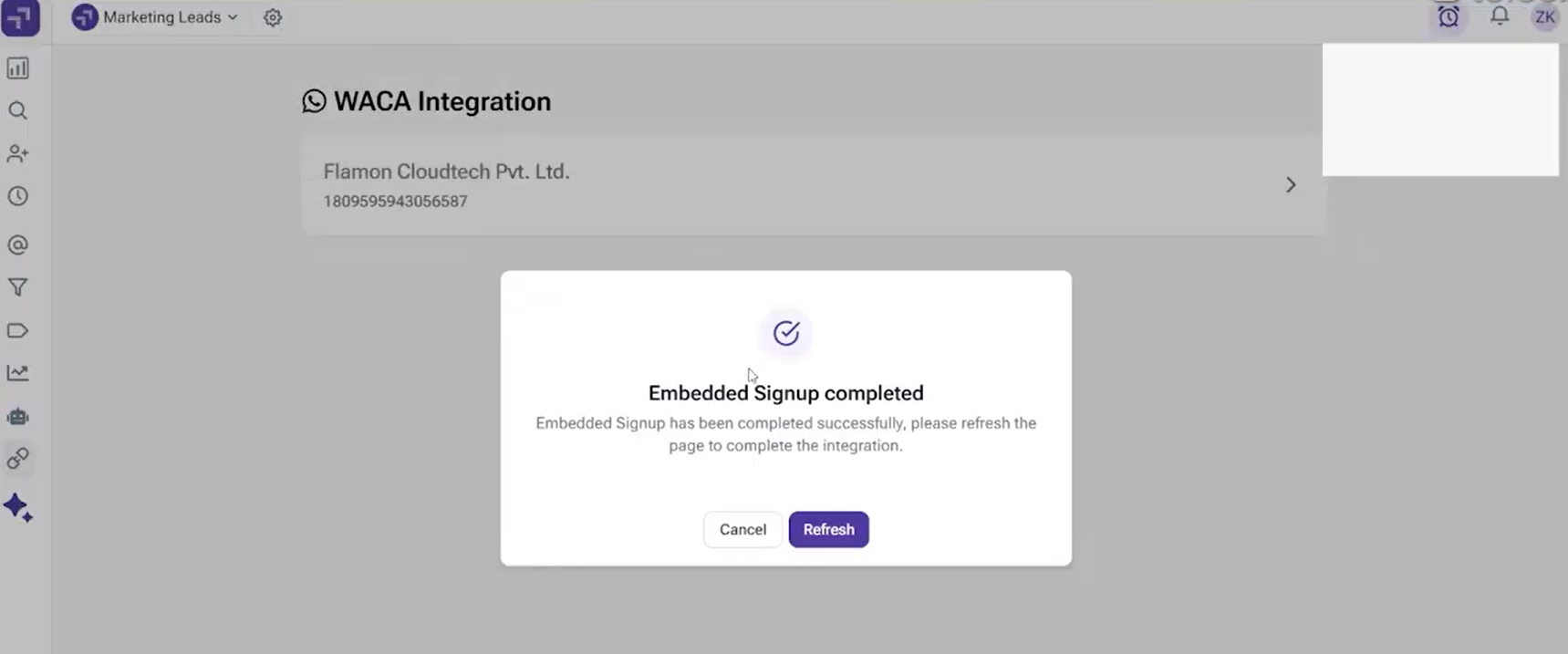
After you are done, you need to go back to your telecrm dashboard. Here, you will see an option to “Refresh”. Click on it to refresh your dashboard.
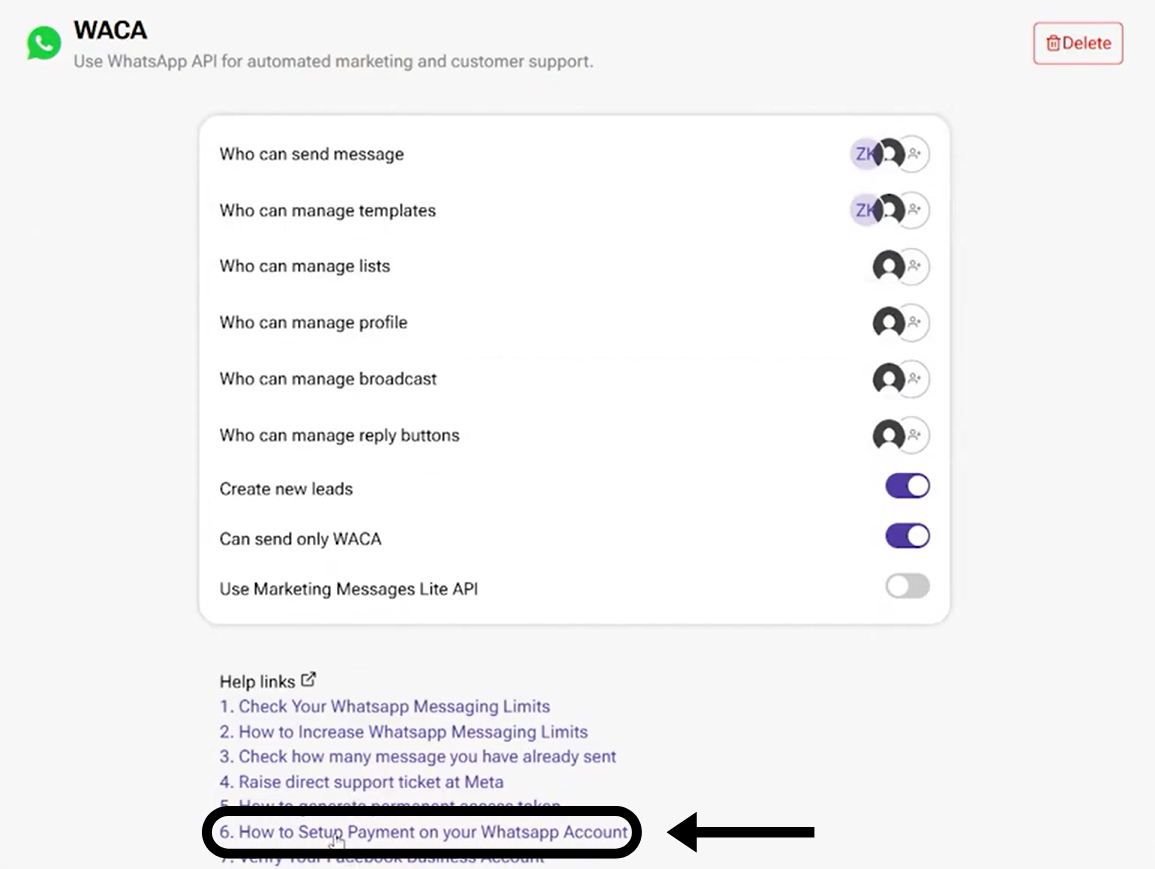
You will see your business profile after you click on your business’s name now. Scroll down and select the 6th link to set up your payment options.
You will be redirected to the Facebook business website.
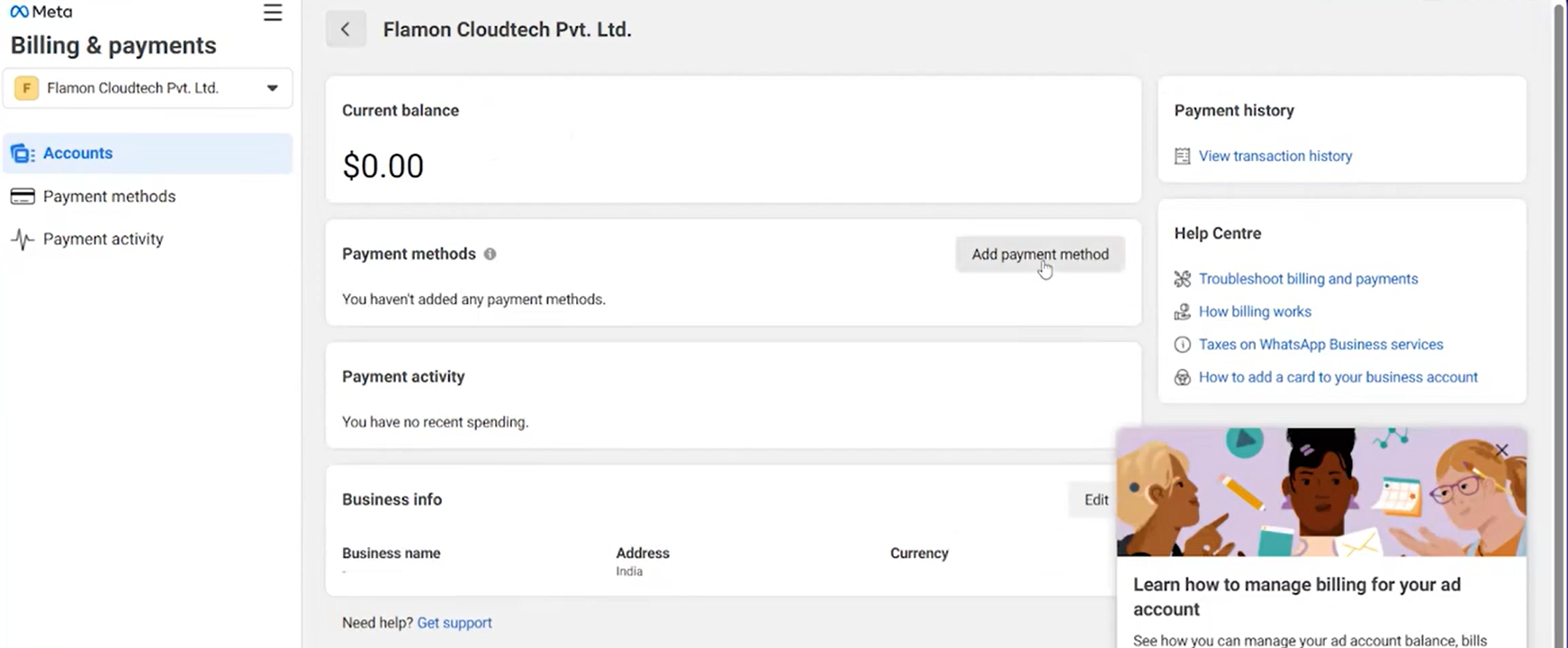
Click on “Add payment method” and enter your credit/debit card details for your payment.
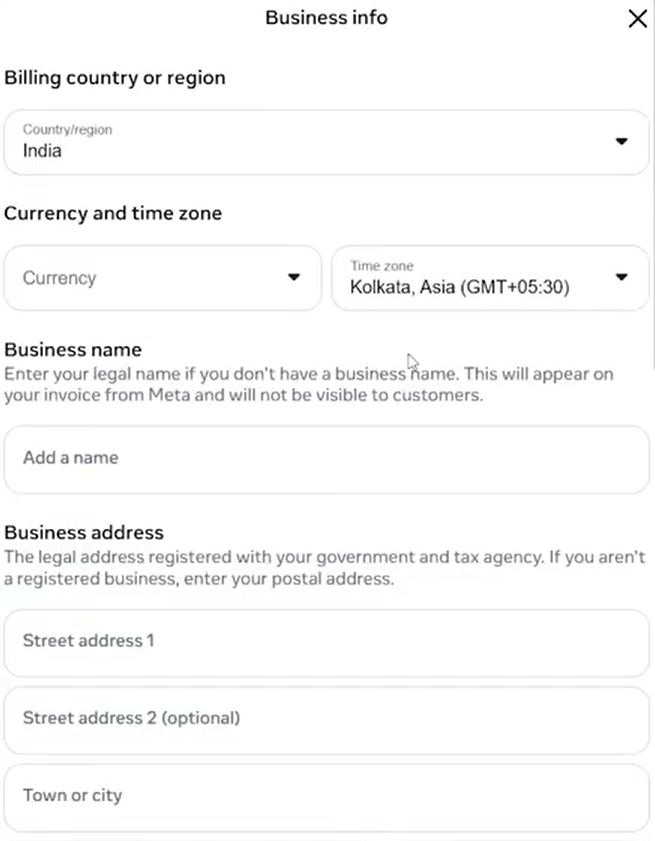
Click on “Edit” in the business info section and add all your business details, including address, postal code, GST number and TAN number.
Go back to your telecrm dashboard and click on the refresh button. Hooray! Your integration with telecrm is now complete!
For your better understanding, here is a video tutorial:
Does the process of setting up your WhatsApp API sound simple? It is because we at telecrm have worked hard to make the process simple for you to start your journey with WhatsApp API.
Without a service provider like telecrm it is a painful job to do!
There are a number of things you need to get straight to start your WhatsApp API. You need to:
Sounds hectic? Join hands with us to avoid this complicated procedure!
You can easily begin using WhatsApp API with telecrm. To ensure that you never get stuck, we handle your full setup process and offer constant support.
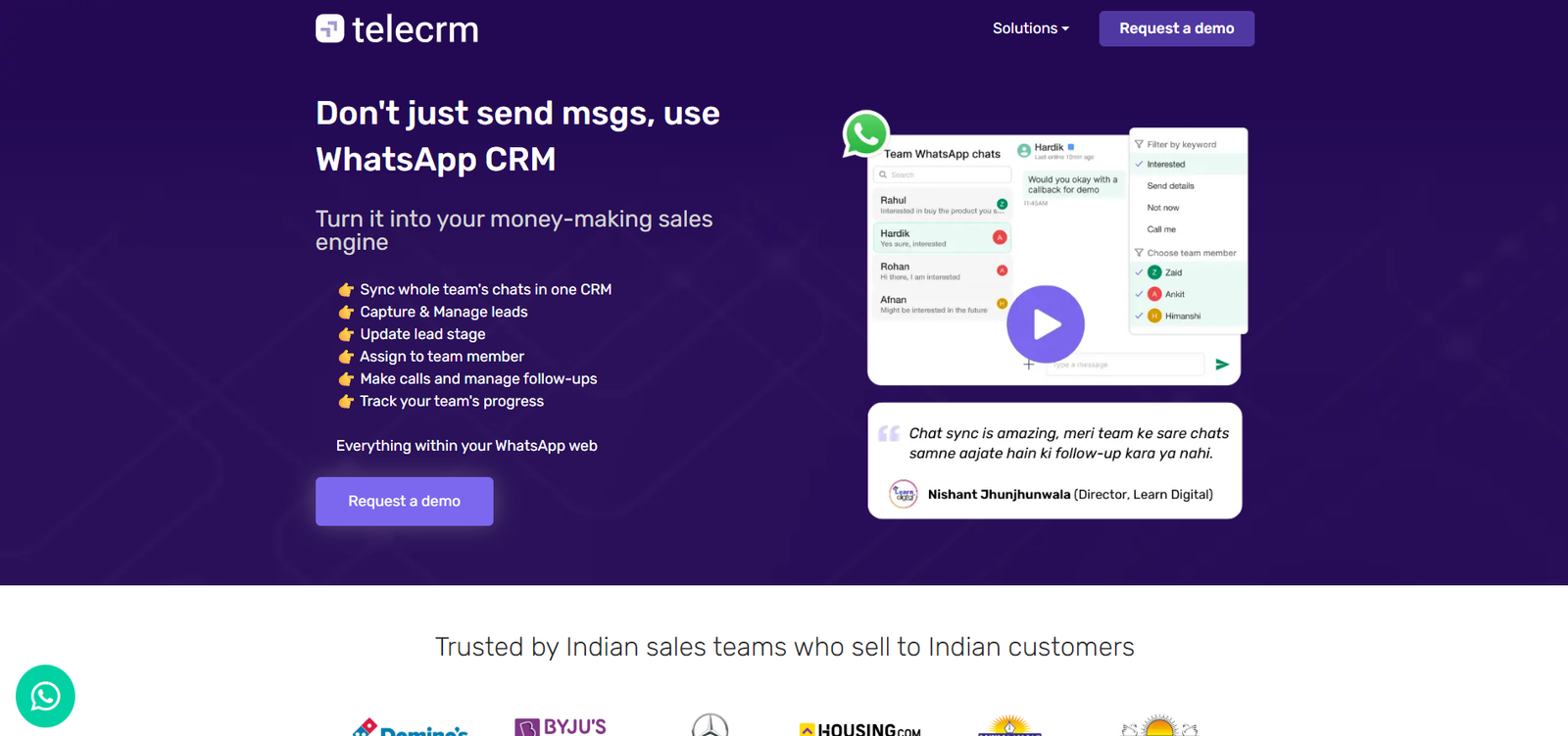
The best part is that we provide a full-featured WhatsApp CRM rather than just a tech provider. Thus, you have access to a wide range of lead management options in addition to bulk communication, automation and analytics.
Here’s what you get with telecrm:
Allows your business to send marketing messages to thousands of customers and leads simultaneously without slowing down.
With telecrm you get automated chatbots to reply to all messages that you receive. You will never have to worry about losing customers due to the inability to reply. Our chatbots will do it for you, 24×7!
Call potential buyers instantly from within a WhatsApp chat. With one click, the call is redirected to the phone’s dialler, making follow-ups faster and responses more timely.
Keep all your WhatsApp conversations organised in one central place. This makes it easier to track interactions of customers with your sales reps, manage follow-ups and maintain context across chats.
Connect telecrm with your website and the platforms you already use, like Google Sheets, JustDial and more. All your data flows into one system, giving you better visibility and control without manual effort.
Speed up your calling workflow with automatic dialling that removes the need to manually enter numbers. This allows your team to focus on meaningful conversations instead of repetitive tasks.
Never miss a high-intent lead again. Timely WhatsApp notifications remind your team to reconnect with potential customers when interest is at its peak.
Review call recordings to understand how your team interacts with leads and customers. This helps ensure quality conversations and consistent adherence to internal processes.
Now, you might assume a system with so many powerful features would come at a high cost. Surprisingly, it does not.
You get access to telecrm’s features, WhatsApp Cloud API and dedicated tech support, all for the price of a fancy dinner.

7 ways to boost your e-commerce sales with WhatsApp
If you’re using the regular version of WhatsApp for your business needs, stop right away!
There are so many business-friendly features in WhatsApp Business that once you have tried them out, you will curse yourself for using WhatsApp Messenger instead of the WhatsApp Business app for customer communication.
Here are some of the tasks you can perform with the app:
Automate replies to the FAQs of customers
Send automatic greeting messages to your leads
Create labels and put different contacts under different labels to manage your entire business network on WhatsApp

WhatsApp Business API is a paid service provided by WhatsApp for medium and large businesses. The main purpose of the API is to overcome the limitations of WhatsApp Business. It unlocks a variety of marketing tools on the platform to grow your e-commerce store.
Here are the key features of WhatsApp’s official Business API that can help you quickly engage new prospects in large numbers and convert them into paying customers:
WhatsApp or WhatsApp Business does not allow bulk messaging. If you try it with third-party apps, your number can get banned from WhatsApp because the WhatsApp app is meant for personal one-to-one communication. But with WhatsApp’s official Business API, you can send bulk WhatsApp marketing messages to a practically unlimited number of people.
Instantly engage with all incoming leads using a WhatsApp chatbot. You can send automatic messages, get them to make choices and redirect them to other platforms and pages based on their choices. All these actions are performed without you having to do anything.
Generate reports on lead conversion rates, follow-ups, successful WhatsApp deal closures, pending deals, lost leads, number of ongoing conversions, etc., all from one central hub. WhatsApp API can also be easily integrated into your e-commerce website to track every website activity that of a prospect.
Unlike WhatsApp Business, WhatsApp’s official API requires technical expertise and setting it up yourself would be challenging because WhatsApp API is not an app. You’ll have to opt for a business service provider (BSP) or a tech partner like telecrm to take care of the complete process — from setup and technical support to integration with third-party software.
Also, WhatsApp API is NOT free. It follows a message-based pricing model. A BSP may charge separate fees for their services which may either be in line with WhatsApp’s pricing model or follow the message-based pricing model.
Let’s say your prospect wants to buy something but before that, s/he has a question.
Having the WhatsApp chat button is an ideal option for such a situation. Because now the prospect can just click a button to contact you, get their query resolved and place the order!
With telecrm’s WhatsApp API integration, you can take it a step further and automate the entire interaction.
No one likes typing long emails to explain their issues, and most importantly, waiting for hours to hear back from the brand or agent.
As a result, people remain unsatisfied with the customer service of most companies.
Studies point out that 60% of users hesitate to make an online purchase because they are concerned about customer service.
What if there was a way to ensure customer satisfaction while at the same time saving your time in manually providing customer service?
That’s exactly what a chatbot does. It’s a 24/7 query-handling machine that is used to provide customer service automatically.
If the customer needs extra support, it can even transfer the chat to a customer service representative.
Therefore, you should use WhatsApp chatbots to provide your customers with efficient customer service anytime they need it.
To Know More: Provide customer support 24×7 with the smart chatbot
Do visitors to your e-commerce website add products to their cart but never check out?
You send them an SMS alert, but it gets filtered by Truecaller or is ignored by the customer so that’s practically useless.
So, what’s the solution?
You can implement a WhatsApp cart recovery strategy. Here’s how:
Send a gentle cart abandonment reminder (You can automate this with WhatsApp API.)
Provide them with some discounts to entice them into buying your product
Make the customer realise that they’re missing out on a very good deal unless they complete their purchase immediately
This way, you’ve reminded your customer about their cart, informed them about the product and solved their queries, all with WhatsApp API. And the best part is that you’ve earned a loyal customer!
This is how WhatsApp API can help you recover lost sales and convert visitors into customers.
Earlier, sending regular order updates and order tracking was difficult via emails and SMS. And not very fruitful because of them being marked as spam or worse yet, not being opened at all.
But WhatsApp API can make sending order updates a whole lot easier and more effective.
Imagine a customer has ordered a pair of shoes from your website. Wouldn’t it be super helpful if they received regular WhatsApp updates about that order and its delivery status?
Pair WhatsApp notifications with a reliable last‑mile courier to close the loop from checkout to doorstep. With same-day delivery services, you can trigger automated messages for pickup confirmation, live ETAs, driver en route, and proof‑of‑delivery — all inside WhatsApp. This keeps customers informed in real time, reduces WISMO queries, and boosts post‑purchase satisfaction. For high‑value or time‑sensitive orders (pharma, retail, perishables), sync order status updates from your logistics partner into telecrm so agents see delivery milestones and can proactively resolve exceptions.
Providing this information to customers leads to increased customer satisfaction, repeat purchases and increased referrals.
Assign a dedicated support agent or a team of agents whose primary responsibility is to monitor incoming WhatsApp messages. This way, your team can answer queries, share catalogs, and promote cross-sells and upsells, ensuring no prospect is left waiting for a resolution to their query.
Pro Tip: Assign different agents at different times to cover both peak and dull hours to further boost communication and ensure that no opportunity is missed.
Using WhatsApp e-commerce store for your business can boost your business significantly. You can use WhatsApp Business for your small business and WhatsApp API for your medium to large business, based on your dependence on WhatsApp for its communication needs.
If you have decided to get WhatsApp API, you don’t have to look further. With telecrm, you can not only start your journey with WhatsApp API, but also manage all your leads and customers from one place.
To learn more about telecrm, book a free demo today!



© Copyright 2026 telecrm.in - All Rights Reserved • Privacy Policy • T&C



© Copyright 2025 Telecrm.in - All Rights Reserved • Privacy Policy • T&C