

WhatsApp green tick verification, now commonly referred to as Official Business Account verification or the WhatsApp blue checkmark, helps customers identify that they are talking to an authentic business account.
The badge shows that Meta has reviewed the business account and recognised it as an Official Business Account. This helps users identify the account as authentic before they engage with your messages.
If you are wondering, ‘How do I get a green tick for my business?’ worry not, we are here to tell you exactly how.
In this blog, you’ll learn all there is to know about the WhatsApp green tick verification — namely what it takes to be eligible, how to apply and why the verified badge is a prerequisite for your business’s success on WhatsApp.
Let’s jump right in.
WhatsApp green tick verification refers to the process of getting Official Business Account status for a WhatsApp Business number. Once approved, the account displays a verified badge next to the business name, helping customers recognise that they are interacting with an authentic business.
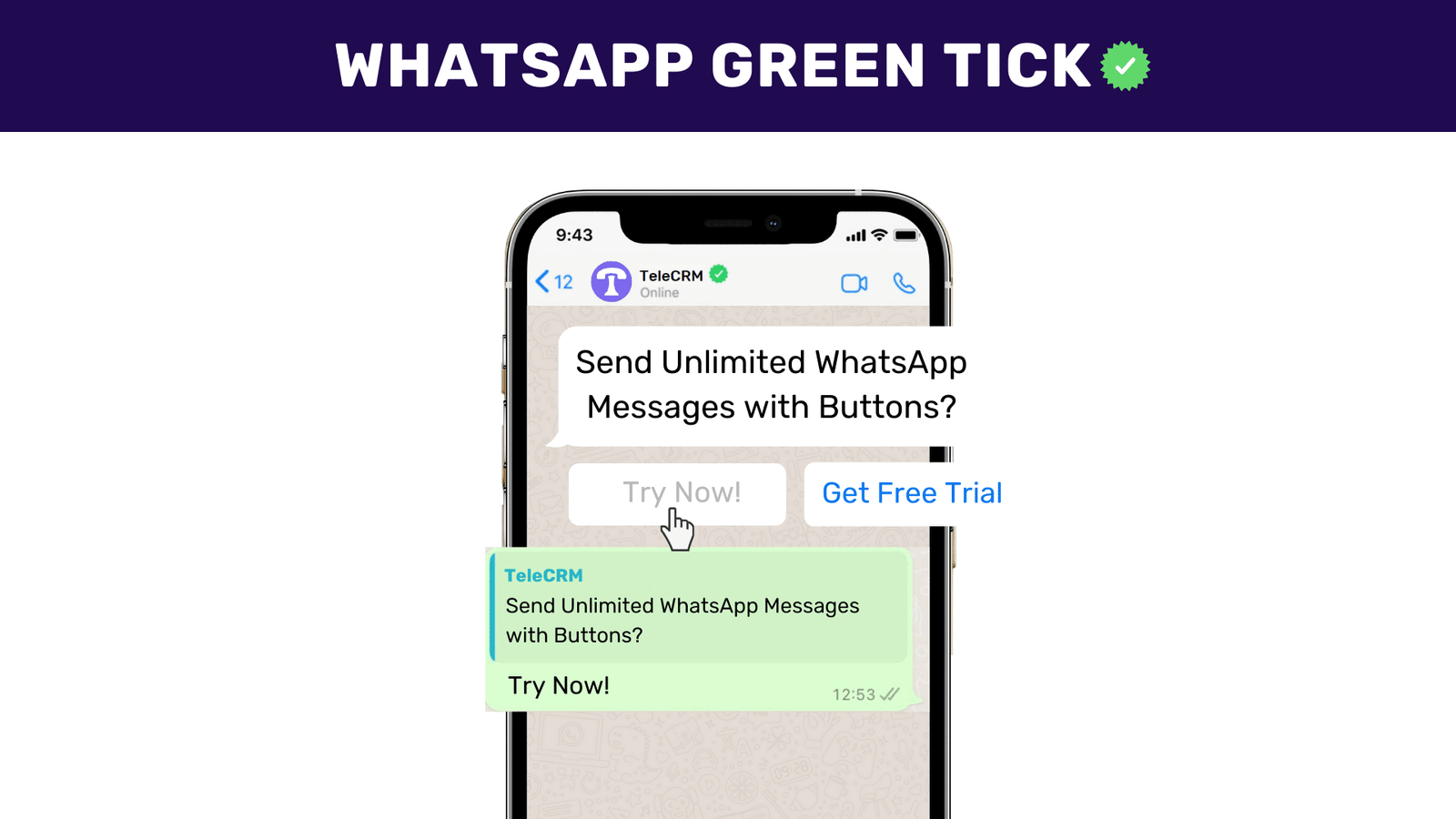
To receive this verification, your business must meet specific criteria set by WhatsApp, including authenticity, notability and an active presence on the platform.
But before we get into the whys and wherefores, let’s see why building brand credibility is so important for a business.
Meta has different types of WhatsApp accounts and has classified WhatsApp Business accounts into two categories, namely:
Business account | Whenever you sign up for an account on the WhatsApp Business app or any WhatsApp Business Platform (Business API or Cloud API), it is by default termed a WhatsApp Business account. |
Official Business account status | A WhatsApp Business account gets termed as an ‘Official WhatsApp Business Account’ once you have completed the green tick verification process and have acquired the tick. |
Any idea how often you receive messages on your personal WhatsApp from businesses? I bet you are receiving at least 3 to 4 messages a day. And you block or mark those messages as spam almost immediately, don’t you? Anyone will because no one wants to receive messages on their WhatsApp from people or businesses they know very little about.
But we rarely ignore WhatsApp messages from brands such as Myntra, Zomato or Kotak Bank. Why? Because all of them have one thing in common: they’re GREEN TICK verified. Another advantage of the verified badge is that it helps you differentiate yourself from your impersonators.
So, without a doubt, the WhatsApp green tick lends your business more CREDIBILITY. Consumers trust the verified badge because it signals that the account has passed Meta’s verification checks. For Official Business Account status, businesses generally need to prove authenticity, maintain a compliant account, and demonstrate notability.
To apply for WhatsApp Official Business Account verification, your business generally needs WhatsApp Business Platform/API access, Meta Business verification, an approved display name, two-step verification, policy compliance, and proof of brand notability.
To begin with, you need to get WhatsApp API from an official API provider like telecrm (India’s best Telecalling and WhatsApp CRM) and set up your WhatsApp API account. Remember, you can only get the green tick with WhatsApp API, it is not available with the free WhatsApp Business app.
You need a verified Meta Business portfolio and an approved WhatsApp display name before applying for Official Business Account status. Your display name should clearly match your business identity and follow Meta’s display name guidelines.
This verification helps establish your business as legally registered with a valid phone number and address.
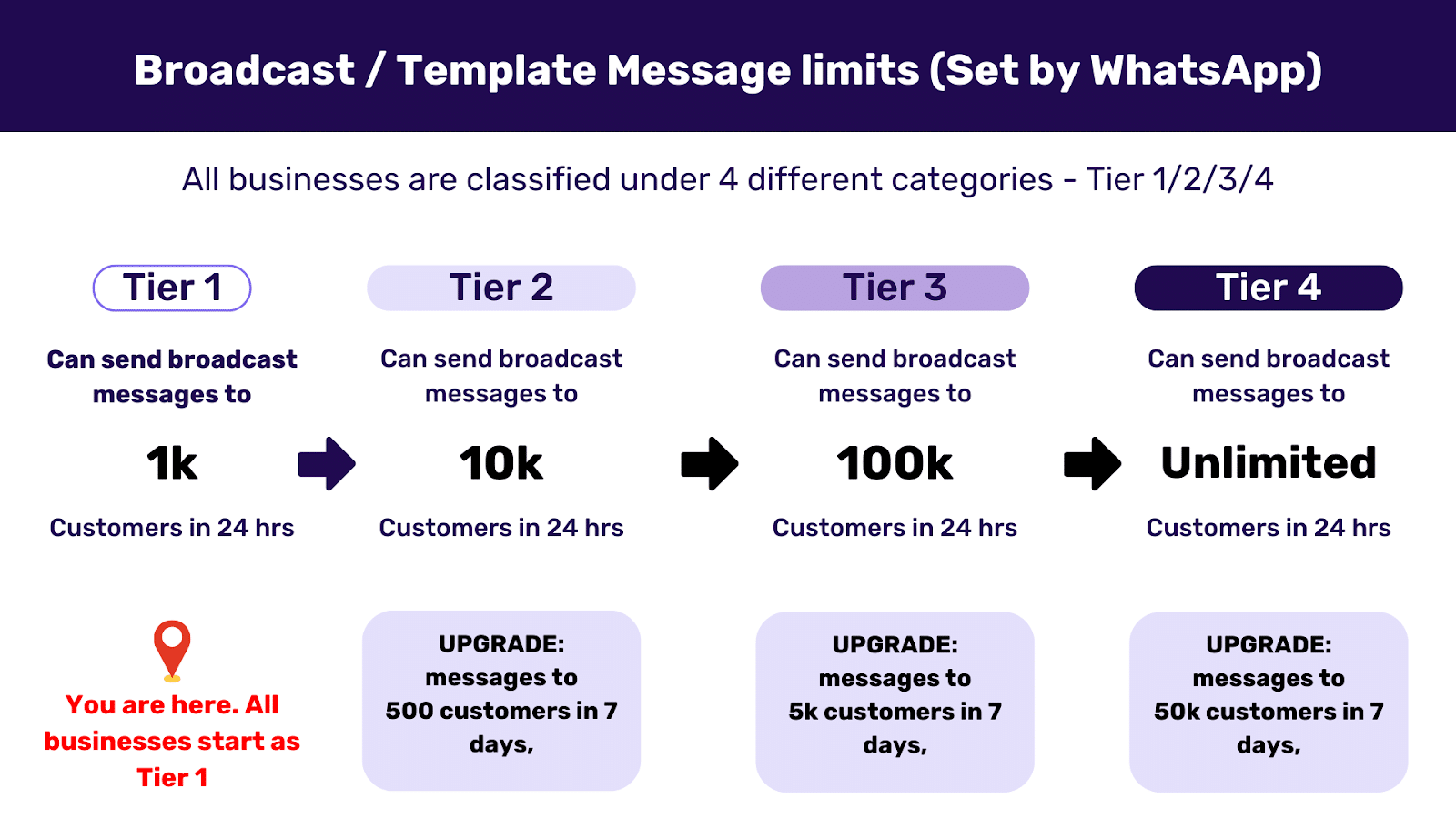
Pro Tip: When you start with API you can only send 250 messages. Once the Meta Business Manager verifies your business, you progress to Tier 1 of the messaging limit. It is recommended that you be in Tier 2 when you apply for green tick verification.
Refer to the image below to better understand WhatsApp messaging tiers or read WhatsApp Messaging Limits by Meta.
Another important requirement for the verification process is to enable two-step verification in the WhatsApp Business Manager. This enhances your WhatsApp Business account’s security. You’ll be sent a six-digit verification code on your registered mobile number before you log into your account. This ensures that only you’re authorized to log into your account and have the authority to make any changes.
Meta only approves green tick applications of those businesses that appear to be prominent or notable in their respective industry. What this means is that your business should have been searched for and reached out to by customers frequently or should have been recognised by reputable media outlets in the recent past.
One of the most important tasks is to build proof of notability through independent media coverage, recognised publications, strong brand presence, and public references. Meta may not consider paid or promotional content as strong evidence for notability.
Now that you have the prerequisites sorted, let’s move on to the green tick verification process. Applying for the coveted badge involves just one process, but you can approach it in two different ways.
In this approach, you can apply for the green tick yourself. Once you know that you meet the prerequisites, simply follow these steps:
1. Head to the WhatsApp Business Manager and select the phone number you want to get verified.
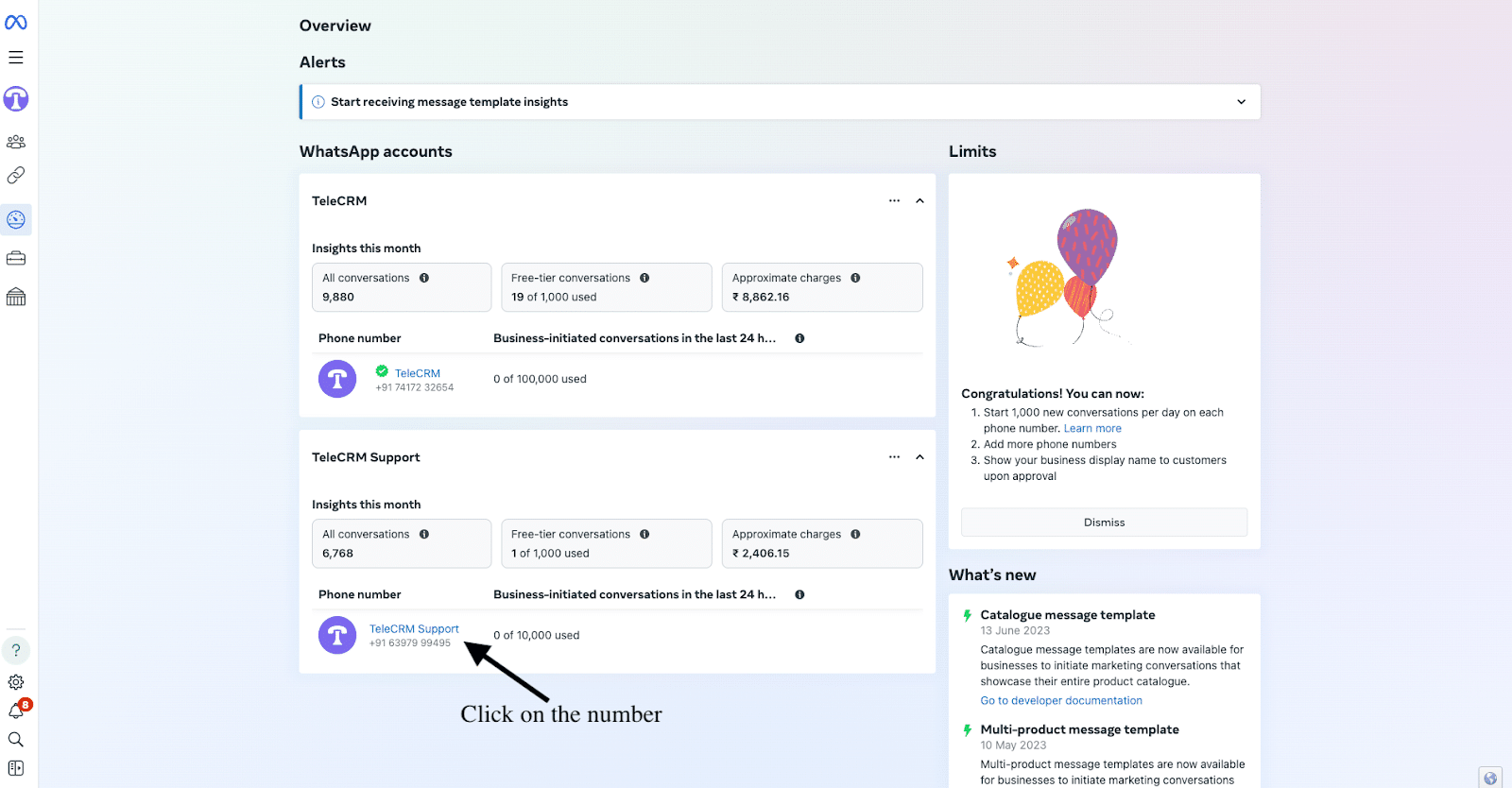
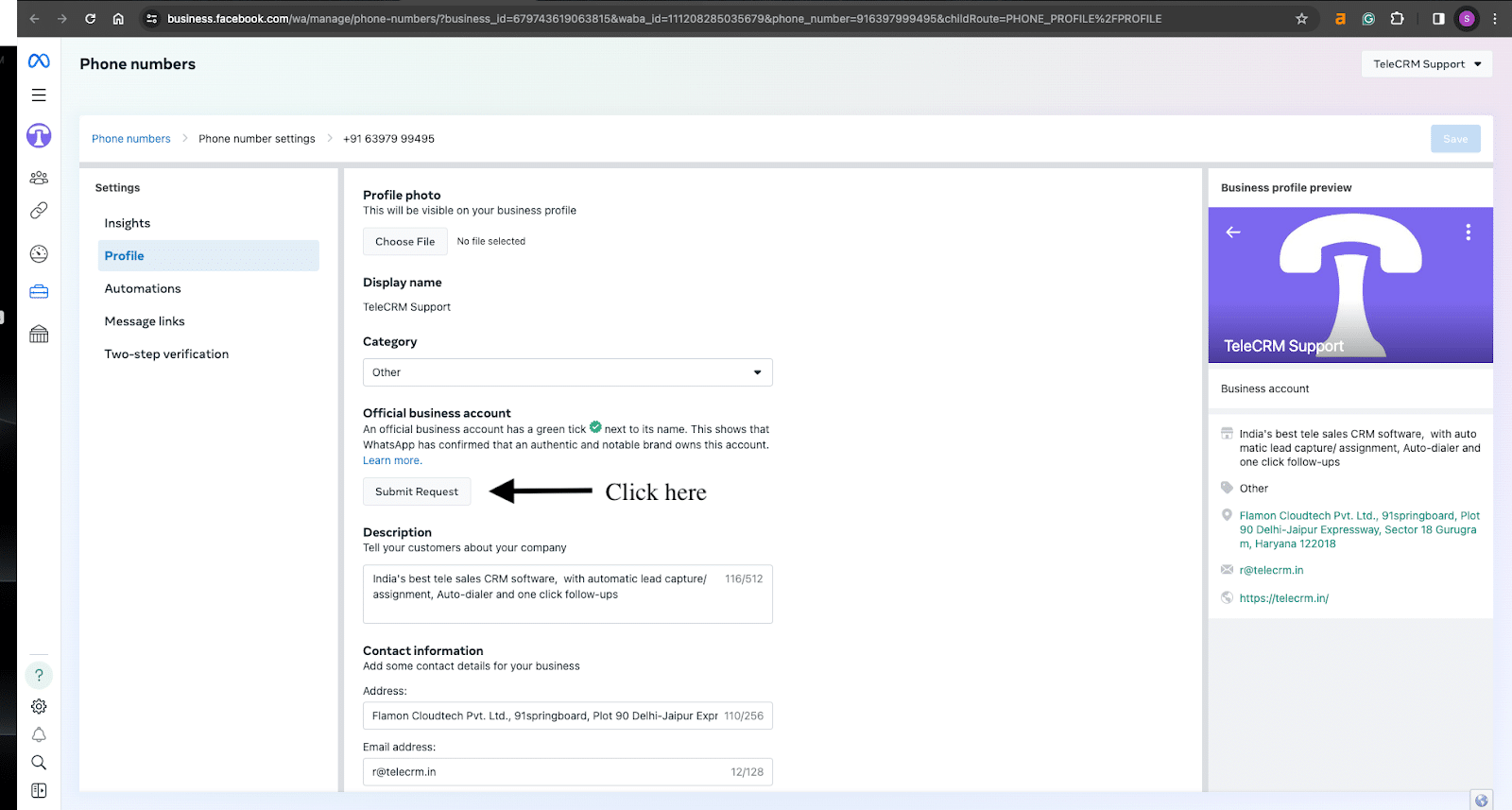
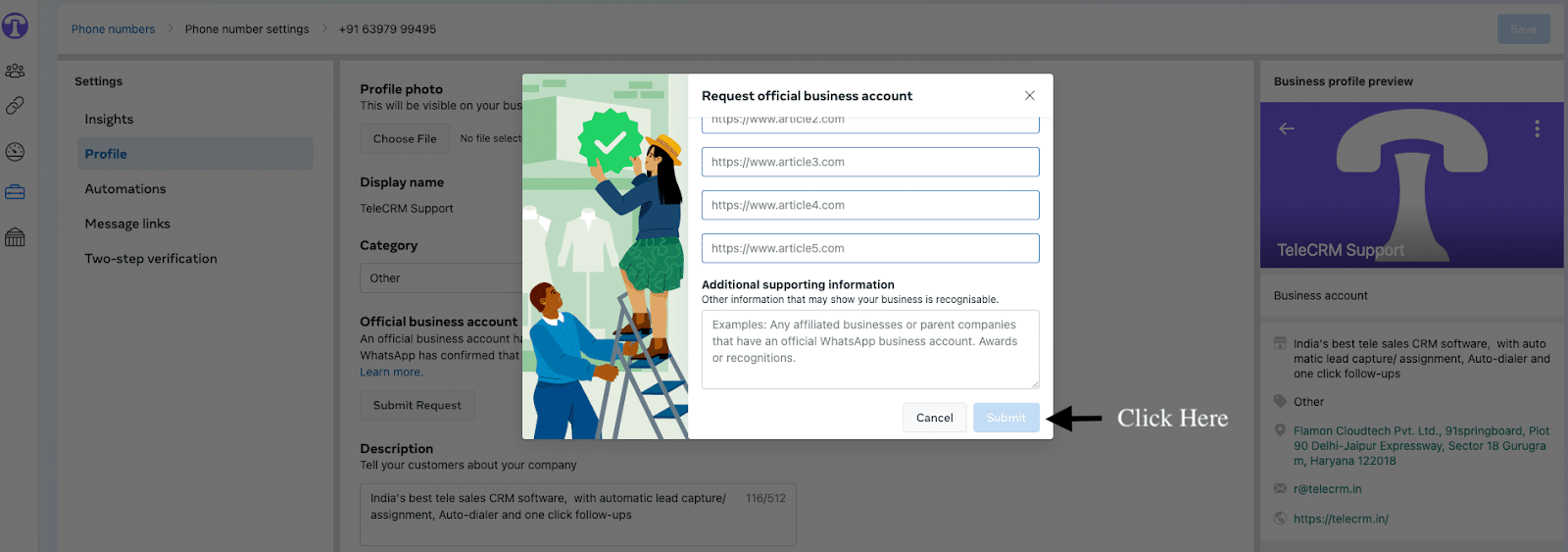
2. In the Phone number section of WhatsApp Manager, tap on the Submit Request button.
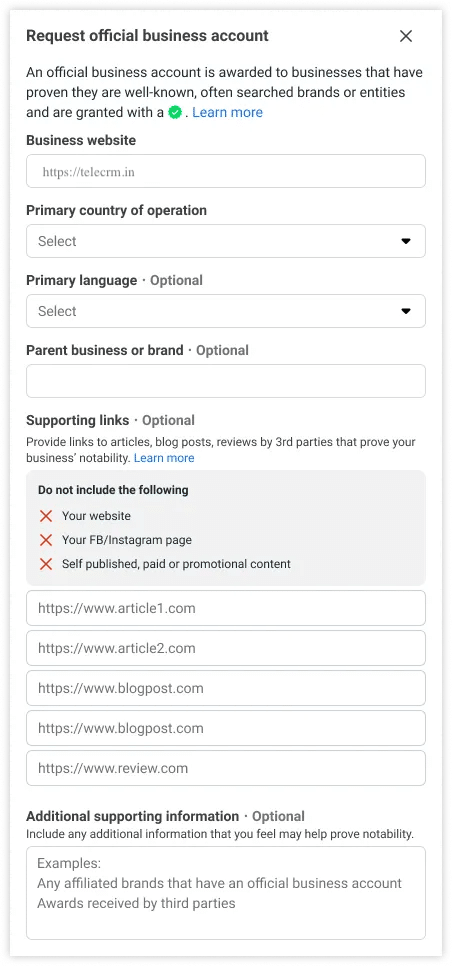
3. You’ll see the WhatsApp green tick application form with your business website details already populated in the form. All you need to do is add details like:
Primary country of operation
Primary language (optional)
Parent business or brand (optional)
Supporting links to 5 articles — link to articles about your brand from renowned media outlets
Additional supporting information — any info that proves your business is a notable brand
4. Once you have entered all required details, click Submit. Your request will be sent to Meta for review. Approval is not guaranteed and depends on whether your business meets the authenticity, compliance, display name, and notability requirements.
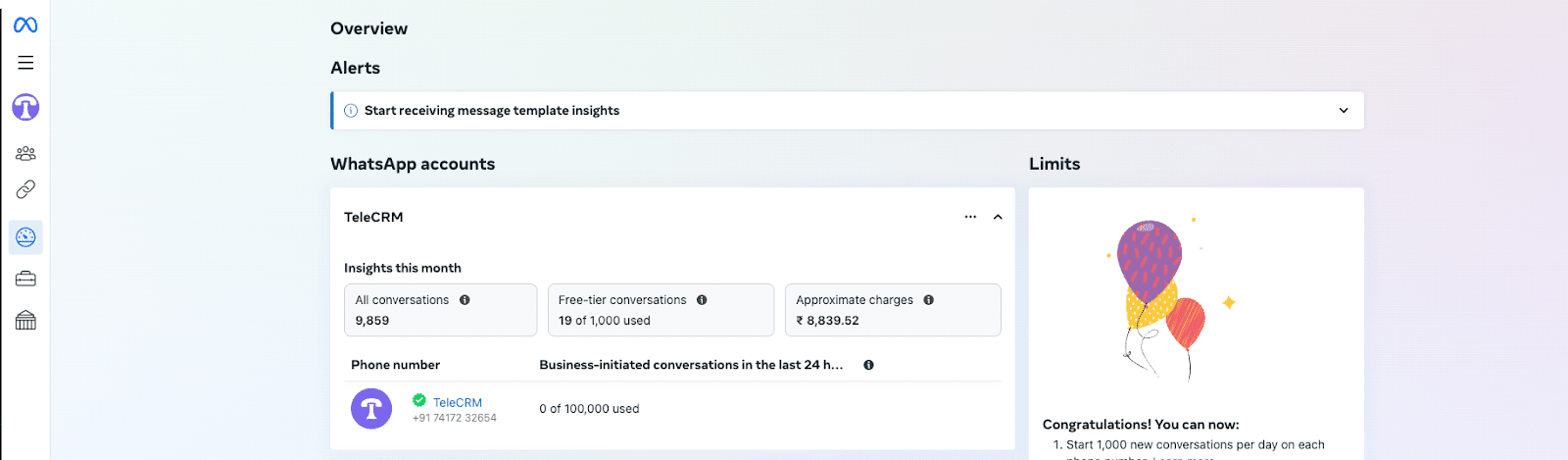
5. If your details are correct and Meta approves your request, you’ll see the green tick against your phone number in the overview section of WhatsApp Business Manager, implying that your account is now an official business account.
This approach works best when you know your business meets all the prerequisites. In case you think this is tricky, then it’s best that you go with the second approach: applying for the WhatsApp green tick through a BSP.
First, you need to select a BSP (business service provider) that suits your business needs. BSPs are companies approved by WhatsApp to help businesses integrate WhatsApp Business API and offer additional services.
Work with your chosen BSP to sign up for WhatsApp Business API. It will guide you through the setup process, which includes verifying your business information.
Once your WhatsApp Business API account is active, you can request green tick verification directly through your BSP. Provide it with all the necessary information and documents needed for the verification.
Your BSP will then submit your verification request to WhatsApp. It might handle some of the communication and follow-up on your behalf, making the process smoother.
Just like with the Meta Business Manager route, you will need to wait for the WhatsApp team to review and approve your application. Your BSP will keep you updated on the status.
Regardless of the method you choose, getting the green tick verification is about proving your business’s legitimacy and standing out on WhatsApp. Make sure the information you provide is accurate and adequate to increase your chances of approval.
Getting a green tick on WhatsApp offers several key benefits that can significantly impact your customer interactions and overall brand perception.
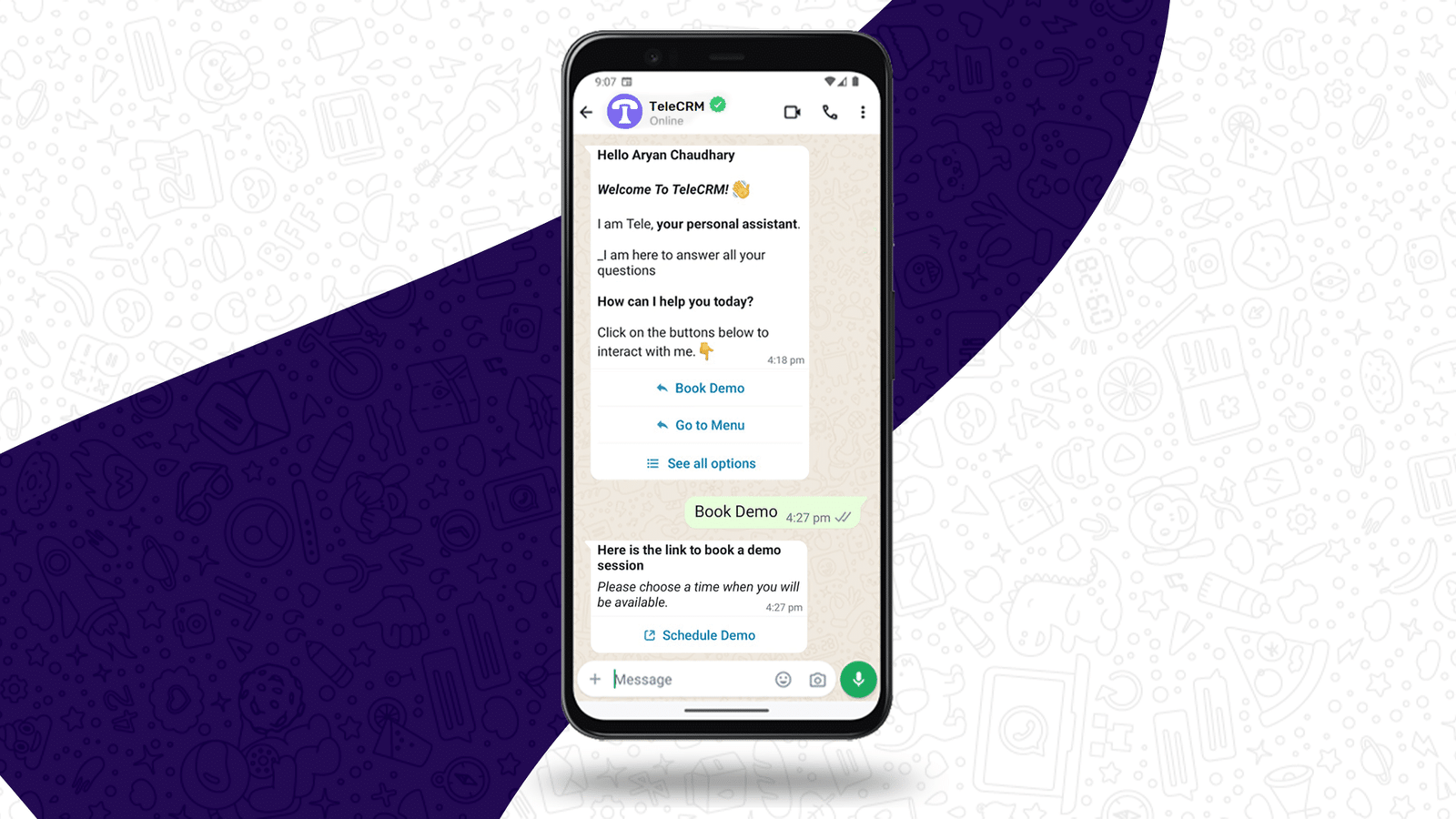
Here are three major benefits:
The green tick acts as a stamp of approval from Meta, instantly signalling to customers that your business is authentic and trustworthy. This can be important in industries where trust is paramount, like banking etc. Customers are more likely to engage with and purchase from a business that has been verified, as it reduces concerns about scams or fraudulent entities.
In a crowded market, differentiating yourself from the pack becomes crucial. The green tick helps your business get noticed by consumers along with giving it a competitive edge. This small yet significant visual differentiation makes it easier for customers to choose your business over others that might not be verified, increasing your customer base and market presence.
Knowing they are interacting with a verified business can make customers more comfortable and willing to engage with your business. This leads to higher response rates to your messages, more productive conversations and an overall increase in business growth.
Additionally, with the trust factor that comes with verification, you may see an uptick in the effectiveness of promotional messages and announcements, as customers are more likely to take them seriously.
All these benefits collectively contribute to a stronger brand presence on WhatsApp, building a more secure and engaging environment for both your business and customers.
Since getting WhatsApp API is a prerequisite for obtaining the verified badge, let’s go over the three main benefits of WhatsApp API in a little more detail.
With WhatsApp API, businesses can automate responses, schedule messages and manage customer queries efficiently. This includes using automated greeting messages and auto reply messages to ensure customers receive timely responses, even outside business hours.
Such automation improves customer experience by providing them with instant resolution, reduced wait times and improved satisfaction.
The API allows businesses to handle a large volume of messages effortlessly, making it ideal for medium and large enterprises with a vast customer base. This capability ensures that businesses can scale their customer service operations without compromising on quality or speed of response.
Whether it’s sending out appointment reminders or promotional messages, businesses can send bulk messages to reach thousands of customers instantly and simultaneously, keeping them informed and engaged.
Unlike the standard WhatsApp Business app, the API supports the sending of rich multimedia messages, including images, videos, documents and more. This allows your business to provide more engaging and informative content to customers, such as product demos, instructional videos or auto-replies to frequently asked questions with high-quality multimedia messages.
Additionally, the API allows for a higher degree of customisation in messaging, enabling your business to implement specific communication strategies to meet the unique needs and preferences of your audience.
These combined WhatsApp Business account benefits make the API a powerful tool that you can leverage to improve your WhatsApp marketing efforts and overall customer communication, ultimately taking your business to the next level.
Pro Tip: If you are running Click-to-WhatsApp ads with API, whenever leads click on the send message button on your ad and the first 72 hours you are not charged any conversation-based fees, just the amount for the ad.
Getting the WhatsApp green tick badge for your business has become more important than ever in 2026. Competition is fierce and earning the trust of new leads is increasingly difficult without a verified presence on WhatsApp.
Whether you go the Meta Business Manager route or apply with the help of a WhatsApp API provider like telecrm, the effort is worth it. This little green tick can make a big difference in how customers perceive and interact with your business.
And remember, it’s not just about the green tick, WhatsApp API opens up a whole new world of possibilities for engaging with your customers more personally. From sending bulk messages to offering instant support and complete WhatsApp automation, it ensures each customer feels special and well taken care of.
So, what are you waiting for? Reach out to our sales team to get WhatsApp API and kick-start the process of green tick verification to become a verified business on WhatsApp.
Small businesses can apply for the green tick, but Meta’s eligibility criteria require the business to be notable, which means it should have been covered by reputable media outlets or have a strong public presence. For smaller businesses that have not yet reached that level of recognition, the recommended approach is to focus on building media presence first, then apply once the notability threshold is met.
Meta typically takes up to 30 days to process a green tick application. The timeline can vary depending on how complete your application is and whether your business clearly meets the notability and authenticity requirements. Submitting through a BSP like telecrm can help make the process smoother, since they can guide you on documentation and follow up on your behalf.
If Meta rejects your application, you will receive a notification through WhatsApp Business Manager. Common reasons for rejection include insufficient notability evidence, incomplete business information or an unverified Meta Business Manager account. You can reapply after addressing the gaps, typically after at least 30 days. Working with a BSP like telecrm helps reduce the chances of rejection by ensuring all prerequisites are properly in place before submission.
Yes, in common usage many people still call it the WhatsApp green tick, but Meta now refers to verified WhatsApp business badges as Official Business Account verification or blue checkmark verification. The purpose remains the same: to show users that the business account is authentic.



© Copyright 2026 telecrm.in (Flamon Cloudtech Pvt Ltd) - All Rights Reserved • Privacy Policy • T&C



© Copyright 2025 telecrm.in - All Rights Reserved • Privacy Policy • T&C