
If you are getting more leads and customer messages on WhatsApp, replying to every question, follow-up and update manually can get messy fast.
That is usually when the confusion starts: do you need a WhatsApp chatbot, WhatsApp automation or both?
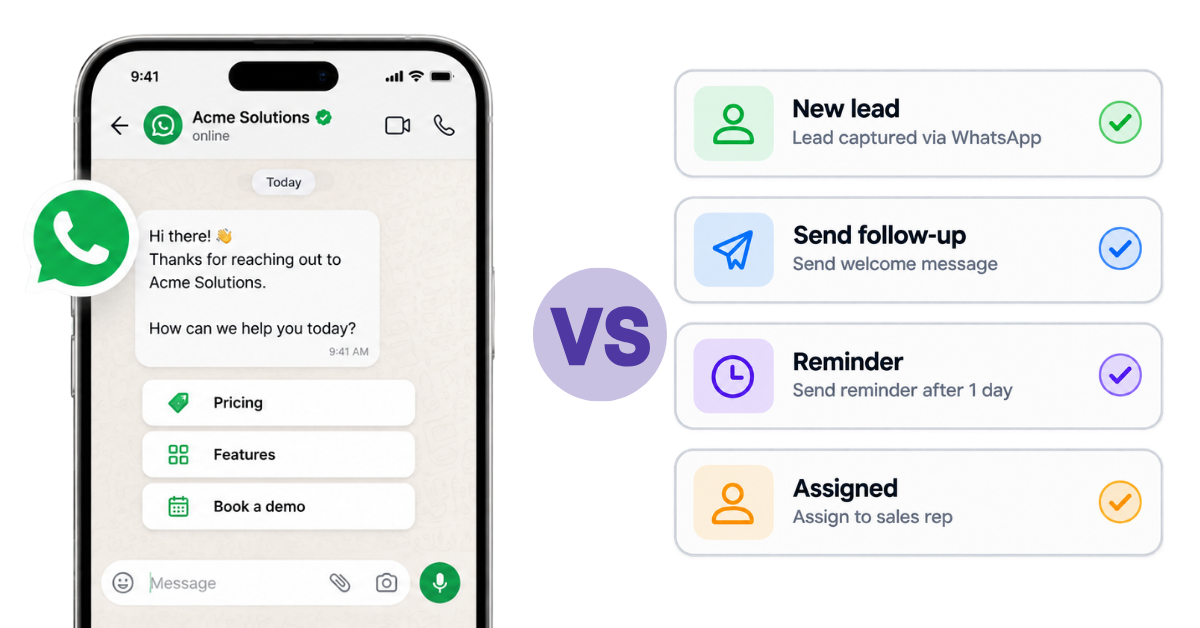
The simplest way to look at it is this: a WhatsApp chatbot handles conversations, while WhatsApp automation helps things happen automatically in the background, like sending follow-ups, reminders or updates.
They often work together, but they are not the same. In this guide, we will break down the difference and help you figure out what your business actually needs.
A WhatsApp chatbot is basically a bot that can talk to customers on WhatsApp without a human agent replying to every message.
Say a customer sends:
“Are you open today?”
“Can I get the price?”
“Where is my order?”
Instead of making someone from your team answer the same questions again and again, the chatbot can respond automatically with the right information.
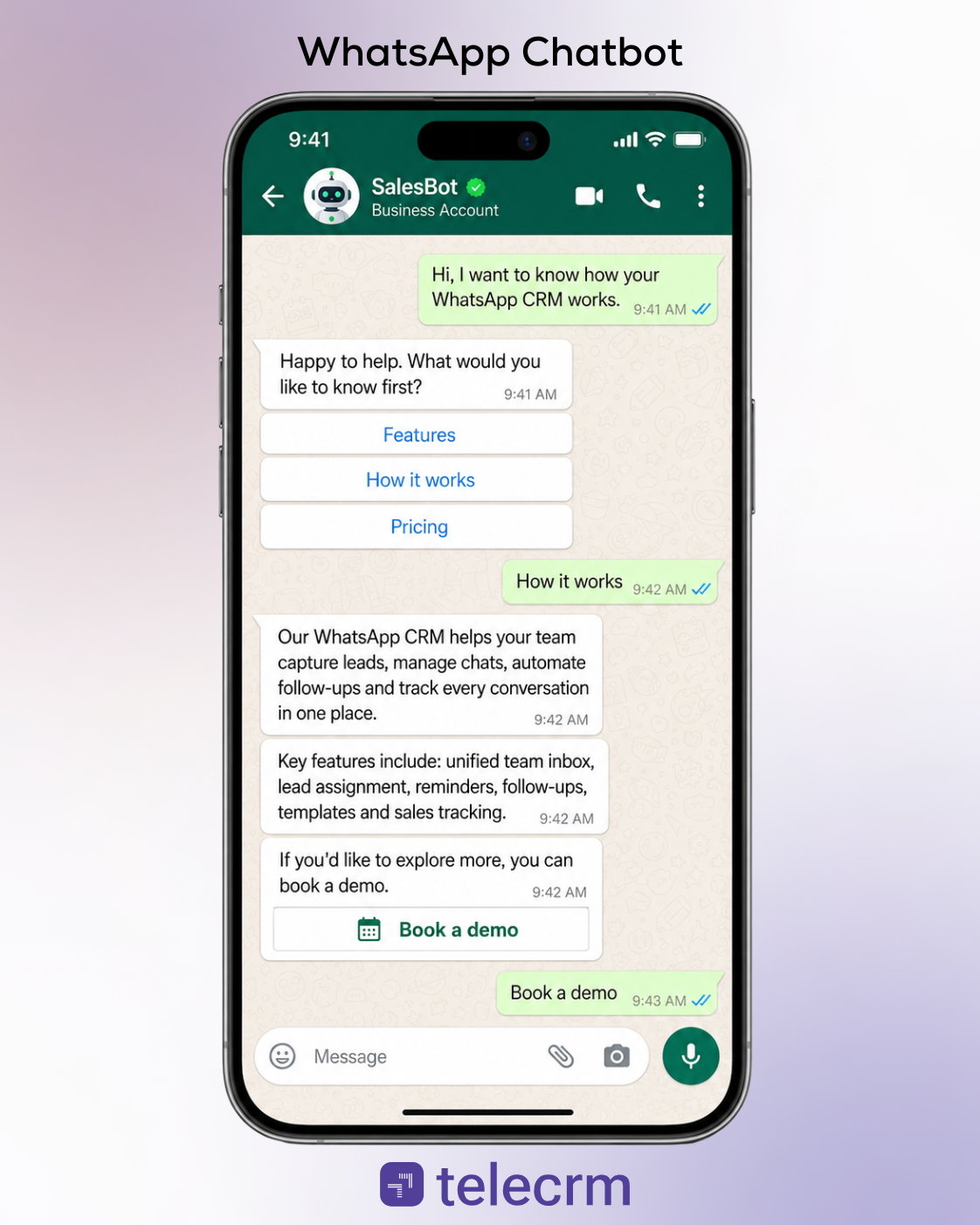
A chatbot usually starts when a customer sends a message, clicks a button or selects an option from a list message. From there, the bot follows a set flow based on what the customer says or chooses.
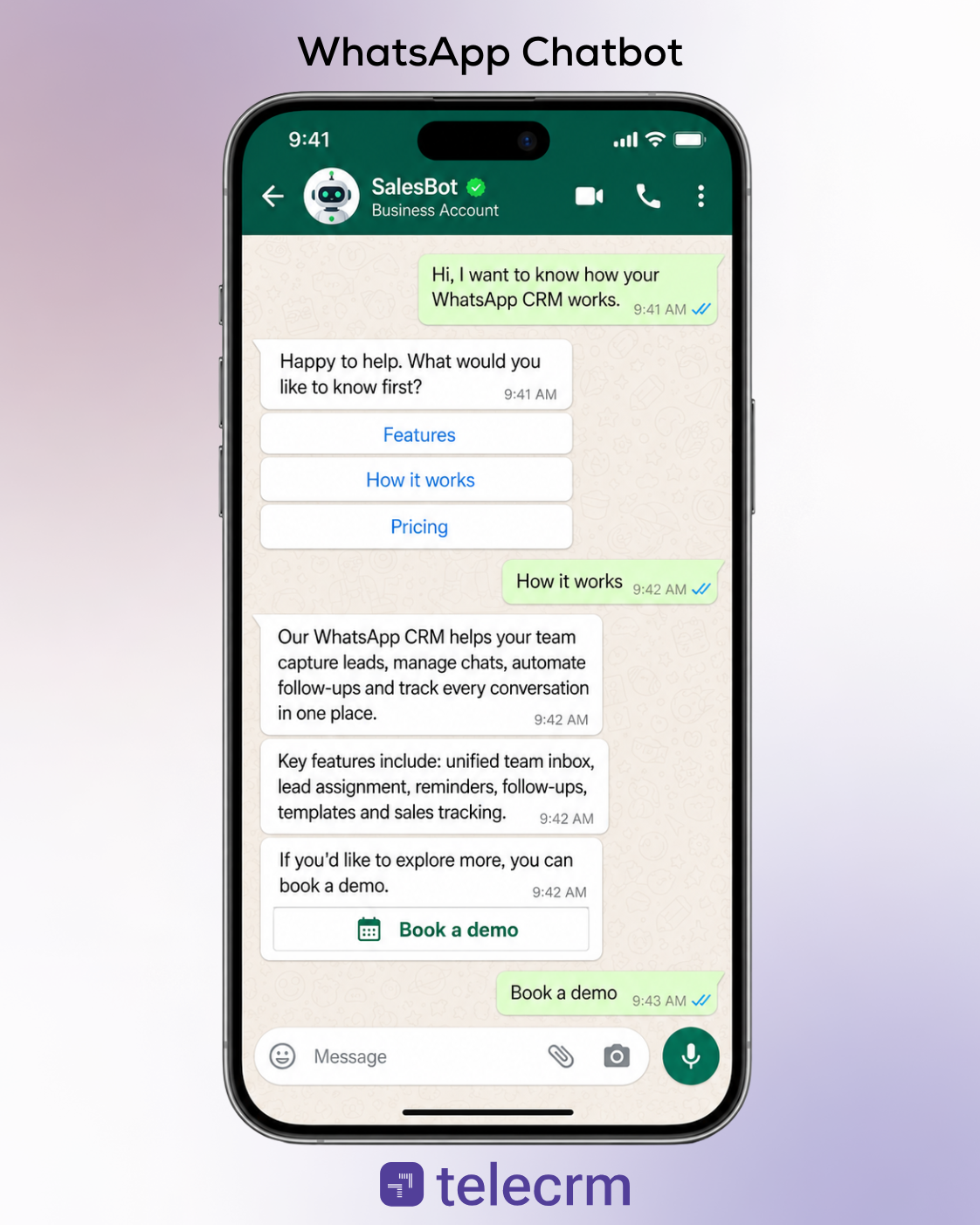
A simple chatbot can work with predefined questions, buttons and rules. More advanced AI-powered chatbots can use artificial intelligence and natural language processing to understand customer intent, conversation context and different ways of asking the same question.
So instead of only responding to exact keywords, AI chatbots can understand that: “Where is my package?” and “Can you check my order status?” are asking for the same thing.
A good chatbot can handle a large part of the repetitive customer interaction that would otherwise take up your team’s time.
It can:
And because one chatbot can manage many conversations simultaneously, customers do not have to wait for business hours just to get an immediate response. That can improve the overall customer experience while reducing the load on human agents.
This is where many businesses make a common mistake: they try to make the chatbot handle everything.
It should not. A chatbot is great for routine questions, qualifying leads and simple customer issues. But when a customer has a complex problem, needs a detailed explanation or simply wants to speak to someone, the conversation should move to a human agent.
The best setup is usually not bot or human. It is bot first when the question is simple, human support when the conversation needs it. That way, your team spends less time answering repetitive messages and more time on conversations that actually need a person.
If a chatbot handles the conversation, WhatsApp automation handles what should happen automatically around that conversation.
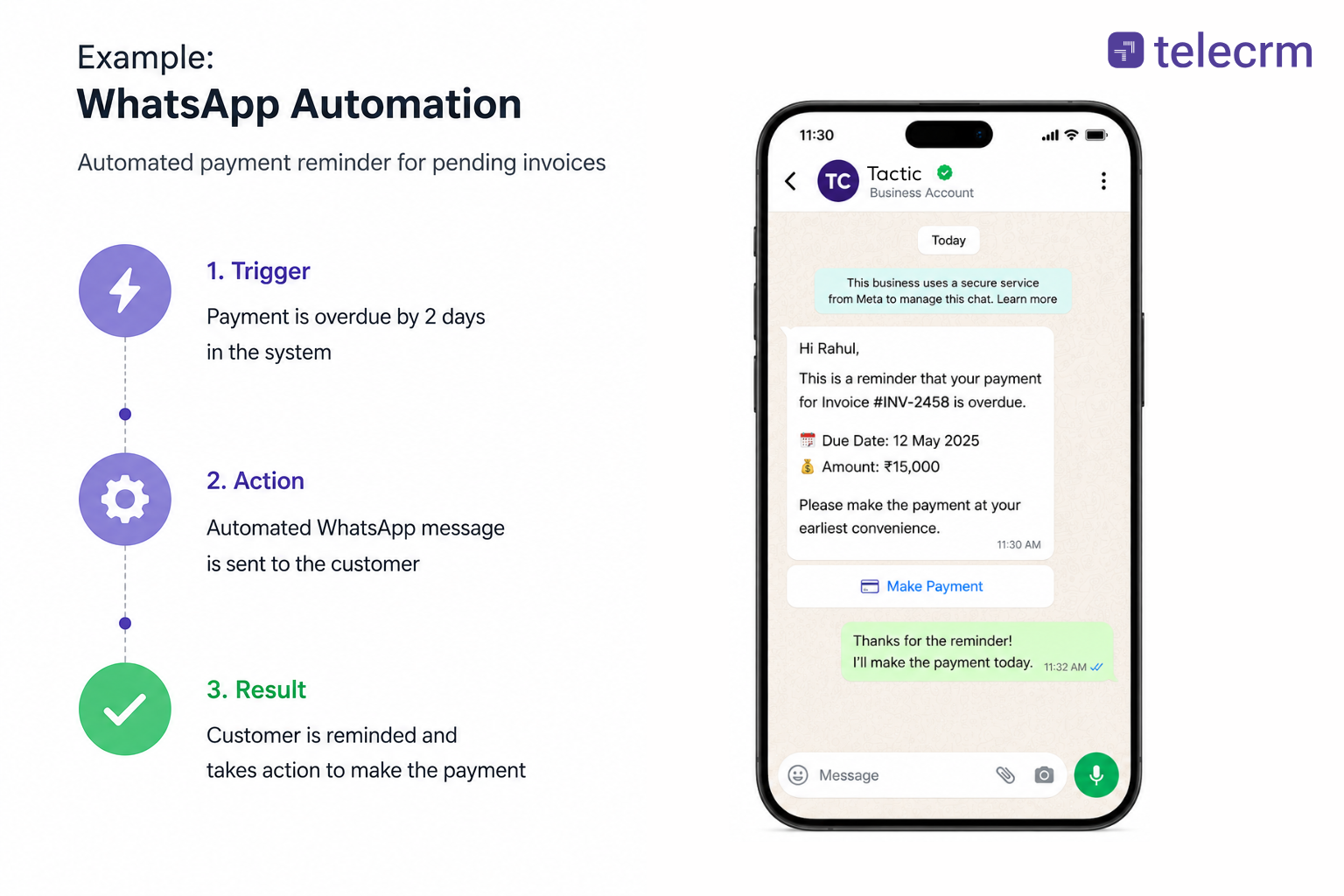
Think of it this way: someone fills out a form, becomes a new lead in your CRM or misses a call. Instead of your team remembering to send the next WhatsApp message manually, automation can take care of it.
That is the big difference. WhatsApp automation does not always need the customer to send the first message. It can respond to events happening across your CRM, website or other business systems.
WhatsApp automation lets software handle messages, replies and routine tasks using rules you set up once. Simple automations like away messages and greeting texts run on the free WhatsApp Business App. Anything more complex, such as multi-step workflows, AI responses or CRM sync, runs on the WhatsApp Business API through a connected platform.
Core components of how it works
Depending on your business needs, WhatsApp automation can help with:
This becomes especially useful as your business grows. Your sales or support team may be able to remember 20 follow-ups, but remembering hundreds of customer interactions at the right time is much harder.
Automation helps make sure those messages do not depend entirely on someone remembering to send them.
Not really.
Setting an away message in WhatsApp Business that says, “Thanks for contacting us. We will get back to you soon,” is technically an automated message, but it is only a very basic form of automation.
Proper messaging automation can use customer data, CRM activity, timings and conditions to decide who should receive a message, what they should receive and when it should be sent.
That is what makes it useful beyond just sending immediate responses.
And this is also where WhatsApp automation starts to overlap with chatbots — because a chatbot can be one part of a much larger automated workflow.
Yes, they overlap. A WhatsApp chatbot is one type of automation. But WhatsApp automation is much broader.
The easiest way to understand it is: A chatbot handles the conversation. Automation handles what should happen before, during and after that conversation.
For example, a customer sends a message asking for pricing. A chatbot can ask a few questions, understand what they need and share the right information.
But automation can go further. It can create the lead in your CRM, assign it to a salesperson, send a follow-up if there is no reply and trigger another message when the lead moves to a new stage.
Here is the difference at a glance:
WhatsApp chatbot | WhatsApp automation | |
Main job | Manage conversations | Automate messages and actions |
Usually starts when | A customer sends a message or clicks an option | A trigger happens in WhatsApp, CRM or another tool |
Best for | FAQs, qualifying leads and support requests | Follow-ups, reminders, notifications and lead nurturing |
Interaction | Mostly conversational | Can be conversational or one-way |
Human involvement | Hands complex issues to human agents | Can alert, assign or move work to human agents |
CRM role | Helpful | Often central to the workflow |
A WhatsApp chatbot is itself a form of automation, but it focuses mainly on customer conversations.
Broader WhatsApp automation can also handle actions outside the conversation, such as sending follow-ups, reminders or messages triggered by CRM activity.
The two often work as part of the same workflow. A chatbot may qualify a lead and collect customer data, while other automations use that information to assign the lead, trigger a follow-up or bring a salesperson into the conversation.
So the real comparison is not chatbot vs automation in the strictest sense. It is chatbot automation vs broader WhatsApp workflow automation.
Since a chatbot is itself a form of automation, the real decision is how much of the customer journey needs a conversation and how much simply needs the next action to happen automatically. For a sales or telecalling team, lets look at where either of them are applicable.
In short: use a chatbot when the conversation needs automation, broader automation when the next action needs automation and both when the complete journey needs to stay connected.
Know more: How to Schedule Messages on WhatsApp
telecrm is an official Meta partner and supports both personal WhatsApp integration and the WhatsApp Business API. This lets sales teams keep human-led WhatsApp conversations connected with the CRM while also automating messages, chatbots and customer journeys at scale. Let’s have a look at its wide-ranging capabilities.
telecrm supports two different WhatsApp setups:
This distinction should come first because it explains that telecrm supports both human conversations and automated communication.
When customers message first, telecrm can automate the repetitive part of the conversation.
This includes:
Not every WhatsApp message needs a conversation. Some simply need to go out at the right time.
telecrm can automate:
This is the broader messaging automation layer.
With telecrm, whatsApp communication can be connected with what is happening to the lead inside the CRM.For example:
New lead captured → send welcome message
Follow-up due → send WhatsApp reminder
Lead moves stage → trigger relevant message
No response after a set period → send follow-up
Meeting booked → send confirmation and reminder
The message is therefore driven by the sales process, not just by someone manually deciding to send it.
Automation should not disconnect the salesperson from the customer. When a lead needs a human, the rep can continue the conversation, call the lead or follow up personally. With ChatSync, WhatsApp conversations can stay connected with the lead’s calls, notes and follow-ups in telecrm. This gives the salesperson context without forcing every interaction through a bot.
The right platform depends on whether you mainly want to automate WhatsApp conversations or build a broader communication workflow around campaigns, lead routing, follow-ups and CRM activity.
Best for: WhatsApp chatbots and shared customer conversations.
What it offers: Chatbot journeys, team inboxes, automated replies and agent handover.
Choose it if: Your main requirement is managing and automating conversations happening inside WhatsApp.
Best for: WhatsApp marketing and campaign automation.
What it offers: Broadcasts, promotional campaigns, chatbot journeys and automated notifications.
Choose it if: Your priority is running WhatsApp campaigns at scale along with basic chatbot automation.
Best for: Smaller teams that want an all-in-one WhatsApp communication setup.
What it offers: Campaigns, automated messages, chatbot functionality and a shared team inbox.
Choose it if: You need a relatively simple platform for marketing, automation and customer conversations.
Best for: Lead qualification and conversational automation.
What it offers: Chatbots, AI-led conversations, data collection, lead qualification and routing.
Choose it if: You receive a high volume of inbound WhatsApp enquiries and want to qualify them before involving your team.
Best for: Advanced communication and workflow automation.
What it offers: AI agents, routing, human handover, workflow automation and multi-channel integrations.
Choose it if: You want to automate the wider customer journey rather than only add a WhatsApp chatbot.
Best for: Custom, enterprise-level WhatsApp automation.
What it offers: API-led bot journeys, complex workflows, campaigns and integrations with other business systems.
Choose it if: You need highly customised automation and have the technical resources to build more complex communication journeys.
The simplest distinction is: choose a chatbot-focused tool if your problem is managing incoming conversations. Choose a broader automation platform if WhatsApp needs to connect with campaigns, CRM activity, follow-ups and the rest of your customer journey.
Your budget, team size and lead volume should decide whether you start with a chatbot, automation or both. Here is a quick checklist:
A chatbot makes WhatsApp responsive. Automation makes it consistent.
A chatbot can answer questions, qualify leads and keep conversations moving when your team is unavailable. Broader WhatsApp automation makes sure the next steps — follow-ups, reminders, lead assignments and CRM-triggered messages — happen without depending on someone to remember them manually.
When both work together, WhatsApp becomes more than an inbox. It becomes a connected part of your sales process, where conversations can start automatically, move to the right salesperson and continue with the right follow-up at the right time.
With telecrm, you can bring WhatsApp chatbots, Flows, automated messages and CRM-connected workflows together while keeping human conversations in the loop.
Want to see how this could work for your sales process? Book a demo with telecrm.
Not exactly. A WhatsApp chatbot is a type of automation focused on conversations, while broader WhatsApp automation can also trigger follow-ups, reminders, notifications and CRM-based actions.
Yes, if you want scalable automation such as chatbots, CRM-triggered messages, templates, broadcasts or automated workflows. The regular WhatsApp Business app only supports limited automation such as greeting and away messages.
Yes. A chatbot can ask questions about requirements, budget, location or other criteria, collect the answers and pass qualified leads to the right salesperson.
You can automate welcome messages, follow-ups, appointment reminders, payment reminders, lead nurturing, template messages, drip campaigns and messages triggered by CRM activity.
Most sales-led Indian SMBs benefit from both. Start by mapping your lead journey – from the moment a customer clicks your ad to the final close. You will usually find that automation for follow-ups and lead assignment should come first, then chatbots for inbound qualification and FAQs. Centralising all whatsapp customer conversations inside telecrm helps teams track outcomes, call recordings, and performance in one place, improving operational efficiency across the board.



© Copyright 2026 telecrm.in (Flamon Cloudtech Pvt Ltd) - All Rights Reserved • Privacy Policy • T&C



© Copyright 2026 telecrm.in - All Rights Reserved • Privacy Policy • T&C